Free Macsoftware One click Download

Posts by Jameskarke
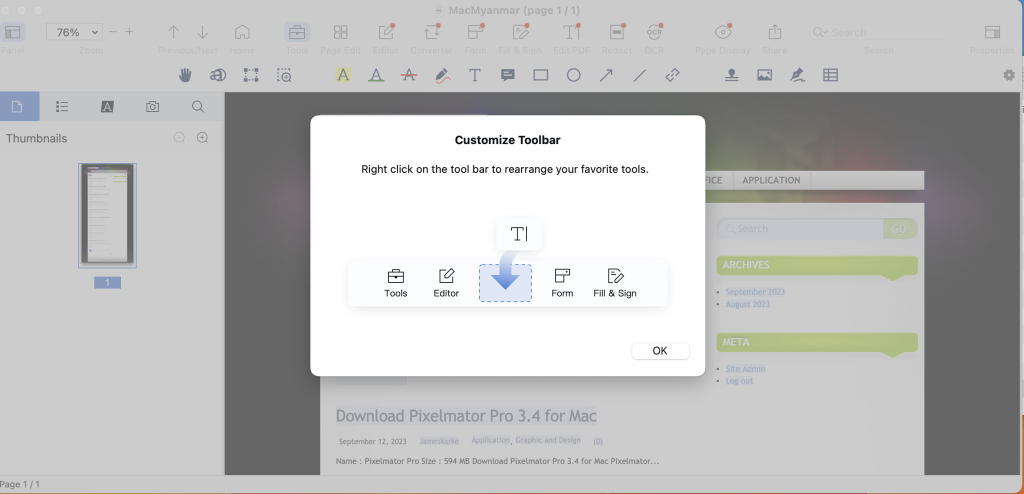
Download PDF Reader Pro Mac V-2.9.9
02 years

Name : PDF Reader Pro
Size : 67 MB
Download PDF Reader Pro Mac V-2.9.9
PDF Reader Pro is a comprehensive PDF editing application designed to empower users with a wide range of tools and features for handling PDF documents. The application offers functionalities for annotation, form filling, OCR, and more. Here are the main features provided by PDF Reader Pro:
Key Features:
- Annotation Tools: Offers various annotation tools such as highlights, underlines, lines, circles, freehand writing, and more to annotate PDF documents.
- Create and Edit Fillable PDF Forms: Allows the creation and modification of fillable PDF forms using interactive field objects like buttons, check boxes, radio buttons, and more.
- Table Creation: Enables the creation of tables consisting of rows and columns, making it easier to organize and present information within the PDF.
- Digital Signatures: Facilitates the creation of multiple signatures using a trackpad, keyboard, or images for different situations.
- Stamps, Comments, and Notes: Provides options to insert stamps, add comments, and notes to the PDF documents.
- Hyperlinks: Allows the addition of hyperlinks to redirect to other destinations within the document and edit links as needed.
- File Conversion: Offers the capability to export PDF files to various formats such as Microsoft Word (.docx), PowerPoint (.pptx), Excel (.xlsx), RTF, HTML, Text, Image, CSV, and more offline. Also supports PDF to Image conversion.
- OCR (Optical Character Recognition): Recognizes and converts scanned PDFs and images into editable and searchable PDFs or TXT files with support for 50+ languages.
- Annotation History: Allows quick access to important sections of documents through an annotation history feature.
- Document Editing: Provides options to edit pages by adding headers, footers, or page numbers, and add watermarks to PDF documents.
- File Management: Offers capabilities to merge, split, extract, append, rotate, delete, replace, and crop PDF pages, as well as combine multiple files into a single document and more.
- Reading and Navigation Features: Supports various reading modes, bookmarks, outlines, night mode, and text-to-speech engine for reading aloud.
- Password Protection: Allows setting passwords and authorization to control editing, modifying, or printing of PDF documents.
System Requirements:
- Compatibility: macOS 10.13 or later
Where to Find PDF Reader Pro:
- Homepage: PDF Reader Pro
PDF Reader Pro offers a comprehensive suite of tools for managing, editing, and manipulating PDF files. It supports various functionalities, ranging from annotation to document management and conversion, making it a versatile solution for handling PDF documents on Mac systems.
Download Topaz Photo AI Mac V-2.0.7
02 years

Name : Topaz Photo AI
Size : 2.4 GB
Download Topaz Photo AI Mac V-2.0.7
Topaz Photo AI is an image enhancement tool powered by artificial intelligence (AI) that elevates the quality of your photos, focusing on sharpening, noise reduction, and resolution enhancement. Here’s an overview of its features:
Key Features:
- AI-Powered Image Enhancement: Utilizes AI to enhance image quality, enabling photographers to concentrate on the creative aspects of photography rather than spending time on technical tools. It emphasizes the idea that exceptional photography arises from the synergy of artistic vision and cutting-edge tools.
- Sharper Images: Enhances image sharpness, particularly beneficial when dealing with blurry photos. The AI technology in Sharpen AI module addresses the root causes of blurriness (e.g., camera shake, motion blur, misfocus), resulting in clearer and crisper details without introducing unwanted artifacts or edge haloes.
- Noise Reduction: Includes the capability to reduce noise, ensuring cleaner and smoother images by eliminating unwanted pixelated artifacts, especially visible in low-light conditions or high ISO settings.
- Resolution Enhancement: Employs advanced technology to upscale and improve the resolution of images, allowing users to increase the size of photos without losing quality or introducing pixelation.
Creative Vision and AI Empowerment:
- Focus on Creativity: Emphasizes that while AI is proficient in enhancing image quality, it cannot replicate human creativity. The tool aims to empower photographers by improving image quality, leaving the creative vision and decision-making in the hands of the photographer.
System Compatibility:
- Compatibility: Topaz Photo AI’s compatibility details would typically be available on their homepage. Unfortunately, the specific compatibility details aren’t provided in the available information.
Where to Find Topaz Photo AI:
- Homepage: Topaz Photo AI
Topaz Photo AI is designed to refine and enhance the quality of images by leveraging AI-driven sharpening, noise reduction, and resolution improvement. This tool is ideal for photographers seeking to optimize their photo quality and details through advanced technology and image enhancement algorithms. The provided information offers an overview of its capabilities and the emphasis on the synergy between AI-based enhancements and human creative vision.
Download Native Instruments Komplete Kontrol 3.0.1
02 years
by Jameskarke
in Application

Name : Native Instruments Komplete Kontrol
Size : 402.70 MB
Download Native Instruments Komplete Kontrol 3.0.1
The KOMPLETE KONTROL software by Native Instruments is a comprehensive tool designed to streamline music production workflows. It organizes a wide array of instruments, effects, presets, loops, and samples, mapping them efficiently to your hardware for simplified access, playback, and tweaking of sounds within a single interface. Here’s an overview of its features and recent updates:
Key Features:
- Unified Workflow: Organizes various instruments, effects, presets, loops, and samples into an intuitive workflow. It supports integration with various MIDI controllers and mouse/keyboard setups.
- Support for Multiple Instruments and Effects: Includes a wide array of instruments and effects, covering NI’s KOMPLETE range, over 750 plug-ins from 90+ leading creators (such as Waves, Spitfire Audio, Softube, Arturia, and Output), and many more. Utilizes the Native Kontrol Standard (NKS) format for seamless integration.
- Loops and Samples Organization: Extends NKS compatibility to loops and samples. Syncs Collections from Sounds.com, tags them for efficient browsing in your DAW, and supports integration with MASCHINE’s library and Expansions. Also includes a built-in sampler and the ability to use loops and one-shots in sample-based instruments like BATTERY, TRK-01, and FLESH.
- Efficient Sound Browsing: Tags sounds for easy browsing, allowing users to quickly find and audition sounds by keywords and descriptions. Provides instant previews of sounds while scrolling for easier selection without needing to load individual plug-ins.
- Smart Play Features: Allows for versatile performance control by mapping keyboards to over 100 scales and modes. One-finger chord playing, expressive arpeggios, and more creative options are available. Offers visual feedback directly on compatible S-Series keyboards through the Light Guide.
- Pre-Mapped Controls: NKS instantly maps all instruments and effects to hardware, providing direct access to essential parameters like filter cutoffs and envelope controls. The mapping is done by the instrument designers themselves for optimal user interaction.
What’s New:
- Compatibility: macOS 12.0 or later, supporting both Apple Silicon and Intel Core processors.
Where to Find KOMPLETE KONTROL:
- Homepage: Native Instruments KOMPLETE KONTROL
KOMPLETE KONTROL brings together an extensive library of instruments, effects, loops, and samples, facilitating easy access, sound browsing, and performance control within a unified environment. The recent update ensures compatibility with the latest macOS versions and processors, offering an optimized experience for music producers and creators.
Download Air Printer – Printer Server Pro 5.1.4
02 years

Name : Air Printer – Printer Server Pro
Size : 50 MB
Download Air Printer – Printer Server Pro 5.1.4
The Air Printer software acts as a virtual printer for Mac devices, allowing users to share their local printers wirelessly with other nearby Mac or devices. With Air Printer, users can print documents, photos, web pages, emails, and other content directly from their computer to various printers. Here is an overview of its features and the recent updates:
Air Printer Features:
- Wireless Printing: Enables wireless printing of various document types from Mac devices to other printers available nearby.
- Printing to PDF: Allows printing documents to PDF format, eliminating the need for physical printers and reducing paper usage.
- Automatic Printer Configuration: Automatically determines print details such as paper type, page range, print quality, and orientation based on the content being printed.
- Direct Wireless Printing: Supports printing photos, emails, web pages, and documents directly, creating PDF documents that are saved on the Mac disk.
- PDF Document Handling: Provides options to open, read, and transfer PDF files, including e-mailing, opening in other apps, and transferring to iPhone or iPad through iTunes File Sharing.
- Custom Printer Properties: Allows users to set printer properties such as color, two-sided printing, quality, and paper sizes, aiding in reducing printing costs.
- Content Printing Support: Enables the printing of various content types, including email attachments, iWork and MS Office documents, Safari web pages, and files from other applications.
Upgrade to Pro:
- Provides the ability to print longer documents (over 2 pages) and access other premium features without ads. Users can upgrade to the paid version to enjoy additional benefits.
Recent Update (Version 5.1.4):
- Support for macOS Sonoma 14.0: Enhanced compatibility with the latest macOS.
- Printer Driver Improvements: Improved printer driver functionality.
- Bug Fixes and Performance Improvements: Addressed known bugs and enhanced overall performance.
System Requirements:
- Compatibility: macOS 10.12 or later
Where to Find Air Printer:
- Homepage: Air Printer on iTunes
Air Printer offers convenient wireless printing, PDF creation, and customization of printer properties for users seeking to print content from their Mac devices. The recent update further improves compatibility and addresses known issues for a smoother user experience.
Download Chronicle Pro for Mac V- 14.3.2
02 years
by Jameskarke
in Application

Name : Chronicle Pro
Size : 11 MB
Download Chronicle Pro for Mac V- 14.3.2
Chronicle Pro is a comprehensive bill management tool designed to help users proactively manage their expenses and bills effectively. It provides features that streamline bill payment, financial planning, and bill tracking, ensuring a more organized and informed approach to personal finances. The Pro version offers advanced functionalities beyond the standard version of Chronicle. Here are the key features available in Chronicle Pro:
Chronicle Pro Features:
Forecast View & Amount to Save
- Future Billing Forecast: Chronicle enables users to view upcoming bills and financial obligations for the next year, allowing a glimpse of what’s due every month. It calculates the monthly amount needed to save for bills that have less frequent payment schedules.
Intelligent Estimated Amount Due
- Smart Bill Estimation: The app intelligently estimates the amount due for bills that vary based on various factors like bill type, payment history, and seasonal fluctuations. For instance, it learns patterns in your utility bills, predicting higher or lower costs during different seasons.
Monthly History & Annual Reports
- Spending Overviews: Users can analyze their spending month by month, and compare year-over-year spending for each month. On the Mac version, detailed spending reports are available to monitor expenses across months.
Chronicle Cloud
- Backup and Sync: Chronicle Pro includes cloud backup features, allowing users to securely store bill data in the cloud. This also facilitates data synchronization across multiple devices, making it easier to share bill-related information with a partner or business associate.
Custom Repeat Intervals
- Flexible Scheduling: Custom repeat intervals offer more control over managing bills with less common or irregular repeat schedules, including various payment intervals like US Estimated Income Tax Schedules.
System Requirements:
- Operating System: macOS 11.0 or later
Where to Find Chronicle Pro:
- Homepage: For more information on Chronicle Pro and to access the software, visit the Chronicle App Homepage.
Chronicle Pro is tailored to help users accurately forecast bills, intelligently estimate due amounts, and provide a comprehensive overview of their monthly and annual spending, empowering better financial planning and bill management.

Download Autodesk Flame V-2024.2
02 years

Name : Autodesk Flame 2024.2
Size : 3.1 GB
Download Autodesk Flame V-2024.2
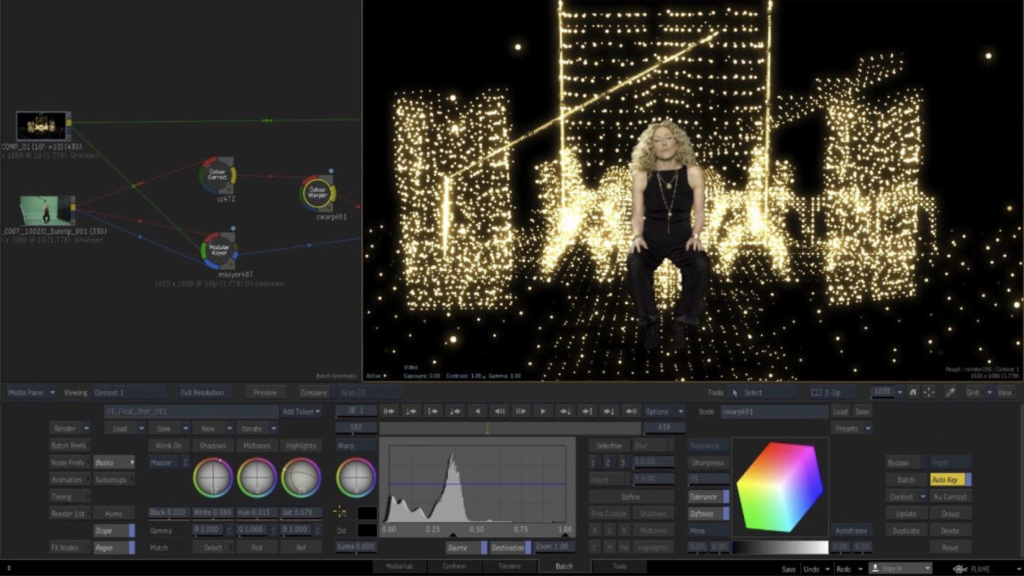
Flame® software is an advanced 3D visual effects tool that serves various purposes including fast 3D visual effects, finishing, compositing, advanced graphics, color grading, conform, editorial, and look development. Here are the notable features and functionalities of Flame®:
Key Features:
3D Compositing (Action):
- Interactive 3D Effects: Action combines the interactive speed of traditional 2D compositing with powerful 3D visual effects. It offers a WYSIWYG preview for artists during sessions.
Node-Based Compositing (Batch):
- Procedural Environment: Batch provides a node-based procedural compositing environment that integrates with the timeline and desktop. It’s designed to combine both 2D and 3D elements for versatile composition work.
Editorial Timeline:
- Project Oversight: Manage projects, ensure consistent looks, and properly match graded and 3D VFX shots. It also includes scene detection capabilities.
Matchbox API:
- GPU-Accelerated Shaders: Utilize Lightbox, Matchbox, and PBR shaders to tackle challenges in Action’s 3D compositing environment using GPU-accelerated GLSL shaders.
Action Projection Tracking:
- Projection to UV Set: Turn a projection into a UV set for the geometry, enhancing tracking capabilities in the 3D space.
Connected Conform Smart Merge:
- Dynamic Editing: Merge new editorial cuts dynamically with work-in-progress shots late in a project, facilitating an efficient workflow.
Python API:
- Scriptable Commands: Drive the Batch environment using scriptable commands, enhancing the flexibility and automation of the compositing process.
Pybox:
- External Renderer Processing: Utilize Pybox, a scriptable handler, to process images via external renderers, offering additional flexibility in rendering pipelines.
System Requirements:
- Operating System: Apple® macOS® Mojave v10.14.x/Catalina v10.15.x/Big Sur v11.1+
- GPU: Mac-native installed graphics cards with a minimum of 8GB VRAM. Recommended: Radeon Pro vega II
- CPU: Recommended Intel Core i7 or higher. Apple M1 CPU is currently not supported.
- RAM: 32GB/64GB
- Display: 1920 x 1200 display with a 60Hz refresh rate.
Where to Find Flame® Software:
- Official Homepage: For more information, access to the software, and details on features, you can visit the Autodesk Flame® Homepage.
Flame® software stands out for its 3D compositing, node-based environment, and its comprehensive suite of tools designed for professionals in the visual effects, finishing, and compositing space.
Download Luminar Neo for Mac 1.15.0 (16133)
02 years
Name : Luminar Neo 1.15.0
Size : 4.7 GB
Download Luminar Neo for Mac 1.15.0 (16133)
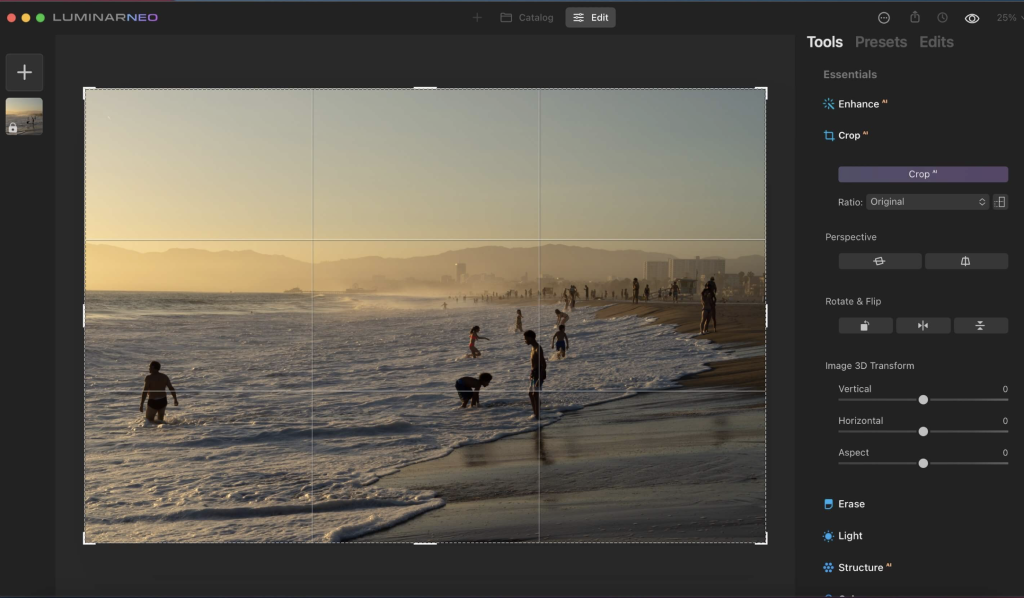
The Luminar Neo software is an advanced and innovative image editing tool that harnesses the power of AI technologies to streamline complex editing processes and empower creators to manifest their most daring ideas. Here are the key features and functionalities of Luminar Neo:
Feature Highlights:
RelightAI:
- Control Light in 3D Space: Utilize RelightAI to adjust the light in three-dimensional space across a 2D image. It calculates depth and creates a 3D map for precise lighting adjustments.
- Separate Foreground and Background Lighting: Enable separate adjustment of the foreground and background lighting, enabling creative relighting for your artistic vision.
AI-Powered Editing:
- Remove Elements with AI: Automatically remove distracting elements like power lines or clutter from your photos using AI.
- Layers and AI Masking: Combine MaskAI and Layers for limitless creativity. MaskAI automates masking while Layers allow for the addition of various objects and graphics.
Sky Replacement:
- Sky Replacement: Seamlessly replace the sky in images using advanced technology, including water reflections and human-aware relighting to match the new sky.
Image Engine Enhancements:
- Lightning-Fast Editing: The updated image engine offers faster performance, optimized module-based processing, and specific enhancements to achieve complex creative results.
Additional Features:
- Innovative User Experience: Aimed at simplifying complex image editing and maximizing creativity.
- Fine Control Over Light: Adjust exposure based on distance from the lens, enabling independent background and foreground exposure control.
- Sensor and Lens Cleaning: Automatically remove spots caused by dust and dirt on your lens or sensor.
New Tools and AI-Powered Solutions:
- Expanded Toolbox: Luminar Neo features new and enhanced AI-powered tools designed to solve photography-related challenges and offer unprecedented creative freedom.
- Mobile App in Development: A new mobile app is being developed to facilitate the easy transfer of photos between mobile devices and computers.
Compatibility:
- Supported Platforms: macOS 10.14.6 or later, compatible with both Apple Silicon and Intel-based Macs.
Skylum’s Commitment:
- Cutting-Edge Features: Additional updates and cutting-edge features are promised to be shipped as free updates after the official release.
Where to Find Luminar Neo:
- Official Homepage: For more details, information, and download options, you can visit the Luminar Neo Homepage.
Luminar Neo stands out for its AI-driven editing capabilities, fast performance, and innovative features designed to cater to photographers looking to take their editing experience to new heights.
Download Mac software Swift Publisher 5.6.8
02 years

Name : Swift Publisher
Size : 459 MB
Download Mac software Swift Publisher 5.6.8
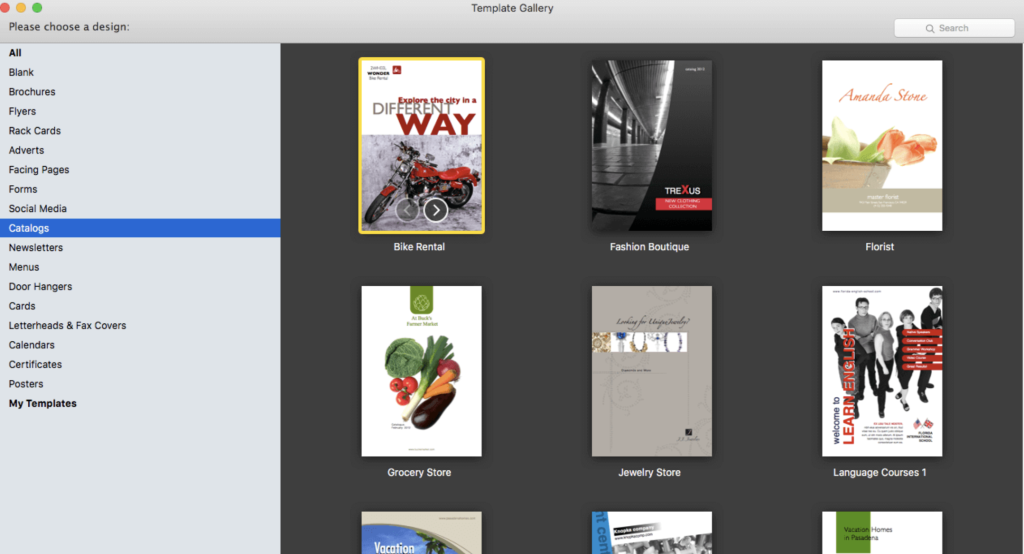
Swift Publisher is a user-friendly desktop publishing tool that simplifies the creation of a wide range of print materials, including flyers, newsletters, brochures, letterheads, and more. Here are some key features and highlights:
User-Friendly Interface: It’s an accessible digital drawing board for those not familiar with complex design apps, making the process of creating publications straightforward and easy to learn.
Text Customization: Swift Publisher offers a comprehensive text toolkit allowing users to customize text styles, link text boxes, and create wrap-around effects for visually engaging content.
Templates and Resources: The software provides a collection of images, designs, and masks, offering a range of templates and resources to inspire and facilitate the design process.
Personalization Options: Swift Publisher enables detailed personalization of publications. Users can tint, tile, group, rotate, or adjust the opacity of objects within the tool.
Compatibility: The software is compatible with macOS 10.12 and later versions, ensuring that users can access its features across different Mac operating systems.
Homepage: To learn more about Swift Publisher and its capabilities, you can visit the official homepage at Swift Publisher.
Swift Publisher provides an accessible and versatile solution for users who need to create professional-looking print materials without the complexity of high-end design software.
Download SILKYPIX Developer Studio Pro for Mac V-11.0.12.0
02 years
by Jameskarke
in Application

Name : SILKYPIX Developer Studio Pro
Size : 857 MB
Download SILKYPIX Developer Studio Pro for Mac V-11.0.12.0
SILKYPIX Developer Studio Pro Overview:
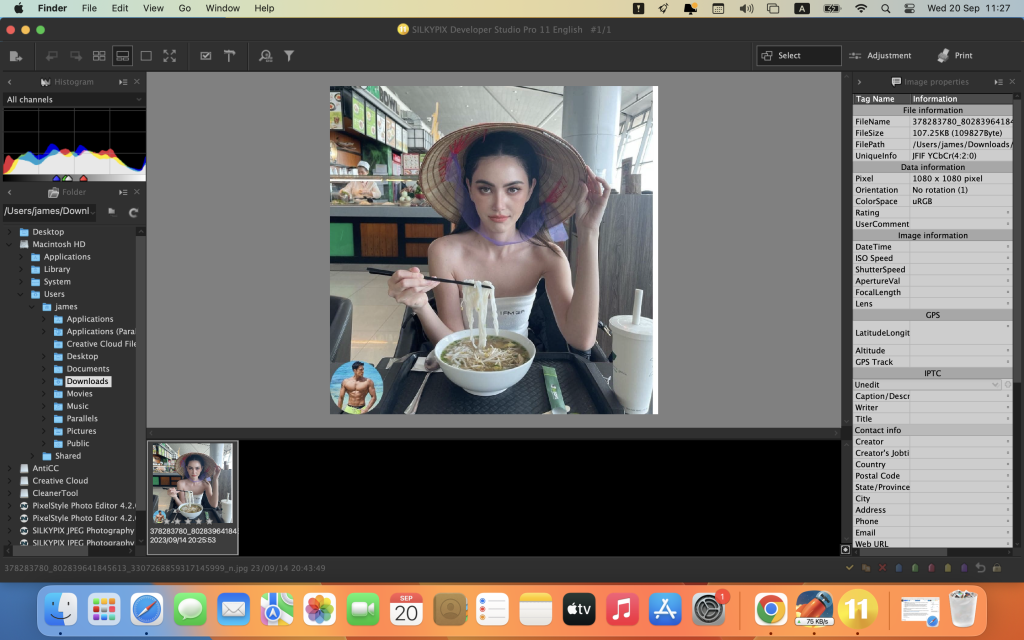
SILKYPIX Developer Studio Pro is advanced RAW development software designed for professional photographers. It offers a wide range of features and tools for optimizing and fine-tuning RAW image files. The software now includes new functions that enhance its capabilities, providing photographers with even greater creative control.
Key Features:
- Compositing Multiple RAWs: SILKYPIX Developer Studio Pro allows users to composite multiple RAW images. This feature opens up new possibilities for creative photographic expression by combining and blending RAW files.
- Fine Detail Mode: The “Fine Detail” mode offers advanced noise reduction, ensuring optimal image quality. This feature is especially useful when working with high-resolution images and fine details.
- Tone Dehaze Slider: Adjust the tone and dehaze your images with precision using the dedicated slider. This tool helps enhance the clarity and overall quality of your photos.
- Exposure Bias-Highlight/Shadow Slider: Fine-tune the exposure, highlight, and shadow areas of your photos with easy-to-use sliders. This allows for precise control over the image’s tonal range.
- Lens Aberration Correction: Correct lens distortions using lens profiles for automatic adjustments. This feature ensures that your photos are free from distortion and other optical imperfections.
- Effect Controls: Apply creative effects to your images with options for blurring or sharpening the periphery. This feature enables artistic and selective focus effects.
- Partial Correction Tool: Make selective corrections using tools like curves, polygon area selection, and color selection. This allows you to focus on specific areas of your image.
- Automatic Adjustment Button: Easily apply automatic adjustments to your images with a single button click, saving time in your workflow.
- Noise Reduction: Reduce noise in shadow areas to improve the overall image quality.
- Thumbnail Search: Quickly locate and access images using the thumbnail search function.
- Customization: Customize your workspace with options to arrange, show, or hide various elements such as the control palette, toolbar, and information box.
- User Mark Color: Add user-defined color marks to your images for easy organization and categorization.
- Open in Another Application: Seamlessly open your edited images in another application for further processing or sharing.
SILKYPIX Developer Studio Pro is compatible with macOS 10.13 or later, making it a versatile and powerful tool for professional photographers seeking to optimize their RAW image files with precision and flexibility.
Download Boris FX Silhouette for Mac V-2023.0.3
02 years
by Jameskarke
in Application

Name : Boris FX Silhouette
Size : 1.9 GB
Download Boris FX Silhouette for Mac V-2023.0.3
Silhouette 2023: Integrated Node-Based Compositing with Premier Features
Introduction:
Silhouette 2023 stands as the industry’s leading roto and paint tool, integrating over 400 nodes, including acclaimed plugins like Sapphire, Mocha Pro, and Particle Illusion. This sophisticated node-based package has played a pivotal role in major Hollywood productions such as “Dune,” “Spiderman: No Way Home,” “Free Guy,” and “The Mandalorian.” Recognized by prestigious awards like Academy and Emmy technical awards, Silhouette has made a significant mark in the industry.
Key Features:
Packed with Effects Tools:
Sapphire:
- Includes 270+ effect nodes and numerous presets, offering top-tier lighting effects, lens flares, and creative image processing filters for VFX.
Mocha Pro:
- Now integrated, featuring tools like PowerMesh, Remove, and Stabilize, providing new data ports and node actions to connect with native nodes.
Particle Illusion:
- Enables the creation of realistic particle simulations, 3D emitters, fluid dynamics, and a vast library of presets within the Silhouette interface. Users can add environmental elements like snow, smoke, and fire seamlessly.
Expanded Filters:
Continuum Nodes:
- Incorporates select Continuum nodes with fast GPU processing, encompassing Magic Sharp, Beauty Studio, Light Leaks, Video Glitch, Film Glow, and additional blur filters.
New Nodes for Invisible VFX:
InPaint:
- Utilizes the InPaint node to remove unwanted pixels by generating textures from surrounding image data, ideal for erasing unwanted elements like markers, blemishes, or wires.
PowerMeshWarp:
- Enables efficient “reverse warp stabilized” painting or rotoscoping, facilitating beauty work, and painting on skin and fabric surfaces.
Tracking & Roto Enhancements:
- Features a new Surface tool and updates to DOD for precision and speed.
- Enhanced Data Port update for better workflows, allowing the Mocha Pro node to pass tracking and spline data within the Silhouette’s node graph.
Node Actions:
- Allows users to create Mocha generated nodes without launching the UI, saving time with Copy Data, Create Roto Node, and Create Tracker Node actions.
More Tracking Exports:
- Adds more tracking and roto export formats with the Mocha Pro node, extending support for Nuke, Fusion, Flame, FBX, and Alembic.
Architecture and Speed:
- Under-the-hood enhancements improve general workflows for professional post-production and VFX studios, with Apple M1 support for speed boosts on the latest Mac hardware.
- Features improved OCIO v2 color management, GPU rendering, and enhanced ACES support for color-managed projects.
System Requirements:
- OS: macOS 10.14 or higher
- CPU: Intel or AMD processor
- Memory: 8GB or more
- Graphics: 1GB of graphics memory for film resolution
Homepage: Boris FX – Silhouette