We rank the best UK-licensed online casinos for real money and live craps in 2026, comparing bonuses, games, payouts, and mobile play. read the best online craps casino guide
Posts by Jameskarke
Microsoft Office 2021 for Mac LTSC v16.86 VL
0
Name : Microsoft Office 2021 for Mac LTSC
Size : 2.31 GB
Microsoft Office 2021 for Mac LTSC free Download
Office 2021 for Mac: Optimized for Modern Mac Features
Office 2021 for Mac is crafted to leverage the latest Mac advancements, including Retina display, full-screen view support, and scroll bounce. It combines the trusted Office experience with the aesthetics and functionality of macOS.
Key Applications and Features
Word
- Professional Document Creation: Advanced editing, reviewing, and sharing tools.
- Design Tab: Quick access to essential features.
- Smart Lookup: Integrates web contextual information directly into your documents.
Excel
- Data Analysis and Visualization: Intuitive interface with familiar keyboard shortcuts.
- Advanced Tools: Analysis Toolpak, Slicers, and Formula Builder enhance productivity and insights.
PowerPoint
- Enhanced Presentation Tools: New slide transitions, improved Animations task pane.
- Collaborative Features: Threaded comments for feedback incorporation.
- Presenter View: Displays current slide, next slide, speaker notes, and timer on your Mac, while projecting the presentation to your audience.
OneNote
- Digital Notebook: Consolidate notes, ideas, web pages, photos, audio, and video.
- Collaboration: Share and collaborate on notes and projects from anywhere.
Outlook
- Email and Calendar Management: Push email support, conversation view, and side-by-side calendar viewing.
- Organize Contacts and Tasks: Efficiently manage your communications and schedules.
New in Version 16.86
- Updates and Enhancements: Latest improvements and features (specific release notes were unavailable).
Supported Languages
- English, العربية, 中文, Čeština, Dansk, Nederlands, Suomi, Français, Deutsch, Ελληνικά, עברית, Magyar, Bahasa Indonesia, Italiano, 日本語, 한국어, Norsk, Polski, Português, Русский, Slovenčina, Español, Svenska, ภาษาไทย, Türkçe
System Requirements
- Operating System: macOS 10.14 or later
For more information and to purchase or download Office 2021 for Mac, visit the Microsoft Office homepage.
Office 2021 for Mac brings a seamless integration of powerful Office tools with the latest Mac features, offering a sophisticated and efficient user experience for all your productivity needs.


Native Instruments Komplete Kontrol 3.2.1
0
Name : Native Instruments Komplete Kontrol
Size : 422.35 MB
Native Instruments Komplete Kontrol for Mac Free Download
KOMPLETE KONTROL: Streamlined Workflow for Musicians and Producers
KOMPLETE KONTROL is a powerful tool designed to enhance your music production workflow by organizing all your instruments, effects, presets, loops, and samples. It smartly maps everything to your hardware, allowing you to find, play, and tweak all your sounds from a single interface. This free plugin works with any DAW and seamlessly integrates with any MIDI controller or can be used with your mouse and keyboard.
Key Features
- Universal Compatibility: Works with all KOMPLETE instruments and effects, plus over 750 other plugins from 90 leading creators like Waves, Spitfire Audio, Softube, Arturia, and Output, through the Native Kontrol Standard (NKS) format.
- Extensive Sound Library: NKS extends to loops and samples, allowing synchronization of all your collections from Sounds.com. It also tags everything for easy browsing in your DAW and works with sounds from the MASCHINE library and Expansions.
- Efficient Sound Browsing: Sounds are sorted via tags for easy browsing. Instant previews for each sound mean you don’t have to load individual plugins to hear them.
- Smart Play: Enhances performance with features like mapping keyboards to over 100 different scales and modes, playing chords with one finger, and creating expressive arpeggios. Owners of S-Series keyboards benefit from additional visual feedback via the Light Guide.
- Pre-Mapped Controls: Instruments and effects are pre-mapped by the designers, placing essential parameters like filter cutoffs and envelope controls right where you need them on your hardware.
Installation and Compatibility
- System Requirements: Compatible with macOS 12.0 or later.
- Processor Requirements: Supports both Apple Silicon and Intel Core processors.
For more information and to download KOMPLETE KONTROL, visit the Native Instruments KOMPLETE KONTROL homepage.
KOMPLETE KONTROL offers an integrated and intuitive approach to managing and utilizing a vast array of sounds and effects, making it an essential tool for musicians and producers aiming for a streamlined and efficient workflow.
iZotope RX 11 Audio Editor Advanced v11.1.0
0
Name : iZotope RX 11 Audio Editor Advanced
Size : 1.7 GB
iZotope RX 11 Audio Editor Advanced for Mac free Download
iZotope RX 8: Comprehensive Audio Repair and Enhancement Suite
iZotope RX has been the industry-standard audio repair suite for various media, including film, television, music, podcasts, and video games. With the latest release, RX 8, iZotope introduces new tools and enhancements to existing modules, streamlining the audio editing process and delivering superior results.
Key Features and Enhancements in RX 8
- Music Rebalance ARA: Improved source separation algorithms allow users to generate stems from stereo recordings, remove or isolate vocals for remixes, and export new stems for further processing.
- Guitar De-noise: Specialized tools to control and reduce fret squeaks, amp hiss, and noisy pick sounds, providing cleaner guitar recordings.
- RX 8 De-hum Overhaul: Enhanced De-hum module to effectively remove background hums from various sources like AC units and refrigerators, ensuring cleaner recordings.
- 32-Tab Limit for Audio Tabs: The RX Audio Editor now supports up to 32 tabs, doubling the previous limit, allowing users to work on more files simultaneously with improved efficiency.
- Wow & Flutter Module: Corrects pitch fluctuations in physical audio recordings, such as tapes and vinyl, by addressing sustained pitch drift (Wow) and faster pitch variances (Flutter).
- Loudness Control: Ensures audio conforms to broadcast standards with detailed level readings and loudness management, featuring numeric and histogram readouts for integrated, short-term, and momentary loudness.
- Spectral Recovery: Restores clarity to grainy audio from live-streamed or remote audio calls, improving overall audio quality.
Installation Instructions
- Download and Install:
- Download the
IZotope RX8.dmgandIZotope RX8.pkgfiles. - Open and install
IZotope RX8.dmg. - Open and install
IZotope RX8.pkg.
- Restart: After installation, restart your computer to complete the setup process.
System Requirements
- Operating Systems: Compatible with macOS 10.13.6 High Sierra through macOS 11 Big Sur.
- Plugin Formats: Available as Standalone, AU, VST, and VST3 plugins.
For more detailed information and to download iZotope RX 8, visit the iZotope RX 8 Homepage.
iZotope RX 8 provides powerful tools and new features designed to enhance and repair audio with precision, making it an essential tool for audio professionals across various industries.
Rectangle Pro for Mac 3.0.28
0
Name : Rectangle Pro
Size : 10 MB
Rectangle Pro for Mac free Download
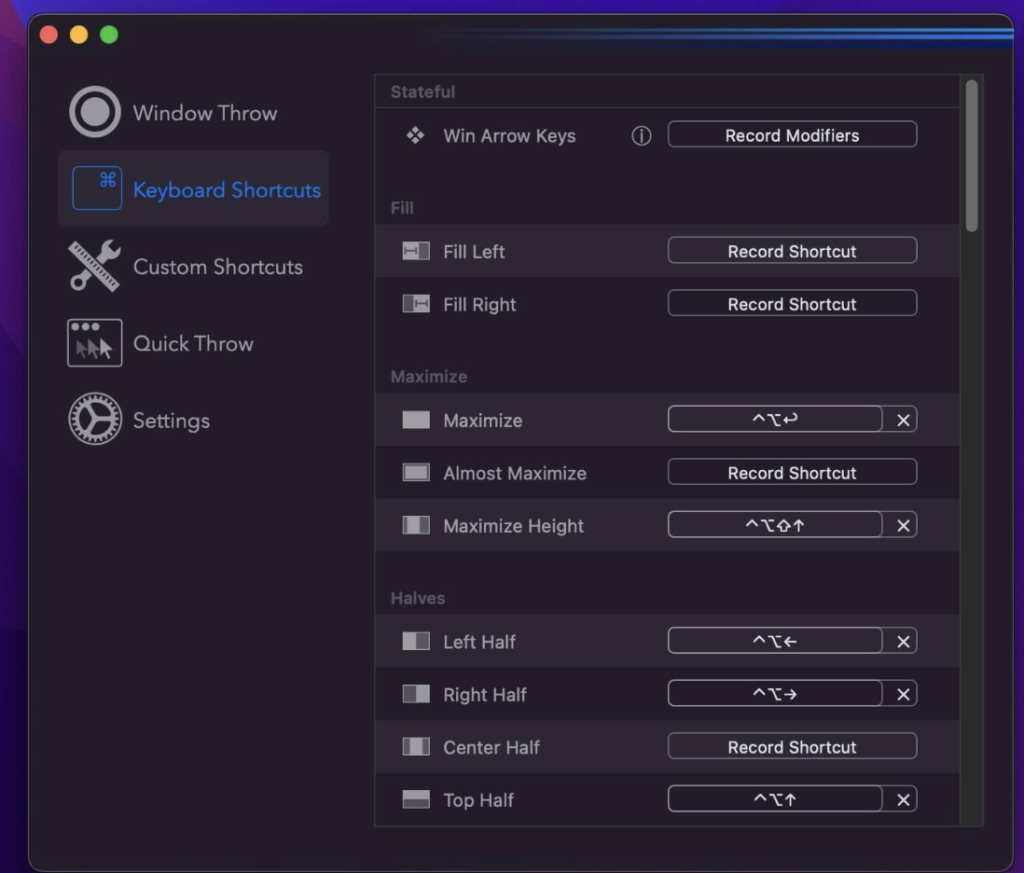
Rectangle Pro is an enhanced window management tool for macOS, building on the features of Hookshot. It enables faster and more efficient window snapping and organization, making it an invaluable tool for power users and multitaskers.
Key Features:
- 16 Window Sizes & Positions: Snap windows into 16 predefined sizes and positions for quick organization.
- Keyboard Shortcuts: Use customizable keyboard shortcuts to move and resize windows instantly.
- Drag to Screen Edges: Snap windows by dragging them to the edges of the screen, making window management intuitive.
- Cursor-Based Movement: Move and resize windows by holding a key and moving your cursor, streamlining window adjustment.
- Snap Under Cursor: Snap windows under your cursor, even if they are not currently in focus.
- Custom Shortcuts: Create custom shortcuts for any window size and position to suit your workflow.
Advanced Customization:
- Multiple Windows: Move multiple windows with a single command, enhancing productivity during complex tasks.
- Customizable Actions: Define your own actions and shortcuts for a highly personalized window management experience.
System Requirements:
- macOS Compatibility: Requires macOS 10.15 or later.
- System Integrity Protection: Disabling System Integrity Protection (SIP) may be necessary for certain functions.
How to Disable System Integrity Protection (SIP):
- Restart your Mac: Hold down Command (⌘) + R to enter Recovery Mode.
- Open Terminal: From the Utilities menu, select Terminal.
- Disable SIP: Type
csrutil disableand press Return. - Restart: Restart your Mac to apply the changes.
Homepage and More Information:
For more details, updates, and support, visit the Rectangle Pro Homepage.
Rectangle Pro enhances your macOS experience by providing powerful window management tools, helping you maintain an organized and efficient workspace with ease.

Timeline 3D for Mac Download 5.4.0
0
Name : Timeline 3D
Size : 17 MB
Timeline 3D for Mac free Download
Timeline 3D: Multimedia Timeline Creation for macOS
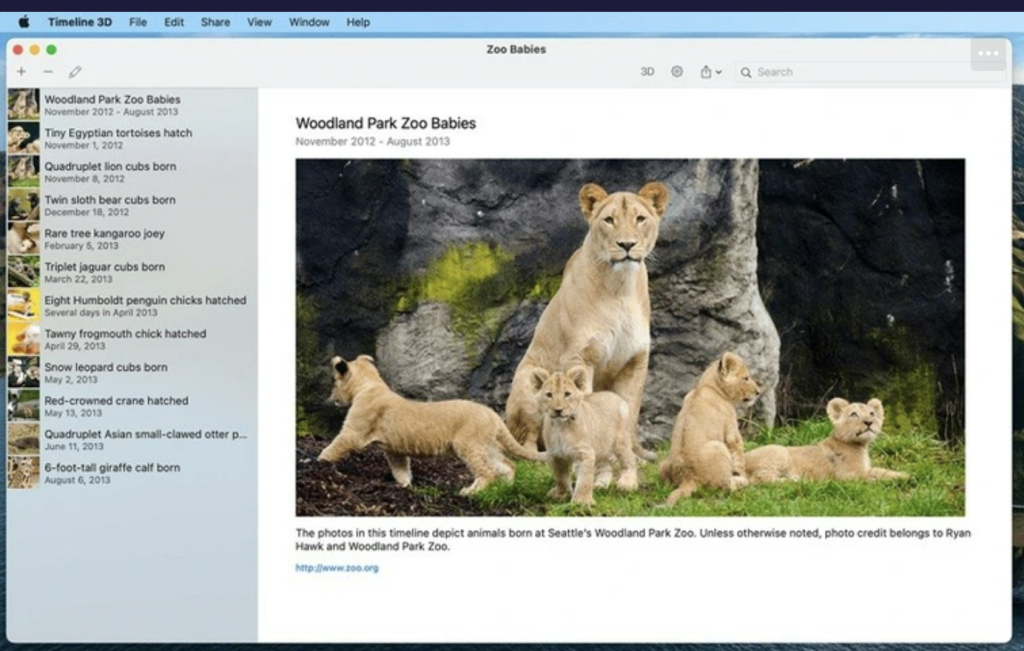
Timeline 3D is an intuitive and powerful application designed for creating stunning multimedia timelines. Whether you need to present historical events, business deadlines, family trees, or fictional stories, Timeline 3D offers a new perspective on understanding and presenting history.
Key Features:
Core Features:
- 3D Presentation: Present timelines full screen with 3D perspective, enhancing visual appeal.
- Multimedia Integration: Add images, movies, or PDFs to events for richer content.
- Flexible Date Entry: Quickly enter events with dates and times in any global format.
- Additional Information: Include optional notes, web links, and tags to events.
- Customizable Themes: Choose from various background themes to suit your presentation style.
- Import Capabilities: Import timelines from previous versions of Timeline 3D and Easy Timeline.
- Designed for macOS: Optimized for macOS Yosemite and later.
Advanced Features (In-App Purchases):
- Printing: Print timelines on a single page, formatted for your paper size.
- PDF Export: Export timelines as PDFs to share with others.
- Movie Export: Export animated timeline movies at resolutions up to 4K.
- Slide Export: Export slideshows to PowerPoint and Keynote for professional presentations.
- Web Export: Export a WebGL website to add interactive 3D timelines to your website.
- Comprehensive Package: Purchase advanced features individually or as a complete package.
Tips & Tricks:
- AirPlay Mirroring: Enable AirPlay Mirroring to view events on your device while presenting.
- Voice Dictation: Use voice dictation to enter text and dates on capable devices.
- Navigation: Use arrow keys to navigate through events in a 3D presentation.
- Zoom Media: Press the spacebar to zoom in on media files during a presentation.
- Date Formatting: Entering the date sets the date format automatically (e.g., January 20, 2015, or 1/20/2015).
- Cloud Sharing: Use iCloud or Dropbox to share timelines and media files between devices and your Mac.
Compatibility:
- macOS: Requires macOS 10.15 or later.
- Processor: Compatible with Apple Silicon and Intel Core processors.
- Homepage: For more information, visit Timeline 3D.
Timeline 3D simplifies the creation of detailed and visually engaging timelines, making it an excellent tool for educators, historians, business professionals, and anyone looking to present chronological information in a compelling way.

Parallels Toolbox Business Edition 6.7.0
0
Name : Parallels Toolbox Business Edition
Size: 800 MB
Parallels Toolbox Business Edition for Mac free Download
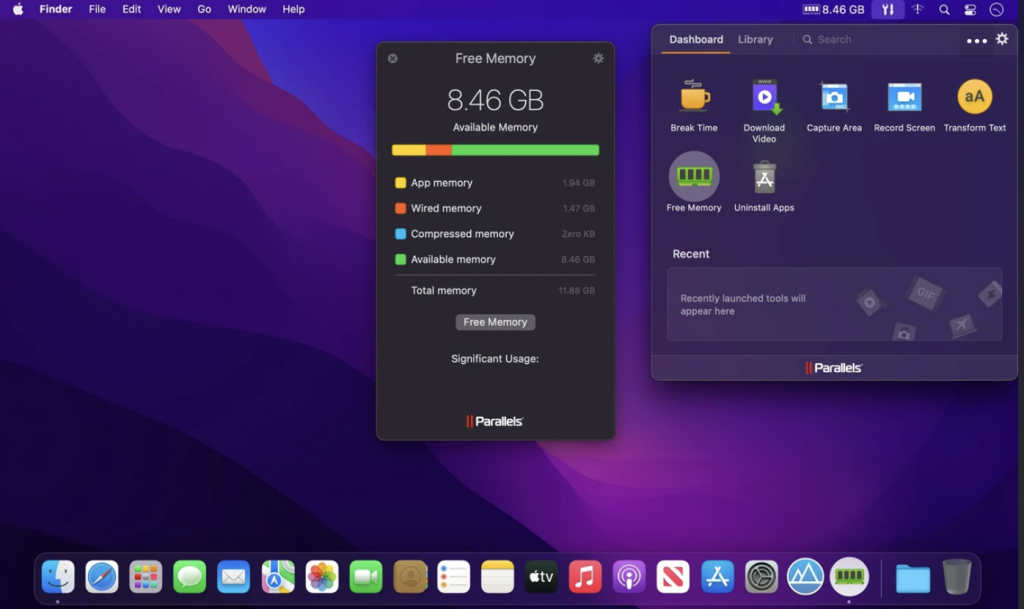
Parallels Toolbox offers a comprehensive suite of over 30 tools designed to enhance productivity and efficiency on macOS. This versatile software caters to a wide range of users, including creative professionals, students, small business owners, IT managers, and multitaskers, providing an easy-to-use interface without the need for complex system configurations.
Key Features:
System Utilities:
- Airplane Mode: Quickly disable all wireless communications.
- Alarm: Set alerts with custom notifications and sounds.
- Archive: Create compressed, password-protected archives from multiple files.
- Clean Drive: Scan and remove unnecessary files to free up disk space.
- Clipboard History: Store and manage clipboard items for up to 30 days.
- Find Duplicates: Identify and remove duplicate files.
- Free Memory: Optimize memory usage and release inactive memory.
- Hidden Files: Toggle the visibility of hidden files and folders.
- Lock Screen: Instantly lock your screen for security.
- Uninstall Apps: Thoroughly remove applications and their associated files.
- World Time: View local times for cities worldwide in the menu bar.
File and Media Management:
- Capture Area, Screen, or Window: Take screenshots of selected areas, windows, or the entire screen.
- Convert Video: Convert videos to formats compatible with iPhone or iPad.
- Download Audio/Video: Download media files from the internet.
- Eject Volume: Unmount all mounted volumes, including external drives and network volumes.
- Make GIF: Create animated GIFs from videos.
- Resize Images: Resize images and convert them to different formats.
- Screenshot Page: Capture entire webpages in PDF, PNG, or JPEG formats.
- Unarchive: Unpack various archive formats, including 7z, RAR, RPM, XAR, and Z.
Productivity Enhancers:
- Do Not Disturb: Disable notifications and animations to focus on tasks.
- Do Not Sleep: Prevent the computer from sleeping or dimming the display.
- Launch: Open multiple items (apps, documents, links) simultaneously.
- Presentation Mode: Minimize distractions during presentations by blocking notifications and hiding desktop icons.
- Sleep Timer: Set a countdown to put the computer to sleep or shut it down.
- Stopwatch: Measure elapsed time with start, stop, and reset functionalities.
- Timer: Set a countdown timer with a notification sound.
- Switch Resolution: Quickly change display resolutions and orientations from the menu bar.
Multimedia Tools:
- Audio Trimmer: Trim audio files.
- Audio Joiner: Merge multiple audio files.
- Audio Mixer: Mix different audio tracks.
- Voice Changer: Adjust the tempo and pitch of audio files.
- Noise Reduction: Reduce background noise in audio files.
- Audio Governor: Control audio playback speed.
- Record Area, Screen, or Window: Record video from selected areas, windows, or the entire screen with audio.
- Record Audio: Record audio using the Mac’s built-in or external microphone.
- Take Photo/Video: Capture photos or videos using the Mac’s camera.
Additional Features:
- Date Countdown: Set up countdowns to specific dates with visual reminders.
- Energy Saver: Extend battery life by enabling energy-saving settings.
- Hide Desktop: Hide all icons on the desktop with a single click.
- Hide Menu Icons: Hide unused menu bar icons for a cleaner interface.
- Mute Microphone: Mute the microphone to prevent unauthorized listening.
Compatibility:
- macOS: Requires macOS 10.14 or later.
- Processors: Compatible with both Apple Silicon and Intel Core processors.
- Homepage: For more information, visit Parallels Toolbox.
Parallels Toolbox simplifies daily tasks with a wide array of tools, offering an all-in-one solution that replaces the need for multiple individual applications, enhancing your Mac experience with a single click.
Watermark Sense for Mac 1.4.3
0
Name : Watermark Sense
Size 10 MB
Watermark Sense for Mac free download
Watermark Sense is a powerful application designed to help you protect your intellectual property, promote your brand, and add informational overlays to multiple images simultaneously. It offers extensive customization and automation capabilities, making it ideal for both professional and casual users who need to watermark a large number of images efficiently.
Key Features:
Comprehensive Watermarking:
- Text and Image Watermarks: Supports both types, giving you flexibility in how you mark your images.
- Customizable Appearance: Adjust watermark opacity, choose blending modes, apply shadows, and replicate watermarks for creative results.
- Metadata-Based Text Watermarks: Generate text watermarks from image EXIF/IPTC metadata for automated and informative overlays.
- Flexible Blending Options: Achieve the desired visual effect with a rich set of fine-tuning options.
Batch Processing:
- Custom Presets: Save watermark configurations and export settings as presets. Apply multiple watermarks or save images with different watermarks in a single batch operation.
- Live Preview: See the final watermarked image in real-time, ensuring the output meets your expectations.
- Manual Positioning: For better control, manually position watermarks on individual images with the option to synchronize positioning across multiple images.
Additional Features:
- Batch Rotation and Flipping: Rotate and flip images in bulk.
- Metadata Editing: Edit EXIF/IPTC metadata as part of the batch process.
- Powerful Renaming: Rename files during the batch processing for better organization.
Resize Sense Integration:
- Seamless Integration: Works with Resize Sense, a batch image resizing and cropping utility, to form a comprehensive image processing toolset. Together, they offer a robust solution for web publishing and other image processing needs.
Compatibility:
- macOS: Requires macOS 10.10 or later.
- Homepage: For more information, visit Watermark Sense.
Watermark Sense is an efficient tool for batch watermarking, providing a range of customization options and automation capabilities that save time and enhance productivity. Its integration with Resize Sense further extends its functionality, making it a valuable asset for anyone needing to process large quantities of images.

iMediaCut-Easy Video Trimming for Mac 7.6.16
0
Name : iMediaCut-Easy Video Trimming
Size : 14 MB
iMediaCut-Easy Video Trimming for Mac free Download
iMediaCut: Easy Audio & Video Editing for macOS
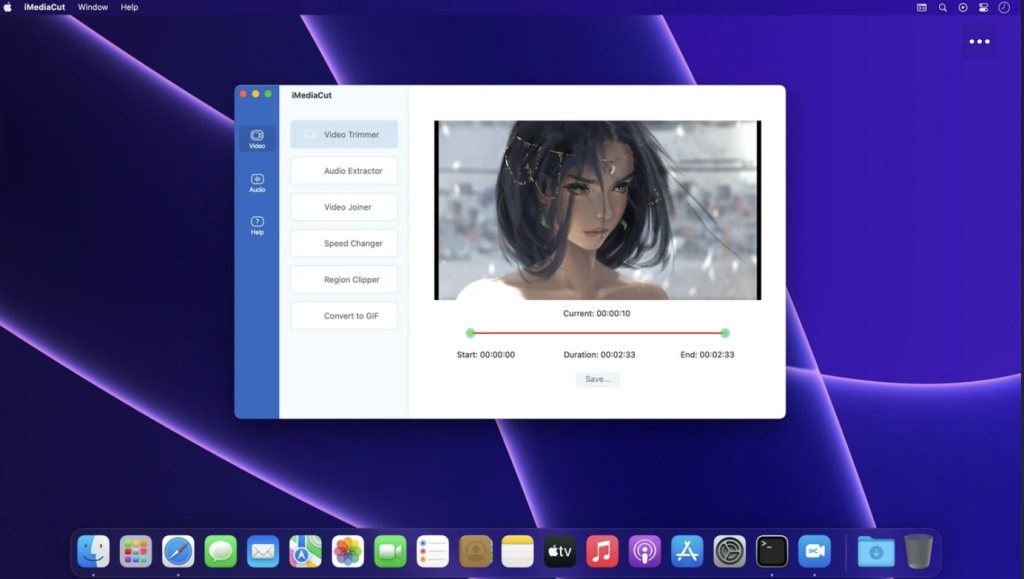
iMediaCut is a versatile and user-friendly audio and video editing software designed for macOS. It offers a range of editing functions such as voice changing, noise reduction, speed changing, region clipping, and video to GIF conversion, making it a comprehensive tool for both casual and professional users.
Key Features:
Video Editing:
- Video Trimmer: Crop and trim video clips to your desired length.
- Audio Extractor: Extract audio tracks from video files.
- Video Joiner: Merge multiple video clips into a single video.
- Speed Changer: Adjust the playback speed of your videos, either speeding them up or slowing them down.
- Region Clipper: Export a specific region of a video as a separate video file.
- Convert to GIF: Convert video segments into GIFs for easy sharing and use.
Audio Editing:
- Audio Trimmer: Trim audio files to remove unwanted sections.
- Audio Joiner: Combine multiple audio tracks into one.
- Audio Mixer: Mix multiple audio tracks together.
- Voice Changer: Modify the tempo and pitch of audio recordings.
- Noise Reduction: Reduce background noise in audio files for clearer sound.
- Audio Governor: Adjust the playback speed of audio tracks.
Compatibility:
- macOS: Requires macOS 10.15 or later.
- Mac App Store: Available for download from the Mac App Store.
iMediaCut simplifies the process of editing both audio and video files, offering intuitive tools that cater to a wide range of editing needs. Whether you need to trim and merge clips, adjust speeds, or enhance audio quality, iMediaCut provides a powerful yet easy-to-use solution for all your media editing projects.
Pixelmator Pro for Mac Download 3.6.3
0
Name : Pixelmator Pro
Size : 656 MB
Pixelmator Pro for Mac free Download
Pixelmator Pro is a robust image editor designed exclusively for Mac, featuring a wide array of professional-grade, nondestructive editing tools. It is crafted to help both beginners and seasoned pros enhance photos, create compositions, draw, paint, and apply effects with ease.
Key Features:
Exceptional Design and Functionality:
- Modern Interface: Single-window design tailored for Mac.
- User-Friendly: Intuitive design accessible for beginners and experts alike.
- Adaptive Appearance: Supports macOS light and dark modes.
- Customizable Workspace: Organize the interface to suit your needs with presets for photography, design, illustration, and painting.
- Photos Extension: Edit images directly within Photos app, maintaining nondestructive edits.
Professional Tools:
- Comprehensive Editing: Full suite of tools for enhancing and creating images.
- Nondestructive Editing: Make adjustments without permanently altering your images.
- Composition Tools: Easily move, resize, and arrange objects.
- Color Adjustments: Machine learning-powered, nondestructive color correction.
- RAW Support: Edit RAW images utilizing their full range data.
- Digital Painting: Handcrafted, customizable brushes with tablet support.
- Effects and Presets: Combine effects, save presets, and use them across projects.
- Retouching: Remove imperfections, clone parts, and adjust lighting precisely.
- Vector Graphics: Add and create vector graphics, including text with advanced typography tools.
- Web Optimization: Compress images for web use.
- Batch Processing: Automate tasks with built-in Automator actions and AppleScript support.
Machine Learning Enhancements:
- Repair Tool: Remove objects with realistic area recreation.
- ML Enhance: Intelligently enhance photos using a trained machine learning algorithm.
- ML Super Resolution: Enhance image resolution.
- ML Match Colors: Copy color adjustments from one photo to another.
- ML Denoise: Remove noise and compression artifacts while preserving details.
- Quick Selection Tool: Make accurate selections effortlessly.
Compatibility:
- Supported Formats: JPEG, TIFF, PNG, PSD, HEIF, SVG, PDF, GIF, BMP, TGA, WebP, JPEG-2000, and more.
- Photoshop Layers: Open and edit Photoshop images with layers.
- SVG Editing: Open and edit SVG vector images.
- Sharing: Easily share images to Photos, Mail, AirDrop, and other platforms.
Built Exclusively for Mac:
- macOS Integration: Designed for macOS, supporting major features and integrating seamlessly with macOS Big Sur.
- Compatibility: Requires macOS 12.0 or later.
For more information and to download Pixelmator Pro, visit the Pixelmator Pro homepage.
Pixelmator Pro offers a powerful and intuitive solution for all your image editing needs, combining advanced features with an accessible design to enhance your creative workflow.

YT Saver Video Downloader & Converter Mac 7.7.1
0
Name : YT Saver Video Downloader & Converter
Size : 59 MB
YT Saver Video Downloader & Converter for Mac free Download
YT Saver is a comprehensive tool designed to download videos, audio, and playlists from over 10,000 websites. It also offers video conversion capabilities, making it a versatile solution for accessing and managing media content offline.
Key Features:
Download Videos with Built-in Browser:
- Integrated Web Browser: YT Saver includes a built-in browser, allowing users to navigate video and audio sharing sites directly and download content seamlessly within the website.
Unlimited Download with YT Saver PRO:
- Bulk Download: Download multiple videos and playlists simultaneously from streaming sites.
- Offline Access: Store videos for offline viewing, ensuring access to your favorite content anytime, anywhere.
Ultra Fast Download Speed:
- 10X Faster: Experience ultra-fast download speeds, allowing quick access to your desired videos and the fastest conversion rates available.
Privacy Protection:
- Private Mode: Keep your downloaded videos and audio secure with password-protected folders, protecting content from prying eyes and ensuring safe viewing for children.
Supported Input Formats:
- Video: MP4, M4V, 3GP, MPEG, DAT, AVI, ASF, WMV, VOB, MKV, FLV, 3GS, 3G2, F4V, WEBM, TS, RMVB, MOV
- Audio: AAC, AC3, FLAC, M4A, WAV, WMA, AMR, MKA, MP2, AIF, AU, AIFF, CAF, OGG, RAM, RA, M4B, M4R, APE, OPUS, WEBM
Supported Output Formats:
- Video: MP4, MOV, WMV, AVI, FLV, MKV, HEVC MP4, HEVC MKV, 3GP, iPhone/iPod, iPad, Android Phone, Android Tablets
- Audio: M4A, MKA, WAV, AAC, FLAC, AIFF, OGG
System Requirements:
- macOS Compatibility: Requires macOS 10.10 or later.
For more information and to download the software, visit the YT Saver homepage.
YT Saver provides a powerful, easy-to-use solution for downloading and managing video and audio content from a vast array of online sources, ensuring you can access and enjoy your media anytime, anywhere.