Free Macsoftware One click Download
Posts tagged Music
Mac Native Instruments Traktor Pro Plus 3.10.0.71
03 years
by Jameskarke
in Application

Name : Native Instruments Traktor Pro Plus
Size : 482.71 MB
Mac Native Instruments Traktor Pro Plus 3.10.0.71
TRAKTOR PRO is a renowned DJ software designed for professional DJs, offering a range of features for creative mixing and live performances. With its four decks and innovative tools, it’s widely used in the industry. Here are some key features and highlights of TRAKTOR PRO:
Key Features:
- Four Decks: TRAKTOR PRO supports four decks, allowing DJs to mix and manipulate multiple tracks simultaneously.
- Stem Decks: Innovative Stem decks enable creative mixing and manipulation of compatible tracks when used with compatible hardware.
- Effects: TRAKTOR PRO offers over 40 high-quality effects to enhance your mixes, including filters, delays, reverbs, and more. It also features a 1-knob Macro control for easy effect manipulation.
- User Interface Redesign: The interface has been redesigned for clarity and ease of use in a club environment. New metering and fader designs improve accuracy in mixing, and essential controls are easily accessible on the master panel.
- Sound Quality: TRAKTOR PRO is designed for high-fidelity sound. It includes Elastique 3 time-stretching for precise tempo shifting and offers a warm and punchy limiter for audio processing.
- Mixer FX: New Mixer FX provides one-touch control over club-grade effects, enhancing your sonic experimentation during performances.
- Reverse Functionality: The Reverse button, combined with Flux Mode, allows for creative and on-beat deck manipulation. You can play a deck backward and seamlessly jump to where you would have been in perfect sync with other decks.
- TRAKTOR SCRATCH Capability: TRAKTOR PRO 3 includes TRAKTOR SCRATCH capability as a standard feature. Scratch DJs can use timecode vinyl with any compatible sound card for precise and expressive turntable control.
System Requirements:
- Compatibility: TRAKTOR PRO is compatible with macOS 10.15 or later.
Official Website:
For more details about TRAKTOR PRO, including tutorials, hardware compatibility, and download options, you can visit the official Native Instruments website provided. This software is highly regarded in the DJ community for its professional-grade features and versatility, making it a top choice for DJs performing live sets and mixing tracks.

Download Multitrack Editor for Mac 1.0.5
03 years
by Jameskarke
in Application
Name :Multitrack Editor
Size : 83 MB
Download Multitrack Editor for Mac 1.0.5
The software you’re describing appears to be a professional audio editing tool for macOS, offering multitrack editing, various audio file format support, file sharing, and other audio editing features. Here’s a brief overview of its key features:
Key Features:
- Multitrack Editing: The software allows for multitrack editing, enabling users to work on multiple audio tracks simultaneously. This feature is valuable for creating complex audio compositions and mixes.
- Audio File Format Support: It supports various audio file formats, allowing users to import and edit audio files in different formats.
- File Sharing: Users can easily share audio files or projects with others, making it convenient for collaboration or sharing work.
- Editing Tools: The software provides a range of editing tools, including the ability to change audio durations, crop, and cut selected areas within audio tracks. These tools help users fine-tune their audio projects.
- Backup and Auto-Save: The app offers backup and auto-save functionality, ensuring that unsaved progress is protected. Users can choose to activate or deactivate this feature in the settings.
- In-App Purchases: The app may offer additional features or full functionality through in-app purchases.
System Requirements:
- Compatibility: The software requires macOS 10.15 or later.
Official Website:
For more information about this audio editing tool, including details about its features and capabilities, you can visit the official homepage provided.
This type of audio editing software is commonly used by musicians, sound engineers, podcasters, and audio enthusiasts to create and edit audio tracks, mix audio, and produce professional-quality audio projects. It allows for precise control over audio elements and can be used for a wide range of audio editing tasks.
Piezo v-1.8.0 for Mac Free Download
03 years
by Jameskarke
in Application

Name : Piezo
Size : 26 MB
Piezo v-1.8.0 for Mac Free Download
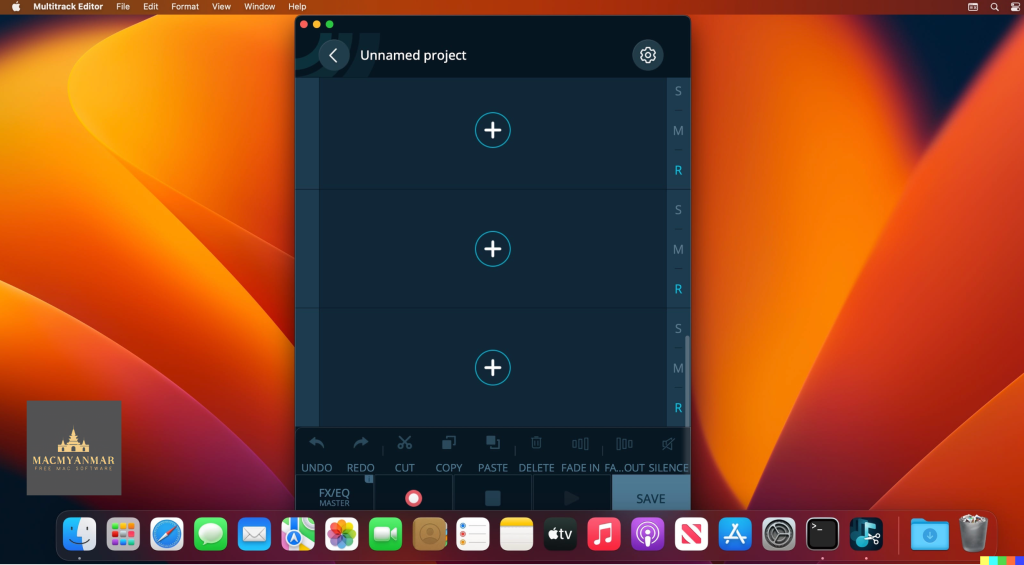
Piezo is an easy-to-use audio recording application for macOS that allows you to quickly capture audio from various sources, applications, and devices on your computer. Whether you want to record audio from an application, microphone, or even web audio, Piezo provides a simple and efficient way to do so. Here are some key features and uses of Piezo:
Record From Apps and Devices: Piezo lets you select an application or audio device, then with a single click, you can start recording audio. It can capture audio from virtually any application playing on your Mac.
Easy Podcast Recording: Recording podcasts or interviews through VoIP apps like Skype is made easy with Piezo. It even saves the audio to distinct channels for easier post-production editing.
Settings Are a Snap: You can easily configure recording settings, including choosing the recording quality, naming your audio clips, and adding comments.
Grab From Any App: Piezo can capture audio from almost any application on your Mac, making it versatile for various recording needs.
Super Simple Recording: With Piezo, recording audio on your Mac is straightforward and requires just one click.
Recording, Demystified: Piezo offers simple recording presets, reducing the need to worry about complex settings.
Record Web Audio: You can save audio from web pages by setting a web browser like Safari or Chrome as your audio source.
Archive Skype Calls: Piezo makes it easy to record Skype calls with a single click.
Save Streaming Music: Capture audio from music streaming services like Spotify, Rdio, MOG, and more.
Record Audio Devices: Hook up any microphone, including your Apple headset, and start recording instantly.
Get Sound Bites: Record audio from movies playing in any video player, such as QuickTime Player and VLC.
Piezo is compatible with macOS 10.14 or later and runs on both Apple Silicon and Intel Core processors. Its simple and intuitive interface makes audio recording enjoyable and accessible. You can learn more about Piezo on the Rogue Amoeba website.
Mac Native Instruments Kontakt 7.6.0 Download
03 years
by Jameskarke
in Application

Name : Native Instruments Kontakt
Size : 918.17 MB
Mac Native Instruments Kontakt 7.6.0 Download
KONTAKT 6 is a powerful software sampler and sound design tool that has been a staple in the music production industry for 20 years. With the release of KONTAKT 6, Native Instruments introduces new features, instruments, and improvements to make it an even more versatile and creative platform for music producers and sound designers. Here’s an overview of what’s new in KONTAKT 6:
Three New Instruments:
KONTAKT 6 introduces the KONTAKT Play Series, featuring three new instruments:
- Analog Dreams: This instrument captures the iconic sounds of 20th-century hardware synthesizers and combines them with creative processing and effects. It’s perfect for creating modern electro and synthwave music.
- Ethereal Earth: A hybrid organic/electronic instrument that combines acoustic instruments from around the world with digital synthesis, foley layers, and effects processing. It offers a wide range of traditional and digital sounds.
- Hybrid Keys: This instrument takes a contemporary and creative approach to keys and piano sounds. It moves away from conventional sampling and explores innovative techniques for unique and expressive piano sounds.
New Effects:
KONTAKT 6 includes several new effects, including Replika Delay, Room Reverb, Hall Reverb, Plate Reverb, and Cry Wah. These effects provide versatile sound processing options for your instruments and sounds.
Wavetable Module:
One of the most significant additions to KONTAKT 6 is the wavetable synthesis module. This powerful tool allows you to create evolving and dynamic sounds by manipulating wavetables. All three Play Series instruments incorporate this module, providing you with endless sonic possibilities.
Creator Tools:
Creator Tools is a standalone application designed to enhance the workflow of library builders and instrument creators. It includes a Debugger for identifying and fixing issues in KONTAKT scripts and an Instrument Editor for automating tasks like sample mapping, batch renaming, and copying settings.
KONTAKT 6 continues to be a go-to choice for musicians, producers, and sound designers looking for high-quality sampling and sound manipulation capabilities. With its new features and improvements, it offers even more creative possibilities and streamlined workflows.
System Requirements:
- macOS 11.0 or later
- Apple Silicon or Intel Core processor
You can learn more about KONTAKT 6 and explore its features on the Native Instruments website.
Mac Farrago free Download V-2.0.5
03 years
by Jameskarke
in Application
Name : Farrago
Size : 44 MB
Mac Farrago free Download V-2.0.5
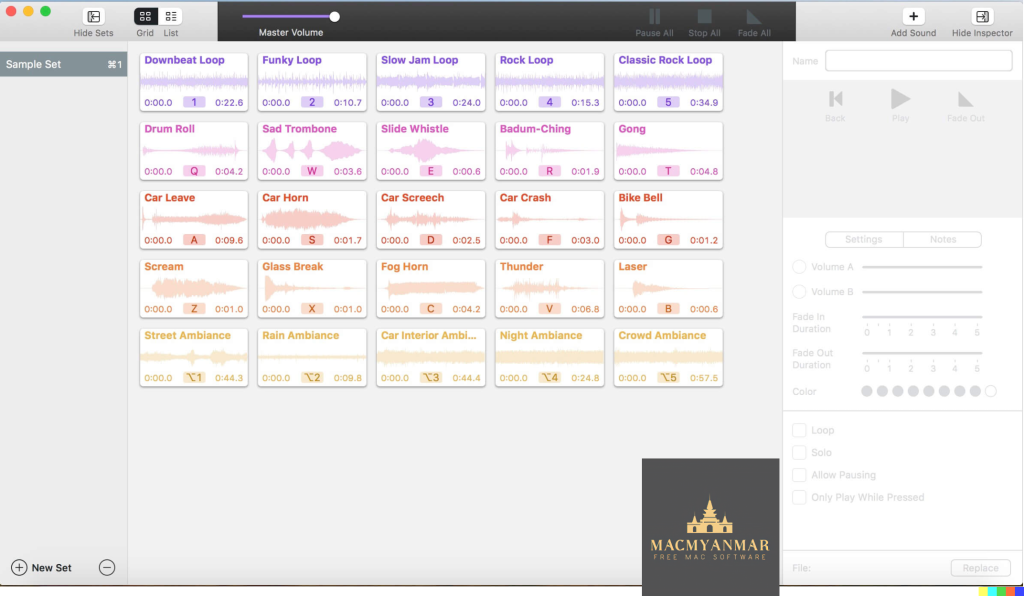
Farrago is a macOS application designed to provide an efficient and user-friendly way to play sound bites, audio effects, and music clips on your Mac. It offers various features that make it useful for different purposes, such as podcasting and live theater production. Here are some of the key features of Farrago:
- Powerful Tile Interface: Farrago uses a tile grid interface, allowing you to arrange your audio clips exactly as you want. This interface makes it easy to have your preferred sounds readily accessible and organized.
- Customization with the Inspector: The Inspector feature in Farrago lets you customize the settings for each sound tile. You can set the tile’s name and color, adjust in/out points, and fine-tune fade settings to suit your specific needs.
- Organization with Sets: You can create sets to organize your audio clips based on criteria like mood, show, or any other category that makes sense for your project. This organizational feature simplifies the management of your audio assets.
- Sound Sets: While Farrago comes with a default sound set, you have the flexibility to create your own sets tailored to your requirements. This allows for easy access to specific groups of audio clips.
- Thoughtful Interface: The tile-based layout of Farrago is designed to provide a clear and intuitive way to play your audio either using your keyboard or mouse, making it user-friendly for a wide range of users.
- Global Access via Hotkeys: Farrago offers a user-definable Global Hotkey, enabling you to bring the application to the forefront and use in-app shortcuts to instantly trigger your desired audio clips. This feature enhances efficiency when working with audio.
- Compatibility: Farrago is compatible with macOS 11.0 (Big Sur) or later versions of the macOS operating system.
In summary, Farrago is a versatile tool that caters to the needs of podcasters, theater technicians, and anyone else who requires quick and organized access to a library of sound bites and audio clips on a Mac. Its customizable interface, organizational features, and hotkey support make it a valuable asset for audio-related tasks. You can find more information and download Farrago from its official homepage at https://rogueamoeba.com/farrago/.
Mac Fission 2.8.4 Free Download
03 years
by Jameskarke
in Application

Name : Fission
Size : 17 Mb
Mac Fission 2.8.4 Free Download
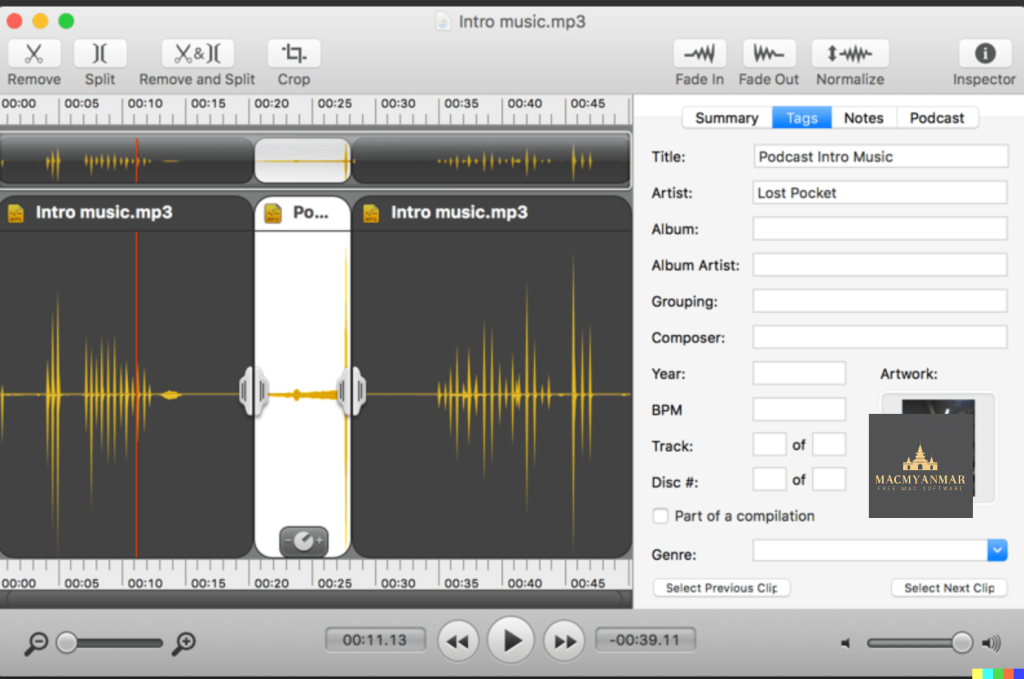
Fission is a app appears to be an audio editing and conversion tool with several key features:
- Lossless Editing: Fission allows you to edit audio files in various formats like MP3, AAC, Apple Lossless, and AIFF without causing any loss in audio quality. This is important as some audio editors may introduce artifacts during editing.
- Audio Splitting: You can quickly split a long audio file into smaller segments using Fission. This feature is useful for breaking down large audio recordings or files into more manageable parts.
- Content Removal: Fission lets you remove unwanted content from your audio files, such as commercials or sections of audio that you don’t need. This can help clean up audio recordings.
- Audio Arrangement: You can re-arrange audio within a single file, copy audio from one file to another, or merge audio files easily by using drag-and-drop functionality. This feature makes it convenient to create custom audio arrangements.
- Ringtone Creation: Fission also offers the ability to create MP3 or AAC ringtones for your cell phone, allowing you to customize your phone’s alert sounds.
- Format Conversion: Fission supports the conversion of audio files between different formats. You can export or batch convert files to formats like MP3, AAC, Apple Lossless, FLAC, AIFF, and WAV. This feature can be handy when you need to convert audio files to a specific format for compatibility or other purposes.
- Compatibility: Fission is compatible with macOS 11.0 or later, indicating that it is designed to work with newer versions of the macOS operating system.
If you’re interested in using Fission, you can find more information and download it from the official website.
Apple MainStage Free Download V-3.6.4
03 years

Name: Apple MainStage 3.6.4
Size : 1 Gb
Apple MainStage Free Download V- 3.6.4
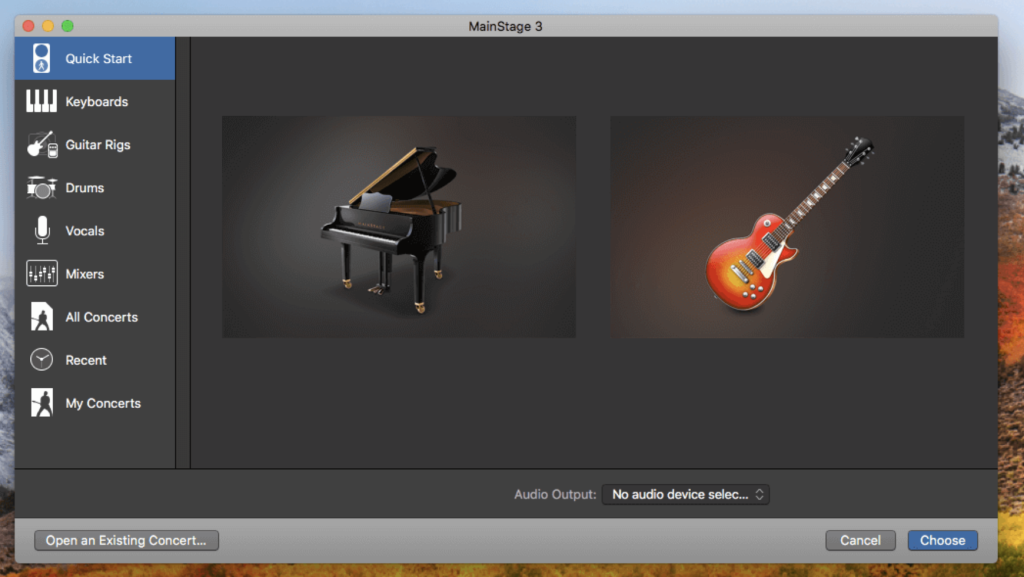
MainStage 3 is a software application developed by Apple for macOS that is designed for live music performance. It offers a wide range of features and capabilities for musicians and performers, including:
- Full-Screen Live Interface: MainStage 3 provides a customizable full-screen interface optimized for live performance. This interface allows performers to focus on what they need during their performance and offers a high-contrast view for easy visibility from a distance.
- Instrument and Effect Plug-Ins: MainStage 3 comes with a vast collection of over 80 instrument, effect, and MIDI plug-ins. These include virtual instruments, audio effects, and MIDI processors that can be used to create and manipulate sounds in real-time during a performance. Users can also incorporate their sounds from Logic Pro X and GarageBand into MainStage.
- Hardware Control: Performers can connect their favorite hardware controllers, such as keyboards, foot pedals, and drum pads, to MainStage 3 and use them to play and control the software’s plug-ins. The software offers automatic device recognition for quick setup and allows users to map hardware controls to onscreen parameters.
- Patch Management: MainStage 3 allows users to create and manage patches, which are collections of instruments, effects, and settings. Performers can switch between patches seamlessly during a live performance without cutting off held notes or stopping sound output.
- MIDI Plug-Ins: MainStage 3 includes nine MIDI plug-ins that enable creative manipulation of MIDI data in real-time. These plug-ins can be used to create dynamic performances, arpeggiate chords, trigger predefined chords with single notes, and more.
- Instrument Library: The software includes a wide variety of instrument plug-ins, including drum kits, synthesizers, vintage keyboard emulations, and sampled instruments. Users can access these instruments to create diverse sounds for their live performances.
- Effects and Mixing Tools: MainStage 3 offers a range of effects and mixing tools, including convolution reverb, delays, modulation effects, equalizers, dynamics processors, and more. These tools allow performers to shape and enhance their sound during live shows.
- Guitar and Bass Gear: Musicians can build custom guitar and bass rigs using Amp Designer, which includes vintage and modern amps, cabinets, and microphones. There’s also a pedalboard feature for adding delay, distortion, and modulation effects.
- Sound Library: MainStage 3 comes with an extensive sound library that includes over 4,300 instrument and effect patches, more than 1,800 meticulously sampled instruments, and 10,000 Apple Loops spanning various musical genres.
- System Requirements: MainStage 3 is compatible with macOS 12.3 or later and is available for download from the Mac App Store.
Overall, MainStage 3 is a powerful tool for musicians and performers looking to bring their studio-quality sound to the stage and enhance their live performances with a wide range of virtual instruments, effects, and creative tools.
Musify 3.3.0 For Mac Free Download
03 years
by Jameskarke
in Application

Name: Musify 3.3.0
Size : 47 MB
Musify 3.3.0 For Mac Free Download
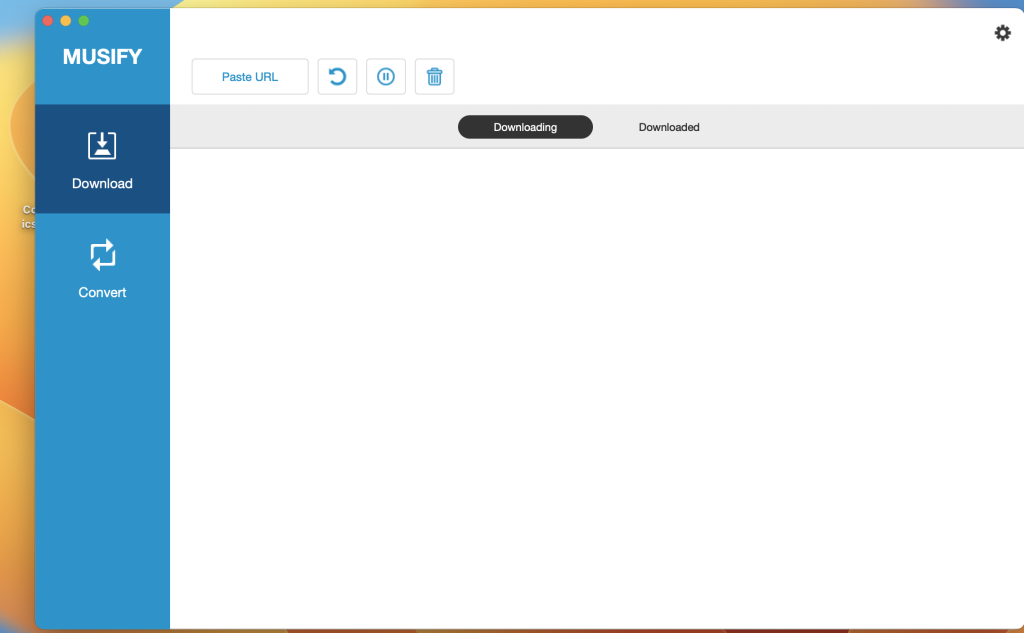
Musify is a versatile software tool designed for downloading and converting music from various online sources, including YouTube, Spotify, SoundCloud, and more. It offers several features for music enthusiasts. Here’s an overview of Musify’s key features:
- Download Music from Multiple Sources: Musify allows you to download music from over 1000+ music-sharing websites, including YouTube, Spotify, SoundCloud, Facebook, Instagram, and others. This enables you to access music offline without compromising audio quality.
- Convert to Various Formats: You can convert downloaded music files to different formats, including MP3, M4A, and WAV. This format versatility ensures compatibility with a wide range of devices, including iPhone, iPad, iPod, Android devices, and music players.
- High-Speed Conversion: Musify offers high-speed music conversion, making it efficient for converting multiple files quickly and easily. This is particularly useful when you need to convert a large number of MP3 files at once.
- Metadata Preservation: The software preserves metadata during the conversion process. This means that important information like song titles, artist names, album names, and album artwork are retained, helping you maintain an organized music library.
- YouTube Music Downloader: Musify can automatically extract music files from YouTube videos and playlists and download them to your computer. You can convert YouTube videos to MP3, M4A, or WAV formats for various purposes, such as creating a music collection or setting a mobile ringtone.
- Spotify Music Downloader: You can download Spotify audio tracks without needing to log in to a Spotify account or subscribe to Spotify Premium. Musify allows you to download Spotify music via URLs of artists, albums, playlists, and more, converting them to MP3, M4A, or WAV formats.
- Support for Multiple Websites: In addition to YouTube and Spotify, Musify supports downloading MP3 music from various social websites, including SoundCloud, MixCloud, Bandcamp, Facebook, Freesound, Audioboom, Veojam, and more.
- Music Playlist Downloader: Musify is capable of downloading entire music playlists from platforms like YouTube, Spotify, SoundCloud, and Bandcamp. It enables you to download the entire playlist in one click and convert it to your preferred format without losing the original sound quality.
- Music Converter: Musify’s music conversion capabilities support dozens of audio and video formats, allowing you to convert to popular formats like MP3, M4A, and WAV. This ensures that you can play your music on various media players and mobile devices.
- System Compatibility: Musify is compatible with macOS 10.12 (Sierra) and later versions of the macOS operating system.
In summary, Musify is a comprehensive music downloader and converter tool that provides a convenient way to access music from a variety of online sources, convert it to different formats, and maintain metadata for organized music libraries. It supports multiple websites, offers high-speed conversion, and is compatible with various devices and media players.
Colibri For Mac V- 2.1.6
03 years
by Jameskarke
in Application

Name : Colibri For Mac V- 2.1.6
Size : 23 MB
Colibri For Mac V- 2.1.6
Colibri is a native macOS audio player designed to provide high-quality and efficient playback of various audio formats. Here are some key features and details about Colibri:
Key Features:
- High-Quality Playback: Colibri is built on top of the BASS audio technology, which allows it to offer crystal-clear bit-perfect playback of popular lossless and lossy audio formats.
- Minimal Resource Usage: The application is optimized for minimal resource consumption, making it energy-efficient and suitable for use on Mac laptops, helping to save battery power.
- Supported Audio Formats: Colibri supports a wide range of audio formats, including FLAC, ALAC, WAV, AIFF, APE, TTA, DSD, WavPack, Ogg Vorbis, MP1, MP2, MP3, AAC, and M4A. It can also handle network streams and online radio.
- CUE Sheets: Colibri reads, processes, and to some extent, sanitizes CUE sheets, which are used to organize audio tracks within a single file. It also attempts to extract metadata from audio file headers if the CUE sheet lacks certain information.
- Gapless Playback: Colibri is designed to provide true gapless playback, ensuring a smooth listening experience, whether you’re using a CUE sheet or individual audio files.
- Playlist Management: The app saves your current playlist upon quitting and restores it when you reopen the app, preserving your song data between sessions.
- Privacy-Focused: Colibri respects your privacy and does not collect usage data or modify files. It only remembers your playlist and settings.
- Album Art Display: The app displays embedded cover art for FLAC files and uses ID3/iTunes artwork metadata for other formats. It also searches for cover art in the folder where the current song is located.
- Menu Bar Integration: Colibri can place an unobtrusive icon in the Menu Bar for easy access to playback controls, song information, and cover art.
- Finder Integration: Colibri integrates with macOS Finder, allowing it to appear as an option in “Open With” when you select a supported audio file.
- Display Compatibility: The interface elements of Colibri scale smoothly on various screen resolutions and pixel densities.
Compatibility:
Colibri is compatible with macOS 10.10 or later.
Mac App Store:
You can download Colibri from the Mac App Store via the following link: Colibri on the Mac App Store.
Colibri is a native macOS audio player that offers a clean and efficient way to enjoy your music library, supporting a wide range of audio formats and providing features like gapless playback, CUE sheet support, and low resource consumption for an improved listening experience on your Mac.

Audio Editor 1.6.1 for Mac
03 years
by Jameskarke
in Graphic and Design
Name : Audio Editor 1.6.1
Size : 199 MB
Audio Editor 1.6.1 For Mac
Audio Editor – Merge, Split And Edit appears to be a sound editing program designed for macOS users. It offers a range of features for editing audio files. Here’s a summary of its key features and compatibility:
Key Features:
- Open and Save Audio Files: You can use this software to open existing audio files and save your edited projects.
- Precise Audio Editing: The program allows for precise audio editing by providing a waveform view, which lets you see the audio’s graphical representation. This can help you make accurate edits.
- Create Ringtones and Jingles: You can use this tool to create custom ringtones and jingles by editing audio files.
- Cut, Copy, Paste, and Delete: You can perform standard audio editing operations such as cutting, copying, pasting, and deleting selected areas of audio.
- Fine Selection: The software enables fine selection on the waveform, which is useful for making detailed edits to your audio.
- Timeline Editing: You can perform your audio editing on a timeline, making it convenient for arranging and editing audio tracks.
- Zoom In/Out: You can zoom in and out on the timeline to find and edit specific moments within the audio.
Compatibility:
- This software is compatible with macOS 10.13.2 or later.
It seems like Audio Editor – Merge, Split And Edit offers a user-friendly interface and basic audio editing features, making it suitable for tasks like creating custom ringtones, making simple edits to audio recordings, and more. Users interested in these functionalities can find it on the Mac App Store through the provided homepage link.