Free Macsoftware One click Download
Application
Download Commander One PRO Pack V-3.7.0
03 years
by Jameskarke
in Application
Name : Commander One PRO Pack
Size : 54 MB
Download Commander One PRO Pack V-3.7.0
Updated Commander One PRO v3.0 can boast about absolute support for macOS Big Sur, optimized and improved work with major cloud services, support for macFUSE4, enhanced work with archives, and way more.
Commander One PRO is a pretty smart and convenient file manager developed in Swift with a dual-panel interface. The app offers a wide range of enhanced functionality for efficient and facilitating work with files, documents, archives, remote servers, cloud computing services, etc.
Appleworld.today -”I’d describe it more as a handy Finder “enhancer” that’s great for Mac OS X “power users”; “If you consider yourself a “power user” and want the ability to tweak and fiddle with the functions on your Mac, you’ll find it very handy — especially the pro version.”
In addition to the basic features of a file manager, Commander One PRO includes a variety of useful features to facilitate and optimize your workflow.
- Create, delete, open, move, and rename files and folders;
- Different view modes;
- Multiple tabs;
- File operations queue including those in progress;
- User-customizable hotkeys;
- History, Favorites, Finder Tabs;
- Support for Regex in file search;
- Select the program to open the file;
- All computers over the network are detected and displayed in the list.
FTP Client:
- Connect to remote servers via FTP, SFTP or FTPS protocols;
- Monitor file operations due to convenient queueing;
- Ability to change files permissions;
- Reach high efficiency with two panels.
WebDAV client:
- Seamless access to WebDAV servers. Simultaneously connect as many servers as you need.
- Deal with your files stored on the server, as if they are your local ones.
- Move files across servers without downloading them to your Mac.
Amazon S3 Browser:
- Mount the entire Amazon S3 account or just a specific bucket;
- Flawlessly handle files of Amazon S3 accounts.
Work with Cloud Services:
- Ensure additional protection to the files stored online due to the Encryption feature;
- Dropbox client for any number of accounts with no need to copy data on your Mac;
- Connect your online Dropbox without installing it;
- Share Dropbox links right from Commander One;
- Mount Dropbox Business account and gain full access to your work files;
- Connect your Google Drive account, share Google Drive folders, including “Shared with me” folder;
- Mount Microsoft OneDrive on Mac and access your online files as any local ones;
- Connect S3-compatible storages as local drives to your Mac;
- Easily mount and manage files on OpenStack;
- Manage your Mega files and folders without saving them on Mac;
- Gain total control over your files stored on pCloud;
- Get full support for Box.com directly from Commander One;
- Have access to your files stored on Backblaze B2 right from Commander One’s window.
Work with archives:
- Work with 7zip packages as regular folders: view, add, or remove files without extracting;
- Create 7zip archives protected with a password;
- Have full control over your TAR packages (TBZ, TGZ, Tar.Z, tar.lzma and tar.xz) including compression, extraction, opening as a folder with support for search archive contents;
- Unpack RAR format with ease, search archive contents, copy files without even extracting them;
- Deal with .ipa, .apk, .jar, .ear, .war files as with regular folders.
Support for MTP devices:
- Have a seamless work with any MTP device. To access and edit their contents – just map your device to Mac and it will be shown as a mounted drive. You can also use it for OS X Android file transfer.
Highly customizable:
- Commander One includes pre-designed color themes and offers you to create your very own theme for maximum convenience and individual appearance;
- Set up fonts to obtain visual convenience.
Language: English, Czech, Dutch, French, German, Russian, Simplified Chinese, Spanish
Compatibility: macOS 10.13 or later
Homepage https://ftp-mac.com
Mac software Sound Siphon 3.6.0
03 years
by Jameskarke
in Application

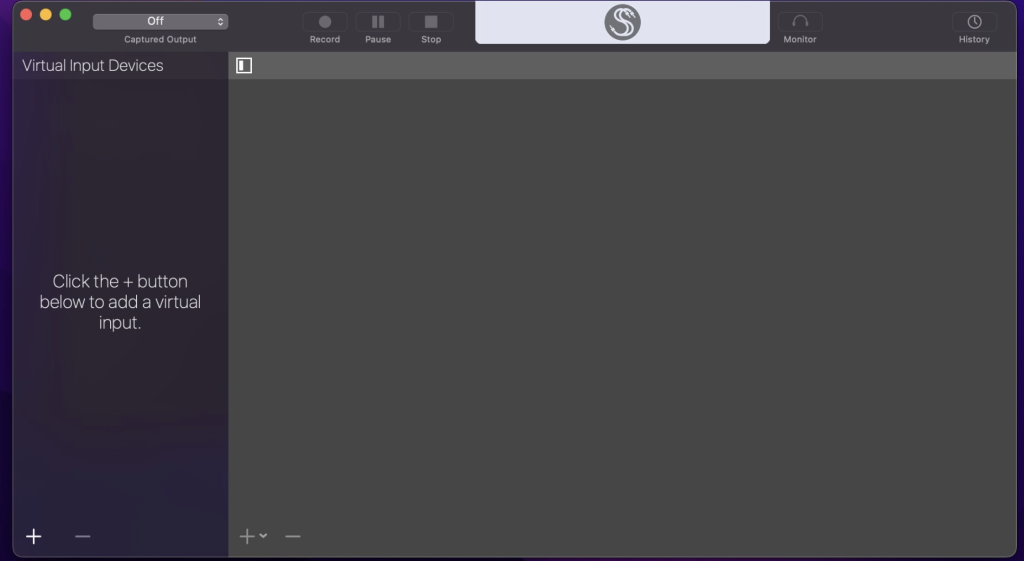
Name : Sound Siphon
Size : 20 MB
Mac software Sound Siphon 3.6.0
Sound Siphon is a macOS application that allows you to make your Mac’s audio output available as an audio input device. It provides a way to send audio from one application to another, enabling you to process, stream, or record audio from various sources. Here are the key features and functionalities of Sound Siphon:
Capture Mac’s Audio:
- Sound Siphon enables you to capture all of your Mac’s audio output. This includes audio from various applications and system sounds.
Capture Specific Application Audio:
- You can choose to capture audio from specific applications individually. This allows you to select which app’s audio you want to process or record.
Adjust Application Audio Levels:
- Sound Siphon provides independent control over the audio levels of each application. You can adjust the volume levels as needed.
Capture Mixed or Discrete Audio:
- You have the option to capture application audio mixed together as stereo audio, or you can capture audio discretely with each application’s audio in its own channels.
Mute Captured Applications:
- While capturing audio, you can mute specific applications to control which audio sources are included in the capture.
Compatibility:
- Sound Siphon is compatible with macOS 10.14.4 or later.
Sound Siphon is a useful tool for users who need to route and manage audio from different applications for various purposes. It is especially handy for audio production, streaming, or recording tasks, allowing for flexibility in managing audio sources on your Mac.
Download Iris 1.6.0
03 years
by Jameskarke
in Application

Name : Iris
Size : 23 MB
Download Iris 1.6.0
Iris is a high-performance screen recording application for macOS that is designed to capture your screen activities with efficiency and quality. It provides several features to help users create high-quality recordings. Here are the main features and functionalities of Iris:
Recording Formats:
- Iris allows you to record your screen activities directly to h.264, Apple ProRes, or optionally record and encode later. This flexibility allows you to choose the format that suits your needs.
Audio Recording:
- You can record audio from your Mac while capturing the screen, and it even provides the option to target a specific app for audio recording. This feature is useful when you want to record sound from a specific application.
Color Matching:
- Iris offers great color matching to ensure that your recorded videos maintain visual fidelity.
Quality Recording:
- On supported Macs, Iris can capture Retina-quality recordings, which means that the recorded content will be crisp and detailed.
Timers and Hotkeys:
- Iris includes start and stop timers to help you control when your recordings begin and end. It also provides full hotkey support for convenient operation.
Naming and Tagging:
- The application offers advanced automatic naming and tagging options, making it easier to organize and identify your recorded files.
Watermark and In-App Purchase:
- Iris is available for free to try, but it embeds a watermark in the recordings. Users can remove the watermark from new recordings by making an in-app purchase.
System Requirements:
- Compatibility: macOS 10.14.4 or later.
Iris is a versatile screen recording tool for users who need to capture their screen activities, whether for tutorials, presentations, or other purposes. It offers multiple recording formats, audio capture options, and quality settings to cater to a variety of recording needs on macOS.
Download MetaImage 2.6.1
03 years
by Jameskarke
in Application

Name : MetaImage 2.6.1
Size : 54 MB
Download MetaImage 2.6.1
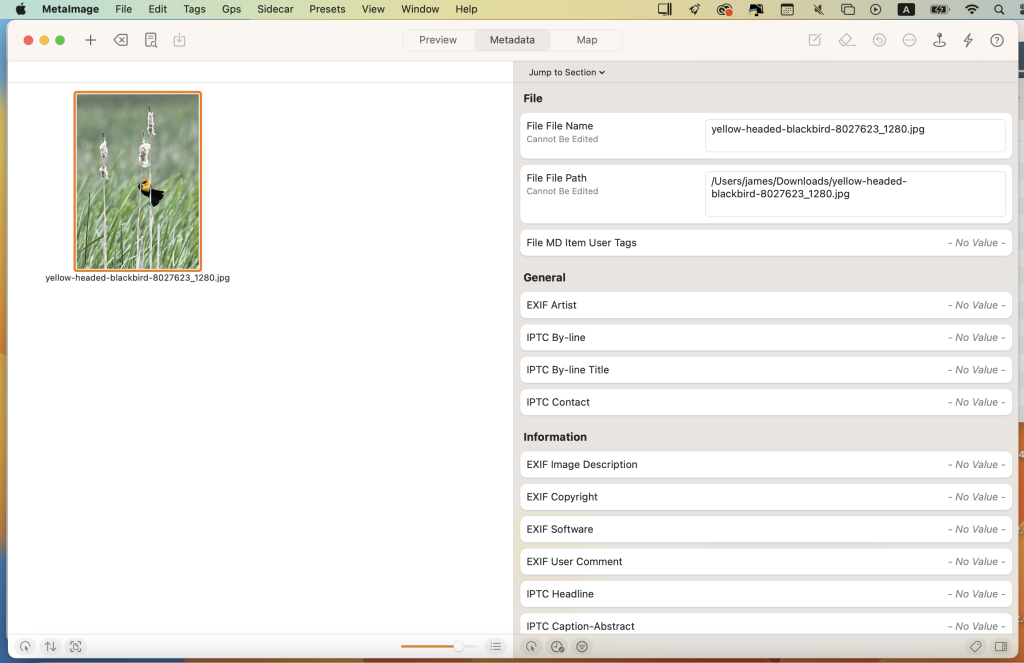
MetaImage is a macOS application designed for reading, writing, and editing image metadata. It provides a comprehensive set of features for managing EXIF, IPTC, XMP tags, and MakerNotes within a user-friendly interface. Here are the key features and functionalities of MetaImage:
Supported Metadata Tags:
- MetaImage supports a wide range of metadata tags, including EXIF, IPTC, XMP, ICC Profile, and specific tags for various camera manufacturers such as Canon, Leica, FujiFilm, Nikon, Olympus, Panasonic, Pentax, SigmaRaw, Sony, and many more.
Presets and Customization:
- Users can create and manage presets to streamline their metadata editing workflow.
- Special support is provided for geographical and thumbnail data.
- Displayed tags can be customized via preferences, allowing users to tailor the application to their specific needs.
Integration with Mac Ecosystem:
- MetaImage is fully integrated into the macOS ecosystem and includes a Photos extension. This allows users to inspect photos directly from the Photos.app.
Image Format Support:
- The application supports over 90 image formats, including HEIC, MOS, CR2, DNG, NEF, NRW, JPEG, PNG, TIFF, RAW, and more.
- MakerNotes tags can be edited, but not created or deleted, to avoid potential compatibility issues with OEM software.
Additional Features:
- Export tags to CSV and JSON formats.
- Export embedded thumbnails and embedded JPEG from RAW files.
- Copy and paste multiple tags.
- Support for password-protected images.
- Notifications and Touch Bar support.
- Folder processing (except for HEIC files).
Optimized for macOS:
- MetaImage is optimized for macOS High Sierra and later.
- The application is available in multiple languages, including English, French, German, Italian, Japanese, Simplified Chinese, and Spanish.
Feedback and Support:
- Users can provide feedback directly from the application to contact the developers for suggestions and improvements.
MetaImage is a powerful tool for professionals and photography enthusiasts who need to manage and edit image metadata efficiently. It offers extensive tag support, integration with macOS, and a range of customization options to enhance the metadata editing experience on a Mac.
Download MetaVideo v-1.1.1
03 years
by Jameskarke
in Application

Name : MetaVideo
Size : 52 MB
Download MetaVideo v-1.1.1
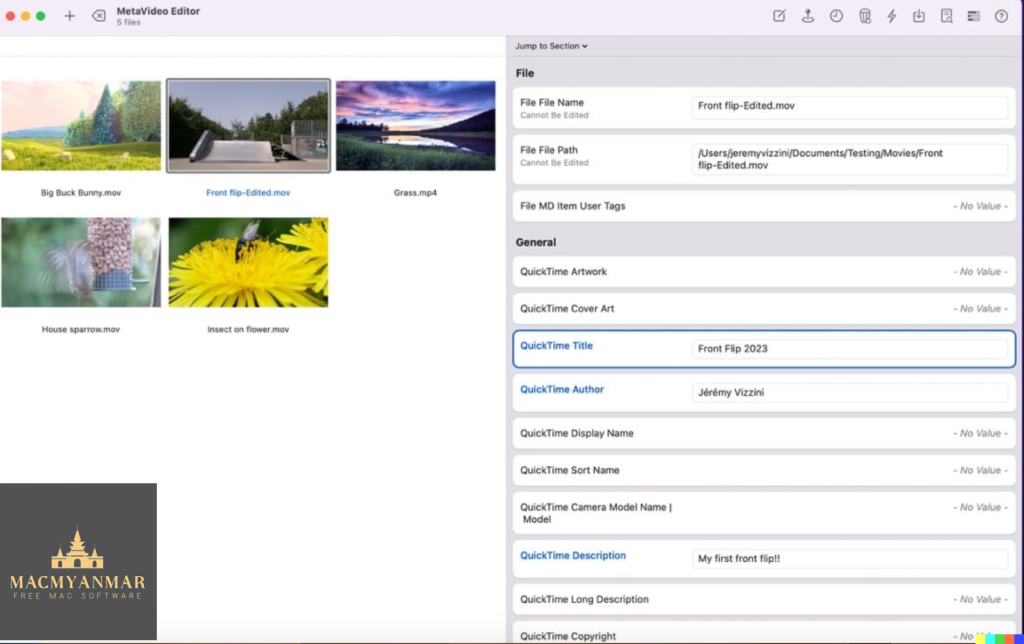
MetaVideo is a macOS application designed for managing video metadata with a focus on QuickTime and GPS tags. It offers several features to streamline the management of video metadata and automate the editing of tags for video and audio files. Here are the key features and functionalities of MetaVideo:
Video Metadata Editing:
- MetaVideo allows users to automate the editing of QuickTime and GPS tags for video and audio files. This includes changing metadata, adding artwork, and fixing GPS coordinates.
Presets:
- Users can create presets for metadata changes, making it easy to apply the same changes to multiple videos. This feature saves time and effort when managing large collections of media.
Wide Range of Metadata Tags:
- In addition to QuickTime tags, MetaVideo supports other metadata tags, including EXIF, XMP, and IPTC, for video and audio files that support them.
- It is not limited to only MP4 and MOV formats, making it suitable for managing various popular video and audio formats.
Movies and TV Shows:
- MetaVideo can automatically retrieve metadata information for movies and TV shows. This includes titles, descriptions, release dates, genres, ratings, and cover art.
- Metadata can be fetched from online services such as Apple TV, iTunes, TheMovieDB, and more.
GPS Tagging Support:
- MetaVideo offers the capability to edit QuickTime location ISO6709, allowing users to add GPS coordinates to videos and audio files.
- Multiple options are available for adding GPS coordinates to cater to different preferences.
System Requirements:
- Compatibility: macOS 11.0 or later.
MetaVideo is a versatile tool for individuals who need to manage and edit video metadata efficiently. It simplifies the process of editing QuickTime and GPS tags, supports a wide range of metadata formats, and can retrieve metadata for movies and TV shows from online sources, making it a comprehensive solution for video metadata management on macOS.
Download RAR Extractor Max – Unzip File 12.2
03 years

Name : RAR Extractor Max – Unzip File
Size : 14 MB
Download RAR Extractor Max – Unzip File 12.2
RAR Extractor Max is a macOS application designed for extracting and managing compressed archive files. It inherits the features of its predecessor, RAR Extractor Pro, and adds more powerful functionalities. Here are the main features and capabilities of RAR Extractor Max:
Supported Archive Formats:
- RAR
- ZIP
- 7z
- tbz
- sti
- tar
- xar
- lha
- lzh
- hqx
- bin
- bz2
- bzip2
- bz
- xz
- iso
- cid
- nrg
- mdf
- taz
- lzma
- exe
- msi
- cpio
- lzx
- jar
- swf
- xip
- ace
- arj
- pak
- pkg
- apk
- lbr
- lqr
- cab
- rpm
- cpt
- sea
- nsa
- dcs
- now
- spk
- And more
Main Features:
- Extract Archives: RAR Extractor Max supports the extraction of compressed files in over 50 different formats.
- Unzip and Unrar: It can unzip and unrar encrypted archives, allowing you to access their contents.
- Preview Winmail.dat Files: You can preview and open files in winmail.dat format sent from Microsoft Outlook.
- Archive File List: Easily view the list of files contained within an archive.
- Quicklook: You can quickly preview files within an archive before extraction, making it easier to identify and access specific files.
- Individual File or Folder Extraction: Unarchive and unrar selected individual files or folders within an archive.
- Default Archiver: Set RAR Extractor Max as the default archiver, and you can double-click files to display or extract them directly.
- Drag and Drop: Simply drag archive files to the dock icon to extract or display them directly.
- Batch Decompression: Batch decompress multiple archives for efficient file management.
- Create Password-Protected Archives: You can create password-protected ZIP and 7Z archives using the AES256 encryption algorithm.
- Drag-and-Drop Extraction: Drag a file from an archive directly to the desktop to extract it.
Version Introduction:
- RAR Extractor: A lite version of the first-generation product, supporting decompression of most archive formats and compression of files to RAR and 7Z packages.
- RAR Extractor Pro: The pro version of the first-generation product, supporting decompression of most archive formats and allowing you to view archive contents before extraction.
- RAR Extractor Max: This version builds upon the first-generation app, featuring a redesigned UI and improved functionalities.
Compatibility: macOS 10.12 or later.
RAR Extractor Max is a comprehensive tool for managing and extracting archive files on macOS. It supports a wide range of archive formats and offers features like quick preview, batch processing, encryption, and more to enhance your file management capabilities.

Default Folder X for Mac Download 6.0.0
03 years
by Jameskarke
in Application

Name : Default Folder X
Size : 20 MB
Default Folder X for Mac Download 6.0.0
Default Folder X is a macOS utility that enhances the functionality and customization options of the default Open and Save dialogs in the operating system. It allows users to personalize their experience by adding new locations, Spotlight tags, comments, and other useful features to improve workflow efficiency. Here are some key features and functionalities of Default Folder X:
Access Favorite Folders:
- Default Folder X provides a status bar menu that allows users to access their default, favorite, and recent folders quickly.
- Users can also view all opened Finder windows and bring any of them forward from the status bar menu.
Customization Options:
- The utility integrates with System Preferences, adding a Preferences Pane where users can configure various settings.
- Specific directories can be assigned as default locations for certain applications.
- Users can create and manage their own Favorite Folders list.
Open and Save Toolbar:
- When Default Folder X is running, it adds a toolbar to macOS native utility dialogs for opening and saving files.
- This toolbar provides easy access to various options and customization features.
- Keyboard shortcuts are available for frequently used functions.
Integrated Spotlight and QuickLook:
- Users can add Spotlight keywords, tags, comments, or labels directly within the Save dialog to facilitate fast file retrieval.
- When opening files, Default Folder X enables users to preview documents as thumbnails and even zoom to full size for better document identification.
Improved Workflow:
- Default Folder X aims to enhance efficiency and improve the user’s workflow when dealing with file opening and saving.
- It provides a simple yet intuitive solution for customizing the default Open and Save dialogs in macOS.
System Requirements:
- Compatibility: macOS 10.10 or later.
Overall, Default Folder X is a valuable utility for macOS users who want to streamline their file management and customization options when using Open and Save dialogs. It provides a more efficient and personalized experience for working with files and folders on a Mac.
Music Tag Editor 7.4.1 for Mac Download
03 years
by Jameskarke
in Application
Name : Music Tag Editor
Size : 29 MB
Music Tag Editor 7.4.1 for Mac Download
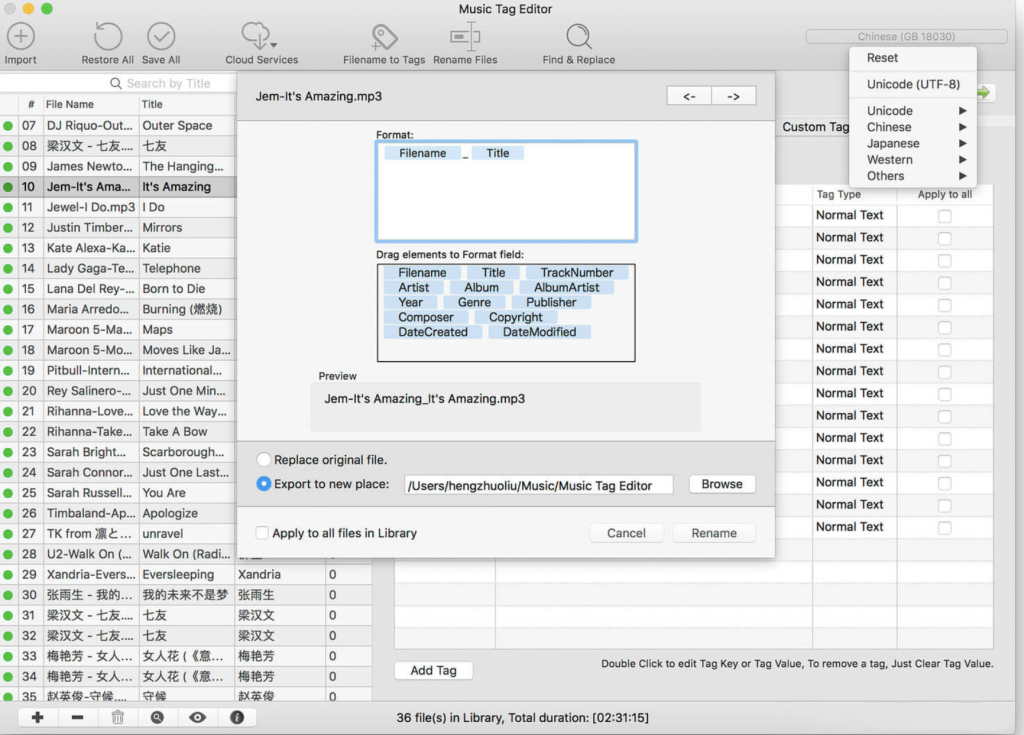
Music Tag Editor Pro is a macOS application designed to help users easily and effectively edit music tag information for various audio file formats. It provides a range of features for managing and organizing your music collection. Here are the main features and functionalities of Music Tag Editor Pro:
Supported Music Formats:
- MP3
- M4A (Apple Lossless)
- MP4
- FLAC
- APE
- AIFF
- WAV
- Ogg files
- ASF
- MKV
- DSF
- DSD
- And more
Supported Tag Formats:
- ID3v1
- ID3v2.3
- ID3v2.4
- XiphComments
- APE Tag
- Ogg Vorbis
- Ogg Speex
- Ogg Flac
Main Features:
- Tag Editing: Edit a wide range of music tag information, including Title, Artist, Album, Genre, Copyright, Comments, Artwork, Lyrics, and more.
- Lyrics Support: You can save lyrics to a file, and they will display correctly in your iPhone or iPod music player.
- Batch Processing: Edit tags and rename multiple music files in batches. It supports iTunes importing.
- Online Album Image Download: Download album artwork from the internet, and it supports multiple album images.
- Batch Conversion: Convert file names to tags and vice versa.
- Text Encoding: Change and convert the text encoding of music tags, with the ability to repair messy code when necessary.
- iTunes Tag Support: Fully supports iTunes tags, making it seamless for iTunes users.
- Tag Stripping: Remove APE or ID3v1 tags from MP3 files.
- Batch Cleaning: Clean tags in batches for multiple music files.
- Built-In Music Player: Includes a built-in music player that supports all audio formats.
Pro Version Additional Features:
- Edit Additional and Advanced Tags: Customize and edit advanced tags as needed.
- Custom Tags: Create and edit custom tags to suit your preferences.
- Batch Find & Replace: Quickly find and replace all tag fields in one click.
- MusicBrainZ Cloud Services: Supports MusicBrainz cloud services for retrieving music tag information.
Compatibility: macOS 10.11 or later.
Music Tag Editor Pro is a comprehensive tool for music enthusiasts who want to manage and organize their music library with detailed and accurate tag information. It offers both basic and advanced features, making it a versatile choice for users looking to maintain well-organized and properly tagged music collections.
Download PhotoSweeper X 4.8.3 for Mac
03 years
by Jameskarke
in Application

Name : PhotoSweeper
Size : 51 MB
Download PhotoSweeper X 4.8.3 for Mac
PhotoSweeper is a macOS application designed to help users efficiently eliminate similar or duplicate photos from their photo collections. It is compatible with photos from iPhoto, Aperture, Adobe Lightroom libraries, as well as photos from your Mac’s local storage and external hard drives. Below are some key features and functionalities of PhotoSweeper:
- Easy Photo Finding: PhotoSweeper simplifies the process of locating photos by allowing users to drag and drop folders into the application. Additionally, you can import photos from your iPhoto, Aperture, or Lightroom libraries via the Media window.
- Flexible Comparison Settings: The software offers six different methods to find similar or duplicate photos. It can identify duplicates even if they have been edited in external programs like Photoshop. PhotoSweeper can handle photos of varying sizes and formats.
- Fast Processing: PhotoSweeper has been optimized for speed, enabling it to efficiently compare a large number of photos. It employs efficient caching mechanisms to expedite subsequent comparisons. You can adjust the matching level of similarity on-the-fly to reorganize results.
- Photo Management: You can review the results in either “Face-to-Face” mode or “Groups” mode. The software allows you to place photos into virtual containers called “Boxes.” You can delete, move, or copy photos from these boxes. Additionally, you can rename photos in bulk while copying or moving them.
- Great Photo Browsing: PhotoSweeper offers a comprehensive photo browsing experience with features such as fast loading of thumbnails, Quick Look previews, drag-and-drop support, display of file paths, ratings, labels, and more. The “Image Info” panel provides detailed information, including histograms and image metadata (EXIF, IPTC, etc.).
- User Manual: A detailed user manual is available within the application’s Help menu, providing guidance on using PhotoSweeper effectively.
- Compatibility: PhotoSweeper is compatible with macOS 10.12.2 or later.
Overall, PhotoSweeper is a useful tool for organizing and decluttering your photo collection, especially if you have a large number of photos or frequently work with various photo editing applications. It simplifies the process of identifying and managing duplicate or similar photos, helping you save disk space and keep your photo library organized.

Download Pixea Plus 5.1 Mac
03 years
by Jameskarke
in Application

Name : Pixea Plus
Size : 140 MB
Download Pixea Plus 5.1 Mac
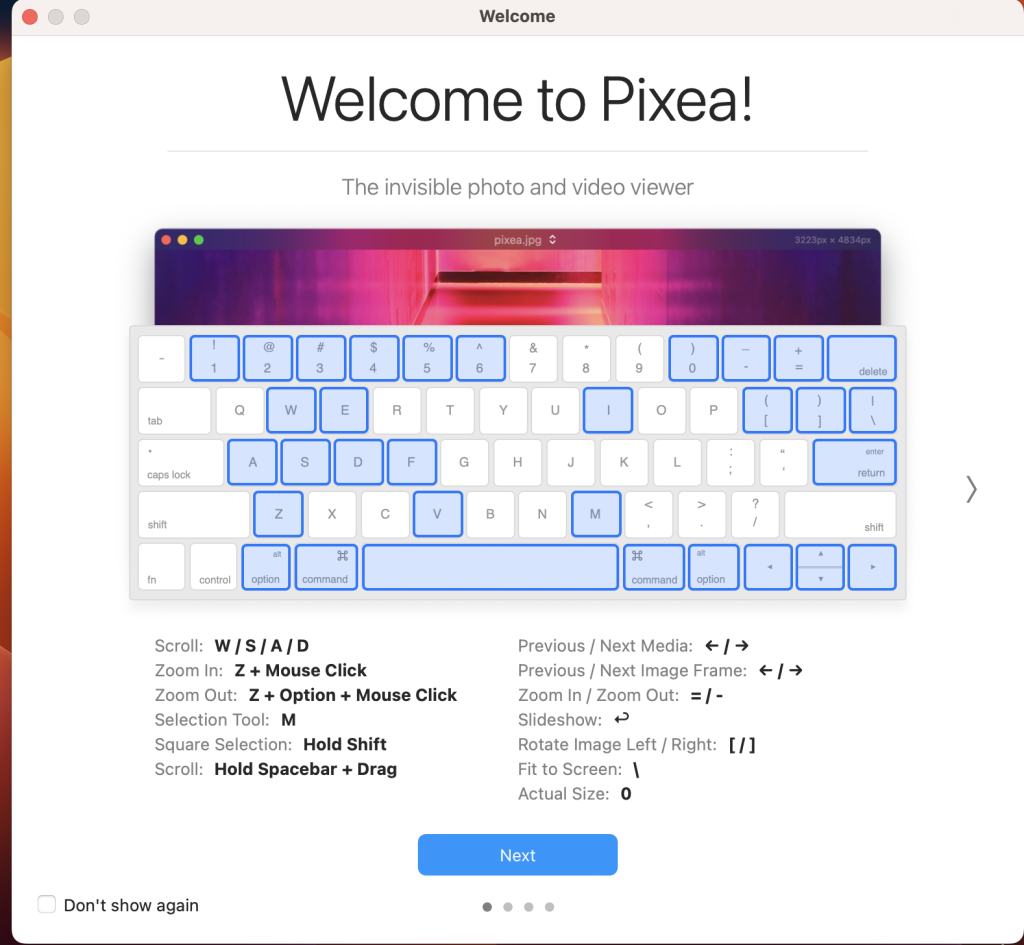
Pixea is a versatile image viewer for macOS that offers a sleek and modern user interface. It’s designed to provide users with a simple and intuitive way to view images, including support for a wide range of image formats. Pixea is also capable of basic image processing tasks, such as flipping and rotating images. Here are some key features and capabilities of Pixea:
Supported Image Formats:
- Pixea supports a variety of image formats, including JPEG, HEIC, GIF, PNG, TIFF, Photoshop (PSD), BMP, fax images, macOS and Windows icons, Radiance images, Google’s WebP, and more.
- It also supports various RAW formats from different camera manufacturers, such as Leica DNG and RAW, Sony ARW, Olympus ORF, Minolta MRW, Nikon NEF, Fuji RAF, Canon CR2 and CRW, Hasselblad 3FR.
- Additionally, Pixea can preview Sketch files, although it doesn’t provide full editing capabilities for Sketch files.
Basic Image Processing:
- Pixea offers basic image processing features, allowing you to flip and rotate images as needed.
- It also provides information about images, including color histograms and EXIF data.
User-Friendly Interface:
- Pixea’s user interface is designed to be minimal and modern, providing an uncluttered and pleasant viewing experience.
- The application supports keyboard shortcuts and trackpad gestures for easy navigation and interaction with images.
Archive Support:
- Pixea can display images contained within ZIP archives without the need to extract them, making it convenient for browsing archived image collections.
Export Options:
- The application allows you to export images in various formats, including JPEG, JPEG-2000, PNG, TIFF, and BMP.
System Compatibility:
- Pixea is compatible with macOS 10.12 or later.
Whether you need a simple and efficient image viewer or want to quickly browse images within archives, Pixea provides a user-friendly solution for macOS users. You can download Pixea from the Mac App Store to explore its features and capabilities further.