Free Macsoftware One click Download
Application
Download Autodesk Flame V-2024.2
02 years

Name : Autodesk Flame 2024.2
Size : 3.1 GB
Download Autodesk Flame V-2024.2
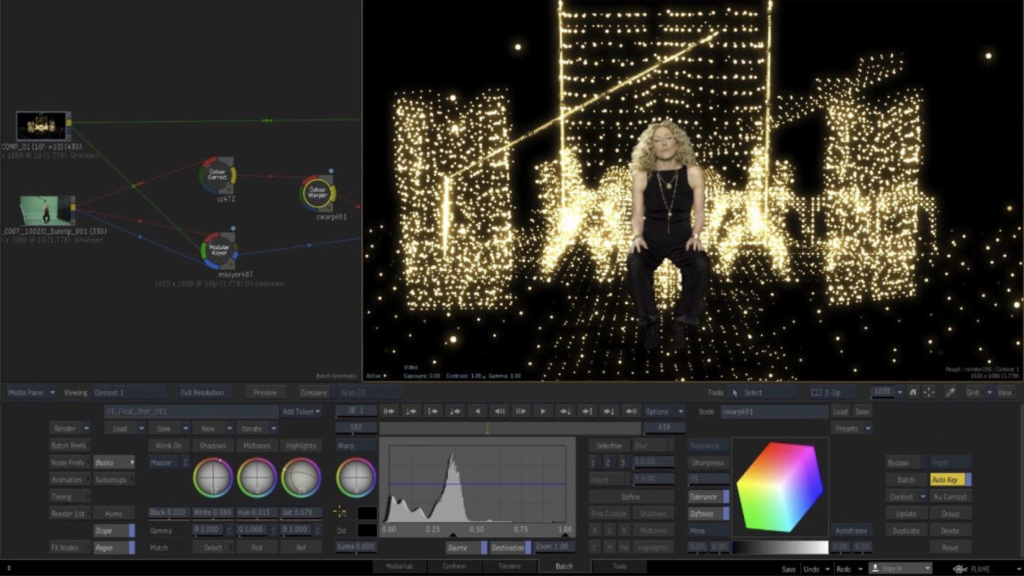
Flame® software is an advanced 3D visual effects tool that serves various purposes including fast 3D visual effects, finishing, compositing, advanced graphics, color grading, conform, editorial, and look development. Here are the notable features and functionalities of Flame®:
Key Features:
3D Compositing (Action):
- Interactive 3D Effects: Action combines the interactive speed of traditional 2D compositing with powerful 3D visual effects. It offers a WYSIWYG preview for artists during sessions.
Node-Based Compositing (Batch):
- Procedural Environment: Batch provides a node-based procedural compositing environment that integrates with the timeline and desktop. It’s designed to combine both 2D and 3D elements for versatile composition work.
Editorial Timeline:
- Project Oversight: Manage projects, ensure consistent looks, and properly match graded and 3D VFX shots. It also includes scene detection capabilities.
Matchbox API:
- GPU-Accelerated Shaders: Utilize Lightbox, Matchbox, and PBR shaders to tackle challenges in Action’s 3D compositing environment using GPU-accelerated GLSL shaders.
Action Projection Tracking:
- Projection to UV Set: Turn a projection into a UV set for the geometry, enhancing tracking capabilities in the 3D space.
Connected Conform Smart Merge:
- Dynamic Editing: Merge new editorial cuts dynamically with work-in-progress shots late in a project, facilitating an efficient workflow.
Python API:
- Scriptable Commands: Drive the Batch environment using scriptable commands, enhancing the flexibility and automation of the compositing process.
Pybox:
- External Renderer Processing: Utilize Pybox, a scriptable handler, to process images via external renderers, offering additional flexibility in rendering pipelines.
System Requirements:
- Operating System: Apple® macOS® Mojave v10.14.x/Catalina v10.15.x/Big Sur v11.1+
- GPU: Mac-native installed graphics cards with a minimum of 8GB VRAM. Recommended: Radeon Pro vega II
- CPU: Recommended Intel Core i7 or higher. Apple M1 CPU is currently not supported.
- RAM: 32GB/64GB
- Display: 1920 x 1200 display with a 60Hz refresh rate.
Where to Find Flame® Software:
- Official Homepage: For more information, access to the software, and details on features, you can visit the Autodesk Flame® Homepage.
Flame® software stands out for its 3D compositing, node-based environment, and its comprehensive suite of tools designed for professionals in the visual effects, finishing, and compositing space.
Download Luminar Neo for Mac 1.15.0 (16133)
02 years
Name : Luminar Neo 1.15.0
Size : 4.7 GB
Download Luminar Neo for Mac 1.15.0 (16133)
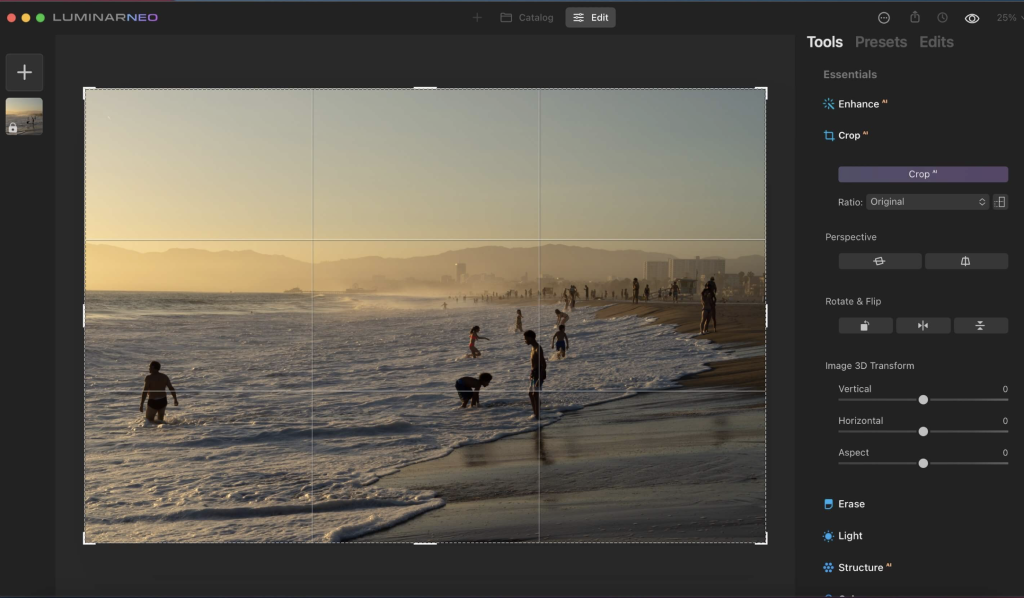
The Luminar Neo software is an advanced and innovative image editing tool that harnesses the power of AI technologies to streamline complex editing processes and empower creators to manifest their most daring ideas. Here are the key features and functionalities of Luminar Neo:
Feature Highlights:
RelightAI:
- Control Light in 3D Space: Utilize RelightAI to adjust the light in three-dimensional space across a 2D image. It calculates depth and creates a 3D map for precise lighting adjustments.
- Separate Foreground and Background Lighting: Enable separate adjustment of the foreground and background lighting, enabling creative relighting for your artistic vision.
AI-Powered Editing:
- Remove Elements with AI: Automatically remove distracting elements like power lines or clutter from your photos using AI.
- Layers and AI Masking: Combine MaskAI and Layers for limitless creativity. MaskAI automates masking while Layers allow for the addition of various objects and graphics.
Sky Replacement:
- Sky Replacement: Seamlessly replace the sky in images using advanced technology, including water reflections and human-aware relighting to match the new sky.
Image Engine Enhancements:
- Lightning-Fast Editing: The updated image engine offers faster performance, optimized module-based processing, and specific enhancements to achieve complex creative results.
Additional Features:
- Innovative User Experience: Aimed at simplifying complex image editing and maximizing creativity.
- Fine Control Over Light: Adjust exposure based on distance from the lens, enabling independent background and foreground exposure control.
- Sensor and Lens Cleaning: Automatically remove spots caused by dust and dirt on your lens or sensor.
New Tools and AI-Powered Solutions:
- Expanded Toolbox: Luminar Neo features new and enhanced AI-powered tools designed to solve photography-related challenges and offer unprecedented creative freedom.
- Mobile App in Development: A new mobile app is being developed to facilitate the easy transfer of photos between mobile devices and computers.
Compatibility:
- Supported Platforms: macOS 10.14.6 or later, compatible with both Apple Silicon and Intel-based Macs.
Skylum’s Commitment:
- Cutting-Edge Features: Additional updates and cutting-edge features are promised to be shipped as free updates after the official release.
Where to Find Luminar Neo:
- Official Homepage: For more details, information, and download options, you can visit the Luminar Neo Homepage.
Luminar Neo stands out for its AI-driven editing capabilities, fast performance, and innovative features designed to cater to photographers looking to take their editing experience to new heights.
Download Mac software Swift Publisher 5.6.8
02 years

Name : Swift Publisher
Size : 459 MB
Download Mac software Swift Publisher 5.6.8
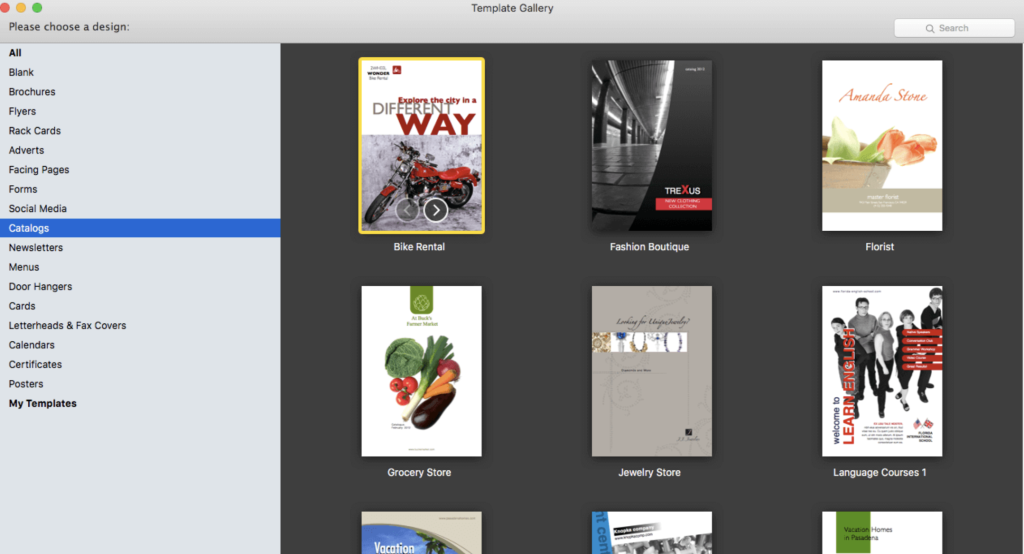
Swift Publisher is a user-friendly desktop publishing tool that simplifies the creation of a wide range of print materials, including flyers, newsletters, brochures, letterheads, and more. Here are some key features and highlights:
User-Friendly Interface: It’s an accessible digital drawing board for those not familiar with complex design apps, making the process of creating publications straightforward and easy to learn.
Text Customization: Swift Publisher offers a comprehensive text toolkit allowing users to customize text styles, link text boxes, and create wrap-around effects for visually engaging content.
Templates and Resources: The software provides a collection of images, designs, and masks, offering a range of templates and resources to inspire and facilitate the design process.
Personalization Options: Swift Publisher enables detailed personalization of publications. Users can tint, tile, group, rotate, or adjust the opacity of objects within the tool.
Compatibility: The software is compatible with macOS 10.12 and later versions, ensuring that users can access its features across different Mac operating systems.
Homepage: To learn more about Swift Publisher and its capabilities, you can visit the official homepage at Swift Publisher.
Swift Publisher provides an accessible and versatile solution for users who need to create professional-looking print materials without the complexity of high-end design software.
Download SILKYPIX Developer Studio Pro for Mac V-11.0.12.0
02 years
by Jameskarke
in Application

Name : SILKYPIX Developer Studio Pro
Size : 857 MB
Download SILKYPIX Developer Studio Pro for Mac V-11.0.12.0
SILKYPIX Developer Studio Pro Overview:
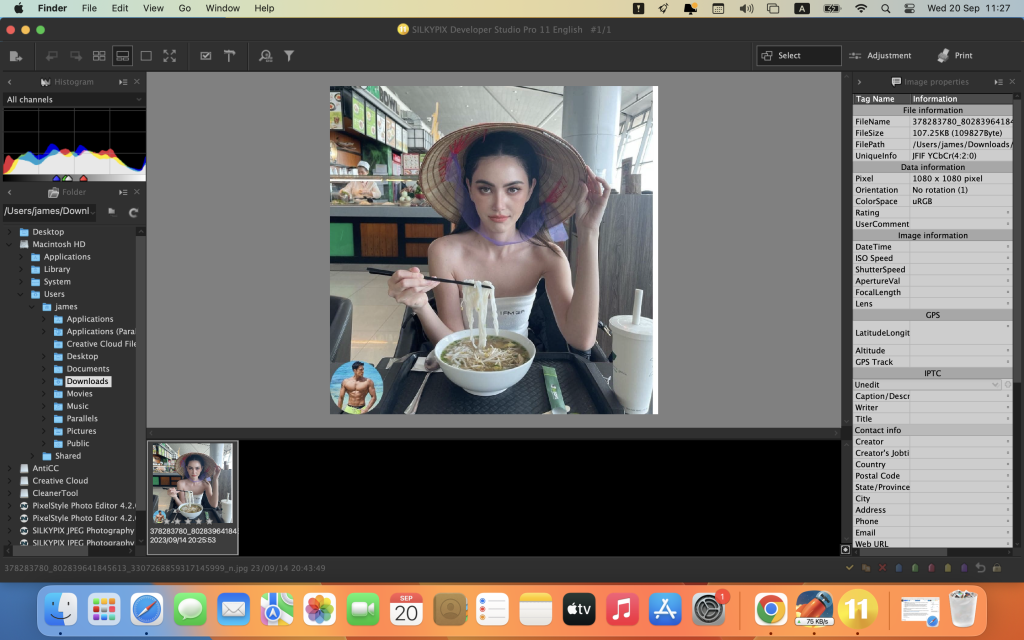
SILKYPIX Developer Studio Pro is advanced RAW development software designed for professional photographers. It offers a wide range of features and tools for optimizing and fine-tuning RAW image files. The software now includes new functions that enhance its capabilities, providing photographers with even greater creative control.
Key Features:
- Compositing Multiple RAWs: SILKYPIX Developer Studio Pro allows users to composite multiple RAW images. This feature opens up new possibilities for creative photographic expression by combining and blending RAW files.
- Fine Detail Mode: The “Fine Detail” mode offers advanced noise reduction, ensuring optimal image quality. This feature is especially useful when working with high-resolution images and fine details.
- Tone Dehaze Slider: Adjust the tone and dehaze your images with precision using the dedicated slider. This tool helps enhance the clarity and overall quality of your photos.
- Exposure Bias-Highlight/Shadow Slider: Fine-tune the exposure, highlight, and shadow areas of your photos with easy-to-use sliders. This allows for precise control over the image’s tonal range.
- Lens Aberration Correction: Correct lens distortions using lens profiles for automatic adjustments. This feature ensures that your photos are free from distortion and other optical imperfections.
- Effect Controls: Apply creative effects to your images with options for blurring or sharpening the periphery. This feature enables artistic and selective focus effects.
- Partial Correction Tool: Make selective corrections using tools like curves, polygon area selection, and color selection. This allows you to focus on specific areas of your image.
- Automatic Adjustment Button: Easily apply automatic adjustments to your images with a single button click, saving time in your workflow.
- Noise Reduction: Reduce noise in shadow areas to improve the overall image quality.
- Thumbnail Search: Quickly locate and access images using the thumbnail search function.
- Customization: Customize your workspace with options to arrange, show, or hide various elements such as the control palette, toolbar, and information box.
- User Mark Color: Add user-defined color marks to your images for easy organization and categorization.
- Open in Another Application: Seamlessly open your edited images in another application for further processing or sharing.
SILKYPIX Developer Studio Pro is compatible with macOS 10.13 or later, making it a versatile and powerful tool for professional photographers seeking to optimize their RAW image files with precision and flexibility.
Download Boris FX Silhouette for Mac V-2023.0.3
02 years
by Jameskarke
in Application

Name : Boris FX Silhouette
Size : 1.9 GB
Download Boris FX Silhouette for Mac V-2023.0.3
Silhouette 2023: Integrated Node-Based Compositing with Premier Features
Introduction:
Silhouette 2023 stands as the industry’s leading roto and paint tool, integrating over 400 nodes, including acclaimed plugins like Sapphire, Mocha Pro, and Particle Illusion. This sophisticated node-based package has played a pivotal role in major Hollywood productions such as “Dune,” “Spiderman: No Way Home,” “Free Guy,” and “The Mandalorian.” Recognized by prestigious awards like Academy and Emmy technical awards, Silhouette has made a significant mark in the industry.
Key Features:
Packed with Effects Tools:
Sapphire:
- Includes 270+ effect nodes and numerous presets, offering top-tier lighting effects, lens flares, and creative image processing filters for VFX.
Mocha Pro:
- Now integrated, featuring tools like PowerMesh, Remove, and Stabilize, providing new data ports and node actions to connect with native nodes.
Particle Illusion:
- Enables the creation of realistic particle simulations, 3D emitters, fluid dynamics, and a vast library of presets within the Silhouette interface. Users can add environmental elements like snow, smoke, and fire seamlessly.
Expanded Filters:
Continuum Nodes:
- Incorporates select Continuum nodes with fast GPU processing, encompassing Magic Sharp, Beauty Studio, Light Leaks, Video Glitch, Film Glow, and additional blur filters.
New Nodes for Invisible VFX:
InPaint:
- Utilizes the InPaint node to remove unwanted pixels by generating textures from surrounding image data, ideal for erasing unwanted elements like markers, blemishes, or wires.
PowerMeshWarp:
- Enables efficient “reverse warp stabilized” painting or rotoscoping, facilitating beauty work, and painting on skin and fabric surfaces.
Tracking & Roto Enhancements:
- Features a new Surface tool and updates to DOD for precision and speed.
- Enhanced Data Port update for better workflows, allowing the Mocha Pro node to pass tracking and spline data within the Silhouette’s node graph.
Node Actions:
- Allows users to create Mocha generated nodes without launching the UI, saving time with Copy Data, Create Roto Node, and Create Tracker Node actions.
More Tracking Exports:
- Adds more tracking and roto export formats with the Mocha Pro node, extending support for Nuke, Fusion, Flame, FBX, and Alembic.
Architecture and Speed:
- Under-the-hood enhancements improve general workflows for professional post-production and VFX studios, with Apple M1 support for speed boosts on the latest Mac hardware.
- Features improved OCIO v2 color management, GPU rendering, and enhanced ACES support for color-managed projects.
System Requirements:
- OS: macOS 10.14 or higher
- CPU: Intel or AMD processor
- Memory: 8GB or more
- Graphics: 1GB of graphics memory for film resolution
Homepage: Boris FX – Silhouette
Download Boris FX Optics for Mac V- 2024.0.1.63
02 years
by Jameskarke
in Application

Name : Boris FX Optics 2024
Size : 1.9 GB
Download Boris FX Optics for Mac V- 2024.0.1.63
Introduction:
Optics is a comprehensive tool created by Academy Award-winning effects artists, offering a complete range of image editing capabilities and photo-based visual effects. Providing 174 unique filters and thousands of creative imaging presets across 10 distinct categories, it brings Hollywood-quality lighting and lens effects, curated film looks, and advanced particle creation tools to photographers and visual artists.
Key Features:
Particle Illusion for Photo Editing:
- New inclusion of the Particle Illusion category allows for creating photorealistic effects and creative elements in photographs.
- Features over 1700 particle presets, including effects like Smoke, Fire, Water, Sparkles, Explosions, Dust, and more.
Comprehensive Lighting Effects:
- Offers a vast library of procedural lens flares, lighting effects, gobos, and particle effects for photography.
- Users can design, edit, and save their own libraries of presets, providing extensive creative control over effects.
Trusted by Professional VFX Artists:
- Features plugins and filters regularly employed in famous films and television shows.
- Integrates top tools from the Boris FX Suite, including Lens Flares, Light Rays, Ultra Zap, UltraGlow, Light Leaks, among others from Boris FX Sapphire collection and Continuum’s Beauty Studio.
Physical Camera Qualities:
- Emulates the physical characteristics of optical camera filters, historical film stocks, color grading, and lens and diffusion effects.
- Includes filters like Mist, Fog, Net, Halo, along with the new Beauty Studio filter for subtle skin retouching.
Effect Presets:
- Offers over 600 historical film stocks and film looks, including color grades inspired by famous Hollywood films.
- Includes 126 optical lens flare presets, 800+ Gobo lighting patterns, and 1700+ particle presets for a variety of effects.
Masking and Paint Tools:
- Employs powerful masking and paint tools for replacing backgrounds, isolating effects, or retouching pixels.
- Includes various masking types, blend modes for combining masks, and painting, cloning, and blurring features.
Graphic Design Exploration:
- Apply Optics to text for creating striking graphics and style frames.
- Incorporates multiple generator and texture effects to design unique backgrounds and graphic elements.
Homepage: Boris FX – Optics
Download Boris FX Mocha Pro 2023 free v10.0.4.41
02 years
by Jameskarke
in Application

Name : Boris FX Mocha Pro 2023
Size : 289 MB
Download Boris FX Mocha Pro 2023 free v10.0.4.41
Mocha Pro is an acclaimed software essential for planar tracking, rotoscoping, and object removal. It’s widely recognized in the film and TV industry, having contributed to prestigious awards and been used in popular shows like The Mandalorian, Stranger Things, and films like Avengers: Endgame.
What’s New in Mocha 2022:
- Performance and Speed:
- Apple M1 Support: Optimized performance for new Mac hardware.
- Adobe MFR Support: After Effects Multi-Frame Rendering integration.
- Upgraded to VFX Platform 2021 for improved color management.
- Improved Planar Tracking Features: Enhancements for superior tracking and roto results.
- New Exports for Nuke, Silhouette, Alembic, and Mistika.
- Insert Module with PowerMesh:
- Warped Surface Compositing: Enhanced workflow with mesh tracking for better insert compositing.
- Motion Blur Rendering: Allows mesh tracking to be rendered with motion blur.
- Offers a new Grid Warp interface for bending and distorting source elements.
- Provides streamlined workflow for insert compositing in editing hosts like Premiere, VEGAS, and Media Composer.
- Improved Tracking Workflows:
- Features RGB channel tracking and viewer controls.
- Multi-link layers and linking mesh tracking to existing planar track layers.
- Enhanced quick stabilization in viewer by layer for improved roto workflow.
- Upgraded Dopesheet for keyframe editing and navigation.
- Advanced Roto and Export Features:
- Improved roto exports for Nuke and Silhouette with split track and spline keyframes.
- Offers new exports like PowerMesh to Nuke Tracker and PowerMesh to Alembic transforms.
- PowerMesh:
- Employs a sub-planar tracking process for VFX and rotoscoping tasks.
- Tracks warped surfaces and organic objects for better match moves and digital makeup shots.
- Renders PowerMesh-driven inserts and allows export to various 3D platforms.
- Roto and Object Removal:
- Provides a streamlined workflow for masking using tracked spline tools.
- PowerMesh helps create accurate masks for organic moving objects.
- Screen Inserts, Match Moves, and Stabilization:
- Enhanced Insert Module driven by PowerMesh for realistic motion blur and improved compositing.
- Stabilize Module stabilizes camera or object motion.
- Allows working with lens distortion through the Lens Module for calibration or removal.
- 360/VR Capabilities:
- Provides an easy workflow for mono or stereo clean-ups on equirectangular footage in 360/VR scenarios.
Homepage: Boris FX – Mocha Pro
Download Duplicate File Finder Pro Mac v- 7.3.2
02 years
Name : Duplicate File Finder Pro
Size : 39 MB
Download Duplicate File Finder Pro Mac v- 7.3.2
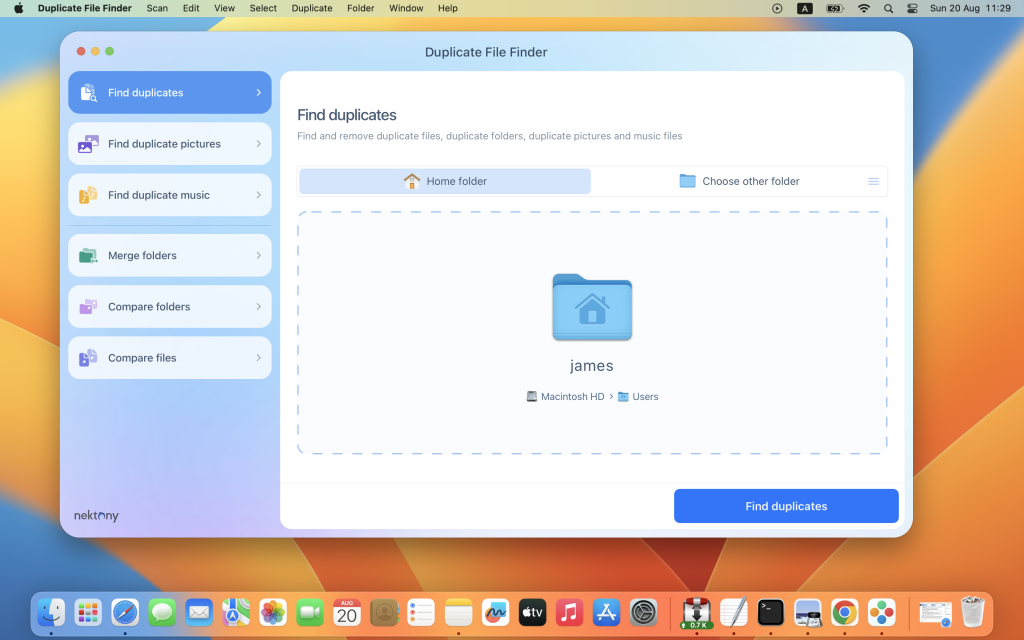
Duplicate File Finder PRO is a powerful and comprehensive tool designed for Mac users to identify and eliminate duplicate files across their system, ensuring better organization and optimization of storage space. Here’s an overview of its features and capabilities:
Main Features:
- Fast and Accurate Duplicate Search:
- Employs a swift scanning algorithm for effectively detecting duplicates across folders, drives, and Photos Libraries.
- Supports multiple drives, external disks, and network storage.
- Incorporates “Recents” to keep track of previously scanned folders.
- Scan and Preview Duplicate Files:
- Displays a visual preview of files grouped by category, enabling users to quickly analyze and compare duplicates.
- Provides a quick look at every duplicate item and its location.
- Lists the largest similar folders and offers a chart of similar folder sizes.
- Removal and Organization:
- Offers the ability to remove duplicate files and folders efficiently.
- Provides a visual progress bar during the selection of files for removal.
- Facilitates a one-click selection of multiple duplicate files.
- Includes smart auto-selection for duplicates based on specific criteria.
- Offers options to confirm the list of duplicates before removal, moving to the Bin, or permanent deletion.
- Handling Similar Media Files:
- Can identify a series of similar photos and audio files in the Photos Library.
- Allows users to compare and review similar photos and audio files in groups.
- Enables the selection of the best files and removal of others within a series, optimizing storage space.
- Folder Merging:
- Facilitates the merging of similar folders or any two folders.
- Provides options to merge two folders into a new folder, managing unique file movement and copying.
- Allows for tagging merged files for easy identification.
Recent Updates:
- Version 7.3.0 has introduced enhancements, primarily focused on improving the duplicate search within the Photos library and implementing user-requested improvements.
Compatibility: macOS 10.12 or later
Homepage: Duplicate File Finder PRO
Download App Cleaner & Uninstaller Pro Mac V- 8.2.4
02 years
Name : App Cleaner & Uninstaller Pro
Size : 25 MB
Download App Cleaner & Uninstaller Pro Mac V- 8.2.4
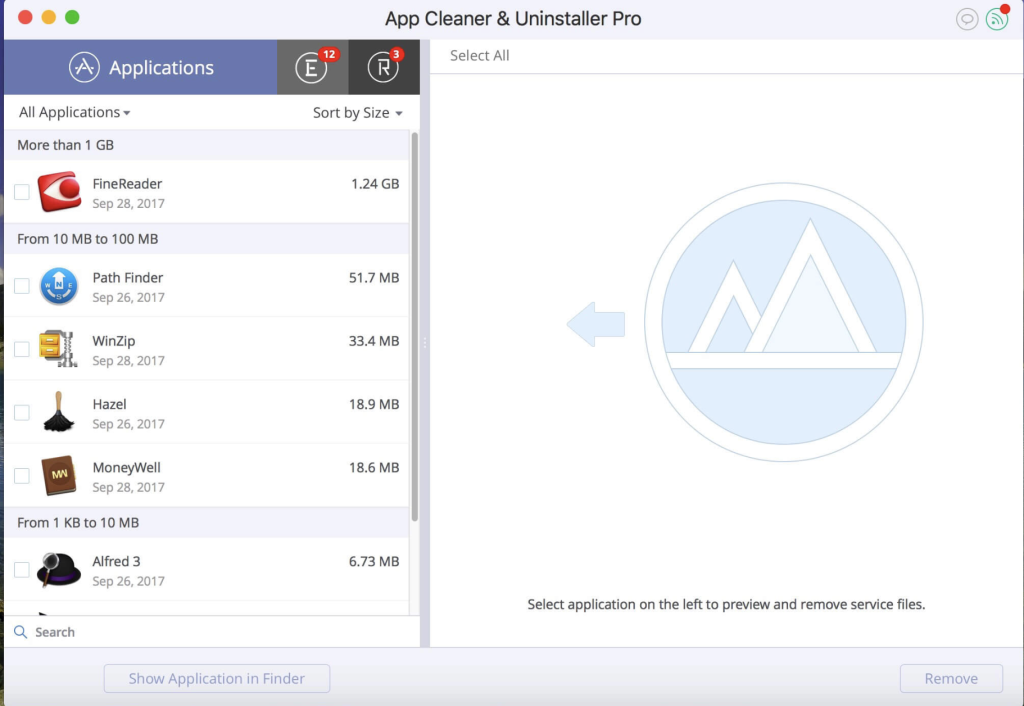
App Cleaner 8 is a comprehensive application designed to help manage and optimize the uninstallation process on your macOS. Here are the key features and functionalities provided by App Cleaner:
Features:
- Preview Installed Applications:
- Allows users to scan the system and preview all installed applications.
- Service Files Management:
- Removes various types of service files such as caches, logs, preferences, etc., associated with applications.
- Deletes remains or leftovers of previously uninstalled apps.
- Startup Optimization:
- Manages login items and launch agents for a faster Mac startup.
- Disables unneeded login items to enhance the speed of the Mac’s boot process.
- System Extensions Management:
- Finds and previews installed System Extensions.
- Removes unwanted System Extensions for better system performance.
- Uninstallation Process:
- Guides users through the uninstallation process for applications.
- Removes service files linked to applications for a complete uninstallation.
- File Preview and Assistance:
- Provides quick file previews associated with specific applications.
- Offers in-app assistance for user convenience.
- Additional Functions:
- Identifies and shows unused applications.
- Features a skip list option for customizing the cleaning process.
App Removal Guide:
To uninstall an application using App Cleaner:
- Launch App Cleaner.
- Scan for all applications installed on your Mac.
- Select the application you want to uninstall.
- Choose the associated service files displayed on the right.
- Click “Remove” to uninstall the selected application and its related service files.
- For some applications that can’t be removed automatically, follow the prompts and manually move the application files to Trash.
Mode Distinctions:
- FREE Mode offers basic functionalities to preview and remove service files for apps and extensions.
- PRO Mode includes more advanced features, such as removing the executable part of applications, disabling ads, and removing system extensions.
Compatibility: macOS 10.13 or later
Download Money Pro for Mac V-2.9.5
02 years

Name : Money Pro
Size : 48 MB
Download Money Pro for Mac V-2.9.5
Money Pro is a comprehensive financial management application that offers tools for bill planning, budgeting, and tracking accounts, making it suitable for both personal and business use. It enables users to manage their financial transactions, set budgets, and stay organized with their finances. Here are some key features of Money Pro:
Calendar:
- Mark days on the calendar when your bills are due.
- Schedule recurring bills with custom periodicity.
- Filter transactions by selecting dates on the calendar.
- Quickly glance at bills due in the “Today” view.
- Predicts transactions for the day that may not have been scheduled manually.
Bills Due Notifications:
- A system of reminders alerts you of upcoming bills.
- Quick rescheduling option to manage bills due soon.
Budgets:
- Create budgeted entries for both income and expenses.
- Set budget limits for each entry.
- Customize budget limits for different periods.
- Track the progress of each category and overall budget.
- Monitor visual indicators for budget overspending.
- Analyze budget trends with on-the-fly charts.
Budget Rollover:
- Set budgets to transfer the leftover amount from the current period to the next.
- Automatically limit your spending if you overspent in previous periods.
Checkbook Register:
- Manage an unlimited number of accounts (checking, savings, credit card, etc.) in one place.
- Set transactions as recurring or one-time.
- Track balance change history.
- Organize records with additional fields like payee, description, check number, and class (personal/business travel expenses).
- Attach receipt photos to transactions.
Account Reconciliation:
- Record transactions and reconcile them.
- Automatically calculate available balance and cleared balance.
Additional Features:
- Supports multiple languages including English, Spanish, Italian, German, and others.
- Easy sync with iPhone/iPad versions for seamless financial management.
System Requirements:
- macOS 10.12 or later
- 64-bit processor
Money Pro is a versatile financial management tool that helps users plan their bills, set budgets, track transactions, and stay organized with their accounts. It’s a valuable application for managing personal and business finances efficiently.