Free Macsoftware One click Download
Application
RAW Power for Mac free Download 3.4.20
02 years

Name : RAW Power
Size : 62 MB
RAW Power for Mac free Download
RAW Power® is a powerful photo editing application designed for macOS, offering advanced RAW editing capabilities, seamless integration with Apple’s ecosystem, and a comprehensive set of features for organizing and enhancing your photos. Here’s an overview of its functionalities:
Overview:
- Advanced RAW Editing: RAW Power leverages Apple’s RAW engine, providing advanced adjustments that enhance photos in ways impossible with other applications. It offers unique adjustments like Boost, previously only available in Aperture.
- Organize and Manage: RAW Power can organize and manage your Photos Library, fully compatible with iCloud Photo Library for seamless syncing across devices.
- Finder Support: Acting as a standalone image editor, RAW Power allows you to quickly browse any folder on your disk, providing fast, non-destructive RAW processing.
- Rate and Filter: Easily filter photos by file type, rating, flag, and edit state. Ratings and flags sync over iCloud Photos for consistent organization.
- Cross-Platform Editing: Start editing on one device and continue seamlessly on another using RAW Power 3 for iOS (separate purchase). It also functions as a Photos editing extension with all adjustments available.
- Batch Processing: Apply presets, paste adjustments, and export images in batches, streamlining your workflow.
Organization and Display:
- Zoom up to 800% for precise adjustments.
- Create, delete, and arrange albums in your Photo library.
- View metadata such as file name, shot information, and location with a map.
- Browse folders or albums, pick favorite folders, and open and edit multiple files simultaneously.
- Thumbnail Grid with badges for edit state, file type, rating, and flags.
- Export with control over size, format, profile, and name.
Real-Time Editing:
- Compatible with hundreds of cameras, including iPhone RAW.
- Unparalleled highlight recovery and real-time control of Apple’s RAW processing.
- Auto Enhance, Auto White Balance, Auto Levels, and Auto Curves for quick adjustments.
- Histogram with Clipping Indicators and Hot Pixels Overlay.
- Advanced editing features like LUTs, Crop and Straighten, Rotate and Flip, White Balance, Highlights, Shadows, Vibrancy, Local Contrast, Curves, Levels, Depth Effect, Chromatic Aberration correction, Perspective correction, Black & White conversion, Vignette, and more.
- Metal-based image processing engine for better performance.
- Fully non-destructive editing with all changes stored in sidecars.
- Real-time, GPU-accelerated sliders.
- Customizable Presets and Copy / Paste of adjustments.
Compatibility:
- Requires macOS 10.14 or later.
Homepage: For more information and to download RAW Power, visit the official homepage on the Mac App Store: RAW Power®
RAW Power® provides photographers with a comprehensive set of tools for editing, organizing, and enhancing their photos, making it a valuable asset for professionals and enthusiasts alike within the macOS ecosystem.
All to MP3 Audio Converter for Mac 3.1.6
02 years
by Jameskarke
in Application
Name : All to MP3 Audio Converter
Size : 97 MB
All to MP3 Audio Converter for Mac free Download
“All To MP3 Audio Converter” is a versatile audio utility available on the Mac App Store, designed to convert various audio formats to MP3 with ease. Here are some key features and information about this application:
Key Features:
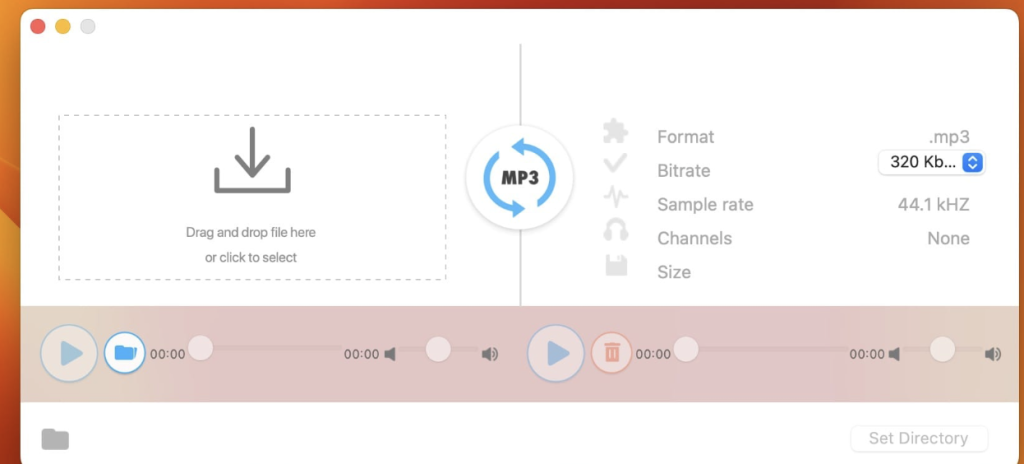
- Input Audio Formats: Supports a wide range of input audio formats including AIF, AIFF, AIFC, CDA, CDDA, CAF, M4V, MP4, M4A, MOV, QT, WAV, WAVE, BWF, AMR, AC3, and more.
- One-Click Conversion: Convert audio files to MP3 format quickly and conveniently with a single click.
- Bitrate Setup: Customize the bitrate of the output MP3 files according to your preference, with options ranging from 320, 256, 192, to 128 kbps.
- Pre-Listening: Ability to pre-listen to uploaded and converted audio files before finalizing the conversion process.
- Playback Compatibility: Enjoy playback of converted MP3 files on any devices after conversion, ensuring universal compatibility.
- Audio Channels and Sample Rate Information: Provides detailed information about audio channels and sample rates for better control over the conversion process.
Compatibility:
- Requires macOS 10.15 or later.
Availability:
- The application is available for download on the Mac App Store.
Mac App Store Link:
With “All To MP3 Audio Converter,” users can easily convert audio files to high-quality MP3 format with customizable settings, making it a convenient solution for various audio conversion needs on macOS.
Blackmagic Design DaVinci Resolve Studio 18.6.6
02 years
by Jameskarke
in Application
Name : Blackmagic Design DaVinci Resolve Studio
Size : 4.9 GB
Blackmagic Design DaVinci Resolve Studio for Mac free Download
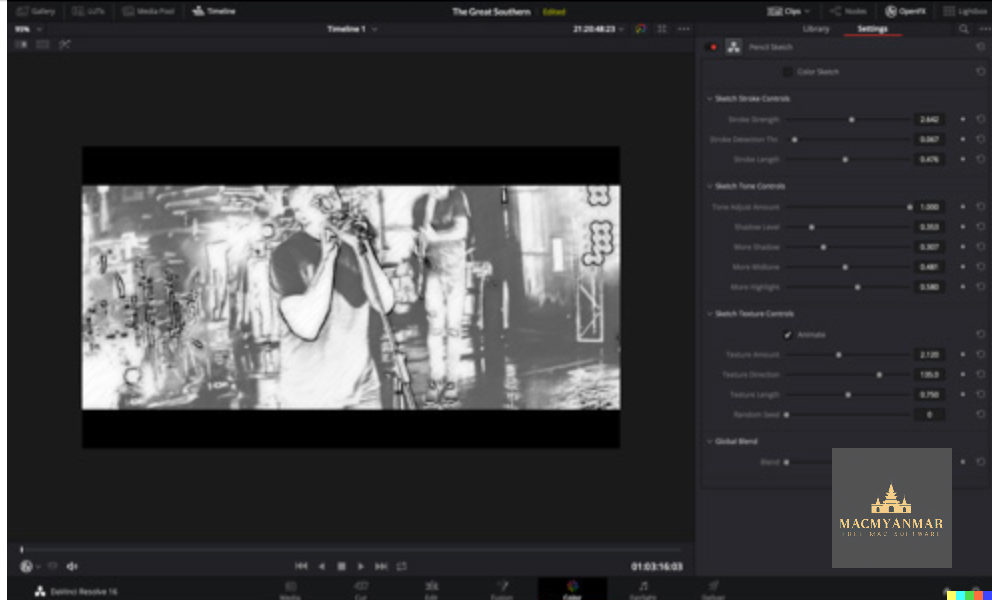
DaVinci Resolve stands out as the premier all-in-one solution for post-production tasks, combining editing, color correction, visual effects, motion graphics, and audio post-production within a single software tool. Here’s an overview of its features and what’s new in DaVinci Resolve 17:
Features:
- Comprehensive Suite: DaVinci Resolve encompasses editing, color correction, visual effects, motion graphics, and audio post-production, providing a complete toolkit for professionals.
- Industry-Leading Quality: It is widely regarded as Hollywood’s preferred post-production solution, offering Emmy™ award-winning image technology, advanced color science, and high-quality Fairlight audio processing.
- Unified Interface: Its modern and intuitive interface is designed for efficiency, catering to both new users and seasoned professionals.
- Page-Based Workflow: The software is divided into dedicated “pages” for specific tasks, including editing, color correction, visual effects, audio, and media organization and output.
- Advanced Color Correction: DaVinci Resolve’s color page is renowned for its advanced grading tools, including primary and secondary color grading features, PowerWindows™, qualifiers, tracking, HDR grading tools, and more.
- Media and Delivery: It supports a wide range of formats for importing, managing, and delivering final projects, with tools for syncing clips, organizing footage, adding metadata, and encoding.
- Resolve FX: Over 100 GPU and CPU-accelerated Resolve FX are available, including blurs, light effects, noise reduction, image restoration, and more. DaVinci Resolve Studio 17 introduces 11 new plugins and enhancements to existing ones.
- Color Panels: DaVinci Resolve color panels provide tactile control over multiple parameters, offering precise adjustments and unique looks that are difficult to achieve with a mouse and keyboard.
What’s New in DaVinci Resolve 17:
- New image processing for the latest wide gamut HDR
- Powerful audio engine with immersive 3D audio workflows
- HDR grading tools and AI-based magic mask for colorists
- Fairlight audio core with support for up to 2,000 tracks on a single system
- Metadata-based “slate” view with bin dividers for editors
- Smart reframing, proxies, live effect previews, and more for editors
- Fusion effects, titles, or transitions usable on edit and cut pages
System Requirements:
- macOS 10.15 or later
- Intel Core processor
Homepage: For more information about DaVinci Resolve, visit the official homepage at https://www.blackmagicdesign.com.
Blackmagic Design DaVinci Fusion Studio 18.6.6
02 years
by Jameskarke
in Application

Name : Blackmagic Design DaVinci Fusion Studio
Size : 2.4 GB
Blackmagic Design DaVinci Fusion Studio for Mac free Download
Blackmagic Design has introduced Fusion Studio 18.6.6, an update to its advanced compositing software. This update brings several improvements and bug fixes, enhancing the user experience and performance. Here’s what’s new in Fusion Studio 18.6.6:
Improvements:
- Enhanced render performance when viewing certain tool configurations.
- Improved performance when loading some OpenEXR files.
- Addressed the issue with deselecting inspector fields.
- Resolved issues related to exiting with Python 3.9.8 and higher.
- Fixed auto crop behavior on empty tools.
- Resolved merging spawned particles issue.
- Addressed issues with the add tool and LUT editor dialogs.
- Fixed path displacement issues when loading projects.
- Resolved problems with FBX import skipping some keyframes.
- General performance and stability improvements.
Fusion Studio is renowned for its advanced capabilities in compositing, catering to visual effects artists, broadcast and motion graphic designers, and 3D animators. With a powerful node-based interface, Fusion allows users to create sophisticated effects by connecting different image processing tools together seamlessly. Key features include a wide range of tools, comprehensive VR and 3D support, GPU acceleration for enhanced performance, unlimited network rendering capabilities, and more.
Language Support: English, Français, Español, Português, Русский, 中文, ภาษาไทย
Supported Architectures: x64
Homepage: For more information about Fusion Studio and to download the latest version, visit the official homepage at https://www.blackmagicdesign.com/.
Fusion Studio continues to be a go-to solution for professionals in the film and television industry, offering powerful tools and features to create stunning visual effects and motion graphics.
Wondershare UniConverter 15.5.3.956 For M
02 years
by Jameskarke
in Application

Name : Wondershare UniConverter only Apple Silicon
Size : 259 MB
Wondershare UniConverter only Apple Silicon Free Download
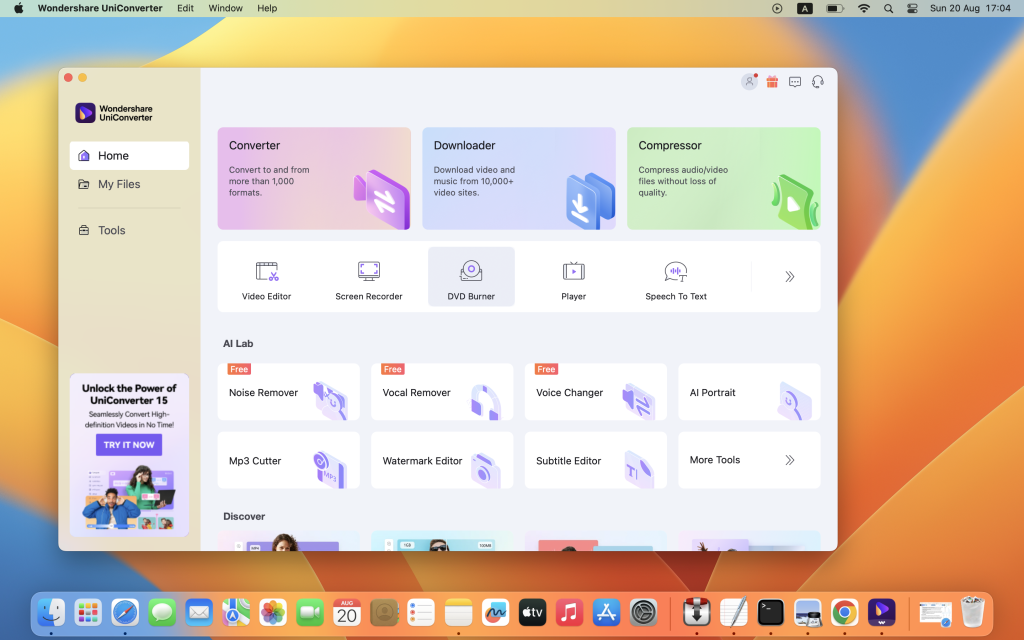
Wondershare UniConverter, previously known as Wondershare Video Converter Ultimate, is a comprehensive video toolbox designed to provide users with a wide range of video-related functionalities. Here’s an overview of its features:
Video Conversion:
- Convert videos to and from various formats, including AVI, WMV, MP4, MKV, FLV, 3GP, MPG, and more.
- Supports conversion to 3D and 4K Ultra HD video formats.
- Boasts a conversion speed that is up to 30 times faster than other converters.
Video Editing and Enhancement:
- Edit and enhance your videos with features such as trimming, cropping, adding subtitles, applying effects, adjusting brightness, contrast, and more.
Download and Record Videos:
- Download videos from popular video-sharing sites such as YouTube, Google, Yahoo, etc.
- Record videos directly from your screen.
DVD/Blu-Ray Burning:
- Burn video files to Blu-Ray or DVD discs, DVD folders, or ISO files.
Organize and Watch Videos:
- Organize your video library efficiently.
- Watch videos on any device, as it supports playback on a wide range of devices.
What’s New in Version 15.5.3.956:
- Unfortunately, release notes were unavailable at the time of updating this listing.
Compatibility:
- Compatible with macOS 10.11 or later, with support for Apple Silicon.
Homepage:
- For more information and to download Wondershare UniConverter, visit its homepage at https://www.wondershare.com/.
In summary, Wondershare UniConverter is a versatile tool for video conversion, editing, enhancement, downloading, recording, burning, organizing, and playback. It offers a wide range of features to cater to various video-related needs, making it a comprehensive solution for both casual and professional users.
TechSmith Snagit for Mac free Download 2024.2.2
02 years
by Jameskarke
in Application

Name : TechSmith Snagit
Size : 245 MB
TechSmith Snagit for Mac free Download
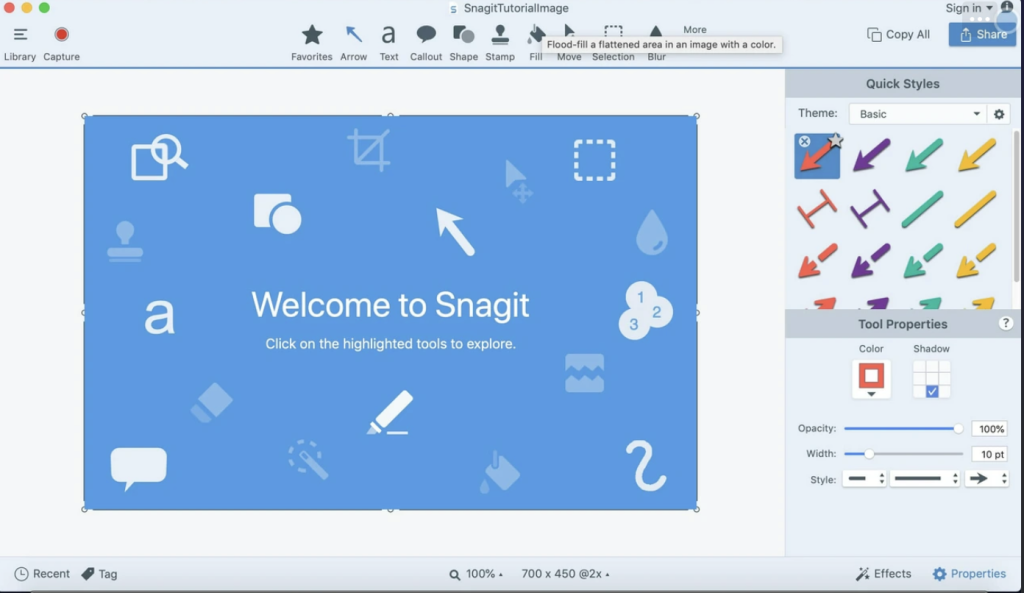
Snagit is a versatile screenshot and video recording tool for macOS, offering enhanced customization options and a user-friendly editing interface. Here’s how you can make the most of Snagit:
Capture Screenshots or Record Videos:
- Snagit provides an intuitive interface accessible from the status bar menu and an autohiding capture window.
- You can customize the interface and choose between using the status bar menu or the capture window, as per your preference.
- Hotkeys are available for quick access to capture options.
- Select the desired capture type and highlight the area you want to record. Snagit automatically sends captures to the processing window.
- You can easily share the captured content using various image or video sharing solutions.
Versatile Editing and Sharing:
- Snagit’s editing area offers simple yet effective tools for personalizing your projects.
- You can highlight areas, add text, erase elements, apply color filters, and more.
- For video content, you can preview the recording and cut specific portions.
- Snagit allows you to connect to various online accounts for quick upload of final projects directly from the application.
Complete Screen Capturing Solution:
- Snagit offers comprehensive screen capturing capabilities, including capturing screenshots (menus, webpages, etc.) and recording videos (screen activity or webcam).
- It is particularly useful for highlighting aspects of an image or creating video presentations.
- Built-in editing tools enable you to refine your content before sharing it with others.
Compatibility:
- Snagit is compatible with macOS 12.0 or later.
Homepage:
- For more information and to download Snagit, visit its homepage at https://www.techsmith.com/.
In summary, Snagit is a powerful and user-friendly tool for capturing, editing, and sharing screenshots and videos on macOS, making it an ideal choice for various professional and personal projects.
PopClip for Mac free Download 2024.3
02 years

Name : PopClip
Size : 8 MB
PopClip 2024 for Mac free Download
PopClip is a handy macOS utility that enhances text manipulation by providing quick access to commonly used actions such as Cut, Copy, Paste, and more. Here’s how to use it:
- Select Text: Simply use your mouse pointer to select the text you want to manipulate or interact with.
- PopClip Appears: Once you select the text, PopClip’s popover menu will appear right beside the selected text.
- Features: PopClip offers various features accessible through its popover menu:
- Search the Web: Instantly search the web for the selected text.
- Open Web Links: Quickly open web links contained in the selected text with just one click.
- Dictionary Definitions and Spelling Corrections: Get definitions and spelling corrections for the selected text.
- Adjust Popover Size: Customize the size of the popover menu according to your preference, from small to very large.
- Compatibility: PopClip is compatible with macOS 10.13.6 or later.
- Homepage: For more information and to download PopClip, visit its homepage at http://pilotmoon.com/popclip/.
PopClip provides a seamless and efficient way to work with text on your Mac, making tasks like text manipulation, searching, and correcting spelling errors much quicker and easier.
ON1 NoNoise AI 2024 for Mac v18.2.0.15224
02 years

Name : ON1 NoNoise AI 2024
Size : 2 GB
ON1 NoNoise AI 2024 for Mac free Download
ON1 NoNoise AI sets a new standard in quality and speed for removing image noise, making it the best noise reduction software for photography. Here are the key features and improvements of the latest version:
Key Features:
- AI-Powered Noise Reduction: Utilizes state-of-the-art machine learning to intelligently remove both luminance and color noise while preserving the finest details in your photos.
- AI-Based Demosaicing: Incorporates AI-based demosaicing during the noise reduction process, resulting in better noise reduction and increased detail and sharpness, especially for raw photos.
- Progressive Sharpening Algorithm: Includes ON1’s exclusive Progressive Sharpening algorithm to enhance sharpness and details without introducing halos and artifacts.
- Super-Fast Live Preview: Provides a lightning-fast preview of adjustments, allowing you to see results in a fraction of the time compared to other applications.
- Plugin Compatibility: Seamlessly integrates into your workflow as a plugin for popular photo editors like Adobe Photoshop, Lightroom Classic, Photoshop Elements, Affinity Photo, Capture One, and Corel Paintshop Pro.
What’s New in Version 2023 v17.1.0.13508:
- Improved masking fidelity and consistency of AI Masking features: Super Select AI, Mask AI, Quick Mask AI, and AI Adaptive Presets.
- Enhanced performance of the Mask Refine Brush.
- Increased raw file opening speed by 33%.
- Reduced Vulkan errors on Windows that could prevent launching.
- Minimized pixelation when using content-aware crop and the Perfect Eraser.
- Fixed an issue causing the log file to grow large.
- Resolved a bug where menus could disappear on Windows when using full-screen mode.
- Added raw file support for Fujifilm X-T5, OM Systems OM-5, and Sony a7RV (ILCE-7RM5).
- Included new lens profiles for various cameras, such as Canon PowerShot G7 X Mark III and Sony FE 50mm F1.2 GM.
- Improved stability for better performance.
ON1 NoNoise AI is compatible with macOS 10.15 or later, supporting both Apple Silicon and Intel Core processors. Visit the official homepage for more information: ON1 NoNoise AI Homepage
OmniReader Pro for Mac free Download 2.8.0
02 years

Name : OmniReader Pro
Size : 31 MB
OmniReader pro for Mac free Download
GM Reader is a versatile book reader designed for macOS, offering a range of features to enhance your reading experience. Here’s an overview of its key features:
- File Format Support: GM Reader supports reading EPUB, CHM, and Kindle (MOBI) files, providing compatibility with a variety of popular ebook formats.
- Search Functionality: The app offers both single-page search and full-text search capabilities, allowing users to easily find specific content within their ebooks. Additionally, search results can be highlighted for quick reference.
- Browsing History: GM Reader keeps track of your browsing history, allowing you to navigate forward and backward through previously viewed pages with ease.
- Reading Controls: Users can take advantage of various reading controls such as page turning, zooming, and sidebar shrinking to customize their reading experience according to their preferences.
- Printing Support: The app enables users to print pages directly from their ebooks, providing a convenient option for those who prefer physical copies.
- File Management: GM Reader allows users to view basic information about their files and supports exporting files to EPUB and PDF formats. Additionally, users can extract all images from a file if needed.
- Encoding Support: The app offers support for file coding, addressing the issue of garbled text by ensuring proper encoding for different languages and character sets.
- Image Adaptive: GM Reader automatically adjusts the size of images within ebooks to ensure optimal readability and viewing experience.
- Bookrack: All files that you’ve read are saved in the bookshelf for quick access and review in the future. The app supports file drag and drop for easy addition of new books to your library.
- Pro Version: GM Reader offers a Pro Version as an in-app purchase, which likely includes additional features or enhancements to further enhance the reading experience.
GM Reader is compatible with macOS 10.13 or later, providing Mac users with a comprehensive ebook reading solution available on the Mac App Store.
Folder Icons for Mac free Download 1.7
02 years

Name : Folder Icons
Size : 178 MB
Folder Icons for Mac free Download
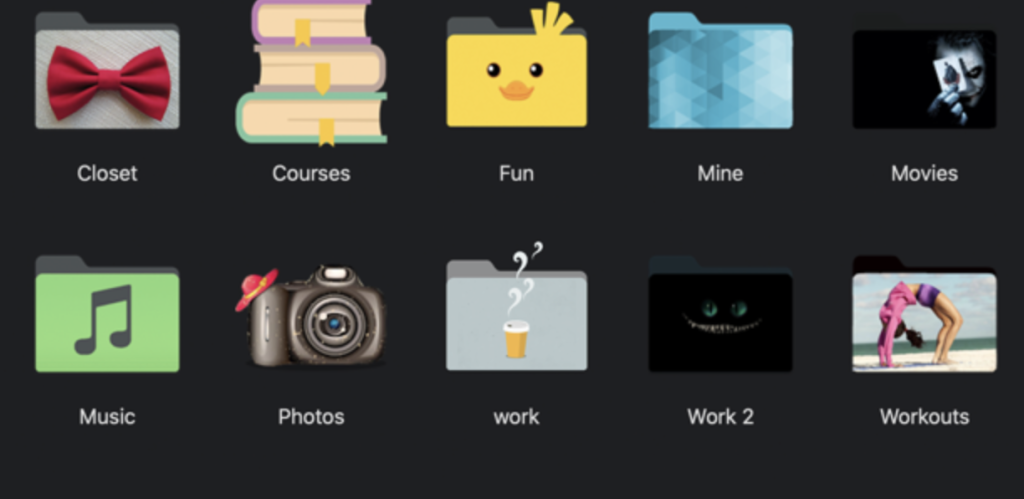
Folder Icons is a macOS application that allows users to customize the icons of their files and folders in just three simple steps. With over 300 icons to choose from across various categories such as Modern, Classy, Cute, Nature, Office, Music, Pictures, and more, users can give their folders a fresh and personalized look. Here are some key features of Folder Icons:
- Easy Customization: With Folder Icons, you can easily add cool icons to your files and folders in just three steps. Simply choose your desired icon, select the file or folder you want to customize, and apply the icon.
- Fresh Look: Say goodbye to the old boring blue folder icons. Folder Icons allows you to bring a fresh look to your folders and files, making them stand out and adding a touch of personality to your desktop.
- Wide Range of Icons: Choose from over 300 icons spanning various categories, including Modern, Classy, Cute, Nature, Office, Music, Pictures, and more. Whether you prefer sleek and minimalist icons or vibrant and whimsical designs, there’s something for everyone.
- Customization Options: In addition to choosing from pre-existing icons, Folder Icons also allows you to add your own picture as a folder icon. This level of customization ensures that you can truly make your folders and files reflect your unique style and preferences.
- Organizational Benefits: By customizing your folder icons, you can make your file organization more visually appealing and intuitive. This can help you stay organized, feel happier, and be more productive as you navigate through your files and folders.
Folder Icons is compatible with macOS 10.10 or later and is designed to run on 64-bit processors. With its user-friendly interface and extensive library of icons, Folder Icons offers a convenient way to personalize your macOS experience and add a touch of creativity to your desktop environment.