Free Macsoftware One click Download
Application
Movie Thumbnails Maker for Mac 5.0.1
02 years
by Jameskarke
in Application

Name : Movie Thumbnails Maker
Size : 39 MB
Movie Thumbnails Maker for Mac free Download
Movie Thumbnails Maker is your all-in-one solution for creating stunning overviews of the latest movies. Say goodbye to guessing the content of a movie – with Movie Thumbnails Maker, you can catch the essence of each film at first glance. Here are some key features:
Key Features:
- Support for Various Formats: Movie Thumbnails Maker supports a wide range of formats including AVI, WMV, RM, MPG, TS, MKV, MOV, FLV, MP4, and RMVB, among others.
- Fast and Easy to Use: Get amazing overviews with just one click, making it quick and simple to generate thumbnails.
- Custom Settings: Customize background color, border color, position of metadata, and more to tailor the thumbnails to your preferences.
- Batch Processing: Process multiple movie files at once with individual settings for each movie, saving you time and effort.
- Various Output Image Formats: Choose from various output image formats such as BMP, PNG, TIFF, and JPEG to suit your needs.
What’s New in Version 5.0.1:
Unfortunately, the release notes for this version were unavailable at the time of updating.
Movie Thumbnails Maker is compatible with macOS 10.10 or later. For more information, visit the homepage.

Final Draft for Mac Download v-13.1.0
02 years

Name : Final Draft
Size : 111 MB
Final Draft for Mac free Download
Final Draft is the ultimate tool for writers, allowing you to focus on your creativity while it takes care of the formatting. Whether you’re writing movie scripts, television episodics, or stage plays, Final Draft provides powerful word processing combined with professional script formatting, all in one easy-to-use package. Here are some of the top features:
Top Writing Features:
- Scene View: Outline your script and reorder scenes effortlessly with a drag-and-drop interface.
- Navigator: View, sort, and filter important details of scenes, script notes, and characters.
- Index Cards: Easily outline your story and restructure your script scene by scene.
- ScriptNotes: Make color-coded notes without affecting script pagination.
- Templates: Access over 100 templates for various formats and customize your own.
- Pagination: Final Draft ensures your script is perfectly formatted to industry standards.
- Watermarking: Add watermarks when printing or saving scripts as PDFs.
- Panels System: Split your screen to view scene outlines while writing.
- Final Draft Courier Font: An industry-standard font designed for easy reading.
- Writing Management: Track your writing progress and goals.
- Format Assistant: Check for formatting errors after completing your first draft.
- Retina and Full Screen Support: Distraction-free writing in full screen mode with retina display compatibility.
- Mac OSX Dictation Support: Utilize Mac’s dictation feature for hands-free writing.
Top Production Features:
- Title Page: Create professional title pages easily.
- Revision Mode: Revise your script and save different versions for production.
- Page Locking: Omit scenes, lock pages, and set revision colors.
- Colored Production Pages: Colored border and solid color production pages for distribution.
- Character Highlighting: Highlight specific characters’ lines for table reads or tracking dialogue.
- Customizable Reporting: Generate seven different reports including Scene, Character, and Location reports.
Final Draft ensures compatibility with macOS 10.15 or later, offering a comprehensive solution for writers and production teams alike. Visit the homepage for more information.
Algoriddim djay Pro for Mac 5.1.6
02 years
by Jameskarke
in Application

Name : Algoriddim djay Pro
Size : 339 MB
Algoriddim djay Pro for Mac free Download
Welcome to djay Pro AI, a revolutionary DJ software powered by groundbreaking AI technology known as NEURAL MIX™. This cutting-edge software, developed by Algoriddim, redefines the art of DJing by offering unprecedented creative mixing capabilities.
NEURAL MIX™
- Real-time Isolation: Isolate vocals, drums, bass lines, and instrumentals in real-time, allowing for unparalleled creative mixing.
- FX Routing: Apply audio effects to individual components of music, such as Vocal Echo, Harmonic Filter, and Drum Reverb.
- Loop Routing: Loop the beat while the melody of the same track continues playing, and vice versa, opening up new possibilities for mixing.
- AI Crossfades: Seamlessly blend and swap drums, bass lines, or vocals of two tracks with AI-powered crossfades.
- AI Waveforms: Visualize vocals, drums, and harmonic waveforms per track side by side, providing enhanced insight into your music.
MUSIC PRODUCTION TOOLS
- Sequencer: Create instant beats on top of music with the built-in sequencer.
- Looper: Remix music with up to 48 loops per track.
- Beat-Matched Sequencing: Sequence drums and samples with beat-matched precision.
- Extensive Content Library: Access over 1000 loops and samples to enhance your productions.
STREAMING INTEGRATIONS
- TIDAL: Access millions of tracks, music videos, and high-quality sound with TIDAL Premium or HiFi.
- SoundCloud: Explore millions of underground and premium tracks with SoundCloud Go+.
- Beatport & Beatsource: Dive into millions of electronic and open-format music tracks with Beatport LINK and Beatsource.
ADVANCED LIBRARY MANAGEMENT
- Custom Playlists: Create custom and smart playlists to organize your music library.
- Track Filtering: Use powerful filtering options to quickly find the tracks you need.
- Finder Integration: Seamlessly integrate with Finder to access your music files effortlessly.
AUTOMIX
- AI-Powered Mixes: Enjoy automatic, beat-matched mixes based on artificial intelligence.
- Queue and Playlist Automation: Automate your DJ sets with queue and playlist automation features.
VIDEOS, VISUALS, AND PHOTOS
- Mix Videos and Visuals: Add videos, visuals, and photos to your DJ sets for a multimedia experience.
- Music Video Streaming: Stream music videos through TIDAL for added visual appeal.
- Beat-Matched Photo Slideshows: Create beat-matched photo slideshows to enhance your performances.
POWERFUL AUDIO ENGINE
- AI Audio Engine: Experience a revolutionary audio engine powered by AI for exceptional sound quality.
- Real-Time Music Source Separation: Separate music sources in real-time for precise mixing.
- Over 40 Built-in Audio Effects: Access a wide range of audio effects to enhance your mixes.
ADVANCED AUDIO ANALYSIS
- BPM and Beat Detection: Detect BPM and beats accurately for seamless mixing.
- Key Detection: Detect the key of your tracks to create harmonically matched mixes.
- Multi-Color Waveforms: Visualize your music with multi-color waveforms for enhanced analysis.
HARDWARE INTEGRATION
- MIDI Controller Support: Native support for over 100 MIDI controllers for flexible hardware integration.
- Pioneer DJ CDJ and RANE Twelve Integration: Seamlessly integrate with Pioneer DJ CDJs and RANE Twelve controllers.
- Advanced MIDI Learn: Customize your MIDI mappings with advanced MIDI learn capabilities.
- External Mixer Mode: Use external mixers with djay Pro AI for enhanced control.
- Multi-Channel USB Audio Interfaces: Support for multi-channel USB audio interfaces for versatile audio routing.
In-App Purchases and Compatibility
- Full Version Included: Enjoy the full version of djay Pro AI with all features included.
- Language Support: Available in multiple languages including English, Spanish, Italian, German, and more.
- Compatibility: Compatible with macOS 10.15 or later.
Explore the future of DJing with djay Pro AI by visiting the homepage at https://www.noteburner.com/.
Video Cut&Crop&Join for Mac 3.9
02 years

Name : Video Cut&Crop&Join
Size : 161 MB
Video Cut&Crop&Join for Mac free Download
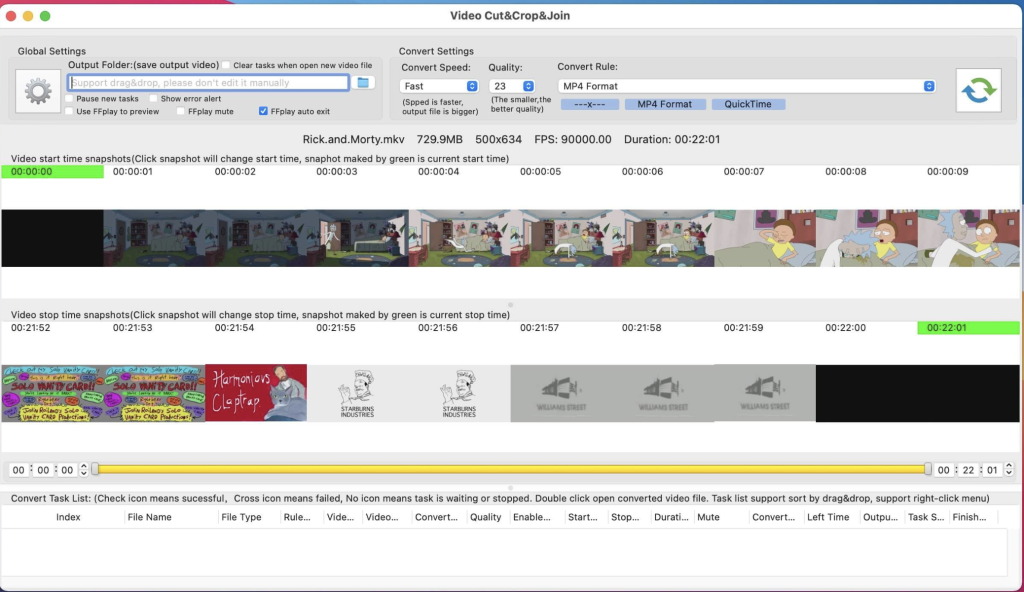
Video Cut & Crop Join is a versatile tool designed to make video editing tasks such as cutting, cropping, merging, and converting videos quick and easy. With support for all popular video formats and powered by FFmpeg, it provides fast and efficient processing capabilities. Here’s how to use it:
How to Use:
1. Cut Videos:
- Step 1: Drag and drop the video file into the app’s snapshot view.
- Step 2: Choose the desired video clip and select the video convert option.
- Step 3: Click the “Submit” button to initiate the cut task.
2. Merge Video Clips:
- Step 1: Follow the steps for cutting videos.
- Step 2: Select the clips you want to merge.
- Step 3: Right-click the task list and choose “Merge videos” from the menu to merge the video clips.
Key Features:
- Fast Processing: Utilizes FFmpeg for quick cutting, merging, and cropping of videos.
- Powerful Selection: Offers handy and powerful video clip selection tools.
- Video Frame Crop: Supports cropping of video frames to reduce the output file size.
- Rich Convert Options: Provides various video conversion options and supports iCloud sync.
- Multi-Task Support: Allows for the execution of multiple conversion tasks simultaneously.
- Embed FFplay: Includes FFplay for efficient video playback, enabling accurate selection of video clips.
FAQs:
- How to Crop Part of Video Frame?
- Use the “Screenshot & Crop” window to draw the rectangle you want to crop, then click “Set Crop Rectangle.”
- Choose the conversion rule in the main interface and click “Convert.”
- How to Join Video Clips?
- Add the video to the app, cut clips, sort them, and select the clips to merge.
- Right-click and select “Merge Video” from the menu.
- How to Select Video Clips?
- Use the time sliders, change start/end time text fields, click the start/end screenshot, or use shortcuts.
- Why Do Conversions Sometimes Fail?
- Clear or reset the output folder and try again. Ensure filenames and output folder paths are not too long or contain illegal characters.
Compatibility:
Video Cut & Crop Join is compatible with macOS 10.14.6 or later.
For more information and to download the app, visit the homepage at https://apps.apple.com/app/video-cut-crop-join/id1258081151.
Labels and Databases for Mac Download 1.7.12
02 years
by Jameskarke
in Application

Name : Labels and Databases
Size : 76 MB
Labels and Databases for Mac Free Download
Labels and Databases is an advanced label maker and designer software that offers robust database support, enabling users to create labels, envelopes, and cards with ease. Whether you need to generate mailing labels or design custom cards, this software provides a comprehensive set of tools to streamline the process.
Key Features:
- Database Integration: Utilize built-in label formats and merge them with information stored in user databases through Mail Merge functionality. This enables efficient creation and printing of labels using data from your database.
- Versatile Design Tools: Incorporate various objects such as text, graphics, images, shapes (boxes, ovals, lines), patterns, and barcodes into your documents. These elements can be customized in terms of font, color, rotation, gradient fills, and more, allowing for creative and visually appealing designs.
- Image Effects: Enhance your designs with image effects like opacity adjustment and image masks. These effects, combined with other settings, enable you to create visually stunning effects and enhance the overall aesthetics of your labels and documents.
- Comprehensive Label Formats: Benefit from a wide range of label formats included in the software, ensuring compatibility with different types of label sheets and printing requirements.
- Advanced Database Customization: Customize the presentation of data in your documents using advanced database features, allowing for tailored and personalized label designs.
Compatibility:
Labels and Databases is compatible with macOS 11.0 or later, ensuring compatibility with the latest macOS versions and systems.
With its intuitive interface and powerful features, Labels and Databases is a versatile solution for creating professional labels, envelopes, and cards with database integration. For more information and to explore the features of Labels and Databases, visit the homepage at https://cristallight.com.
Proxyman for Mac free Download 5.2
02 years
by Jameskarke
in Application

Name : ProxyMan
Size : 33 MB
Proxyman for Mac free Download
Proxyman is a cutting-edge HTTP Debugging Proxy application designed to streamline web debugging tasks with its modern and intuitive interface. Say goodbye to cumbersome debugging tools and embrace the seamless experience offered by Proxyman’s native macOS app. With Proxyman, capturing, inspecting, and manipulating HTTP(s) traffic has never been easier.
Here are some of its basic features:
- Inspect HTTP/HTTPS traffic in plain text, allowing you to delve into the details of network requests and responses.
- SSL Proxying enables you to intercept and analyze encrypted HTTPS traffic, providing insight into secure communication channels.
- Proxying on iOS Devices, iOS Simulator, and Android devices empowers you to debug network traffic across a variety of platforms.
- Export Requests/Responses for further analysis or documentation purposes.
- Content Filter allows you to focus on specific types of traffic, enhancing your debugging efficiency.
- Body Syntax Highlighting improves readability by visually highlighting different parts of request and response bodies.
- JSON/Tree View Format presents JSON data in a structured tree format for easy navigation and comprehension.
- Horizontal/Vertical Layout customization options ensure that the interface adapts to your preferred workflow.
- Finder Categorize organizes captured traffic for easier management and reference.
- Multiple Tabs support enables you to work on multiple debugging sessions simultaneously.
- Custom Previewer Tabs let you customize how request and response data is displayed, tailoring the debugging experience to your needs.
- Custom Header Columns provide additional context by displaying custom headers alongside requests and responses.
- Highlight with Color & Add Comment feature allows you to annotate traffic for easier identification and collaboration.
- MessagePack Body Previewer supports the inspection of MessagePack-encoded data.
- JSONPath Filter enables you to filter JSON data using JSONPath expressions.
- Customize Toolbar lets you tailor the toolbar to include the tools and features you use most frequently.
With Proxyman, you can dive deep into HTTP(s) traffic analysis while enjoying a seamless and intuitive user experience. Whether you’re a seasoned developer or just starting out, Proxyman empowers you to debug with confidence.
For more information and to experience the power of Proxyman, visit the homepage at https://proxyman.io.
Wondershare Recoverit for Mac 12.5.10.7
02 years
by Jameskarke
in Application

Name : Wondershare Recoverit
Size : 125 MB
Wondershare Recoverit for Mac free Download
Wondershare Recoverit stands out as a comprehensive data recovery suite tailored for Mac users, offering a solution for recovering lost data caused by various scenarios such as accidental deletion, formatting, virus infection, improper operation, unexpected power failure, and more.
This versatile tool is capable of recovering Mac data from a wide range of storage devices including hard drives, iPods, USB drives, SD cards, digital cameras, mobile phones, MP3 players, and MP4 players. It supports HFS+, FAT16/32, and NTFS file system volumes, ensuring compatibility across different storage media. Notably, Recoverit prioritizes data safety with its read-only and risk-free approach to data recovery, ensuring that no writing operations are performed on the original data.
Key Features:
- Versatile preview functionality allows users to view real-time scan results for images and preview other Mac files such as videos, audio files, archives, and documents in Hex mode.
- Precise file recovery options enable users to select specific file types to scan, saving time especially when dealing with a large number of files.
- Recovered files maintain their original names, shooting dates, and storage paths, enhancing the restoration process.
- File name search functionality within scanning results provides precise Mac file recovery.
- Easy-to-use interface and complete wizard streamline the Mac data recovery process, making it accessible for users of all levels.
The latest version, 12.5.10.7, brings unspecified improvements and fixes, although specific release notes were unavailable at the time of updating the listing.
Recoverit is compatible with macOS 10.14 or later. For more information and to access Recoverit, visit the homepage at https://recoverit.wondershare.com.
mTitle Cyberpunk FCPX Plugin for Mac
02 years
by Jameskarke
in Application

Name : mTitle Cyberpunk FCPX Plugin
Size : 330 MB
mTitle Cyberpunk FCPX Plugin for Mac download
Immerse yourself in the futuristic world of cyberpunk with this cutting-edge pack from MotionVFX. Designed to captivate the senses with modern aesthetics and sci-fi themes, these stunning openers and visual effects will transport your edits into the realm of cybernetic wonder.
Featuring digital glitches and energetic distortions, this pack elevates your work to a new level of quality, infusing it with the dynamic energy of cyberpunk culture. The tech-advanced stylistics of these visuals express the true essence of futuristic stylization, allowing you to create edits that resonate with the cyberpunk aesthetic.
With a complete pack of cyb3rpunk visuals at your fingertips, including titles and a wide range of effects and thematic details, you can effortlessly enhance your edits and imbue them with the unmistakable vibe of cyberpunk. Transform your videos into immersive cybernetic experiences that leave a lasting impression on your audience.
To explore this exciting pack and unlock the true potential of cyberpunk visuals, visit the homepage at https://www.motionvfx.com/store,mtitle-cyberpunk,p3500.html.
Download mTransition Zoom – Dynamic Footage Transitions for FCP for Mac
02 years
by Jameskarke
in Application

Name : mTransition Zoom – Dynamic Footage Transitions for FCP
Size : 92 MB
mTransition Zoom – Dynamic Footage Transitions for FCP Download for Mac
This innovative pack from MotionVFX is an essential tool for any editor, offering 50 dynamic footage shifts that can elevate your video projects to new heights. With a focus on impactful transitions, this pack provides editors with a versatile range of options to add energy and style to their videos.
The transitions included in this pack are designed to be highly dynamic, ensuring that your edits stand out and capture the audience’s attention. Whether you’re working on a fast-paced action sequence or a stylish promotional video, these transitions offer the flexibility and creativity you need to achieve your vision.
The transitions are seamlessly integrated into popular editing software, making them easy to use for editors of all levels. With just a few clicks, you can apply these transitions to your footage and instantly enhance the visual impact of your projects.
With its innovative approach to transitions and its focus on dynamic movement, this pack is truly a must-have for any editor looking to take their videos to the next level. For more information and to get your hands on this essential pack, visit the homepage at https://www.motionvfx.com/store,mtransition-zoom,p2016.html.
ForkLift for Mac Download 4.1.2
02 years

Name : ForkLift
Size : 13 MB
ForkLift for Mac free Download
ForkLift stands out as a robust file manager and lightning-fast FTP client, boasting a sleek and adaptable UI that seamlessly blends absolute simplicity with raw power, characteristic of top-notch Mac software.
This versatile tool effortlessly connects to a wide array of remote servers, including SFTP, FTP, WebDAV, Amazon S3, Backblaze B2, Google Drive, Rackspace CloudFiles, SMB, AFP, and NFS shares. Essentially, ForkLift can interface with virtually any server or device that can be linked to a Mac. Additionally, it offers an extensive toolbox for file management, featuring Folder Synchronization, Multi-Rename, Archive handling, Application deletion, remote file editing, and more. All these potent capabilities are wrapped within a Finder-like, dual-pane interface that ensures optimal workflow while maintaining a familiar user experience. Moreover, ForkLift supports Quick Look, Spotlight search, and other essential macOS functionalities.
Notable features include:
- Complete transition to Swift for enhanced performance and efficiency
- ForkLift Mini for quick access to essential functions
- Two-way Sync for seamless file synchronization
- Preview functionality for quick file examination
- Quick Open for speedy file access
- Dark Mode support for a comfortable viewing experience
- Dual Pane layout options (vertical or horizontal)
- Favorite Sync via Dropbox for convenient synchronization
- Transfer bandwidth throttling for efficient data transfer management
- Tags support for better file organization
- Disklet feature for mounting remote connections as local disks
- Sync Browsing for synchronized navigation across local and remote directories
- Tabs for multitasking within the same window
- Advanced search capabilities by name, extension, kind, tags, or content
- Quick Select feature for efficient file selection
- Remote Editing for editing files directly over remote connections
- Archive Management tools for handling compressed files
- Keyboard Control for streamlined navigation
- Workspaces for customizing workflow setups
- FXP Copy for direct server-to-server file transfer
- Tools such as Git support and integration with Terminal, iTerm, or Hyper
- Hidden Files visibility toggle
- Share functionality for easy file sharing
- Option to set as the default file viewer
- File Compare with support for various comparison tools like FileMerge, Kaleidoscope, Beyond Compare, and Araxis Merge
- Multilingual support with languages including English, German, Hungarian, Polish, Russian, and Ukrainian
The latest version 4.1.2 brings unspecified improvements and fixes, although specific release notes were unavailable at the time of updating the listing.
Please note that disabling System Integrity Protection (SIP) may be required to perform certain actions with the application.
ForkLift is compatible with macOS 12.0 or later. For more information and to download ForkLift, visit the homepage at https://binarynights.com/.
