We rank the best UK-licensed online casinos for real money and live craps in 2026, comparing bonuses, games, payouts, and mobile play. read the best online craps casino guide

Posts by Jameskarke
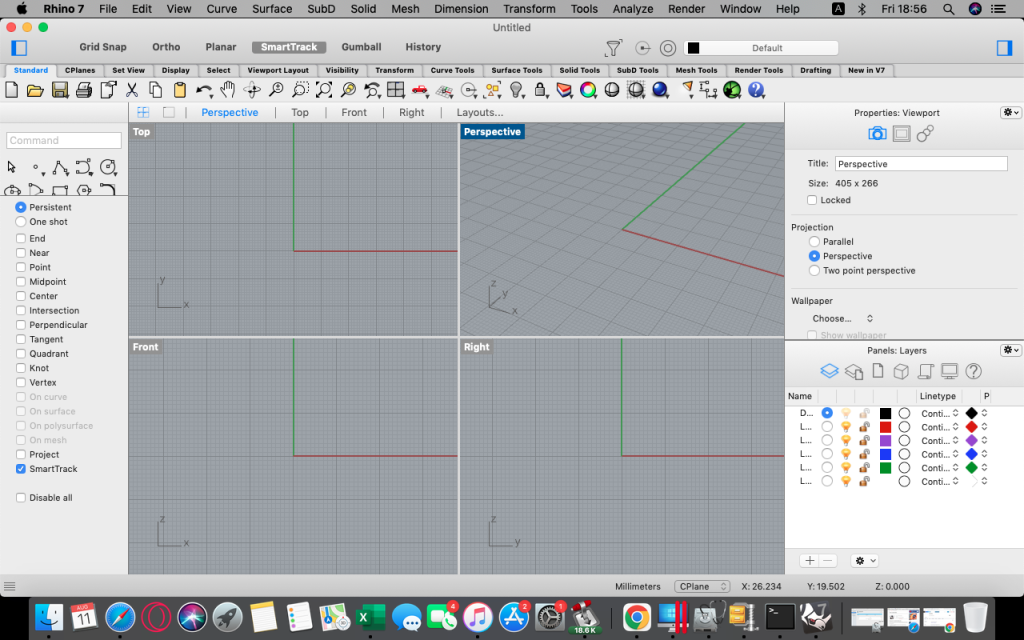
Rhino 8 for Mac Download v8.7.24138.15432
0
Name : Rhino 8
Size : 718 MB
Rhino 8 for Mac free Download
Rhino, or Rhinoceros, is a highly versatile 3D modeler designed to provide powerful tools for creating, editing, analyzing, documenting, rendering, animating, and translating NURBS curves, surfaces, and solids, as well as point clouds and polygon meshes. It stands out for its capability to handle complex and detailed 3D models efficiently, regardless of their size or complexity, within the constraints of your hardware.
Key Features of Rhino
- Free-Form 3D Modeling:
- Advanced Tools: Offers free-form 3D modeling tools that are usually only found in significantly more expensive software, allowing for the creation of any shape imaginable.
- High Accuracy:
- Precision Design: Provides the accuracy required for designing, prototyping, engineering, analyzing, and manufacturing a wide range of products, from large-scale items like airplanes to intricate jewelry.
- Compatibility:
- Interoperability: Compatible with various other software used for design, drafting, CAM (Computer-Aided Manufacturing), engineering, analysis, rendering, animation, and illustration.
- Mesh and IGES File Handling:
- Mesh Processing: Can read and repair meshes and handle extremely challenging IGES files, making it suitable for a broad spectrum of design tasks.
- User-Friendly:
- Ease of Use: Designed to be easy to learn and use, allowing users to concentrate on their design and visualization tasks without being hindered by the software.
- Performance:
- Efficiency: Runs efficiently even on standard laptop computers without the need for specialized hardware, ensuring fast performance and a short learning curve.
- Affordability:
- Cost-Effective: Offers an affordable purchase price with no ongoing maintenance fees, making it accessible to a wide range of users.
Compatibility
- OS Requirement: Compatible with macOS 12.4 or later.
Availability
- Homepage: More details and download options are available on the official Rhino website.
Summary
Rhino is a robust and comprehensive 3D modeling software that provides a rich set of features for free-form modeling, making it suitable for a wide variety of applications, including industrial design, architecture, jewelry design, automotive design, and more. Its combination of advanced tools, high accuracy, wide compatibility, user-friendly interface, efficient performance, and affordability makes it a valuable tool for professionals and hobbyists alike. Whether you’re designing complex engineering products or creating detailed artistic models, Rhino offers the functionality and flexibility you need to bring your ideas to life.

Piezo for Mac Download 1.9.2
0
Name : Piezo
Size : 21 MB
Piezo for Mac free Download
Piezo is a user-friendly audio recording tool for macOS that allows users to quickly capture audio from any application or device on their computer. Whether you need to record podcasts, save Skype calls, or capture streaming music, Piezo makes the process simple and efficient.
Key Features of Piezo
- Record From Apps and Devices:
- App Selection: Easily select any application or audio device from which to record audio.
- One-Click Recording: Simply hit the Record button to start saving audio.
- Podcast Recording:
- VoIP App Recording: Record from Skype and other VoIP apps, with audio saved to distinct channels for straightforward editing.
- Simple Settings:
- Easy Configuration: Open the settings popover to adjust recording quality, name your clip, and add comments.
- Versatile Audio Capture:
- Any Application: Capture audio from almost any application playing on your Mac.
- Web Audio: Record audio directly from web browsers like Safari or Chrome.
- Streaming Music: Save audio from streaming services such as Spotify, Rdio, and MOG.
- Video Players: Record audio from movies playing in QuickTime Player, VLC, and other video players.
- Device Integration:
- Microphones: Connect any microphone, including Apple headsets, and start recording immediately.
- Built-In Microphone: Record using the built-in microphone, ideal for quickly creating podcasts or audio notes.
- User-Friendly Interface:
- Charming Design: Piezo’s simple and striking interface makes audio recording enjoyable and accessible.
- Recording Presets: Simplified recording presets reduce the complexity of setup.
Compatibility
- OS Requirement: Compatible with macOS 10.14 or later.
Availability
- Homepage: Piezo can be downloaded and further explored on the official Rogue Amoeba website.
Summary
Piezo is an intuitive and powerful audio recording application for macOS. Its ability to capture audio from various applications and devices, combined with a user-friendly interface and easy setup, makes it an excellent tool for anyone needing to record audio on their Mac. Whether you’re recording a podcast, saving a Skype call, or capturing streaming music, Piezo provides a simple, efficient, and enjoyable recording experience.

Dropshare for Mac Download 5.51
0
Name : Dropshare
Size : 51 MB
Dropshare for Mac free Download
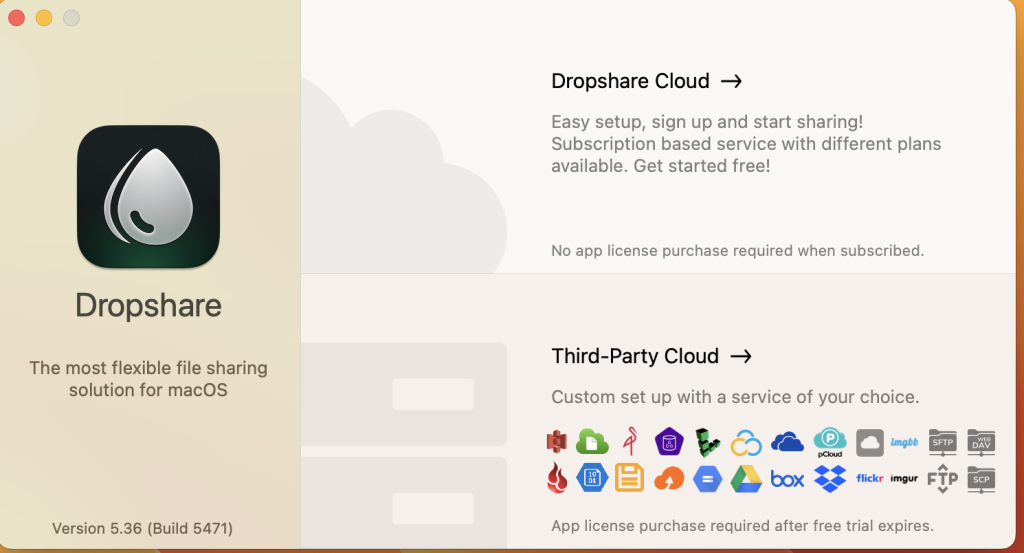
Dropshare is a powerful and versatile file sharing tool designed for macOS, enabling users to securely upload and share files, folders, text, and screenshots. It supports various upload destinations, including your own server, Amazon S3, Rackspace Cloud Files, and Google Drive, providing a seamless and private file-sharing experience. Here’s an overview of its features and capabilities:
Key Features of Dropshare
- Wide Range of Uploads:
- Files and Folders: Drag and drop files, folders, text, and screenshots to upload them to your chosen destination.
- Clipboard Uploads: Upload data directly from the clipboard or other applications like Safari.
- Secure Upload Protocols:
- SCP over SSH: Supports SCP over SSH, a secure protocol for file transfers.
- Cloud Integration: Uploads to Amazon S3, Rackspace Cloud Files, and Google Drive, connecting directly to your own storage containers without third-party involvement.
- Multiple Connections:
- Multiple Upload Destinations: Set up and switch between different upload destinations using user-defined keyboard shortcuts.
- Automatic Screenshot and Screen Recording Uploads:
- Screenshot Uploads: Set up keyboard shortcuts for fullscreen or selection-based screenshots that upload automatically.
- Screen Recordings: Capture and upload screen recordings, with options for fullscreen and selection-based recordings.
- Enhanced Security:
- Dropshare Safe: Create access-restricted URLs for your uploads with password protection and/or expiration dates.
- Customizable Landing Pages:
- Individual Designs: Choose from free designs or create custom landing pages using HTML, CSS, and JavaScript. Embedded previews are available for several file types.
- URL Shortening:
- Native and Custom Shorteners: Supports native URL shorteners (e.g., dsh.re) and custom URL shorteners like bit.ly or YOURLS.
- Synchronization and Management:
- Dropshare Sync: Sync your upload history across all devices with Dropshare installed.
- 1-Click Delete: Easily delete files from your server with a single click.
- Markdown Conversion:
- Markdown to HTML: Automatically convert Markdown files to HTML if enabled.
- macOS Integration:
- Services Menu: Integrates with the macOS Services Menu, allowing you to create keyboard shortcuts for specific actions.
- IPv6 Compatibility:
- IPv6 Ready: Fully functional in IPv6 environments.
Compatibility
- OS Requirement: Compatible with macOS 10.10 or later.
Availability
- Homepage: More information and the download link can be found on the official Dropshare website.
Summary
Dropshare is a comprehensive file-sharing solution that emphasizes security, flexibility, and ease of use. With support for various upload destinations, automatic uploads, customizable landing pages, and strong security features, Dropshare is ideal for users who need a reliable and private way to share files on macOS. Whether you’re managing professional data or sharing personal media, Dropshare provides the tools and features to do so efficiently and securely.

4K Stogram Pro for Mac 4.9.0
0
Name : 4K Stogram Pro
Size : 120 MB
4K Stogram Pro for Mac free Download
4K Stogram is a versatile Instagram downloader that enables users to download and backup Instagram photos and videos, including content from private accounts. It allows users to download media using hashtags or specific locations, making it a comprehensive tool for managing Instagram content.
Key Features of 4K Stogram
- Simultaneous Account Downloads:
- Multiple Accounts: Download photos and videos from several Instagram accounts at the same time, saving them in JPEG format on your desktop.
- Automatic Photo Updates:
- Follow Photographers: Automatically download the latest photos from your favorite photographers as soon as they post them.
- Instagram Stories Download:
- Stories as Files: Save Instagram Stories as video or image files, ensuring you don’t miss out on temporary content.
- Private Account Access:
- Private Content Download: Use your Instagram credentials to log in and download photos and videos from private accounts you follow.
- Integrated Media Viewer:
- In-App Viewing: Access and view your downloaded media directly within the application.
- Video Downloads:
- MP4 Format: Download Instagram videos in MP4 format, making them compatible with most media players.
- User-Friendly Interface:
- Minimalistic Design: Enjoy a clean, easy-to-use interface that simplifies navigation and operation.
What’s New in Version 4.9.0
- Update Information: Specific release notes for version 4.9.0 were not available at the time of the update.
Compatibility
- OS Requirement: Compatible with macOS 10.13 or later, 64-bit versions.
Availability
- Homepage: 4K Stogram can be downloaded from the official 4K Download website.
Summary
4K Stogram is a powerful tool for downloading and backing up Instagram content, providing features such as simultaneous account downloads, automatic updates from favorite photographers, and access to private account media. Its ability to save Stories and videos in common formats like JPEG and MP4, along with a minimalistic interface, makes it a user-friendly and efficient solution for managing Instagram media.
Invisor for Mac Download 3.25
0
Name : Invisor
Size : 19 MB
Invisor for Mac free Download
nVisor is a comprehensive tool for displaying and analyzing technical information about video, audio, and photo files. It supports a wide array of file formats and provides detailed metadata information, making it an essential utility for media professionals and enthusiasts. Here’s a detailed overview of its features and capabilities:
Key Features of nVisor
- Format Support:
- Video and Audio Formats: Supports a variety of formats including MPEG-1/2/4, Matroska, WMV, XVID, AVI, MXF, MOV, MJPEG, MP3, AAC, Vorbis, AC-3, DTS, WMA, ALAC, FLAC, PCM, and more.
- Photo Formats: Supports JPEG, TIFF, PNG, and most raw formats from various cameras.
- Detailed Technical Information:
- File Containers and Media Streams: Displays comprehensive information about file containers, media streams, subtitles, and chapters.
- Photo Metadata: Shows EXIF, IPTC, GPS, XMP, and MakerNote tags for photos.
- Export and Comparison:
- Export Information: Allows exporting gathered information in multiple formats such as Text, HTML, XML, JSON, and CSV.
- Comparison Table: Enables comparison of collected data, which can be exported to a CSV document for further analysis.
- Privacy Features:
- Geolocation Metadata Removal: Includes a command to remove geolocation metadata from photos and MPEG-4 (QuickTime) movies to protect your privacy when sharing media files.
Compatibility
- OS Requirement: Compatible with OS X 10.7.3 or later versions.
Availability
- Mac App Store: nVisor can be downloaded from the Mac App Store.
Summary
nVisor is a versatile and powerful application for displaying and comparing technical metadata of various media files. Its support for a wide range of formats and detailed metadata extraction, combined with export and comparison capabilities, makes it an invaluable tool for anyone needing in-depth analysis of their media files. Additionally, its privacy features ensure that sensitive location data can be removed before sharing files, adding an extra layer of security for users.
Dropzone 4 Pro for Mac 4.80.12
0
Name : Dropzone 4 Pro
Size : 62 MB
Dropzone 4 Pro for Mac free Download
Dropzone is a highly versatile macOS application that enhances file management and workflow efficiency. It allows users to copy and move files, open applications, and share files across various services quickly and effortlessly. Here’s an in-depth look at its features and capabilities:
Key Features of Dropzone
- File Management:
- Faster File Operations: Copy and move files swiftly.
- Drop Bar: Temporarily stash files for easy access later by dropping them on the Drop Bar icon in the grid.
- Application and URL Management:
- Open Applications: Launch applications directly from the Dropzone grid.
- URL Shortening: Quickly shorten URLs using Tinyurl. Just select a URL and press Ctrl+Option+Cmd+S to copy the shortened URL to the clipboard.
- Integration with Services:
- AirDrop: Easily share files or folders with other Macs over the network.
- Imgur: Quickly upload images and get a shareable link.
- Amazon S3: Upload files to Amazon S3 (Pro feature).
- FTP Servers: Upload files to your FTP server (Pro feature).
- Google Drive: Upload files to Google Drive (Pro feature).
- Add-On Actions: Download and install additional actions for services like YouTube and others (Pro feature).
- Multitasking and Progress Tracking:
- Powerful Multitasking: Run multiple tasks simultaneously and track their progress within the in-grid task status area.
- Animated Menu Item: Quickly see how tasks are progressing.
- Customization and Extendability:
- Grid Customization: Easily add applications, folders, or actions to the grid by dragging and dropping them onto the “Add to Grid” area.
- Scripting API: Extend functionality with custom actions using Ruby or Python (Pro feature).
- Keyboard Shortcuts: Launch Dropzone actions using newly added keyboard shortcuts (Pro feature).
In-App Purchases
- Dropzone 4 Pro: Unlocks advanced features such as uploading to Amazon S3, FTP servers, Google Drive, additional action downloads, and the ability to create custom actions using the scripting API.
Compatibility
- macOS Requirement: Compatible with macOS 10.15 or later versions.
Availability
- Mac App Store: Dropzone can be downloaded from the Mac App Store.
Summary
Dropzone is a unique and powerful application that integrates seamlessly with macOS, enhancing productivity by streamlining file management and sharing processes. Its extendability through a scripting API and the wide range of supported services make it a valuable tool for both casual users and professionals.

Colori for Mac Download 1.4
0
Name : Colori
Size : 6 MB
Colori for Mac free Download
Colori is a versatile and user-friendly color palette generator designed specifically for macOS. It provides a wide array of features to help you create beautiful color schemes effortlessly. Here’s a detailed look at what Colori offers:
Key Features of Colori
- User-Friendly Interface:
- Ease of Use: Colori is designed to be intuitive and easy to navigate, making it simple to generate and customize color palettes.
- Accessibility: All features are easily accessible, ensuring a smooth user experience.
- Color Palette Generation:
- Diverse Palette Options: Create a variety of color schemes, including complementary, analogous, triadic, tetradic, and more.
- Customization: Fine-tune your color palettes with precise controls for hue, saturation, and brightness.
- Advanced Tools:
- Color Harmonies: Explore different color harmonies to find the perfect combination for your project.
- Color Adjustments: Modify individual colors within a palette to achieve the exact shade you need.
- Export and Sharing:
- Multiple Formats: Export your color palettes in various formats suitable for different applications, such as HEX, RGB, and more.
- Easy Sharing: Share your color schemes with others directly from the app.
- Integration:
- Design Software Compatibility: Compatible with popular design tools, allowing seamless integration into your workflow.
Compatibility
- macOS Requirement: Compatible with macOS 12.0 or later versions.
Availability
- Homepage: You can download and learn more about Colori from the official Colori website.
Colori stands out as a comprehensive tool for anyone involved in design, providing an extensive range of features to create, customize, and share stunning color palettes directly from your Mac. Whether you’re a professional designer or a hobbyist, Colori is designed to meet all your color scheme needs with ease.
QR Wizard for Mac Download 2.2
0
Name : QR Wizard
Size : 6 MB
QR Wizard for Mac free Download
QRwiz is a powerful and user-friendly application for macOS that allows you to generate and style beautiful QRCode images. Here’s a detailed overview of its features and capabilities:
Key Features of QRwiz
- Ease of Use:
- Simple and Practical: The application is designed to be intuitive and easy to use. You just need to input your data or text, and the app will generate the QRCode for you.
- Quick Setup: Minimal steps required to create a QRCode, making it accessible for users of all levels.
- Customization Options:
- Color Options: Customize the colors of your QRCode to match your branding or personal preference.
- Shape Options: Various shapes available to make your QRCode unique and eye-catching.
- Extensive Customization: Numerous other options to fine-tune the appearance and style of your QRCode.
- Performance:
- Lightning Fast: The app works quickly and efficiently, generating QRCodes almost instantaneously.
- Export Formats:
- PNG: High-quality raster image format.
- JPG: Widely used raster image format.
- SVG: Scalable vector graphic format for high-quality print and digital use.
- ASCII Art: Unique option to export your QRCode as ASCII art for text-based applications.
What’s New in Version 2.2
- Release Notes: Specific details were not available at the time of the listing update.
Compatibility
- macOS Requirement: Compatible with macOS 10.13 or later versions.
Availability
- Homepage: The app can be accessed and downloaded from the official QRwiz website.
QRwiz is an excellent tool for anyone looking to create customized and attractive QRCodes quickly and easily. Its range of features and export options makes it a versatile choice for both personal and professional use.

OmniReader Pro for Mac free 2.9.8
0
Name : OmniReader Pro
Size : 31 MB
OmniReader Pro for Mac free Download
GM Reader is a comprehensive book reader designed for macOS that supports various file formats, including EPUB, CHM, and Kindle files. It boasts several features aimed at enhancing the reading experience, making it a versatile tool for avid readers and researchers alike. Here’s a detailed overview of its features and capabilities:
Key Features of GM Reader
- File Format Support:
- EPUB: A widely used format for eBooks.
- CHM: Commonly used for Windows help files.
- Kindle Files: Typically MOBI and AZW formats used by Amazon Kindle devices.
- Search Functionality:
- Single Page Search: Allows you to search within the currently displayed page.
- Full Text Search: Enables searching throughout the entire document.
- Highlighted Search Results: Makes it easy to locate search terms within the text.
- Browsing History:
- Forward and Backward Navigation: Facilitates easy navigation through previously viewed pages.
- Reading Experience:
- Page Turning: Simulates the experience of turning pages in a physical book.
- Zooming: Allows zooming in and out for better readability.
- Sidebar Shrinking: Optimizes the viewing area by adjusting sidebars.
- Additional Functionalities:
- Page Printing: Provides the option to print pages directly from the app.
- File Information Viewing: Displays basic metadata and information about the file.
- File Export: Supports exporting documents to EPUB and PDF formats.
- Image Extraction: Capable of extracting all images contained within a file.
- File Encoding Support: Helps resolve issues with garbled text due to encoding problems.
- Image Adaptation: Automatically adjusts image sizes for better integration into the text.
Bookrack Feature
- Bookshelf Management: Keeps track of all files read, allowing for quick access and review.
- Drag and Drop: Simplifies adding new files to the bookshelf.
In-App Purchases
- Pro Version: Unlocks additional features and capabilities, providing a more enhanced reading experience.
Compatibility
- macOS Requirement: Compatible with macOS 10.13 or later versions.
Availability
- Mac App Store: The app can be downloaded from the Mac App Store.
GM Reader offers a robust set of features for reading and managing various eBook formats, making it a valuable tool for users who require a versatile and efficient eBook reader on macOS.

Little Snitch for Mac Download 5.7.4
0
Name : Little Snitch
Size : 30 MB
Little Snitch for Mac free Download
Little Snitch is an essential macOS application that offers powerful network monitoring and connection control to safeguard your privacy. Here’s what you can expect from this versatile tool:
- Network Traffic Monitoring: Little Snitch provides a well-designed interface for filtering connections and monitoring network traffic with ease. Animated and informative diagrams offer real-time insights into bandwidth usage, connectivity status, traffic totals, and detailed traffic history.
- Silent Mode: Stay focused on your work without interruptions by enabling Silent Mode, which suppresses network-related notifications. You can review the Silent Mode Log to create rules for connection attempts during this period.
- Profile Management: Organize your rules into different profiles and activate them as needed from the status bar menu. Automatic Profile Switching associates networks with specific profiles, allowing you to apply different rulesets based on your location or network.
- Temporary Rules: Set up temporary rules that are effective for a limited period of time, offering flexibility in managing your network connections.
- Automatic Analysis: Little Snitch automatically analyzes your ruleset to identify overlapping, redundant, or invalid rules, helping you maintain an optimized and efficient configuration.
- Updates: The latest version, Little Snitch 5.7, ensures compatibility with macOS 14 Sonoma and addresses rare issues with connection alerts in multiple Spaces. Additionally, potential crashes related to notifications have been fixed.
With its comprehensive features and user-friendly interface, Little Snitch is a valuable tool for monitoring and controlling network traffic on macOS systems.
Compatibility: macOS 11.0 or later • Apple Silicon or Intel Core processor
For more information, visit the official homepage: Little Snitch