Jameskarke

Jameskarke

This user hasn't shared any profile information

Home page: http://macmyanmar.com

Posts by Jameskarke

PDF Expert for Mac Download 3.10.3

0

Name : PDF Expert

Size : 110 MB

PDF Expert for Mac free Download

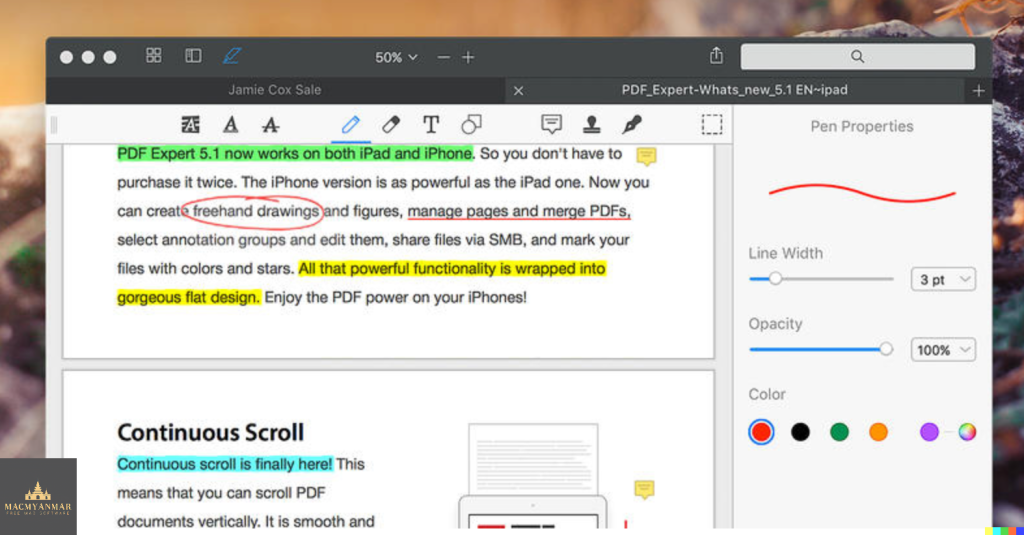
PDF Expert is a powerful and versatile PDF management application designed for macOS. It offers a wide range of features to enhance your PDF reading, annotation, form filling, and document signing experiences. Known for its smooth scrolling, fast search capabilities, and seamless integration across Apple devices, PDF Expert is a must-have tool for anyone who regularly works with PDF files.

Key Features

  1. Smooth and Fast PDF Viewing:
  • Instantly opens PDFs, whether they are small attachments or large documents.
  • Supports smooth scrolling and fast search functions.
  1. Professional Annotation Tools:
  • Easy-to-use annotation tools for making simple changes or engaging in extensive editing sessions.
  • Includes highlighting, underlining, strikethroughs, and other annotation options.
  1. Tabbed Document Viewer:
  • Award-winning viewer that allows for fast navigation through multiple PDFs using tabs.
  1. Form Filling Excellence:
  • Provides a superior experience for filling out PDF forms.
  • Supports text fields, checkboxes, radio buttons, and other form elements.
  • Handles complex interactive forms with JavaScript effectively.
  1. Easy Document Signing:
  • Simplifies the process of signing documents on your Mac.
  • Allows for typing your name, using the trackpad to write your signature, or using pre-existing signatures from PDF Expert for iOS.
  1. Wide Sharing Options:
  • Excellent support for macOS’s system-wide share sheet and other apps.
  • Easily share PDFs with clients, coworkers, and others.
  1. Cross-Device Compatibility:
  • Works seamlessly across all Apple devices, including Mac, iPad, and iPhone.
  • Utilizes Apple’s Continuity and Handoff features to transfer documents between devices effortlessly.

System Requirements

  • Operating System: macOS 10.13 or later

Homepage

For more information, visit the PDF Expert homepage.

Conclusion

PDF Expert is a comprehensive and user-friendly PDF management tool that enhances your productivity by providing fast and efficient PDF viewing, editing, annotation, form filling, and signing capabilities. Its smooth integration with other Apple devices and apps makes it a versatile choice for professionals and casual users alike. Whether you need to annotate documents, fill out forms, or sign contracts, PDF Expert offers a robust solution that meets all your PDF-related needs.

A Better Finder Attributes 7 for Mac v7.32

0

Name : A Better Finder Attributes

Size : 16 MB

A Better Finder Attributes for Mac free Download

A Better Finder Attributes is a comprehensive file-tweaking utility designed for macOS. It provides a wide range of features for managing file attributes, especially useful for photographers and power users who need precise control over file metadata and timestamps.

Key Features

  1. EXIF Timestamp Manipulation:
  • Modify EXIF timestamps for JPEG, CR2, NEF, ARF, CRW, and CIFF formats.
  • Set specific times or batch adjust timestamps by adding or removing time.
  • Corrects timestamps for images taken with incorrect camera settings or compensates for timezone changes.
  1. Finder Sorting Synchronization:
  • Sync file creation and modification dates with shooting dates for JPEG EXIF and various RAW formats.
  • Ensures proper sorting of photos in Finder and other systems.
  1. Total Control Over File Dates:
  • Set creation and modification dates to specific times and dates.
  • Add or remove time from file dates or remove them entirely.
  1. Automation with Droplets:
  • Save frequently used settings to “droplet” applications.
  • Apply changes by dragging and dropping files onto the droplet or double-clicking to edit settings.
  1. Batch Operations:
  • Support for batch processing of files and sub-folders.
  • Drag-and-drop files into the application or onto its icon.
  • Use Finder context menu or hot keys to activate the tool.
  1. Additional Controls:
  • Manage file extensions visibility in Finder.
  • Batch lock or unlock files.
  • Set or remove legacy creator and type codes.
  • Remove invisible files or see them in Finder.
  • Batch set Finder labels.
  • Force Finder to update its information about files and folders.

User Experience

A Better Finder Attributes is designed to be intuitive and easy to use, even for those who may not be very technical. Its drag-and-drop functionality and the ability to save frequently used settings as droplets make it accessible for users of all levels.

The software also handles file date consistency rules automatically, ensuring that your changes do not cause any inconsistencies or issues within the file system.

System Requirements

  • Operating System: macOS 10.11 or later

Homepage

For more details, features, and download options, visit the A Better Finder Attributes homepage.

Conclusion

A Better Finder Attributes is a powerful tool for macOS users who need precise control over their file metadata and timestamps. With its robust feature set, ease of use, and automation capabilities, it is an invaluable utility for photographers, content creators, and anyone who works with large volumes of files. Whether you need to correct EXIF timestamps, synchronize file dates for proper sorting, or automate repetitive tasks, A Better Finder Attributes offers a comprehensive solution.

MarsEdit for Mac Download 5.2.0

0

Name : MarsEdit

Size : 23 MB

MarsEdit for Mac free Download

MarsEdit is a robust desktop application designed for bloggers who prefer to write and manage their blog content offline on their Mac. It offers a range of features that enhance the blogging experience, making it easier and more efficient to create, edit, and publish posts.

Key Features

  • Wide Range of Blogging Service Support:
  • MarsEdit supports popular blogging platforms including WordPress, Blogger, TypePad, Tumblr, Movable Type, and any service compatible with MetaWeblog or AtomPub interfaces.
  • Versatile Writing Options:
  • Write using HTML, RTF, or Markdown.
  • Live preview feature to see how your post will look before publishing.
  • Integration with Text Editors:
  • Seamless integration with TextMate, WriteRoom, TextWrangler, BBEdit, and other text editors that support the ODBEditor suite.
  • Easy Media Management:
  • Quickly search and import images from iPhoto, Lightroom, Flickr, or Aperture libraries with a single click.
  • Offline Drafting and Local Saves:
  • Write and save drafts locally, allowing you to work offline and publish when you have an internet connection.

Benefits

  • Improved Efficiency:
  • Streamline your blogging process by managing everything from a native Mac app, eliminating the need for clunky web interfaces.
  • Convenient Offline Writing:
  • Write blog posts anytime, anywhere, without needing an internet connection. This is perfect for drafting posts during travel or when internet access is unreliable.
  • Rich Text and Markdown Support:
  • Flexibility to write in your preferred format, with live previews to ensure your posts look just right.
  • Enhanced Media Handling:
  • Simplify adding images and media to your posts with easy access to your photo libraries.

User Experience

While MarsEdit boasts a robust feature set and a user-friendly interface, it is worth noting that the application’s design has remained relatively unchanged over the years. The interface is straightforward and intuitive, making it easy to manage your blog. However, some users might find it a bit dated in terms of visual aesthetics.

Despite this, the functionality and convenience MarsEdit offers make it an excellent tool for bloggers seeking to streamline their workflow and write posts offline.

System Requirements

  • Operating System:
  • Compatible with macOS 10.15.4 or later.

Homepage

For more details, features, and download options, visit the MarsEdit homepage.

Conclusion

MarsEdit is a valuable tool for bloggers who want to enhance their writing and publishing process. With support for multiple blogging platforms, versatile writing options, and offline capabilities, MarsEdit provides a comprehensive solution for managing your blog from your desktop. While its interface may appear a bit dated, the application’s efficiency and functionality more than make up for it, making it a worthwhile investment for any serious blogger.

Viwizard Audio Converter for Mac 3.11.0

0

Name : Viwizard Audio Converter

Size : 30 MB

Viwizard Audio Converter for Mac free Download

ViWizard Audio Converter is a powerful and versatile application designed to convert a wide range of audio files into universally compatible formats. This tool is especially useful for overcoming the restrictions imposed on certain audio formats, allowing you to enjoy your music and audiobooks on any device or platform.

Key Features

  • Wide Range of Supported Formats:
  • Convert M4P songs, M4A/M4B audiobooks, and Audible AA/AAX audiobooks.
  • Handle common audio formats such as MP3, M4A, AAC, FLAC, WAV, and M4B.
  • Bypass Playback Restrictions:
  • Easily download and convert restricted audio files to play on any cross-platform device, including Android and Windows phones, tablets, and more.
  • High-Quality Conversion:
  • Maintain original audio quality during the conversion process to ensure the best listening experience.
  • User-Friendly Interface:
  • Intuitive and straightforward design makes it easy for users of all skill levels to convert their audio files.
  • Batch Conversion:
  • Convert multiple files at once to save time and effort.
  • Preserve ID3 Tags:
  • Keep important metadata like track title, artist, album, and genre intact during conversion.
  • Customizable Output Settings:
  • Adjust parameters such as bit rate, codec, sample rate, and channel to suit your preferences.

System Requirements

  • Operating System:
  • Compatible with macOS 10.10 (Yosemite) or later.

Use Cases

  • Listen Anywhere:
  • Convert restricted audio files to formats compatible with any device, ensuring you can listen to your favorite tracks and audiobooks wherever you go.
  • Backup and Archival:
  • Save your audio files in more accessible formats for easier storage and retrieval.
  • Editing and Mixing:
  • Convert files to formats compatible with various audio editing software for further processing.

Homepage

For more information, features, and download options, visit the ViWizard Audio Converter homepage.

Conclusion

ViWizard Audio Converter is an essential tool for anyone looking to enjoy their audio library without limitations. Whether you’re converting for compatibility, backup, or editing purposes, this tool provides the functionality and ease of use needed to manage your audio files effectively. With support for a wide range of formats and high-quality conversion, ViWizard Audio Converter ensures you can listen to your audio files on any device, anywhere, anytime.

MWeb Pro for Mac 4.6.2

0

Name : MWeb Pro

Size : 36 MB

MWeb Pro for Mac free Download

Perfectly Clear Workbench by Athentech is a powerful application designed to showcase and utilize the capabilities of the Perfectly Clear image correction libraries. This tool is ideal for users who want to perform precise image corrections and export these settings for integration into other software via the Perfectly Clear SDK.

Key Features

  • Intuitive Interface:
  • The new interface in Perfectly Clear Workbench 4 is designed to be user-friendly and efficient, allowing quick access to all tools and features.
  • Advanced Image Correction Tools:
  • Preprocessing Section: Includes “Input Looks” and “Image Ambulance” for manual exposure corrections.
  • Face Aware Exposure: Provides more accurate auto-exposure corrections, especially useful for portraits and group photos.
  • Black Point Tool: Enhances the depth of blacks in your images.
  • Color Vibrancy Tool: Complements the existing Color Restoration tool for richer color adjustments.
  • Sky and Foliage Enhancements: Specialized tools to enhance skies and foliage in your images.
  • Improved Existing Tools:
  • Light Diffusion and Vibrancy: Now feature strength sliders for better control.
  • Enhanced Color Pickers: Improved tools for Skin Tone and Blush adjustments.
  • Manual Face Detection and Adjustment:
  • Manually identify faces that are not automatically detected.
  • One-click zoom to individual faces.
  • Modify facial regions to ensure the best possible corrections.
  • Additional Features:
  • Histogram: Provides a visual representation of the tonal distribution in your image.
  • Improved Preset Management: Easier to manage and apply presets for consistent corrections across multiple images.
  • Export to API: Quickly export your custom correction settings to a text file, making it easy to integrate these settings into your source code with the Perfectly Clear SDK.

Supported Image Formats

  • RGB-formatted images: Compatible with 8 or 16-bit color depth.
  • Photoshop and Lightroom Files: Any image file that can be opened and converted by Photoshop or Lightroom can be used.
  • RAW Files: Must be opened through Adobe Camera RAW and loaded into Photoshop before using Perfectly Clear.
  • Monochrome and CMYK Images: Must be converted to RGB before use.

System Requirements

  • Operating System:
  • Compatible with macOS 10.15 (Catalina) or later.

What’s New in Version 4.6.2

  • The latest version includes various enhancements and bug fixes. Specific release notes were not available at the time of this update.

Homepage

For more information, features, and download options, visit the Perfectly Clear Workbench homepage.

Conclusion

Perfectly Clear Workbench is a comprehensive tool for advanced image correction, offering both manual and automated features to enhance photo quality. Its integration capabilities with the Perfectly Clear SDK make it a valuable asset for developers looking to incorporate sophisticated image correction into their applications. Whether for professional photo editing or integrating into larger workflows, Perfectly Clear Workbench provides the tools needed for precise and high-quality results.

TechSmith Snagit for Mac 2024.2.5

0

Name : TechSmith Snagit

Size : 265 MB

TechSmith Snagit for Mac free Download

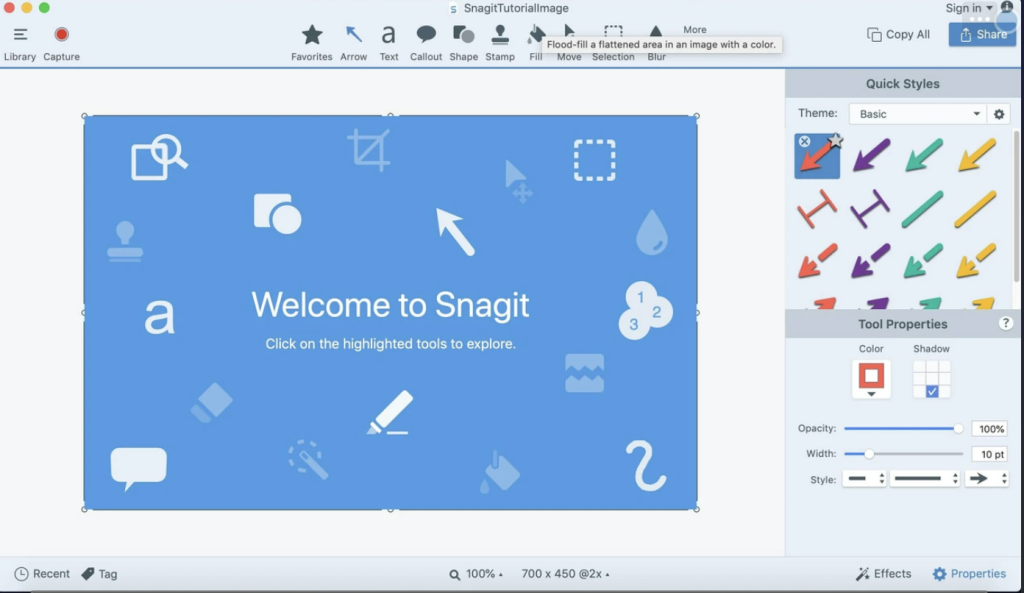
Snagit by TechSmith is a versatile and powerful screen capturing tool designed to offer more advanced functionality than the basic capabilities of macOS. It provides a wide array of screenshot and video recording options, coupled with an integrated editor for personalizing your captures without needing third-party applications.

Key Features

  • Diverse Capture Types:
  • Capture screenshots, including full-screen, window, or region-specific captures.
  • Record video content from your screen, including webcam input.
  • Capture entire webpages, menus, or set a delay to capture timed screenshots.
  • User-Friendly Interface:
  • Snagit operates from a status bar menu application with an autohiding capture window at the top right corner of the screen.
  • Customizable hotkeys allow for quick access to different capture types.
  • The interface is designed to be unobtrusive and integrates smoothly into your workflow.
  • Integrated Editing Tools:
  • The built-in image editor includes tools for highlighting areas, adding text, erasing elements, applying color filters, and edge effects.
  • Video editing capabilities are focused on simple tasks like previewing and trimming recordings.
  • These tools enable you to enhance and personalize your captures directly within Snagit.
  • Efficient Sharing Options:
  • Snagit supports connecting to various online accounts (such as Google Drive, Dropbox, etc.) for quick uploads and sharing.
  • Streamlined sharing options make it easy to distribute your captures without leaving the application.

Usage Scenarios

  • Educational and Training Material:
  • Create detailed tutorials and presentations by capturing and annotating screenshots or recording video walkthroughs.
  • Highlight key information and steps to enhance understanding.
  • Professional Communication:
  • Capture and share visual information in reports, documentation, or presentations.
  • Use screenshots and videos to communicate complex ideas more effectively.
  • Personal Projects:
  • Easily capture and share moments from your screen activities, whether for personal records or sharing with friends.

System Requirements

  • Operating System:
  • Compatible with macOS 12.0 (Monterey) or later.

Homepage

For more information, features, and download options, visit the Snagit product page on TechSmith’s website.

Conclusion

Snagit is a comprehensive screen capturing solution that enhances productivity with its advanced features and intuitive interface. It is particularly useful for creating educational content, professional documentation, and detailed visual communications. By integrating powerful editing and sharing capabilities, Snagit ensures that users can quickly and efficiently manage their screen captures and recordings.
Autodesk Maya for Mac 2025.1

0

Name : Autodesk Maya

Size : 4 GB

Autodesk Maya for Mac free Download

Maya® by Autodesk is a leading 3D animation software offering an extensive suite of creative tools for 3D computer animation, modeling, simulation, rendering, and compositing. It serves as a highly extensible production platform, ideal for both individual artists and large studios handling complex data and projects.

Key Features

  • Advanced 3D Modeling:
  • Create intricate 3D models with precision and flexibility.
  • Includes tools for advanced surface modeling, NURBS (Non-uniform rational B-spline) modeling, and polygonal modeling.
  • Simulation of Natural Elements:
  • Simulate a variety of natural and environmental elements such as climate changes, water and liquids, fire, and vegetation.
  • Use Bifrost for sophisticated fluid simulations and BOSS for ocean wave simulations.
  • Enhanced Modeling Workflows:
  • Accelerated modeling workflows with intuitive tools.
  • Streamlined UV and texture tools for better handling of complex data.
  • Attribute Transfer:
  • Easily transfer properties from one object to another, facilitating workflow efficiency and consistency.
  • Character and Environment Design:
  • Tools for designing detailed characters, including clothes, hair, and various textures.
  • Create dynamic environments and scenarios with ease.
  • Interoperability:
  • Seamless coordination with other modeling and animation software.
  • Supports industry-standard formats for smooth integration into any production pipeline.
  • Scripting and Customization:
  • Utilize MEL (Maya Embedded Language), C++, and Python for scripting and developing custom tools.
  • Highly customizable interface to tailor the software to specific production needs.
  • Two-Dimensional and Three-Dimensional Integration:
  • Combine 2D and 3D elements to create complex and dynamic scenes.

System Requirements

  • Operating System:
  • Apple® macOS® 13.x (Ventura), 12.x (Monterey), 11.x (Big Sur).
  • CPU:
  • 64-bit Intel® or AMD® multi-core processor with SSE4.2 instruction set.
  • RAM:
  • Minimum: 8 GB (16 GB or more recommended).

Homepage

For more information, updates, and a detailed overview of Maya’s capabilities, visit the Maya product page on Autodesk’s website.

Summary

Maya provides a robust platform for 3D artists and animators, combining cutting-edge display technology with advanced tools for modeling, simulation, rendering, and compositing. Its extensive feature set supports a wide range of creative and technical needs, making it a preferred choice for professionals in film, game development, and other industries requiring high-quality 3D graphics and animations.

Autodesk Flame for Mac 2025.0.1

0

Name : Autodesk Flame

Size : 3.44 GB

Autodesk Flame for Mac free Download

Flame® is an advanced 3D visual effects software offering a comprehensive suite of tools for fast, interactive 3D visual effects, finishing, compositing, advanced graphics, color grading, conform, editorial, and look development. Tailored for professional visual effects artists, Flame provides a robust platform to create high-quality visual effects and finish projects with precision.

Key Features

  • 3D Compositing (Action):
  • Combines the interactive speed of traditional 2D compositing with powerful 3D visual effects.
  • Provides a WYSIWYG (What You See Is What You Get) preview for artists during sessions.
  • Node-Based Compositing (Batch):
  • Batch is a node-based procedural compositing environment that integrates seamlessly with the timeline and desktop.
  • Allows for the combination of 2D and 3D elements to create complex visual effects.
  • Editorial Timeline:
  • Enables project oversight, creation of consistent looks, and accurate matching of graded and 3D VFX shots.
  • Includes scene detection to streamline the editing process.
  • Matchbox API:
  • Features Lightbox, Matchbox, and PBR shaders for utilizing GPU-accelerated GLSL shaders in the 3D compositing environment (Action).
  • Action Projection Tracking:
  • Converts a projection into a UV set for geometry, enhancing the flexibility and precision of 3D effects.
  • Connected Conform Smart Merge:
  • Dynamically merges new editorial cuts with work-in-progress shots late in a project, ensuring seamless integration and updates.
  • Python API:
  • Allows for the automation of the Batch environment through scriptable commands, providing increased efficiency and customization.
  • Pybox:
  • Uses a scriptable handler to process images via external renderers, expanding the range of visual effects capabilities.

System Requirements

  • Operating System:
  • Apple® macOS® Mojave v10.14.x, Catalina v10.15.x, Big Sur v11.1 or later.
  • GPU:
  • Native Mac graphics cards with a minimum of 8GB VRAM.
  • Recommended: Radeon Pro Vega II.
  • CPU:
  • Recommended: Intel Core i7 or higher.
  • Note: Apple M1 CPU is not currently supported.
  • RAM:
  • Minimum: 32GB.
  • Recommended: 64GB.
  • Display:
  • 1920 x 1200 resolution with a 60Hz refresh rate.

Homepage

For more information and to explore the full range of features offered by Flame, visit the Flame product page on Autodesk’s website.

Summary

Flame provides a powerful and versatile platform for creating advanced 3D visual effects, combining the speed of 2D compositing with the depth and flexibility of 3D visual effects. Its comprehensive suite of tools, including Action for 3D compositing and Batch for node-based compositing, along with robust scripting and API support, make it an essential tool for professional visual effects artists looking to produce high-quality, intricate visual effects.

Topaz Gigapixel AI for Mac 7.1.4

0

Name : Topaz Gigapixel ai

Size : 236 MB

Topaz Gigapixel Ai for Mac free Download

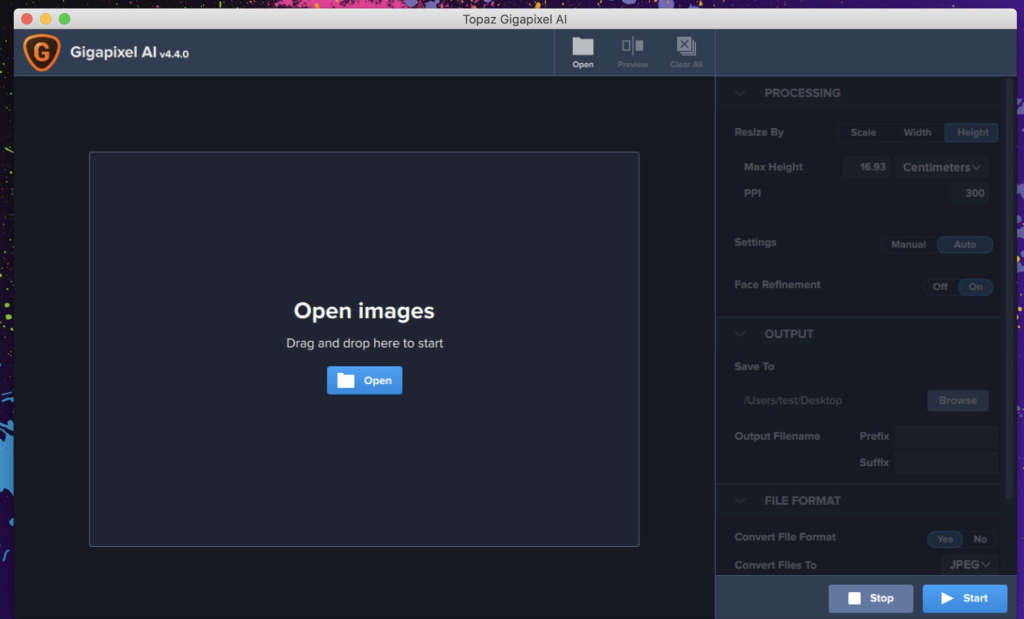
Gigapixel AI redefines photo enlargement by using machine learning to upscale images up to 600% while preserving and enhancing detail. This revolutionary technology transforms ordinary photos into high-resolution masterpieces, suitable for professional use and large-format prints.

Key Features

  • Enlarge Images by up to 600%:
  • Create stunningly detailed large prints from small images, such as transforming a basic iPhone photo into a sharp 80 x 60 inch print.
  • Truly Intelligent Upscaling:
  • Trained with millions of sample images, Gigapixel AI uses deep learning to deliver superior quality enlargements that retain detail and clarity.
  • Crisp and Clear Results:
  • Gigapixel AI performs around 2 million operations per pixel to achieve the highest possible detail and sharpness, ensuring your enlarged photos look crisp and clear.
  • Recover Real Details:
  • Unlike traditional methods that simply increase edge contrast, Gigapixel AI recovers real details lost during the original capture, providing actual sharpness and detail.
  • High-Quality Output:
  • Whether for breathtakingly sharp prints, high-resolution cropping, or enhancing photos from smartphones to look like DSLR outputs, Gigapixel AI ensures the best possible quality for all your enlargements.

How It Works

  • Machine Learning vs. Interpolation:
  • Traditional interpolation-based enlargement algorithms approximate new pixels from surrounding ones, smoothing transitions but not adding detail.
  • Gigapixel AI’s neural network learns from thousands of photo pairs, effectively adding new detail by filling in lost information based on learned patterns.

Use Cases

  • Professional Photography:
  • Used by leading photographers to create high-resolution, detail-rich images from lower resolution captures.
  • Video Game Modding:
  • Enhances textures and elements in video games for sharper, more detailed graphics.
  • Motion Picture Studios:
  • Employed by major studios to upscale and enhance visual elements in films.

Technical Details

  • Latest Version:
  • Version 7.1.4 (release notes were unavailable at the time of this listing).
  • Compatibility:
  • macOS 10.14 or later.
  • Homepage:
  • For more information and to download Gigapixel AI, visit Topaz Labs.

Summary

Gigapixel AI is the leading photo enlargement software that leverages advanced machine learning to upscale images while preserving and even adding detail. Its intelligent upscaling capabilities make it an essential tool for professionals needing high-quality, large-format prints or detailed image enhancements. With its state-of-the-art technology, Gigapixel AI sets a new standard in image enlargement, far surpassing traditional interpolation methods.

Boxy SVG for Mac Download 4.32.2

0

Name : Boxy SVG

Size : 182 MB

Boxy SVG for Mac free Download

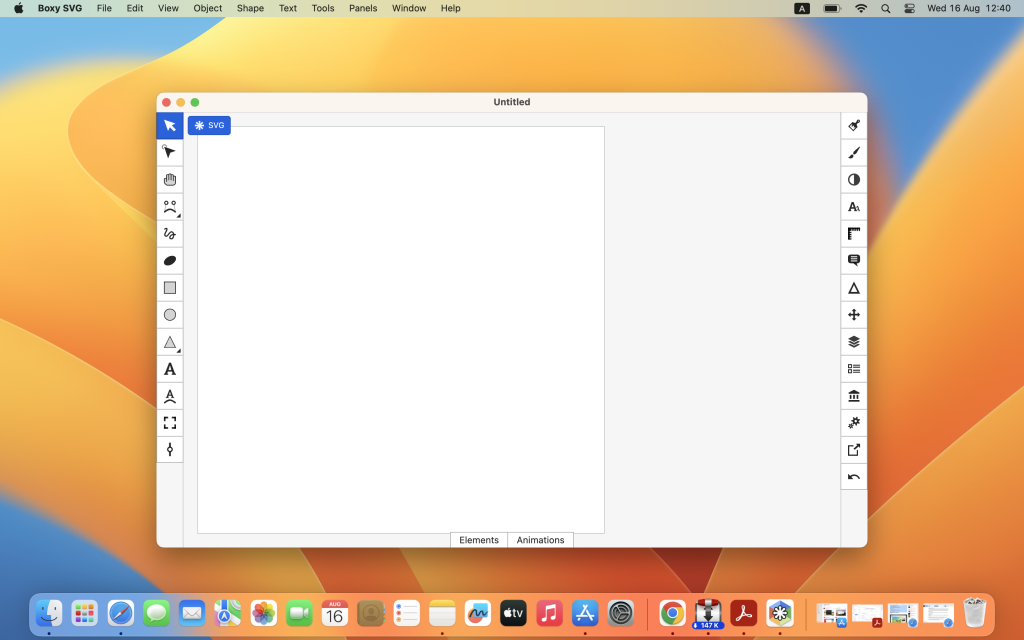
Boxy SVG is designed to be the best SVG editor for both non-technical users and professional designers and developers. It provides an intuitive interface and a comprehensive set of tools for creating and editing SVG files, which are the standard format for vector graphics such as icons, banners, charts, and illustrations.

Core Features

  • Clean and Intuitive UI:
  • Inspired by popular tools like Inkscape, Sketch, and Adobe Illustrator.
  • User-friendly interface suitable for beginners and professionals alike.
  • On-Canvas Editing:
  • Extensive support for editing object geometry, transform, paint, and other properties directly on the canvas.
  • File Formats:
  • Save projects in SVG and SVGZ formats.
  • Export options include PNG, JPG, WebP, PDF, and HTML5.
  • Integrations:
  • Open Clip Art Library integration offers thousands of free vector arts.
  • Google Fonts integration provides access to hundreds of free fonts.
  • Customization and Precision:
  • Configurable keyboard shortcuts for over 100 commands.
  • Manual guides, smart guides, and grid for precise alignment and measurement.
  • Advanced Operations:
  • Path operations such as unite, intersect, subtract, exclude, close, and reverse.
  • Arrangement operations include aligning, rotating, flipping, ordering, and grouping objects.

Features for Web Developers

  • Chromium-Based Rendering Engine:
  • Ensures accurate and reliable rendering of SVG graphics.
  • SVG and CSS Code Inspector:
  • Similar to Chrome Dev Tools, allows for in-depth inspection and editing of SVG and CSS code.
  • Clean SVG Output:
  • Preserves IDs, classes, titles, and other metadata for clean and organized SVG files.
  • SVG Sprites Editing Support:
  • Facilitates efficient management and editing of SVG sprite sheets.

Compatibility

  • Operating System: macOS 10.15.0 or later

Homepage

For more information and to download Boxy SVG, visit the Boxy SVG Homepage.

Summary

Boxy SVG stands out as a versatile and accessible tool for creating and editing SVG graphics. Its user-friendly interface, combined with powerful features and integrations, makes it suitable for a wide range of users from beginners to seasoned professionals. Whether you are designing icons, banners, or complex illustrations, Boxy SVG provides the tools and flexibility you need to bring your vector graphics to life efficiently.
Jameskarke's RSS Feed
Go to Top