Free Macsoftware One click Download

Posts by Jameskarke
Pixelmator Pro for Mac Download 3.6.3
02 years
by Jameskarke
in Application

Name : Pixelmator Pro
Size : 656 MB
Pixelmator Pro for Mac free Download
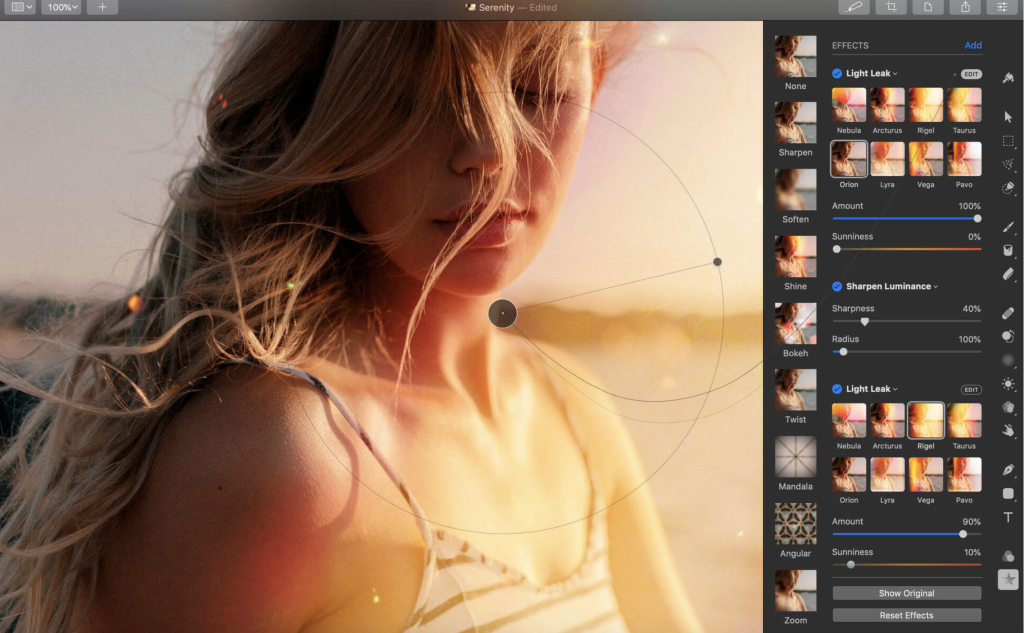
Pixelmator Pro is a robust image editor designed exclusively for Mac, featuring a wide array of professional-grade, nondestructive editing tools. It is crafted to help both beginners and seasoned pros enhance photos, create compositions, draw, paint, and apply effects with ease.
Key Features:
Exceptional Design and Functionality:
- Modern Interface: Single-window design tailored for Mac.
- User-Friendly: Intuitive design accessible for beginners and experts alike.
- Adaptive Appearance: Supports macOS light and dark modes.
- Customizable Workspace: Organize the interface to suit your needs with presets for photography, design, illustration, and painting.
- Photos Extension: Edit images directly within Photos app, maintaining nondestructive edits.
Professional Tools:
- Comprehensive Editing: Full suite of tools for enhancing and creating images.
- Nondestructive Editing: Make adjustments without permanently altering your images.
- Composition Tools: Easily move, resize, and arrange objects.
- Color Adjustments: Machine learning-powered, nondestructive color correction.
- RAW Support: Edit RAW images utilizing their full range data.
- Digital Painting: Handcrafted, customizable brushes with tablet support.
- Effects and Presets: Combine effects, save presets, and use them across projects.
- Retouching: Remove imperfections, clone parts, and adjust lighting precisely.
- Vector Graphics: Add and create vector graphics, including text with advanced typography tools.
- Web Optimization: Compress images for web use.
- Batch Processing: Automate tasks with built-in Automator actions and AppleScript support.
Machine Learning Enhancements:
- Repair Tool: Remove objects with realistic area recreation.
- ML Enhance: Intelligently enhance photos using a trained machine learning algorithm.
- ML Super Resolution: Enhance image resolution.
- ML Match Colors: Copy color adjustments from one photo to another.
- ML Denoise: Remove noise and compression artifacts while preserving details.
- Quick Selection Tool: Make accurate selections effortlessly.
Compatibility:
- Supported Formats: JPEG, TIFF, PNG, PSD, HEIF, SVG, PDF, GIF, BMP, TGA, WebP, JPEG-2000, and more.
- Photoshop Layers: Open and edit Photoshop images with layers.
- SVG Editing: Open and edit SVG vector images.
- Sharing: Easily share images to Photos, Mail, AirDrop, and other platforms.
Built Exclusively for Mac:
- macOS Integration: Designed for macOS, supporting major features and integrating seamlessly with macOS Big Sur.
- Compatibility: Requires macOS 12.0 or later.
For more information and to download Pixelmator Pro, visit the Pixelmator Pro homepage.
Pixelmator Pro offers a powerful and intuitive solution for all your image editing needs, combining advanced features with an accessible design to enhance your creative workflow.
YT Saver Video Downloader & Converter Mac 7.7.1
02 years
by Jameskarke
in Application

Name : YT Saver Video Downloader & Converter
Size : 59 MB
YT Saver Video Downloader & Converter for Mac free Download
YT Saver is a comprehensive tool designed to download videos, audio, and playlists from over 10,000 websites. It also offers video conversion capabilities, making it a versatile solution for accessing and managing media content offline.
Key Features:
Download Videos with Built-in Browser:
- Integrated Web Browser: YT Saver includes a built-in browser, allowing users to navigate video and audio sharing sites directly and download content seamlessly within the website.
Unlimited Download with YT Saver PRO:
- Bulk Download: Download multiple videos and playlists simultaneously from streaming sites.
- Offline Access: Store videos for offline viewing, ensuring access to your favorite content anytime, anywhere.
Ultra Fast Download Speed:
- 10X Faster: Experience ultra-fast download speeds, allowing quick access to your desired videos and the fastest conversion rates available.
Privacy Protection:
- Private Mode: Keep your downloaded videos and audio secure with password-protected folders, protecting content from prying eyes and ensuring safe viewing for children.
Supported Input Formats:
- Video: MP4, M4V, 3GP, MPEG, DAT, AVI, ASF, WMV, VOB, MKV, FLV, 3GS, 3G2, F4V, WEBM, TS, RMVB, MOV
- Audio: AAC, AC3, FLAC, M4A, WAV, WMA, AMR, MKA, MP2, AIF, AU, AIFF, CAF, OGG, RAM, RA, M4B, M4R, APE, OPUS, WEBM
Supported Output Formats:
- Video: MP4, MOV, WMV, AVI, FLV, MKV, HEVC MP4, HEVC MKV, 3GP, iPhone/iPod, iPad, Android Phone, Android Tablets
- Audio: M4A, MKA, WAV, AAC, FLAC, AIFF, OGG
System Requirements:
- macOS Compatibility: Requires macOS 10.10 or later.
For more information and to download the software, visit the YT Saver homepage.
YT Saver provides a powerful, easy-to-use solution for downloading and managing video and audio content from a vast array of online sources, ensuring you can access and enjoy your media anytime, anywhere.
Deskew Technologies Gig Performer for Mac 5.0.9
02 years
by Jameskarke
in Application

Name : Deskew Technologies Gig Performer
Size : 108.39 MB
Deskew Technologies Gig Performer for Mac Free Download
Gig Performer® is a sophisticated live performance host designed to manage and enhance live music performances. It offers an exceptionally powerful and easy-to-use solution for musicians, providing seamless control over virtual instruments and effects, all within a lightweight and stable platform.
Key Features:
Powerful Audio Plugin Host:
- Versatile for All Musicians: Ideal for keyboardists, guitarists, bassists, drummers, and Front of House engineers, Gig Performer offers unmatched performance power, ease, and flexibility.
- Stable Performance: Spend less time on setup and more on making music with a reliable and stable platform designed for live performances.
Professional Sound with a Small Footprint:
- Simplified Setup: Say goodbye to heavy gear and complex setups. Use your favorite plugins to create studio-quality sounds without the need for extensive hardware.
- High-Quality Performance: Host studio-quality audio effects with ultra-low latency, delivering clear and professional sound.
Intuitive Sound Management:
- Easy Sound Creation and Organization: Create, organize, and switch between sounds effortlessly. Focus on your performance without getting bogged down by technical details.
- Setlists and Song Parts: Organize sounds into setlists and song parts for seamless transitions during your performance.
Freedom from Hardware Limitations:
- Flexible Effects Chains: Replace bulky pedal boards with flexible effects units within Gig Performer, preserving audio tails and eliminating volume jumps.
- Unlimited Instruments: Host an unlimited number of virtual instruments, providing convenience and exceptional sound quality.
For Keyboardists:
- Convenience and Quality: Achieve excellence without multiple heavy keyboards. Host numerous instruments within the software, ensuring convenience and exceptional sound quality.
- Effortless Sound Management: Create and organize sounds into setlists, moving between them without touching your laptop.
For Guitarists and Bassists:
- Robust Effects Unit: Say goodbye to heavy pedal boards and create flexible effects chains. Switch sounds with a single button press while preserving audio tails and eliminating volume jumps.
For Front of House Engineers:
- Studio-Quality Effects: Use studio plug-ins in your live sound workflow with ultra-low latency. Record live performances and save effects on a per-song basis.
- Enhanced Control: Move beyond the limitations of your sound desk, accessing and showcasing valuable effects with ease.
Focus on Playing, Not Software Control:
- Bulletproof Performance: Gig Performer allows you to focus on sound design and creativity, ensuring a smooth and reliable live performance.
- Intuitive Setup: Build sounds quickly and intuitively by connecting plugin blocks with virtual wires, emulating the familiarity of physical cables.
Control What Matters:
- Essential Controls: Eliminate distractions by controlling only the essential elements of your VST during live performances.
- Effortless Access: Route audio/MIDI chains to global instruments and effects while maintaining access to other sounds.
Custom Sounds and Setlists:
- Assign and Reuse Sounds: Easily assign and reuse custom sounds to different parts of a song within your setlist. Switch between sounds with a single touch for an intuitive live performance experience.
Effortless Rig Integration:
- Quick Setup: Connect your computer to any rig and select your setup in Gig Performer within a minute. Enjoy a stress-free way to integrate with a venue’s back-line rig.
System Requirements:
- macOS: Requires macOS 10.14 or later.
- Processor: Compatible with Apple Silicon or Intel Core processors.
For more details and to download Gig Performer, visit the Gig Performer homepage.
Gig Performer provides a revolutionary way to manage and enhance live music performances, offering powerful, flexible, and intuitive tools for musicians of all kinds.
Logic Pro X for Mac Download 11.0.1
02 years
by Jameskarke
in Application

Name : Logic Pro X
Size : 1.3 GB
Download Logic Pro X for Mac free Download
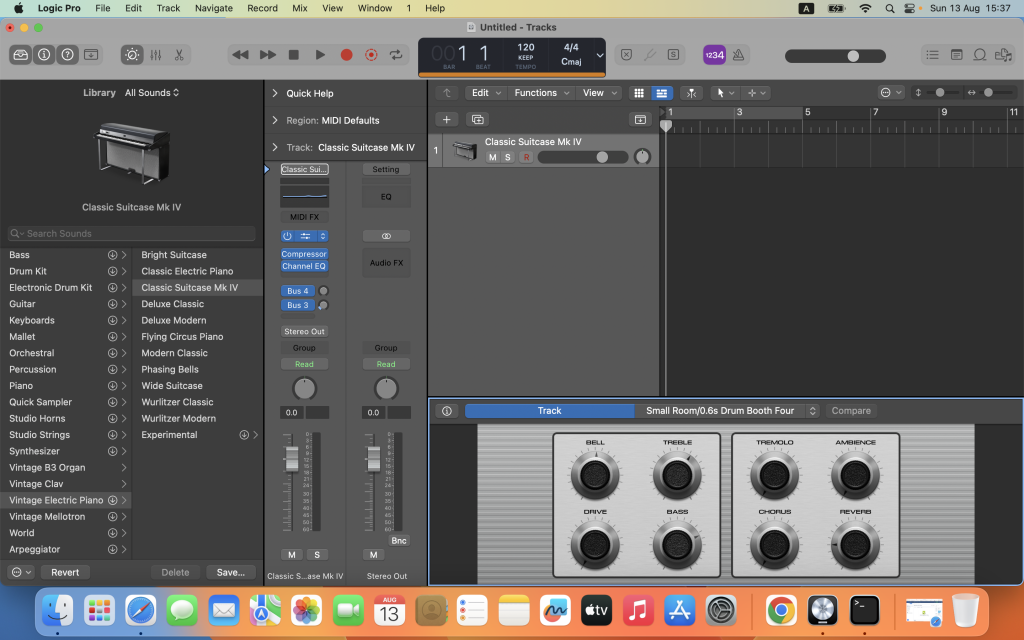
Logic Pro 11.0: Complete Music Production Suite
Logic Pro is a sophisticated software suite designed for professional songwriting, beat making, editing, and mixing. Built around a modern, intuitive interface, Logic Pro offers a complete toolkit for creating amazing-sounding music. The latest version, 11.0, introduces AI-enhanced tools, new instruments, and enhanced spatial audio capabilities.
Key Features:
Professional Music Production:
- Spatial Audio Tools: Mix and export music for Dolby Atmos with comprehensive spatial audio tools.
- Live Loops: Capture inspiration and build arrangements by mixing and matching loops, samples, and recordings.
- Advanced Editing: Record and edit MIDI or audio with a comprehensive set of tools, including take folders and Quick Swipe Comping.
- Flex Pitch and Flex Time: Fix out-of-tune vocals and manipulate the timing and tempo of recordings with ease.
- Smart Tempo: Automatically conform imported audio to your project’s BPM.
- Logic Remote: Perform and mix from anywhere in the room using an iPad or iPhone.
- Score Editor: Produce lead sheets or orchestral scores.
Drum Production and Beat Making:
- Drum Machine Designer: Build and perform custom kits.
- Step Sequencer: Program beats, bass lines, and melodies.
- Drummer: Create authentic drum tracks with virtual session players and beat producers.
Sampling:
- Sampler: Create and edit sophisticated multi-sampled instruments quickly.
- Quick Sampler: Build playable instruments from single audio files or direct recordings.
Keyboards and Synths:
- Synth Collection: Explore a variety of synthesis methods including analog, wavetable, FM, additive, granular, spectral, and modeling.
- Alchemy: Powerful sample manipulation synthesizer for unique sound creation.
- Arpeggiator: Turn simple chords into rich performances.
- Classic Instruments: Play models of classic organs, keyboards, and vintage synths.
Guitar and Bass Gear:
- Amp Designer: Build custom guitar or bass rigs with vintage and modern amps, cabinets, and mics.
- Pedalboard: Design custom setups from a collection of stompboxes.
Creative and Production Effects:
- Vintage and Modern Effects: Access a collection of delays, EQs, and compressors.
- Reverbs: Play sounds through various realistic or creative reverb effects.
- Modulation Effects: Add movement to tracks.
Sound Library:
- Extensive Collection: Over 5,900 instrument and effect patches, 1,200 sampled instruments, and 14,750 Apple Loops.
Compatibility:
- Third-Party Plug-Ins: Expand with Audio Units-compatible plug-ins.
- iCloud Integration: Share projects with GarageBand and import/export XML for Final Cut Pro workflows.
- Dolby Atmos Export: Export spatial audio mixes compatible with Apple Music.
- SoundCloud Integration: Share songs directly to SoundCloud.
What’s New in Version 11.0:
AI Enhanced Tools:
- Session Players: Bass Player and Keyboard Player join Drummer, using AI for responsive performances.
- ChromaGlow: Advanced plug-in for vintage analog warmth.
- Stem Splitter: Separate stereo audio files into stems for vocals, drums, bass, etc.
Sound Library Enhancements:
- Studio Bass and Studio Piano: Deeply-sampled instruments for authentic sounds.
- Producer Packs: New packs from Hardwell, The Kount, and Cory Wong.
- Chord Track Integration: Loops with chord tags automatically populate the chord track.
Spatial Audio Enhancements:
- Downmix and Trim Options: Custom mixing for non-Atmos channel configurations.
- Expanded ADM BWF Files: Include settings for various multi-channel formats.
General Enhancements:
- Bounce in Place: Real-time recording for external instruments and hardware.
- MIDI Routing: Route MIDI from software instruments and effects for creative layering.
- Key Commands: Efficiently edit with key commands for marquee selections.
System Requirements:
- macOS: Requires macOS 13.5 or later.
For more details and to download Logic Pro 11.0, visit the Logic Pro homepage.
Logic Pro continues to push the boundaries of music production, providing a robust and flexible platform for musicians and producers.
Ableton Live 12 Suite for Mac Download 12.0.5
02 years
by Jameskarke
in Graphic and Design

Name : Ableton Live 12 Suite
Size : 2.91 MB
Ableton Live 12 Suite for Mac free Download
Ableton Live 11.3.25: Fast, Fluid, and Flexible Music Creation Software
Ableton Live is a powerful software tool for music creation and performance, packed with a wide range of effects, instruments, and creative features designed to inspire musicians of all levels. The latest version, 11.3.25, brings significant enhancements and fixes to improve your music-making experience.
New Features and Improvements:
- Performance Enhancements:
- Reduced audio dropouts on Windows machines with Intel Alder Lake processors.
- GPU-accelerated Metal renderer on macOS for improved UI performance with large window sizes.
- Max for Live API:
- New endpoints:
Track.create_audio_trackandClipSlot.create_audio_trackto create new audio clips. - The
Songobject now includesnameandfile_pathproperties (get-only). - New
Driftdevice properties available in the API.
- Control Surface Updates:
- APC64: Lock device control with
[Shift] + [Device], and navigate session ring in Project mode. - Komplete Kontrol S Mk3: Use the 4D encoder to scroll song time when not on the DAW page.
- Enhanced MIDI port identification when connecting multiple controllers of the same type.
- Bundled Max Update:
- Max version updated to 8.5.8 for better integration and performance.
Bug Fixes:
- Audio and MIDI Issues:
- Detect and warn about 32-bit integer PCM .wav files that cannot be loaded.
- Accept all MIDI CCs (0-127) from VST3 plug-ins.
- Fixes to Drift’s LFO behavior, Simpler device, and various control surfaces.
- Performance and Stability:
- Improved performance on macOS ARM-based machines and Intel Alder Lake processors.
- Resolved crashes related to loading device Rack presets, large video clip sets, and editing automation values.
- Addressed high CPU usage and audio dropouts with scene tempo updates using Link.
- User Interface and Usability:
- Corrected display issues in the Device View, Groove Pool, and Arrangement View Time Ruler.
- Fixed issues with clip slots, tempo settings, and vertical scrolling in MIDI Note Editor.
- Improved descriptions for MIDI note selection in the Status Bar.
- Miscellaneous:
- Better handling of Live’s preferences during auto-update.
- Fixed various crashes and performance regressions, ensuring a smoother user experience.
Compatibility:
- macOS: Requires macOS 11.0 or later, including Apple Silicon support.
- Languages: Available in English, Français, Deutsch, Italiano, 日本語, Español.
Explore More:
For detailed release notes and to download the latest version, visit the Ableton Live homepage.
Ableton Live continues to evolve with these updates, providing musicians with a robust and flexible platform for creating and performing music.
Iris for Mac free Download 1.7.1
02 years
by Jameskarke
in Application

Name : Iris
Size : 11 MB
Iris for Mac free Download
Iris: High-Performance Screen Recorder for Mac
Iris is a robust screen recording application designed for macOS, offering high-quality video recording with efficient performance. Ideal for creating tutorials, presentations, and any screen-based content, Iris provides a range of features to ensure professional results.
Key Features:
- High-Performance Recording:
- Direct Recording: Capture video directly to h.264 for efficient and high-quality compression.
- Apple ProRes: Optionally record in Apple ProRes for higher quality and better editing flexibility.
- Post-Recording Encoding: Record now and encode later if needed.
- GPU Acceleration:
- Leverages on-board GPU acceleration for smoother performance and faster processing.
- Audio and Video Integration:
- Multiple Audio Sources: Record audio from up to two microphones.
- Specific App Audio: Target and record audio from a specific application on your Mac.
- Camera Integration: Optionally include video from your camera for picture-in-picture recordings.
- Color Matching:
- Ensures great color accuracy to match the original screen colors closely.
- Retina Quality Recording:
- Supports recording in Retina quality on compatible Macs for crisp and clear visuals.
- User-Friendly Features:
- Timers: Start and stop timers for automated recording sessions.
- Hotkey Support: Full support for hotkeys to control recording without interrupting your workflow.
- Advanced Naming and Tagging: Automatically name and tag recordings for easy organization and retrieval.
- Trial and Purchase Options:
- Free Trial: Try Iris for free with a watermark embedded in recordings.
- In-App Purchase: Remove the watermark from new recordings with a one-time purchase.
Compatibility:
- macOS: Requires macOS 10.14.4 or later.
Explore More:
For more information and to download Iris, visit the official Iris homepage.
Iris is an excellent tool for anyone needing a reliable and high-quality screen recording solution on macOS, providing professional features and ease of use for all users.
PhotoMill X for Mac Download 2.6.0
02 years
by Jameskarke
in Application

Name : PhotoMill X
Size : 54 MB
PhotoMill X for Mac free Download 2.6.0
PhotoMill: Advanced Batch Image Processing for Mac
PhotoMill is a comprehensive tool designed to streamline the bulk processing of images, including conversion, renaming, metadata editing, resizing, and watermarking. With its wide array of features, PhotoMill is ideal for photographers, designers, and anyone who needs to manage large collections of photos efficiently.
Key Features:
- Image Conversion:
- Supports conversion to popular formats: BMP, GIF, JPEG, JPEG 2000, PDF, PNG, TIFF.
- Handles various color models: RGB, Gray, CMYK.
- Offers color depth options: 8/16/32 bits, with or without alpha channel.
- Metadata Editor:
- Correct EXIF/IPTC tags: add GPS coordinates, remove private data, correct capture dates, add copyrights, keywords, or ratings.
- Photo Browser:
- Image Info Panel: Displays detailed information about selected photos.
- Groups Panel: Organizes photos into groups based on criteria like capture dates.
- Search Panel: Allows multi-criteria search of photos.
- Batch Renaming:
- Construct meaningful file names using text and tags (index, capture date, original name, image dimensions, etc.).
- Rename photos without conversion if needed.
- Image Resizing:
- Multiple geometry actions: scale, crop, add borders, trim, rotate, flip, auto rotate (by EXIF orientation), and change resolution.
- Watermarking:
- Text Watermarks: Use metadata tags (capture date, keywords, camera maker) or custom text. Options for font size, multiline text, stroke, shadow, rotation, tiling, and more.
- Image Watermarks: Size can be fixed or relative to main image. Tiling available.
- Rectangle Watermarks: Backgrounds for text with options for square or rounded shapes, fill, and stroke colors with transparency.
- Color Adjustments:
- Filters include auto contrast, auto white balance, gamma, contrast, exposure, sharpness, grayscale, sepia, colorize, temperature, and channel adjustments (HSL, HSV, RGB).
- Transparency options: alpha mask, color to alpha, alpha to color.
- Color matching: assign profiles, convert to profiles, and proof with profiles.
What’s New in Version 2.6.0:
- Release notes were not available at the time of this update.
Compatibility:
- macOS: Requires macOS 10.12.2 or later.
Explore More:
For additional details and to download PhotoMill, visit the official PhotoMill homepage.
PhotoSweeper X for Mac 4.9.0
02 years

Name : PhotoSweeper X
Size : 51 MB
PhotoSweeper X for Mac free Download
PhotoSweeper: Efficiently Eliminate Duplicate and Similar Photos on Mac
PhotoSweeper is a powerful tool designed to help you quickly and efficiently identify and remove similar or duplicate photos from your Mac. It integrates seamlessly with popular photo management applications like iPhoto, Aperture, and Adobe Lightroom, and can also handle photos stored in various locations on your Mac.
Key Features:
- Wide Compatibility:
- Supports photos from iPhoto, Aperture, and Adobe Lightroom libraries.
- Works with photos stored in folders on your local disk and external drives.
- Flexible Photo Comparison:
- Utilizes six different methods to find similar or duplicate photos, including those edited in external programs like Photoshop.
- Compares photos regardless of their size or format, ensuring a thorough search.
- Fast and Efficient:
- Optimized for speed, even when handling large photo libraries.
- Efficient caching allows for quicker comparisons during subsequent searches.
- Easy Photo Management:
- Review results using “Face-to-Face” or “Groups” mode to easily compare photos.
- Use the “Box” feature to temporarily store photos before deciding whether to delete, move, or copy them.
- Bulk rename photos while copying or moving to keep your collection organized.
- Advanced Photo Browsing:
- Fast loading of thumbnails for quick browsing.
- Integrated Quick Look preview and drag-and-drop support.
- Displays detailed image information, including paths, ratings, labels, histogram, and metadata (EXIF, IPTC, etc.).
- User-Friendly Interface:
- Simple drag-and-drop functionality to add folders for comparison.
- Adjust matching levels on-the-fly to regroup comparison results as needed.
- Comprehensive User Manual:
- Detailed user manual available in the Help menu to assist with all features and functionalities.
Usage Scenarios:
- Series Shots: Perfect for photographers who take multiple shots of the same scene and want to keep only the best ones.
- Edited Photos: Ideal for managing backups and edited photos from applications like Photoshop and Pixelmator.
- Scattered Photos: Helps organize photos stored on various external drives and local disks.
- Photo Collection Cleanup: Assists in freeing up disk space by removing duplicate or unnecessary photos.
Compatibility:
- macOS: Compatible with macOS 10.12.2 or later.
Explore More:
For more details and to download PhotoSweeper, visit the official PhotoSweeper homepage.
RAW Power for Mac Download 3.4.22
02 years

Name : RAW Power
Size : 62 MB
RAW Power for Mac free Download
RAW Power: Advanced Photo Editing and Management for Mac
RAW Power® combines the power of advanced RAW editing with seamless integration into Finder, Photos, and iCloud. It offers a comprehensive set of features that cater to both casual users and professional photographers. If you were a fan of Apple’s Aperture, you’ll find RAW Power’s advanced adjustments familiar and highly effective.
Key Features:
- Three-in-One Tool:
- Image Editor App: Non-destructive editing without the need to import files. Quickly browse and edit any folder on your disk.
- Photos Library App: Manage your Apple Photos library with full iCloud Photos compatibility.
- Photos Editing Extension: Access RAW Power’s editing features directly within Apple Photos.
- Advanced RAW Processing:
- Unlock Apple’s RAW engine with unique adjustments like Boost, Noise Reduction, Black Point, and Gamut Mapping.
- Unparalleled highlight recovery and real-time control over your RAW images.
- Organize and Manage Photos:
- Rate, flag, and filter photos by file type, rating, flag, and edit state, with changes synced over iCloud.
- Create albums, delete images, and arrange photos within albums.
- View detailed metadata and utilize map-based location data.
- Finder Support:
- Standalone image editor that supports browsing and non-destructive editing directly from Finder.
- Batch processing capabilities to apply presets, paste adjustments, and export images in bulk.
- Editing Tools and Adjustments:
- LUTs: Built-in looks and film simulations with the ability to add custom LUTs.
- Auto Enhancements: Auto Enhance, Auto White Balance, Auto Levels, and Auto Curves.
- Detailed Adjustments: Highlights, Shadows, Vibrancy, Local Contrast, Lighten, and Darken sliders.
- Curves and Levels: Linear and Lab modes with samplers for precise control.
- Effects: Depth Effect, Chromatic Aberration, Perspective adjustments, Black & White, and Vignette.
- Real-Time Editing:
- GPU-accelerated, real-time editing for high-precision, deep color imaging.
- Non-destructive edits stored in sidecars for easy adjustments.
- Customizable presets and camera-specific starting points.
Compatibility:
- macOS: Compatible with macOS 10.14 or later.
- Cameras: Supports hundreds of cameras including iPhone RAW. (Note: Fuji Compressed RAW is not supported).
Explore More:
For detailed information and to download RAW Power, visit the official RAW Power homepage.
PopClip for Mac Download 2024.5.2
02 years

Name : PopClip
Size : 8 MB
PopClip for Mac free Download
PopClip: Quick Text Processing at Your Fingertips
PopClip is a minimalist and unobtrusive status bar menu application designed to enhance your text processing capabilities on a Mac. When you select text with your mouse, a popover menu instantly appears, giving you quick access to essential actions such as Cut, Copy, and Paste, along with additional useful functions.
How to Use PopClip:
- Select Text: Use your mouse pointer to highlight the text you want to work with.
- PopClip Appears: The PopClip menu will automatically appear, presenting you with various options.
Key Features:
- Beautiful Interface: The user interface is beautifully rendered, ensuring it looks great on your Mac display.
- Web Search: Instantly search the web for the selected text with a single click.
- Open Links: Open web links directly from the PopClip menu.
- Dictionary & Spelling: Get dictionary definitions and spelling corrections for the selected text.
- Resizable Popover: Adjust the size of the popover to fit your preference, ranging from small to very large.
- Efficiency: Small, fast, and convenient, PopClip is an excellent tool for improving your workflow when working with text on your Mac.
Compatibility:
- macOS: Compatible with macOS 10.13.6 or later.
Explore More:
For additional details and to download PopClip, visit the official PopClip homepage.