Free Macsoftware One click Download
Posts tagged Photography
Download PhotoSweeper X for Mac 4.8.5
02 years

Name : PhotoSweeper X
Size : 51 MB
PhotoSweeper X for Mac free Download
PhotoSweeper is an invaluable tool for efficiently managing and decluttering your photo collection by identifying and removing duplicate or similar photos. Whether you’re a professional photographer or a casual user, PhotoSweeper streamlines the process of organizing your images across various libraries and storage locations.
Key Features:
- Easy Photo Discovery: Simply drag and drop folders to allow PhotoSweeper to scan for all photos inside. Additionally, you can add photos from iPhoto, Aperture, or Lightroom libraries via the Media window.
- Flexible Comparison Settings: Utilize six different methods to identify similar or duplicate photos, regardless of size or format, even those edited in external programs like Photoshop.
- Speed: PhotoSweeper is optimized for speed, capable of comparing large numbers of photos quickly. Efficient caching mechanisms ensure swift performance, and you can adjust the matching level of similarity on-the-fly.
- Effortless Photo Management: Review results in “Face-to-Face” or “Groups” mode, allowing you to organize photos into virtual containers called “Boxes.” From there, you can easily delete, move, or copy photos, as well as bulk rename them during the process.
- Intuitive Photo Browsing: Benefit from a user-friendly photo browser with features like fast thumbnail loading, Quick Look preview, drag-and-drop support, and detailed information display including histogram and image metadata.
- Comprehensive User Manual: Access a detailed user manual from the Help menu to guide you through the software’s features and functionalities.
Compatibility: macOS 10.12.2 or later
With PhotoSweeper, you can efficiently manage your photo library, free up valuable disk space, and ensure a clutter-free collection of images. Visit PhotoSweeper Homepage
Download Pixelmator Pro for Mac 3.5.7
02 years

Name : Pixelmator Pro
Size : 612 MB
Download Pixelmator Pro for Mac free Download
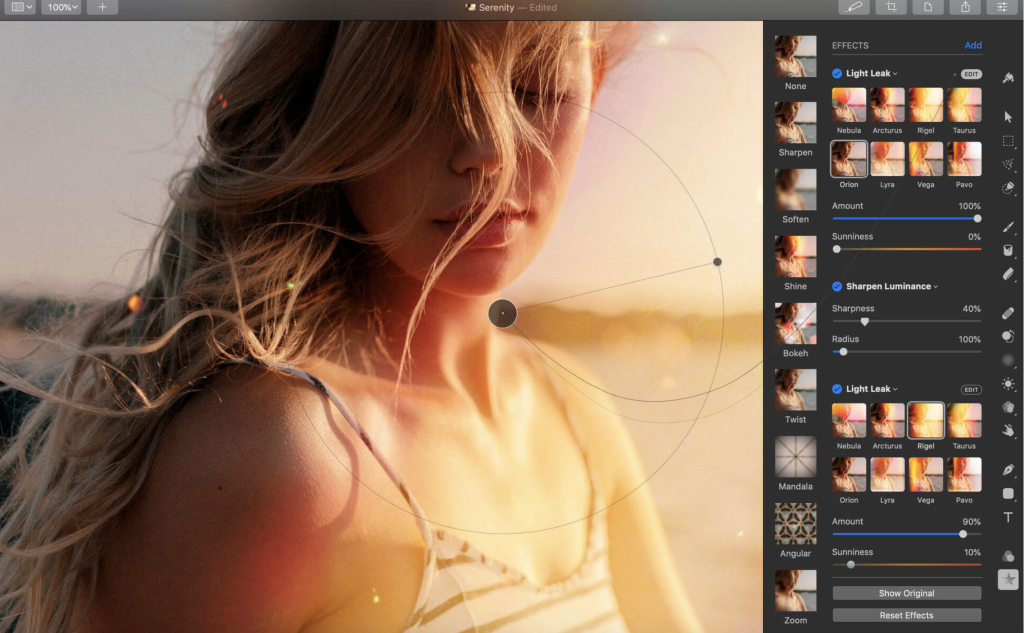
Pixelmator Pro is a robust, intuitive, and beautifully designed image editor crafted solely for Mac users. It offers a wide array of professional-grade, nondestructive image editing tools that empower users to enhance photos, create stunning compositions, design graphics, and more. Here are some key features of Pixelmator Pro:
Exceptional Design and Functionality:
- Modern single-window interface designed exclusively for Mac users.
- Intuitive and refined design makes image editing accessible to beginners and seasoned professionals alike.
- Native dark and light appearances adapt to macOS light and dark modes.
- Customizable interface for organizing creative environment with preset workspaces for various tasks.
- Full-featured Photos extension enables editing directly within the Photos app, saving edits nondestructively to the library.
Professional Tools:
- Comprehensive suite of image editing tools for enhancing and creating images.
- Nondestructive editing allows for individual adjustments at any time.
- Easy manipulation of objects with resizing, arranging, and moving capabilities.
- Advanced color adjustments powered by machine learning.
- Strong support for RAW files, preserving extended range data.
- Extensive brush library for digital or traditional painting.
- Ability to combine effects for artistic and special effects creation.
- Save presets for adjustment, effect, and layer style combinations.
- Retouching tools for removing imperfections, cloning, and selective adjustments.
- Reshaping tools for altering object shapes.
- Vector graphics creation with customizable options.
- Typography tools for designing text with ease.
- Web optimization features for saving images with advanced compression.
Image Editing Enhanced by Machine Learning:
- Repair tool for magically removing objects with realistic results.
- ML Enhance for intelligent photo enhancements based on professional photo algorithms.
- ML Super Resolution for zooming and enhancing image resolution.
- ML Match Colors for copying the look of one photo to another.
- ML Denoise for noise and compression artifact reduction while preserving details.
- Quick Selection tool for making accurate selections effortlessly.
Compatibility:
- Supports popular image formats including JPEG, TIFF, PNG, PSD, HEIF, SVG, PDF, GIF, BMP, TGA, WebP, and JPEG-2000.
- Ability to open and edit Photoshop images with layers.
- Supports SVG vector images.
- Easy sharing to various platforms including Photos, Mail, AirDrop, and more.
Built Exclusively for Mac:
- Designed exclusively for macOS, seamlessly integrating with macOS Big Sur.
- Compatibility: macOS 12.0 or later.
Pixelmator Pro is a powerful and versatile image editor that caters to the needs of both amateurs and professionals, offering a delightful user experience on Mac. For more information, visit the official homepage: Pixelmator Pro.

Download Acorn for Mac 7.4.4
02 years

Name : Acorn
Size : 35 MB
Acorn for Mac free Download
Acorn is a streamlined image editor designed to offer simplicity without compromising on functionality. With its fast and fluid interface, Acorn provides essential options without unnecessary complexity, ensuring a smooth editing experience that won’t break the bank.
Key Features of Acorn:
- Quick and Easy Editing:
- Capture screenshots using Acorn and edit them instantly.
- Apply a variety of image filters to create stunning effects.
- Enjoy layer-based image editing, a standard in the industry.
- Built-In iSight Integration:
- Create new images and layers directly from your built-in iSight camera.
- Effortless Resizing:
- Resize images and canvas with ease by adjusting the size of your window.
- Full-Screen Editing:
- Utilize every pixel of your monitor with full-screen image editing.
- Tablet Compatibility:
- Take advantage of tablet sensitivity for pressure strokes and eraser usage.
- Layer Control:
- Benefit from vector shape and text layers for precise editing.
- Make selections using freeform, elliptical, rectangular, and magic wand tools.
- Apply gradients and customize text styles.
- Advanced Editing Options:
- Control opacity and blending modes for each layer.
- Write plugins using Python scripting language or Objective-C for extended functionality.
- GPU Acceleration:
- Leverage GPU power for smooth performance, even during demanding graphics operations.
Acorn is compatible with macOS 10.14 or later and supports both Apple Silicon and Intel Core processors.
Download Capture One Enterprise for Mac16.3.6.6
02 years

Name : Capture One Enterprise
Size : 963 MB
Capture One Enterprise For Mac free Download
Capture One 23 Enterprise is the ultimate photo editing solution tailored for image production studios and e-commerce platforms. Renowned for its authentic true-to-life color processing, seamless editing experience, and industry-leading tethering capabilities, Capture One 23 Enterprise empowers studios worldwide to achieve total creative control over their photography projects. Developed by Capture One, based in Copenhagen, Denmark, this software offers cutting-edge features designed to keep photographers one step ahead in the competitive world of studio photography.
How Capture One Enterprise Adds Value to Photography Studios:
For over a decade, leading studio photography has relied on Capture One for its world-class tethering, state-of-the-art editing tools, and top-tier RAW processing. Now, Capture One introduces the Enterprise version, specifically crafted for businesses and tailored to the unique workflow of photography studios.
Capture One Enterprise provides the same standard features as Capture One’s flagship product, Capture One 20, but with enhancements customized for studio photography needs.
Designed for Business:
Photographers are integral to the success of any photography studio. However, in a studio environment involving multiple photographers, studio managers, retouchers, quality assurance managers, and project leaders, collaboration, standardization, and efficient workflows become paramount.
Capture One Enterprise addresses these challenges by offering enterprise-specific features that streamline image production processes and enhance results across key performance indicators (KPIs).
Value Creation with Capture One Enterprise:
Capture One Enterprise unlocks significant value creation potential for studio photography by optimizing workflows and boosting performance across relevant KPIs:
- Time to Market: Streamlining the image production process, from planning to publishing, accelerates time to market for products on e-commerce platforms.
- Cost per Image: Optimization of studio photography workflows can dramatically reduce costs associated with image production.
- Risk Reduction: Exclusive enterprise features such as Image Backup, License Management, and MDM support help secure studio photography processes, minimizing errors and associated costs.
Key Features and Benefits of Capture One Enterprise:
- Barcode Scanner Tool
- Advanced Guides
- Next Capture Backup
- Next Capture Keywords
- Next Capture Metadata
- Tool Locks
- Capture Pilot with Enterprise Enhancements
- Dedicated Studio Workspaces
Automated Workflows and Integrations:
Capture One Enterprise offers opportunities to intensify value creation through automated workflows and integrations with existing IT infrastructure:
- Workflow Enhancement: Leverage automation features within Capture One to enhance studio photography workflows.
- Integrations: Extend or automate processes by interfacing with other applications.
Customized Solutions:
Capture One understands that every photography studio may have unique needs. Therefore, customized solutions can maximize value by addressing specific requirements, such as ultra-accurate color profiling to reduce product returns.
Reduce Product Returns:
Color profiling optimization ensures true color reproduction, minimizing color discrepancies between product images and actual products, thus reducing the rate of returns due to color discrepancies.
Capture One Enterprise offers individual color profiles tailored for businesses, ensuring accurate colors out-of-the-box and reducing editing time and retoucher costs.
Capture One Enterprise is equipped with exclusive features designed to meet the demands of studio photography. Contact the Enterprise team to discover how Capture One Enterprise can specifically benefit your business.
What’s New:
- Release Notes:
- Compatibility: macOS 10.15 or later
Download Capture One Pro for Mac 16.3.6.6
02 years

Name : Capture One Pro
Size : 963 MB
Capture One Pro for Mac free Download
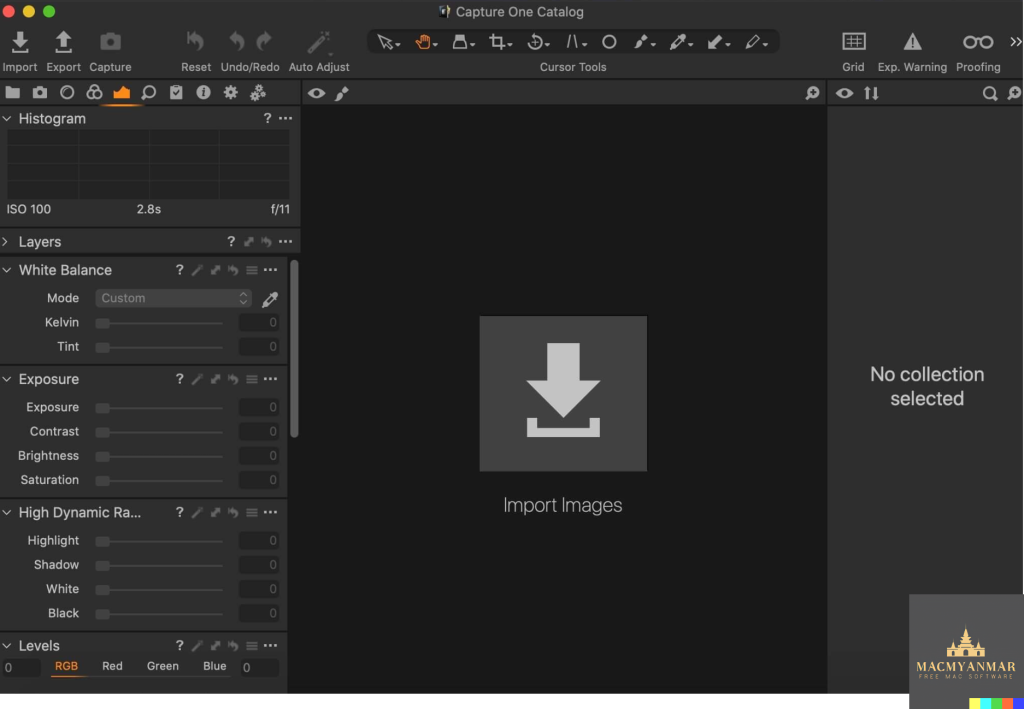
Capture One 23 is an advanced RAW converter designed to deliver superior image quality, vibrant colors, and exceptional detail for over 500 high-end cameras. It combines state-of-the-art tethered capture, robust digital asset management, comprehensive adjustment tools, and a flexible workflow customizable to your preferences.
Key Features:
- Ultimate Image Quality: Capture One ensures stunning image quality by leveraging an updated processing engine and precise tools for RAW file conversion.
- Tethered Capture: Enjoy seamless tethered shooting capabilities that enable you to connect your camera directly to your computer for instant image transfer and live preview.
- Digital Asset Management: Organize and manage your image library efficiently with powerful digital asset management tools, making it easy to find, sort, and categorize your photos.
- Extensive Adjustment Tools: Access a wide range of adjustment tools to fine-tune your images, including exposure, color balance, sharpening, and more, ensuring precise control over your editing process.
- Customizable Workspaces: Tailor your workflow to suit your needs with customizable workspaces, allowing you to arrange tools and panels according to your preferences for maximum efficiency.
New Features and Improvements:
- Speed Edit: Streamline your editing workflow with Speed Edit, a highly responsive tool that enables you to make adjustments quickly using keyboard shortcuts.
- Dehaze: Enhance the clarity and contrast of your images with the new Dehaze tool, which effectively reduces haze and atmospheric interference.
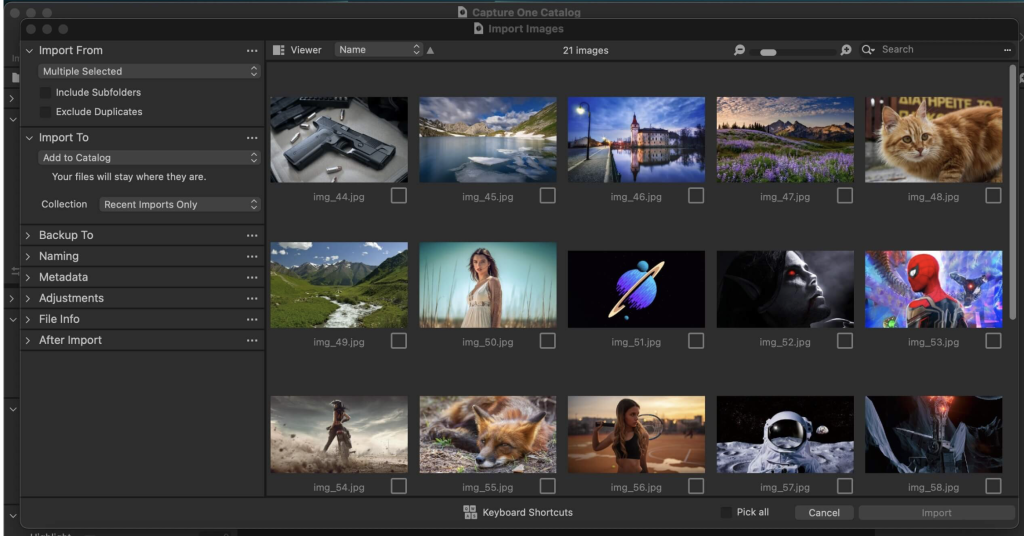
- Improved Importer: Enjoy a more streamlined importing process with enhancements to the importer, making it easier to import and organize your photos.
- HEIF Support: Capture One now supports HEIF (High Efficiency Image Format), allowing you to work with HEIF files alongside traditional RAW formats.
- Easy Brush Adjusting: Make precise adjustments to your images using brushes with improved ease and accuracy.
- Enhanced Performance: Experience improved performance and speed enhancements throughout the application, ensuring a smoother editing experience.
- General User Experience Improvements: Benefit from various tweaks and enhancements to the user interface, tooltips, tutorials, and more, enhancing overall usability.
Capture One 23 is the professional choice for photographers seeking unparalleled image quality, performance, and flexibility in their editing workflow.
Compatibility:
Capture One 23 is compatible with macOS 10.15 or later.
Download LRTimelapse Pro for Mac 6.5.4
02 years

Name : LRTimelapse Pro
Size : 164 MB
LRTimelapse Pro for Mac free Download
LRTimelapse 6 provides a comprehensive solution for time-lapse editing, keyframing, grading, and rendering. Whether you’re on Windows or Mac, and no matter which camera you use, LRTimelapse elevates your time-lapse results to the next level.
LRTimelapse is trusted by the most renowned time-lapse producers and many amateurs alike. It allows for keyframing and grading of time-lapse sequences in an all-raw-file-based workflow, leveraging the Adobe Camera RAW develop engine integrated into Lightroom (CC Classic, 6, 5, and 4) and Adobe Camera Raw.
Easily create day-to-night and night-to-day time-lapse transitions with the “Holy-Grail-Wizard.” The final sequences can be rendered in professional video formats like Prores 4:4:4 and 4:2:2, supporting resolutions up to 8K and beyond. Additionally, consumer formats like MP4/H.264/H.265/HEVC and MJpeg are supported. Time-lapse movies are increasingly popular among still photographers, filmmakers, and multimedia artists, offering a new and exciting facet of photography.
LRTimelapse enables users to leverage their favorite photographic tools (Lightroom Classic or Adobe Camera RAW) to produce time lapses with all the advantages and power those tools offer for image editing. It simplifies dealing with time-lapse specifics, such as eliminating the flicker effect, and helps achieve the “holy grail of time-lapse photography”: smooth day-to-night transitions.
Features:
- Animate and Keyframe Exposure, White Balance, and any other Lightroom editing tool over time. Utilize the full potential of Lightroom / ACR for color grading and even animate Graduated, Radial, and Paint-Brush Filters.
- Make day-to-night transitions (the “Holy Grail” of time-lapse photography) easy, either by manually adjusting your camera when shooting or using a ramper like qDslrDashboard or others.
- Deflicker with one click, based on the look of the developed images without leaving the RAW workflow, ensuring the best quality.
- Seamless integration with Lightroom CC Classic, 6, 5, and 4 with the powerful LRTExport plugin.
- High-performance video rendering engine for high-quality videos up to 8K resolution in MP4/H.264, ProRes (even on Windows), H.265, and MJpeg.
- And many, many more features.
System Requirements:
LRTimelapse supports Lightroom CC Classic, 6, 5, and 4, as well as Adobe Camera Raw, Bridge, and After Effects in the corresponding versions.
Compatibility: macOS 10.10 or later.
Homepage: https://lrtimelapse.com/

Download PhotoMill X for Mac 2.5.0
02 years
by Jameskarke
in Application

Name : PhotoMill X
Size : 54 MB
PhotoMill X for Mac free Download
PhotoMill is a comprehensive image processing tool designed to help you convert, edit metadata, rename, resize, watermark, and adjust colors of your photos efficiently. Here are the key features and functionalities of PhotoMill:
Conversion:
- Convert images to popular formats such as BMP, GIF, JPEG, JPEG 2000, PDF, PNG, and TIFF.
- Customize color models and depth including RGB, Gray, CMYK, and choose between 8/16/32 bits with or without alpha channel.
Metadata Editor:
- Edit EXIF/IPTC metadata tags to correct or add information such as GPS coordinates, capture dates, copyrights, keywords, and ratings.
- Remove private metadata to protect your privacy and add your own copyright information to photos.
Photo Browser:
- Browse and search photos easily with detailed information, grouping by criteria such as capture dates, and multi-criteria search options.
Renaming:
- Rename photos with meaningful names using text and tags such as index, capture date, original name, image width, and more.
- Rename photos without conversion to maintain file integrity.
Resizing:
- Resize images with various geometry actions including scaling, cropping, adding borders, trimming, rotating, and changing resolution.
Watermarking:
- Add text or image watermarks to your photos with options for customization such as font size, rotation, tiling, and more.
- Use metadata information or enter custom text for watermarking.
Color Adjustment:
- Apply various color adjustments including auto contrast, white balance, gamma, exposure, sharpness, grayscale, sepia, colorize, and more.
- Work with transparency, color matching, and color profiles to achieve desired results.
What’s New in Version 2.5.0:
- Release notes for this version were unavailable.
PhotoMill offers a comprehensive set of features for batch processing, metadata editing, renaming, resizing, watermarking, and color adjustment, making it a versatile tool for managing and enhancing your photo collection. It is compatible with macOS 10.12.2 or later. To learn more and download PhotoMill, visit the official homepage: PhotoMill by Overmacs
Download Adobe Photoshop 2024 for Mac v25.4.0
02 years

Name : Adobe Photoshop 2024
Size : 7 GB
Adobe Photoshop 2024 for Mac free Download
Adobe Photoshop: Welcome to the AI Generation
Welcome to a new era of creativity and productivity with Adobe Photoshop, where the full power of generative AI meets all your favorite Adobe tools. Whether you’re into photo editing, compositing, digital painting, animation, or graphic design, Photoshop empowers you to bring your ideas to life like never before. With a seamless experience across desktops and iPads, fast editing powered by artificial intelligence, and access to a vibrant community of creators, the possibilities are endless.
Key Features:
- Comprehensive Toolset: From image editing to 3D artwork, Photoshop offers a broad spectrum of tools to turn your inspiration into incredible creations on any device.
- Timeless Classic: First introduced in 1988, Photoshop remains the world’s leading image-editing software and the choice of thousands of creative professionals worldwide.
- Intuitive Interface: Despite its comprehensive capabilities, Photoshop boasts an intuitive and easy-to-navigate interface, ensuring a seamless user experience.
- Content-Aware Fill Workspace: The new Content-Aware Fill workspace allows for easier removal of objects or distracting elements from images, offering an interactive editing experience.
- New Tools: Enjoy a range of new tools, including the Frame Tool for simpler masking and the default multiple undo feature, ensuring that no project changes are lost.
What’s New in Version 2024 v25.4.0:
- Release notes were unavailable at the time of this update.
System Requirements:
- macOS v10.15 or later
- Intel or Apple silicon processor
Unlock your creativity and unleash the full potential of your images with Adobe Photoshop. Whether you’re a seasoned professional or a budding enthusiast, Photoshop provides the tools and features you need to create stunning visuals and express your artistic vision.
Homepage: Adobe Photoshop
Download ACDSee Photo Studio for Mac 10.0.4
02 years

Name : ACDSee Photo Studio
Size : 186 MB
ACDSee Photo Studio for Mac free Download
ACDSee Photo Studio for Mac: Harnessing the Beauty of Your Images
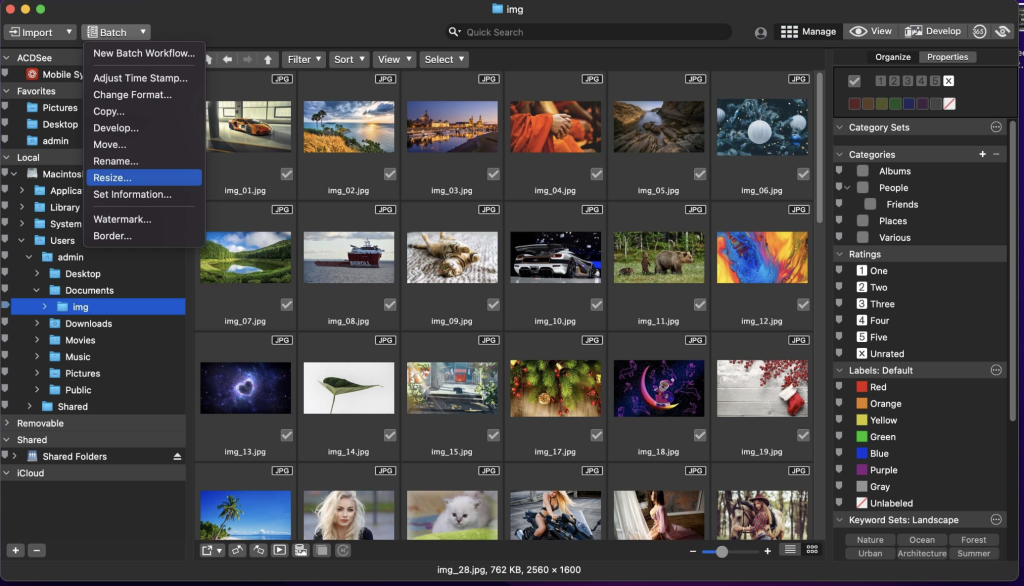
ACDSee Photo Studio for Mac offers one of the fastest digital asset managers and RAW processors on the platform, empowering users to take control of their image collections with ease. With import-free access to images, one-click searches, drag-and-drop searching, and saved searches, managing your photo collection has never been more convenient. Enjoy faster launching, browsing, scrolling, and searching, along with sleek organizational tools, customizable batch operations, RAW support for over 550 camera models, and a comprehensive toolkit of non-destructive adjustments.
Key Features:
- Speedy Digital Asset Management: Manage your photo collection effortlessly with import-free access, one-click searches, and drag-and-drop searching.
- RAW Processor: Process RAW files from over 550 camera models with ease, ensuring high-quality results for your images.
- Improved Browser History Support: Easily navigate through your recently browsed folders by holding down the Back button to view a list of your browsing history.
- Easy-Select Tabs: Select or deselect multiple folders and subfolders using Easy-Select Tabs along your file tree, streamlining your organization process.
- Direct Access to iCloud Drive: Backup and share files on your iCloud drive directly through ACDSee Photo Studio for Mac, enhancing accessibility and collaboration.
- Improved Keyword Management: Enjoy pre-loaded frequently used keyword sets and import/export established keyword lists for efficient organization.
- Saved Searches: Create searches based on your chosen criteria and access the results with a single click whenever you need them.
What’s New in Version 10.0.4:
- Release notes were unavailable at the time of this update.
Compatibility: macOS 11.0 or later
ACDSee Photo Studio for Mac empowers photographers with efficient digital asset management, robust RAW processing capabilities, and a range of convenient features for seamless organization and editing of images.
Homepage: ACDSee Photo Studio for Mac
Download Topaz Gigapixel AI for Mac 7.0.2
02 years

Name : Topaz Gigapixel AI
Size : 230 MB
Topaz Gigapixel AI for Mac free Download
Gigapixel AI: Revolutionary Photo Enlargement with Machine Learning
Gigapixel AI is a groundbreaking photo enlargement software that utilizes machine learning technology to upscale images without sacrificing detail. With Gigapixel AI, you can enlarge your photos by up to 600%, resulting in stunningly sharp and detailed images suitable for high-quality prints and professional applications.
Key Features:
- Up to 600% Enlargement: Transform your photos into large-format prints or ultra-detailed images with up to 600% enlargement without losing quality.
- Intelligent Upscaling: Trained with millions of sample images, Gigapixel AI intelligently upscales your photos while preserving image quality and detail.
- Crisp and Clear Results: With around 2 million operations per pixel, Gigapixel AI delivers sharp and detailed results, surpassing traditional interpolation-based methods.
- Detail Recovery: Unlike traditional interpolation, Gigapixel AI recovers real details in your images, enhancing sharpness and clarity for a natural and realistic appearance.
- Noise Suppression: Gigapixel AI distinguishes between image features and noise, accentuating details while suppressing noise for crisp and clean upscaled images.
- Used by Professionals: Trusted by leading photographers, video game modders, and major motion studios, Gigapixel AI is the go-to solution for high-quality image enlargement.
Interpolation vs. Machine Learning:
- Interpolation: Traditional interpolation algorithms approximate new pixels based on surrounding colors, smoothing out transitions without adding detail.
- Neural Network (Gigapixel AI): Gigapixel AI utilizes deep learning methods to analyze photo pairs and learn how details are lost during enlargement. It then adds new detail to upscaled images, resulting in superior quality and clarity.
What’s New in Version 7.0.2:
- Release notes were unavailable at the time of this update.
Compatibility: macOS 10.14 or later
Experience the future of photo enlargement with Gigapixel AI and unlock unparalleled detail and quality in your upscaled images.
Homepage: topazlabs.com