Free Macsoftware One click Download
Posts tagged Photography
My PaintBrush Pro for Mac download 2.4.5
02 years

Name : My PaintBrush Pro
Size : 7 MB
My PaintBrush Pro for Mac free Download
My PaintBrush for Mac
My PaintBrush is a powerful multilayer paint and drawing application designed for Mac users. It offers a wide range of tools and brushes to help you create and save smooth images. Whether you’re a professional artist or a hobbyist, My PaintBrush provides the flexibility and features needed to bring your artistic visions to life.
Key Features
High-Quality Brushes
- Variety of Brushes: Over 100 types of high-quality natural brushes.
- Brush: 25 types
- Pencil: 6 types
- Pen: 16 types
- Airbrush: 11 types
- Decoration: 25 types
- Blur: 19 types
- Eraser: 4 types
Adjustable Brush Parameters
- Transparency: Control the transparency of your brushes.
- Pressure-Sensitive: Brushes respond to pressure for a natural drawing experience.
- Radius: Adjust the size of your brushes.
- Hardness: Control the hardness of your brush strokes.
Layer Management
- Multiple Layers: Build up and manage multiple layers for complex drawings.
- Merge/Combine Layers: Merge layers together.
- Alpha Value: Set the transparency of individual layers.
- Visibility: Customize whether a layer is visible or not.
- Layer Order: Freely change the order of layers.
- Delete Layers: Remove unwanted layers.
Layer Operations
- Undo/Redo: Customized times for undoing and redoing actions.
- Flip: Flip layers horizontally or vertically.
- Move: Move selected zones within a layer.
Preset Tools
- Erasers, Fill Tools, Color Picker, Zoom In: Essential tools for painting and drawing.
- Shapes: Create straight lines, curves, rectangles, rounded rectangles, and ellipses.
- Text Tool: Customize the font, size, and color of your text.
- Palette: Set the foreground and background colors for your tools.
Export Options
- File Formats: Export your work to PNG, JPEG, TIFF, BMP, GIF.
- MPB Format: Save your work in MPB format to retain layer information.
Compatibility
- macOS: 10.9 or later
Mac App Store
For more information and to download My PaintBrush for Mac, visit the Mac App Store.
My PaintBrush is an ideal choice for artists looking for a versatile and powerful painting application on their Mac, offering an extensive range of brushes, layers, and customization options to create stunning digital art.
PhotoSweeper X for Mac Download 4.9.2
02 years
by Jameskarke
in Application

Name : PhotoSweeper X
Size : 50 MB
PhotoSweeper X for Mac free Download
PhotoSweeper: Efficient Photo Management Tool
PhotoSweeper is a powerful and efficient tool for eliminating similar or duplicate photos on your Mac. It works seamlessly with photos from iPhoto, Aperture, and Adobe Lightroom libraries, as well as photos stored on your Mac.
Key Features
- Easy Photo Import:
- Drag and drop folders to allow PhotoSweeper to find all photos inside.
- Add photos from your iPhoto, Aperture, or Lightroom library via the Media window.
- Flexible Comparison Settings:
- Six different methods to find similar or duplicate photos, even those edited in external programs like Photoshop, regardless of image size or format.
- Fast Performance:
- Extremely fast at comparing large numbers of photos using efficient caches.
- Regroup results on-the-fly by changing the matching level of similarity.
- Photo Management:
- Review results in “Face-to-Face” or “Groups” mode.
- Use a virtual container, “Box,” to manage photos by deleting, moving, or copying them.
- Bulk rename photos while copying or moving.
- Photo Browsing:
- Up-to-date photo browser with features like fast loading of thumbnails, Quick Look preview, drag and drop support, and showing paths, ratings, and labels.
- “Image Info” panel shows detailed information, including histogram and image metadata (EXIF, IPTC, etc.).
System Requirements
- Compatibility: macOS 10.12.2 or later
Availability
- Homepage: PhotoSweeper on Mac App Store
PhotoSweeper is an ideal solution for photographers and anyone looking to clean up their photo collection by quickly identifying and removing duplicate or similar photos.
Pixea Plus for Mac Download 5.3
02 years

Name : Pixea Plus
Size : 140 MB
Pixea Plus for Mac free Download
Pixea is a sleek and modern image viewer designed for macOS. With its minimalist user interface, Pixea offers a seamless viewing experience for a wide range of image formats and provides basic image processing features.
Key Features
- Wide Format Support: View images in various formats including JPEG, HEIC, PSD, RAW, WEBP, PNG, GIF, TIFF, BMP, and more.
- Basic Image Processing: Easily flip and rotate images.
- Advanced Information Display: View color histograms and EXIF data for detailed image information.
- Convenient Navigation: Use keyboard shortcuts and trackpad gestures for smooth navigation.
- Archive Support: View images directly from ZIP archives without needing to extract them.
Supported Formats
- Image Formats: JPEG, HEIC, GIF, PNG, TIFF, Photoshop (PSD), BMP, Fax images, macOS and Windows icons, Radiance images, Google’s WebP.
- RAW Formats: Leica DNG and RAW, Sony ARW, Olympus ORF, Minolta MRW, Nikon NEF, Fuji RAF, Canon CR2 and CRW, Hasselblad 3FR.
- Other Formats: Sketch files (preview only), ZIP archives.
Export Formats
- JPEG, JPEG-2000, PNG, TIFF, BMP.
System Requirements
- Compatibility: macOS 10.12 or later.
Availability
- Homepage: Pixea on Mac App Store
Pixea is an excellent choice for macOS users seeking a lightweight and efficient image viewer that supports a variety of formats and provides essential image processing tools.
Affinity Designer for Mac 2.5.3
02 years

Name : Affinity Designer
Size : 767 MB
Affinity Designer for Mac free Download
Affinity Designer: Professional Graphic Design Software for Mac
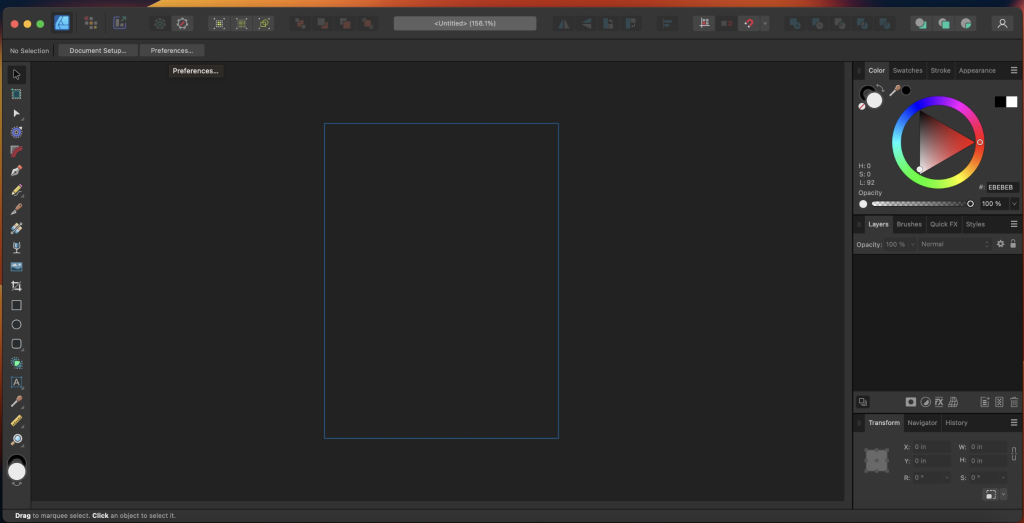
Affinity Designer is a versatile and powerful graphic design application tailored for Mac users. It offers a comprehensive set of tools and features for creating various graphic materials, including web designs, interface elements, icons, and concept art.
Key Features
- Customizable Workspace:
- Work with a docked or floating UI that integrates with macOS features like iCloud, Full Screen, and Spaces.
- Instant access to a wide range of design tools such as node, pen, crop, pencil, and vector brushes.
- Advanced Design Tools:
- Pixel Control: Real-time pixel preview for precise editing, with the ability to edit in pixels when needed.
- Raster Tools: Includes tools like lasso, pixel and paint brush, eraser, blur, dodge, burn, smudge, selection brush, and sharpen.
- Stylus Support: Use pressure and velocity-sensitive stylus input for smooth, editable strokes and natural-looking artwork.
- Non-Destructive Editing:
- Use pixel brush tools to paint inside vectors without destruction, ideal for adding shadows, textures, and highlights with high precision.
- Extensive File Format Support:
- Full support for popular file formats including AI, PSD, PDF, and SVG.
- Export areas, layers, or objects independently with options for standard or retina versions.
- Color Space Flexibility:
- Work in RGB, LAB, CMYK, or Greyscale color spaces to suit your project needs.
- Customizable Shapes and Geometry Operations:
- Access a broad collection of shapes with smart-snapping indicators and Boolean geometry operations for precise adjustments.
System Requirements
- Compatibility: Requires macOS 10.15 or later.
What’s New in Version 2.5.3
- Updates: Specific release notes were unavailable at the time of the update.
For more information and to download Affinity Designer, visit the Affinity Designer Homepage.
Affinity Designer provides professional-grade graphic design capabilities with a focus on flexibility, precision, and performance, making it a top choice for designers on macOS.
Affinity Photo for Mac free 2.5.3
02 years

Name : Affinity Photo
Size : 772 MB
Affinity Photo for Mac free Download
Affinity Photo: Professional Photo Editing for Mac
Affinity Photo is a powerful photo editing software designed for professionals. It offers a comprehensive set of tools for enhancing, editing, and retouching images within an intuitive interface, ensuring high performance and a smooth workflow. Here are the key features and details about Affinity Photo:
Key Features
- Professional Editing Capabilities:
- Photoshop PSD Support: Open, edit, and save Photoshop® PSD files seamlessly.
- Color Spaces: Work with RGB, CMYK, Greyscale, and LAB color spaces.
- CMYK Workflow: Complete end-to-end CMYK workflow with ICC color management.
- High Bit Depth Editing: Support for full 16-bit and 32-bit per channel editing.
- Wide Format Support:
- Image Formats: Compatible with all standard formats including PNG, TIFF, JPG, GIF, SVG, EPS, EXR, HDR, and PDF.
- Performance:
- Real-Time Editing: Experience panning and zooming at 60fps with live previews, live tools, and real-time editing capabilities.
- Large File Handling: Open and edit massive images without compromising performance or running out of memory.
System Requirements
- Compatibility: Requires macOS 10.15 or later.
What’s New in Version 2.5.3
- Updates: Specific release notes were unavailable at the time of the update.
For more information and to download Affinity Photo, visit the Affinity Photo Homepage.
Affinity Photo redefines professional photo editing on Mac with its robust features, ensuring a seamless experience for photographers and designers.

Pixelmator Pro for Mac Download 3.6.4
02 years

Name : Pixelmator Pro
Size : 656 MB
Pixelmator Pro for Mac free Download
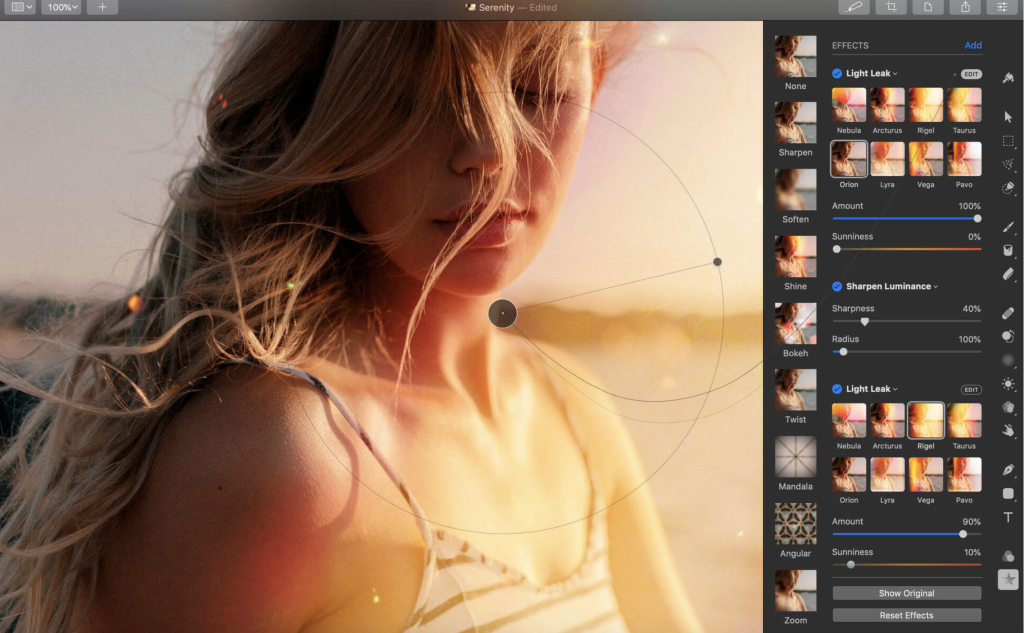
Pixelmator Pro: Powerful and Intuitive Image Editing for macOS
Pixelmator Pro is a high-end image editor designed exclusively for Mac, offering a wide array of professional-grade, nondestructive editing tools in a beautifully crafted, user-friendly interface. Whether you’re a beginner or a seasoned pro, Pixelmator Pro provides everything you need to bring your creative visions to life.
Exceptional Design and Functionality
- Modern, Single-Window Interface: Tailored for Mac, Pixelmator Pro’s design is intuitive and accessible, making image editing straightforward and enjoyable.
- Adaptable Appearances: Supports both dark and light modes of macOS, adapting to your preferred system appearance.
- Customizable Interface: Organize your workspace according to your needs with presets for photography, design, illustration, and painting.
- Full-Featured Photos Extension: Edit images within the Photos app while saving layered, nondestructive edits directly to your library.
Professional Tools
- Comprehensive Editing Tools: Enhance photos, create compositions, draw, paint, apply effects, and design text with ease.
- Nondestructive Editing: Adjust individual changes whenever necessary without permanently altering your images.
- Machine Learning-Powered Adjustments: Use advanced, AI-powered tools for color adjustments and enhancements.
- Superior RAW Support: Edit RAW images with full access to their extended range data.
- Digital Painting and Retouching: Use customizable brushes and a full set of retouching tools for both traditional and digital painting.
- Effects and Presets: Combine built-in effects, save custom presets, and use them across multiple projects.
Image Editing Enhanced by Machine Learning
- Repair Tool: Magically remove objects and recreate image areas with stunning realism.
- ML Enhance: Automatically enhance photos using a machine learning algorithm trained on millions of professional photos.
- ML Super Resolution: Zoom and enhance image resolution with remarkable clarity.
- ML Match Colors: Copy the look of one photo to another effortlessly.
- ML Denoise: Reduce image noise and compression artifacts while preserving details.
- Quick Selection Tool: Make accurate selections quickly and easily.
Compatibility and Integration
- Supports Popular Image Formats: Open and edit JPEG, TIFF, PNG, PSD, HEIF, SVG, PDF, GIF, BMP, TGA, WebP, and JPEG-2000 formats.
- Photoshop Compatibility: Open and edit Photoshop images with layers.
- Vector Graphics: Open and edit SVG vector images.
- Seamless Sharing: Share your creations via Photos, Mail, AirDrop, and other platforms.
Built Exclusively for Mac
- macOS Integration: Designed to work seamlessly with macOS, supporting features such as Full Screen, Split View, and more.
- Compatibility: Requires macOS 12.0 or later.
- Homepage: Pixelmator Pro
Pixelmator Pro combines powerful tools, a sleek interface, and advanced machine learning to offer a top-tier image editing experience on Mac. Whether enhancing photos, creating detailed illustrations, or designing sophisticated graphics, Pixelmator Pro provides the tools and features necessary for any project.

Sketch for Mac Download 100.1
02 years

Name : Sketch
Size : 88 MB
Sketch for Mac free Download
Sketch: Award-Winning Graphic Design Tool
Sketch is a powerful and elegant graphic design software designed for a digital world, offering an array of tools that make creating beautiful designs a joy rather than a burden. Its intuitive interface and robust feature set have made it a favorite among designers for projects ranging from icons and websites to full-fledged user interfaces.
Key Features
- Advanced Vector Tools:
- Multiple Fills, Borders, and Shadows: Apply multiple styling options to a single layer for rich, detailed designs.
- Non-Destructive Boolean Operations: Combine basic shapes into complex designs while retaining the ability to edit them later.
- Smart Pixel Alignment: Ensure your designs look sharp and pixel-perfect at all sizes.
- Layer Styles: Use advanced layer styles including multiple shadows, fills, gradients, noise, blending, and background blurring.
- Easy Exporting:
- Automatic Slicing: Simplify the export process with automatic slicing.
- Multiple Resolution Export: Export your designs in various resolutions to suit different devices and platforms.
- Powerful Image and Text Tools:
- Image Manipulation: Rotate, scale, crop, and mask imported images.
- Text Tool: Add beautiful typography with native font rendering, ensuring text looks accurate and sharp.
- Symbols and Reusability:
- Symbols: Reuse entire groups of content across your design. Update a symbol once, and it reflects changes everywhere it’s used.
- Dynamic Components: Ideal for interface elements like buttons, headers, and footers, enhancing consistency and efficiency.
- Mac Integration:
- OS X Versions and Auto Save: Benefit from macOS’s built-in versioning and auto-save features, so you can focus on your work without worrying about saving frequently.
- iCloud Sync: Keep your projects in sync across multiple Mac computers with iCloud support.
- Full Screen Mode: Maximize your canvas space and minimize distractions.
- User-Friendly Interface:
- Single-Window Design: All tools and features are easily accessible and neatly tucked away until needed, maintaining a clean workspace.
- Focus on Creativity: The simple yet powerful interface ensures that you can focus on creating without getting bogged down by complex menus.
What’s New in Sketch 3
- Symbols: Introduced to allow the reuse of entire groups of content, making it easier to maintain consistency across your design projects.
- Enhanced Layer Styles: More options for creating sophisticated designs with multiple effects and non-destructive editing.
System Requirements
- Compatibility: Requires macOS 12.0 or later.
Availability
- Homepage: Sketch Updates
Sketch is tailored for macOS, integrating seamlessly with its features and providing a streamlined design experience. Whether you’re creating icons, websites, or complete user interfaces, Sketch’s comprehensive toolset and user-friendly interface make it a powerful ally in the world of digital design.
Artstudio Pro for Mac Download 5.2.1
02 years
Name : Artstudio Pro
Size : 243 MB
Artstudio Pro for Mac free Download
Artstudio Pro: Advanced Painting and Photo Editing App
Artstudio Pro is a powerful and versatile painting and photo editing application available for both macOS and iOS. As the successor to the popular ArtStudio app, it has been redesigned to incorporate numerous new features and improvements, leveraging the latest technologies like Metal, iCloud Drive, and optimization for 64-bit multi-core processors. This results in a smooth and efficient workflow.
Key Features
- Advanced Engine:
- ArtEngine: Developed by Lucky Clan, this GPU-accelerated engine is 5-10 times faster than the previous version, enabling work with multiple documents, large canvas sizes, and unlimited layers with incredible optimization.
- Canvas Size: Up to 256 megapixels.
- Unlimited Layers: Manage complex projects with ease.
- Versatile Tools:
- 27 Tools: Includes Move, Select, Crop, Eyedropper, Paint, Wet Paint, Eraser, Fill, Smudge, Dodge, Burn, Sponge, Text, Heal, Clone, and more.
- Flexible Layer System: Features grouping, non-destructive layer effects, adjustment layers, masks, clipping masks, and text layers.
- Blending Modes: 27 different blending modes to enhance your creativity.
- Advanced Brush Engine:
- Optimized Performance: Lag-free mechanism for smooth, realistic strokes.
- Brush Customization: Over 100 built-in brushes with 80 customizable settings.
- Symmetric Painting: Custom symmetry line for creative designs.
- Professional Photo Editing:
- Non-Destructive Adjustments: 15 adjustments including Brightness/Contrast, Levels, Curves, Exposure/Gamma, Shadows/Highlights, Vibrance, Hue/Saturation, and more.
- Auto Adjustments: Auto Contrast, Levels, Lightness, Saturation.
- Filters: Real-time preview with the ability to generate seamless patterns.
- Retouching Tools: Heal, Dodge, Burn, Sponge, etc.
- Image Resizing: Resize images and canvases, crop, and trim transparent areas.
- Import/Export:
- Import Formats: PNG, JPEG, PSD, HEIC, TIFF, GIF, raw formats, ABR, TPL (brushes), ASE, ACO (color swatches), PAT (patterns), GRD (gradients), TTF, OTF (fonts).
- Export Formats: PNG, JPEG, PSD, TIFF, PDF.
- Additional Features:
- iCloud Integration: Full support for seamless file management.
- Screen Recording: Capture your process.
- Cross-Platform Availability: All features available on macOS, iPad, and iPhone.
- Advanced Selection: Display as marching ants, quick mask, or invisible.
- Guidelines and Grids: Snapping, dynamic guidelines, grid, and perspective grid assist.
- Canvas Manipulation: Mirror view, canvas rotation.
System Requirements
- Compatibility: macOS 11.0 or later
Availability
- Homepage: Artstudio Pro on Mac App Store
Artstudio Pro is a comprehensive and powerful tool for artists and photographers, offering an extensive range of features that cater to both painting and photo editing needs. Its advanced engine, versatile tools, professional photo editing capabilities, and seamless import/export functions make it a top choice for creative professionals.

Capture One Pro for Mac Download 16.4.3.15
02 years

Name : Capture One Pro
Size : 1 GB
Capture One Pro for Mac free Download
Capture One 23: Professional RAW Converter and Image Editing Software
Capture One 23 is the latest version of the renowned photo editing software, offering unparalleled image quality, advanced editing tools, and a highly customizable workflow. Designed for professional photographers, it supports over 500 high-end cameras and ensures optimal performance and efficiency in image processing.
Key Features
- Ultimate Image Quality:
- RAW Image Processing: True-to-life colors and incredible detail with tailored profiles for nearly 600 camera models and lenses.
- Detail Enhancement: Extract maximum detail from RAW files for stunning image quality.
- Tethered Capture:
- Fast Tethering: Industry-leading tethered capture for seamless shooting and workflow integration.
- Live View: Real-time adjustments and focus control during shoots.
- Editing Tools:
- Comprehensive Adjustment Tools: Extensive options for exposure, color correction, sharpening, and more.
- Layers and Masks: Advanced capabilities for precise adjustments using layers and masks.
- Styles and Presets: Apply and create custom styles and presets to streamline editing processes.
- Digital Asset Management:
- Efficient Organization: Robust catalog and session management tools for efficient image organization.
- Metadata Management: Powerful tools for handling keywords, ratings, and metadata.
- Customizable Workflow:
- Flexible Interface: Customizable interface to suit personal workflow preferences, with tailored workspaces for different tasks.
- Automation Tools: Tools to automate repetitive tasks, enhancing efficiency and saving time.
- Performance:
- Updated Processing Engine: Enhanced performance and responsiveness with the latest processing engine.
- Batch Processing: Capabilities to process large volumes of images quickly and efficiently.
New Features and Improvements in Capture One 23
- Speed Edit:
- Quickly adjust multiple settings simultaneously without the need for sliders, enhancing the editing workflow.
- Dehaze:
- A powerful tool to reduce haze and improve clarity and contrast in your images.
- Improved Importer:
- Enhanced importing process for faster and more efficient file management.
- General User Experience Improvements and Tweaks:
- Ongoing enhancements to the user interface and overall user experience for greater ease of use.
- HEIF Support:
- Support for High-Efficiency Image File (HEIF) format, allowing for more efficient storage and processing of images.
- Easy Brush Adjusting:
- Simplified adjustment of brush settings for more intuitive and efficient editing.
- Improved Performance:
- Further optimization of performance for faster and more responsive editing.
- Colored Gradients on White Balance Sliders:
- Visual enhancements to white balance sliders, making adjustments more intuitive.
- Enhanced Tooltips:
- Improved tooltips for better guidance and user understanding of features and tools.
- Easy Access to Tutorials:
- Direct access to tutorials and educational resources within the software to help users maximize their editing potential.
Compatibility
- Operating System: macOS 12.0 or later
Availability
- Homepage: Capture One
Capture One 23 continues to set the standard in professional photo editing with its advanced features, exceptional image quality, and customizable workflow, making it the go-to choice for photographers seeking the best in image processing and editing software.
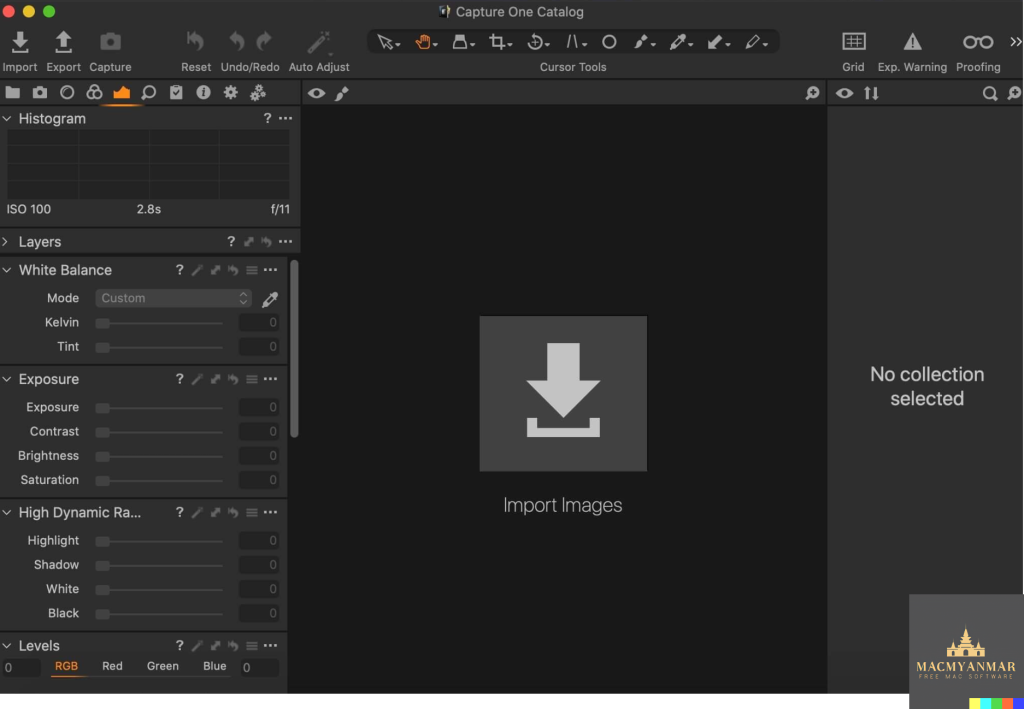
Capture One Studo for Mac 16.4.3.15
02 years

Name : Capture One Studo
Size : 1 GB
Capture One Studo for Mac free Download
Capture One: Professional RAW Converter and Image Editing Software
Capture One is a leading professional RAW converter and photo editing software that delivers exceptional image quality, powerful editing tools, and a highly customizable workflow. It supports more than 500 high-end cameras and offers advanced features tailored for professional photographers and studios.
Key Features
- Ultimate Image Quality:
- RAW Image Processing: Renowned for producing true-to-life colors with tailored profiles for nearly 600 camera models and lenses.
- Detail Enhancement: Extract incredible detail from RAW files for stunning image quality.
- Tethered Capture:
- Lightning-Fast Tethering: Provides the fastest tethered capture in the industry, ensuring a seamless workflow during photoshoots.
- Live View: Allows real-time adjustments and focus control directly from the software.
- Editing Tools:
- Extensive Adjustment Tools: Includes a wide range of tools for exposure, color correction, sharpening, and more.
- Layers and Masks: Advanced layer and masking capabilities for precise adjustments.
- Styles and Presets: Apply and create custom styles and presets to streamline your editing process.
- Digital Asset Management:
- Catalogs and Sessions: Organize your images efficiently with robust catalog and session management.
- Keywords and Metadata: Powerful tools for managing keywords, ratings, and metadata.
- Customizable Workflow:
- Flexible Interface: Customize the interface to fit your personal workflow, with workspaces tailored to different tasks.
- Automation Tools: Automate repetitive tasks to save time and improve efficiency.
- Performance:
- Updated Processing Engine: Offers market-leading performance and responsiveness.
- Batch Processing: Quickly process large volumes of images with batch processing capabilities.
Capture One Studio
Capture One Studio includes all the features of Capture One Pro, along with additional tools designed specifically for professional photography studios. These features enhance the management, efficiency, and overall workflow of studio environments.
Additional Features in Capture One Studio
- Barcode Scanner Tool: Automate file naming and metadata entry by integrating barcode scanners.
- Advanced Guides and Grids: Assist in precise composition and alignment.
- Next Capture Backup: Automatically back up images during tethered capture to ensure data security.
- Capture Pilot: Enhanced version for remote viewing and adjustments during shoots.
- Dedicated Studio Workspaces: Pre-configured workspaces optimized for different studio tasks.
Compatibility
- Operating System: macOS 12.0 or later
Availability
- Homepage: Capture One
Capture One offers a comprehensive suite of tools that cater to the needs of professional photographers, ensuring superior image quality, efficient workflows, and powerful editing capabilities. Whether you’re working in a studio environment or on-location, Capture One provides the tools you need to bring your photography to life.