Free Macsoftware One click Download
Application
Artstudio Pro for Mac Download 5.2.1
02 years

Name : Artstudio Pro
Size : 243 MB
Artstudio Pro for Mac free Download
Artstudio Pro: Advanced Painting and Photo Editing App
Artstudio Pro is a powerful and versatile painting and photo editing application available for both macOS and iOS. As the successor to the popular ArtStudio app, it has been redesigned to incorporate numerous new features and improvements, leveraging the latest technologies like Metal, iCloud Drive, and optimization for 64-bit multi-core processors. This results in a smooth and efficient workflow.
Key Features
- Advanced Engine:
- ArtEngine: Developed by Lucky Clan, this GPU-accelerated engine is 5-10 times faster than the previous version, enabling work with multiple documents, large canvas sizes, and unlimited layers with incredible optimization.
- Canvas Size: Up to 256 megapixels.
- Unlimited Layers: Manage complex projects with ease.
- Versatile Tools:
- 27 Tools: Includes Move, Select, Crop, Eyedropper, Paint, Wet Paint, Eraser, Fill, Smudge, Dodge, Burn, Sponge, Text, Heal, Clone, and more.
- Flexible Layer System: Features grouping, non-destructive layer effects, adjustment layers, masks, clipping masks, and text layers.
- Blending Modes: 27 different blending modes to enhance your creativity.
- Advanced Brush Engine:
- Optimized Performance: Lag-free mechanism for smooth, realistic strokes.
- Brush Customization: Over 100 built-in brushes with 80 customizable settings.
- Symmetric Painting: Custom symmetry line for creative designs.
- Professional Photo Editing:
- Non-Destructive Adjustments: 15 adjustments including Brightness/Contrast, Levels, Curves, Exposure/Gamma, Shadows/Highlights, Vibrance, Hue/Saturation, and more.
- Auto Adjustments: Auto Contrast, Levels, Lightness, Saturation.
- Filters: Real-time preview with the ability to generate seamless patterns.
- Retouching Tools: Heal, Dodge, Burn, Sponge, etc.
- Image Resizing: Resize images and canvases, crop, and trim transparent areas.
- Import/Export:
- Import Formats: PNG, JPEG, PSD, HEIC, TIFF, GIF, raw formats, ABR, TPL (brushes), ASE, ACO (color swatches), PAT (patterns), GRD (gradients), TTF, OTF (fonts).
- Export Formats: PNG, JPEG, PSD, TIFF, PDF.
- Additional Features:
- iCloud Integration: Full support for seamless file management.
- Screen Recording: Capture your process.
- Cross-Platform Availability: All features available on macOS, iPad, and iPhone.
- Advanced Selection: Display as marching ants, quick mask, or invisible.
- Guidelines and Grids: Snapping, dynamic guidelines, grid, and perspective grid assist.
- Canvas Manipulation: Mirror view, canvas rotation.
System Requirements
- Compatibility: macOS 11.0 or later
Availability
- Homepage: Artstudio Pro on Mac App Store
Artstudio Pro is a comprehensive and powerful tool for artists and photographers, offering an extensive range of features that cater to both painting and photo editing needs. Its advanced engine, versatile tools, professional photo editing capabilities, and seamless import/export functions make it a top choice for creative professionals.

Allavsoft Video Downloader Converter Mac v-3.27.2.8935
02 years

Name : Allavsoft Video Downloader Converter
Size : 95 MB
Allavsoft Video Downloader Converter for Mac Free Download
Allavsoft: Comprehensive Video Downloader and Converter
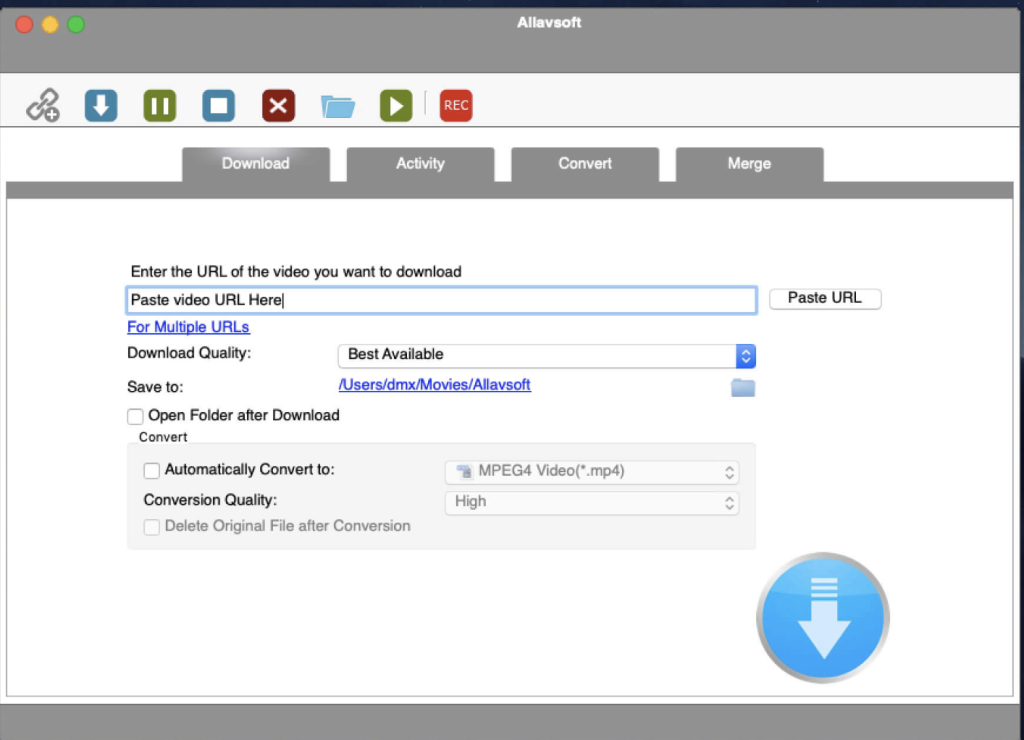
Allavsoft is a powerful video downloader and converter that supports downloading a wide range of video content from more than 100 video-sharing websites, including popular sites like Facebook, Dailymotion, and eHow. This tool not only downloads videos in their original format but also offers the convenience of converting them to various popular video and audio formats.
Key Features
- Extensive Downloading Capabilities:
- Multiple Sources: Download movies, music videos, playlists, sports videos, lectures, and more from over 100 video-sharing sites.
- High-Quality Downloads: Supports downloading videos in various qualities, including ultra-high definition (4K), 3D video, HD 2k, HD 1080p, HD 720p, and standard definition 480p, 360p, and 240p.
- Video Conversion:
- One-Click Conversion: Download and convert videos to popular formats like MP4, AVI, WMV, MOV, MPEG-1, MPEG-2, VOB, ASF, RMVB, DV, TS, Apple ProRes, WebM, FLV, and OGV.
- Audio Extraction: Extract and download audio from online music videos or movies, converting to formats like MP3, WMA, WAV, AAC, Apple Lossless M4A, AIFF, RA, FLAC, OGG, and AU.
- Batch Processing:
- Multiple URLs: Supports adding multiple video URLs for batch downloading and converting.
- Ad Detection: Automatically detects and skips advertisements during downloads.
- Convenient Features:
- Built-in Player: Preview and playback downloaded video files with the built-in video player.
- Breakpoint Resume: Pause and resume downloads at any time, ensuring convenience and flexibility.
- Post-Download Actions: Set your computer to shut down automatically after completing all download tasks.
- Download History: Keeps a history of all downloads for easy reference.
System Requirements
- Compatibility: macOS 10.10 or later
Availability
- Homepage: Allavsoft
Allavsoft provides a robust and user-friendly solution for downloading and converting online video and audio content. Its support for multiple formats, high-quality downloads, batch processing, and convenient features make it an ideal choice for users looking to manage their media files efficiently.
Downie for Mac free Download 4.7.18
02 years

Name : Downie
Size : 50 MB
Downie for Mac free Download
Downie: A Simple and Effective Video Download Manager for macOS
Downie is a user-friendly download manager designed to help you quickly and easily save videos from a variety of websites to your local disk drive. It is especially useful for users with slow internet connections, allowing them to download videos and watch them offline using their preferred media player.
Key Features
- User-Friendly Interface:
- Drag and Drop: Simply drag and drop the video URL onto Downie’s main window or Dock icon to start downloading.
- Download List Management: Easily add, start, and remove items from the download list.
- Flexible Download Options:
- Format and Location: By default, Downie downloads videos as MP4 files to your default Downloads folder. These settings can be customized via the Preferences window.
- Post Processing: Options to convert downloads to MP4 if necessary or to extract audio only.
- Extensive Website Support:
- Wide Range of Sites: Supports downloading from over 400 video hosting websites, including popular ones like YouTube, Apple, LiveLeak, Vimeo, and BBC.
- Request New Sites: If a particular website is not supported, users can send a request to the Downie developers directly from the app.
- Browser Integration:
- Extensions: Offers matching extensions for popular web browsers such as Firefox, Safari, Google Chrome, and Chromium. These add-ons can be installed from the Preferences window as needed.
- Performance:
- Offline Viewing: Ideal for users with slow internet connections, allowing them to download and view videos offline without interruptions.
System Requirements
- Compatibility: macOS 10.12.6 or later
Availability
- Homepage: Downie
Downie provides a straightforward solution for downloading video content hosted online, ensuring a smooth experience even for those with less than optimal internet speeds. Its intuitive interface, extensive website support, and flexible download options make it a valuable tool for anyone looking to save online videos for offline playback.
Keka for Mac free Download 1.4.0
02 years

Name : Keka
Size : 32 MB
Keka for Mac free Download
Keka: A Full-Featured File Archiver for macOS
Keka is a comprehensive file archiver for macOS, designed to be both powerful and user-friendly. It supports a wide range of compression and extraction formats, making it an essential tool for managing your files efficiently.
Key Features
- Easy File Compression:
- Multiple Formats: Compress files into various formats including 7Z, ZIP, TAR, GZIP, BZIP2, XZ, LZIP, and ISO.
- Simple Interface: Just drag and drop files to the Keka icon in the Dock or main window to compress them.
- Password Protection: Secure your compressed files with passwords.
- File Splitting: Easily divide large files into smaller parts for easier sharing and storage.
- Versatile File Extraction:
- Wide Format Support: Extract files from formats like 7Z, ZIP, RAR, TAR, GZIP, BZIP2, XZ, LZIP, DMG, ISO, LZMA, EXE, CAB, WIM, PAX, JAR, APK, APPX, XPI, IPA, CPGZ, CPIO, and more.
- Simple Extraction: Double-click on any supported compressed file to extract it using Keka, or drag and drop the file to the Keka icon.
- User-Friendly Experience:
- Intuitive Design: Keka’s design is straightforward, ensuring that even users with minimal technical expertise can easily compress and extract files.
- Dock Integration: The seamless Dock integration allows for quick access and operation directly from your desktop.
Supported Formats
- Compression: 7Z, ZIP, TAR, GZIP, BZIP2, XZ, LZIP, ISO
- Extraction: 7Z, ZIP, RAR, TAR, GZIP, BZIP2, XZ, LZIP, DMG, ISO, LZMA, EXE, CAB, WIM, PAX, JAR, APK, APPX, XPI, IPA, CPGZ, CPIO, and more
System Requirements
- Compatibility: OS X 10.10 or later
Availability
- Homepage: Keka
Keka is the go-to solution for anyone needing a reliable and straightforward file archiver on macOS. Its extensive format support and user-friendly interface make it ideal for both everyday users and professionals needing robust file compression and extraction capabilities.
Capture One Pro for Mac Download 16.4.3.15
02 years

Name : Capture One Pro
Size : 1 GB
Capture One Pro for Mac free Download
Capture One 23: Professional RAW Converter and Image Editing Software
Capture One 23 is the latest version of the renowned photo editing software, offering unparalleled image quality, advanced editing tools, and a highly customizable workflow. Designed for professional photographers, it supports over 500 high-end cameras and ensures optimal performance and efficiency in image processing.
Key Features
- Ultimate Image Quality:
- RAW Image Processing: True-to-life colors and incredible detail with tailored profiles for nearly 600 camera models and lenses.
- Detail Enhancement: Extract maximum detail from RAW files for stunning image quality.
- Tethered Capture:
- Fast Tethering: Industry-leading tethered capture for seamless shooting and workflow integration.
- Live View: Real-time adjustments and focus control during shoots.
- Editing Tools:
- Comprehensive Adjustment Tools: Extensive options for exposure, color correction, sharpening, and more.
- Layers and Masks: Advanced capabilities for precise adjustments using layers and masks.
- Styles and Presets: Apply and create custom styles and presets to streamline editing processes.
- Digital Asset Management:
- Efficient Organization: Robust catalog and session management tools for efficient image organization.
- Metadata Management: Powerful tools for handling keywords, ratings, and metadata.
- Customizable Workflow:
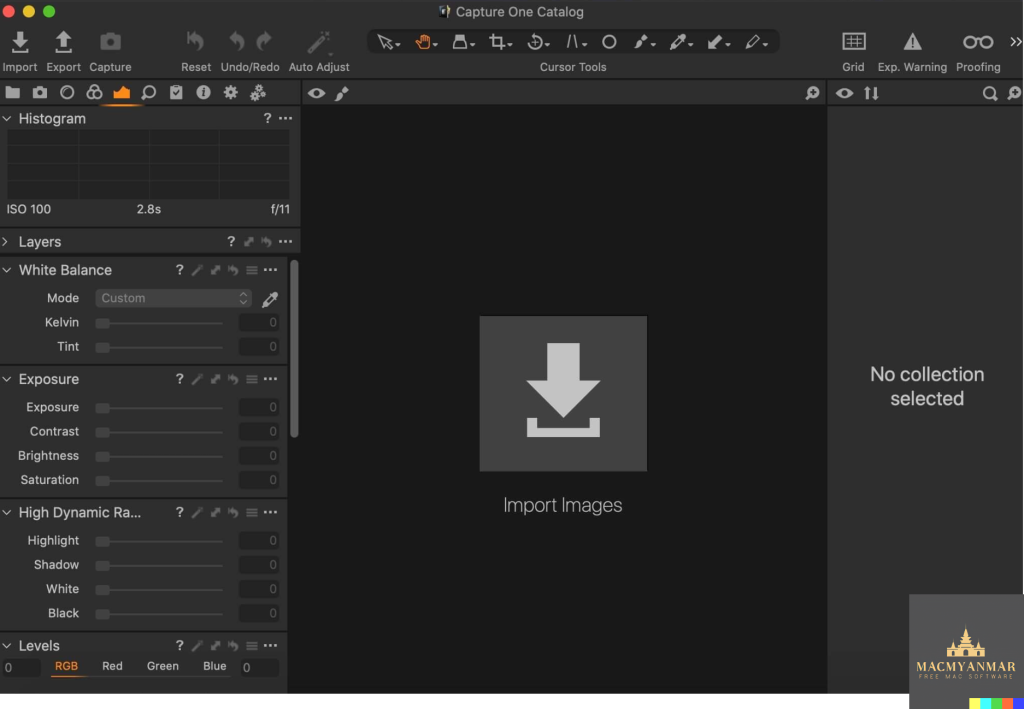
- Flexible Interface: Customizable interface to suit personal workflow preferences, with tailored workspaces for different tasks.
- Automation Tools: Tools to automate repetitive tasks, enhancing efficiency and saving time.
- Performance:
- Updated Processing Engine: Enhanced performance and responsiveness with the latest processing engine.
- Batch Processing: Capabilities to process large volumes of images quickly and efficiently.
New Features and Improvements in Capture One 23
- Speed Edit:
- Quickly adjust multiple settings simultaneously without the need for sliders, enhancing the editing workflow.
- Dehaze:
- A powerful tool to reduce haze and improve clarity and contrast in your images.
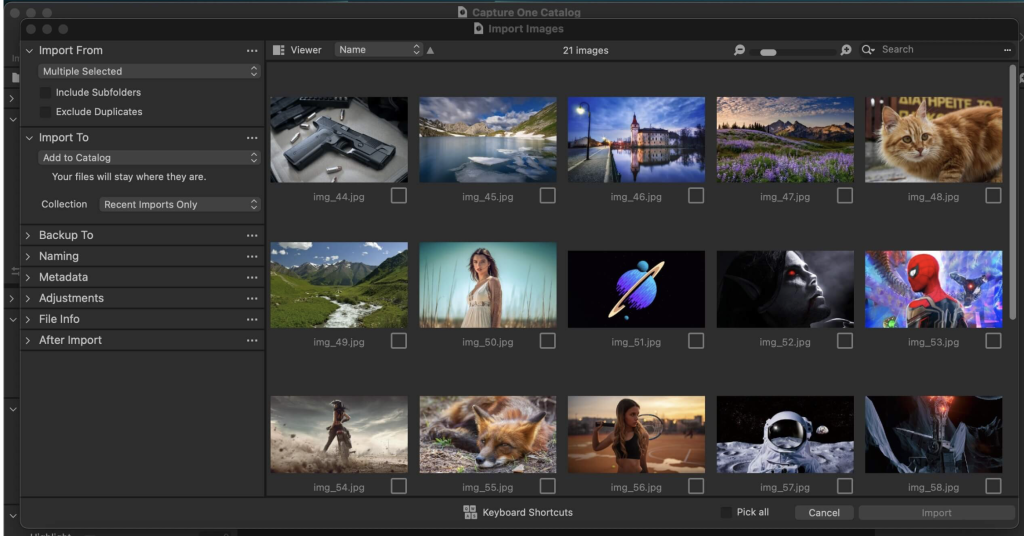
- Improved Importer:
- Enhanced importing process for faster and more efficient file management.
- General User Experience Improvements and Tweaks:
- Ongoing enhancements to the user interface and overall user experience for greater ease of use.
- HEIF Support:
- Support for High-Efficiency Image File (HEIF) format, allowing for more efficient storage and processing of images.
- Easy Brush Adjusting:
- Simplified adjustment of brush settings for more intuitive and efficient editing.
- Improved Performance:
- Further optimization of performance for faster and more responsive editing.
- Colored Gradients on White Balance Sliders:
- Visual enhancements to white balance sliders, making adjustments more intuitive.
- Enhanced Tooltips:
- Improved tooltips for better guidance and user understanding of features and tools.
- Easy Access to Tutorials:
- Direct access to tutorials and educational resources within the software to help users maximize their editing potential.
Compatibility
- Operating System: macOS 12.0 or later
Availability
- Homepage: Capture One
Capture One 23 continues to set the standard in professional photo editing with its advanced features, exceptional image quality, and customizable workflow, making it the go-to choice for photographers seeking the best in image processing and editing software.
Capture One Studo for Mac 16.4.3.15
02 years

Name : Capture One Studo
Size : 1 GB
Capture One Studo for Mac free Download
Capture One: Professional RAW Converter and Image Editing Software
Capture One is a leading professional RAW converter and photo editing software that delivers exceptional image quality, powerful editing tools, and a highly customizable workflow. It supports more than 500 high-end cameras and offers advanced features tailored for professional photographers and studios.
Key Features
- Ultimate Image Quality:
- RAW Image Processing: Renowned for producing true-to-life colors with tailored profiles for nearly 600 camera models and lenses.
- Detail Enhancement: Extract incredible detail from RAW files for stunning image quality.
- Tethered Capture:
- Lightning-Fast Tethering: Provides the fastest tethered capture in the industry, ensuring a seamless workflow during photoshoots.
- Live View: Allows real-time adjustments and focus control directly from the software.
- Editing Tools:
- Extensive Adjustment Tools: Includes a wide range of tools for exposure, color correction, sharpening, and more.
- Layers and Masks: Advanced layer and masking capabilities for precise adjustments.
- Styles and Presets: Apply and create custom styles and presets to streamline your editing process.
- Digital Asset Management:
- Catalogs and Sessions: Organize your images efficiently with robust catalog and session management.
- Keywords and Metadata: Powerful tools for managing keywords, ratings, and metadata.
- Customizable Workflow:
- Flexible Interface: Customize the interface to fit your personal workflow, with workspaces tailored to different tasks.
- Automation Tools: Automate repetitive tasks to save time and improve efficiency.
- Performance:
- Updated Processing Engine: Offers market-leading performance and responsiveness.
- Batch Processing: Quickly process large volumes of images with batch processing capabilities.
Capture One Studio
Capture One Studio includes all the features of Capture One Pro, along with additional tools designed specifically for professional photography studios. These features enhance the management, efficiency, and overall workflow of studio environments.
Additional Features in Capture One Studio
- Barcode Scanner Tool: Automate file naming and metadata entry by integrating barcode scanners.
- Advanced Guides and Grids: Assist in precise composition and alignment.
- Next Capture Backup: Automatically back up images during tethered capture to ensure data security.
- Capture Pilot: Enhanced version for remote viewing and adjustments during shoots.
- Dedicated Studio Workspaces: Pre-configured workspaces optimized for different studio tasks.
Compatibility
- Operating System: macOS 12.0 or later
Availability
- Homepage: Capture One
Capture One offers a comprehensive suite of tools that cater to the needs of professional photographers, ensuring superior image quality, efficient workflows, and powerful editing capabilities. Whether you’re working in a studio environment or on-location, Capture One provides the tools you need to bring your photography to life.
KeyKey for Mac free Download 2.9.12
02 years
by Jameskarke
in Application

Name : KeyKey
Size : 49 MB
KeyKey for Mac free Download
KeyKey Typing Tutor: Improve Your Typing Skills
KeyKey is a minimalist and effective typing tutor designed to enhance your typing speed and accuracy through consistent daily practice. The app is tailored to learn from your typing patterns and adapt its exercises to help you improve efficiently.
Key Features
- Responsive Learning:
- KeyKey adapts to your typing skill level, presenting words that adjust in difficulty based on your performance.
- Tracks your errors and provides targeted practice on challenging letter combinations.
- Keyboard Trainer:
- Includes a built-in virtual keyboard that shows proper finger placement in real-time.
- Helps you develop correct hand positioning for optimal typing efficiency.
- Real World, Real Words:
- Utilizes wordlists generated from over 3,000 books and articles in both English and Cyrillic.
- Offers practice with phrases commonly used in real-life situations, enhancing practical typing skills.
- Expert Mode:
- Designed to push your typing speed beyond 60 words per minute.
- Provides more complex and challenging words and phrases for advanced practice.
- Accuracy Focus:
- Emphasizes precise typing over speed to reduce errors.
- Aims to improve your confidence and accuracy, making your typing more reliable.
Benefits
- Simple and Effective: No complicated lessons or minigames, just straightforward typing practice.
- Progress Tracking: View your errors, completed words, and time elapsed during practice sessions.
- Daily Commitment: Just 15 minutes of practice each day can significantly improve your typing speed and accuracy.
- Language Support: Improves typing skills in both English and Cyrillic, suitable for native speakers and those learning a new language.
Compatibility
- Operating System: macOS 10.11 or later
Availability
- Mac App Store: KeyKey on Mac App Store
KeyKey Typing Tutor offers a streamlined and adaptive approach to improving your typing skills, suitable for both beginners and advanced users aiming to boost their typing speed and accuracy.
FxFactory Pro 8.0.16 Build for Mac 7877
02 years

Name : FxFactory Pro 8.0.16 Build
Size : 35 MB
FxFactory Pro 8.0.16 Build for Mac free Download
FxFactory Pro – Premier Visual Effects Toolbox for Video Editing
FxFactory Pro is a comprehensive visual effects package that powers an extensive collection of plug-ins for professional video editing software like Final Cut Pro, Motion, After Effects, and Premiere Pro. It offers unmatched features and an intuitive interface, making it a go-to tool for video editors and creators.
Key Features
- Wide Range of Visual Effects:
- Provides quick access to a vast collection of visual effects designed to work seamlessly with Adobe After Effects, Final Cut Pro, and Motion.
- User-Friendly Interface:
- Intuitive interface for browsing and managing installed effects.
- Allows users to preview and configure effects to suit their projects.
- Free and Commercial Products:
- Offers both free and commercial products, with support for purchasing and registering commercial products directly within the application.
- No-Code Effect Creation:
- FxFactory Pro enables users to create their own visual effects without writing any code.
- Users can modify existing plug-ins or create new ones from scratch.
- Seamless Integration:
- Once installed, plug-ins are immediately available for use in Final Cut Pro, Motion, and After Effects.
- Full integration with FxPlug ensures smooth operation and high performance.
- High-Quality Output:
- Supports 16-bit and 32-bit moving image construction.
- Provides tools for connecting necessary modules, applying them to content, and rendering high-quality visual effects.
- Plug-in Management:
- Built-in plug-in manager offers a complete environment for managing all visual effects.
- Simplifies the process of connecting, previewing, and rendering effects within projects.
System Requirements
- Supported Applications:
- Apple Final Cut Pro X 10.2+
- Motion 5.2+
- Adobe After Effects CC+
- Adobe Premiere Pro CC+
- Operating System:
- macOS 12.6 – 14.x or higher
What’s New in Version 8.0.16 Build 7877
- Specific release notes were not available at the time of the update.
Get FxFactory Pro
- Homepage: FxFactory Pro
FxFactory Pro is an essential tool for any video editor looking to enhance their workflow with high-quality visual effects, offering both powerful features and ease of use.

OmniReader Pro for Mac 2.9.11
02 years
by Jameskarke
in Application

Name : OmniReader Pro
Size : 31 MB
OmniReader Pro for Mac free Download
GM Reader – Versatile eBook Reader for macOS
GM Reader is a comprehensive and user-friendly application designed for reading a variety of eBook formats, including EPUB, CHM, and MOBI. With its intuitive interface and robust set of features, GM Reader enhances your reading experience on macOS.
Key Features
- Supported Formats:
- Read EPUB, CHM, and Kindle files (MOBI).
- Search Functionality:
- Single page and full-text search capabilities.
- Highlights search results for easy navigation.
- Navigation:
- Forward and backward browsing history to easily revisit previous pages.
- Page turning and zooming features for customized reading.
- Sidebar shrinking to maximize reading space.
- Printing and Exporting:
- Print pages directly from the app.
- Export files to EPUB or PDF formats.
- Extract and save all images contained in the eBook.
- File Information:
- View basic file information such as title, author, and other metadata.
- Image Handling:
- Adaptive image sizing to fit the page layout automatically.
- Resolve issues with garbled text through file encoding support.
- Bookshelf Management:
- Keep all your read files organized in a bookshelf for easy access.
- Drag and drop files to add them to the bookshelf quickly.
- Pro Version Features:
- The Pro version, included with top in-app purchases, offers advanced functionalities and an ad-free experience.
System Requirements
- Compatibility: Requires macOS 10.13 or later.
Get GM Reader
- Mac App Store: Download GM Reader
GM Reader provides a seamless and efficient way to read and manage your eBooks, making it a must-have tool for avid readers who use macOS.
Capture One Enterprise for Mac 16.4.3.15
02 years

Name : Capture One Enterprise
Size : 1 GB
Capture One Enterprise for Mac free Download
Capture One 23 Enterprise – Advanced Photo Editing Solution for Studios
Capture One 23 Enterprise is a powerful photo editing software specifically designed for image production studios and e-commerce platforms. Developed in Copenhagen, Denmark, Capture One is renowned for its high-quality RAW processing, authentic color rendering, and industry-leading tethering capabilities. The Enterprise version is tailored to meet the specific needs of professional studio photography, offering advanced features to streamline workflows and improve efficiency.
Key Features
- Advanced Tethering:
- Fastest tethering in the industry for seamless shooting and instant review.
- Barcode scanner tool for easy organization and workflow integration.
- High-Quality RAW Processing:
- True-to-life color rendering with individual color profiles for accurate reproduction.
- Optimized for popular e-commerce cameras, reducing editing time and costs.
- Robust Editing Tools:
- Comprehensive suite of photo editing tools, including advanced guides and tool locks.
- Smart adjustments and custom styles to enhance productivity and consistency.
- Automation and Integration:
- Workflow enhancement features for automating repetitive tasks.
- Integrates with other systems like PIM, DAM, and e-commerce platforms for streamlined operations.
- Enterprise-Specific Features:
- Next Capture Backup to secure images during shoots.
- Next Capture Keywords and Metadata for efficient data management.
- Capture Pilot with enterprise enhancements for remote collaboration.
- Dedicated studio workspaces tailored for various roles within the studio.
- Collaboration and Efficiency:
- Supports multiple users, including photographers, retouchers, and project managers.
- License management and MDM support for large-scale operations.
- Customizable solutions to address specialized studio needs, reducing errors and costs.
- Security and Backup:
- Features like Image Back-Up and secure workflow options to minimize risks and protect data.
Value Creation for Photography Studios
Capture One 23 Enterprise enhances studio productivity and cost-efficiency by optimizing key performance indicators (KPIs):
- Time to Market: Streamlines the image production process from planning to publishing, reducing the time required to make images available on e-commerce platforms.
- Cost per Image: Improves efficiency at every step, lowering overall production costs.
- Reduce Risk: Ensures secure and error-free image production through advanced backup and management features.
New in Capture One 23 Enterprise
Latest Updates:
- Compatibility with macOS 12.0 or later.
- Enhanced features for more efficient and accurate studio workflows.
For more details and to explore the full range of features, visit the Capture One Enterprise Homepage.
Capture One 23 Enterprise is designed to meet the demanding needs of professional photography studios, providing the tools necessary to maintain high standards of quality, efficiency, and security.