Free Macsoftware One click Download
Application
Download Micromat Drive Scope Download 1.2.22
02 years

Name : Micromat Drive Scope
Size : 24 MB
Micromat Drive Scope 1.2.22
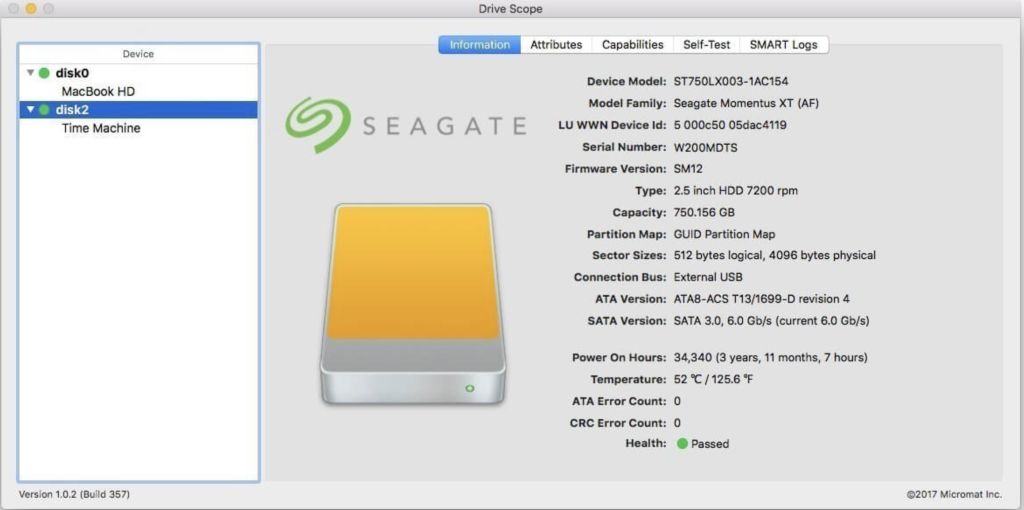
Drive Scope is a comprehensive utility designed to provide users with detailed insights into the health of their hard drives and solid-state drives (SSDs) connected to their Mac. Here are some key features of Drive Scope:
- SMART Monitoring: Drive Scope leverages the Self-Monitoring, Analysis, and Reporting Technology (SMART) built into drives to provide in-depth health analysis. It goes beyond basic pass/fail reports and offers granular information about each aspect monitored by SMART.
- Early Warning System: The utility offers advance warnings when a drive is showing signs of potential failure. It provides detailed information about errors that have occurred, their frequency, and whether they indicate temporary issues or impending failure.
- Complete Drive Information: Users can access comprehensive information about their drives, including model details, capacity, and specific attributes contributing to overall health. Drive Scope offers a detailed overview of drive health, including attributes related to potential failure.
- Support for SSDs: Drive Scope supports modern SSDs, including those with NVMe connections used in the latest Macs. It provides access to SMART data for these SSDs, allowing users to monitor their health effectively.
- Manual Testing: Users have the option to manually trigger the drive’s internal tests to ensure that SMART data is up-to-date. Drive Scope allows users to check the testing log to see when the last test was performed.
- Information Dashboard: Upon opening Drive Scope, users are presented with an information page summarizing critical details about their drives. This includes Drive Scope’s health assessment, error count, model information, and drive capacity.
- Compatibility: Drive Scope is compatible with Intel-based Macs running OS X 10.8.5 or later, including macOS 10.13 ‘High Sierra’.
Overall, Drive Scope offers users a comprehensive solution for monitoring the health of their drives, providing advanced warnings, detailed insights, and control over testing to ensure optimal drive performance and reliability.
Download GM EPUB Reader Pro for Mac2.6.2
02 years

Name : GM EPUB Reader Pro
Size : 21 MB
GM EPUB Reader Pro for Mac free Download
The GM EPUB Reader is a comprehensive ebook reader designed to provide users with a seamless reading experience and a variety of useful features. Here’s an overview of its key features:
- EPUB and Mobi Support: The reader supports EPUB and Mobi file formats, allowing users to access a wide range of ebooks.
- Search Functionality: Users can perform single-page and full-text searches within ebooks, with the ability to highlight search results for easy reference.
- Browsing History: The reader keeps track of browsing history, enabling users to navigate forward and backward through pages they’ve visited.
- Reading Controls: Users can customize their reading experience with features like page turning, zooming, and sidebar shrinking. The reader also supports page printing for physical copies.
- File Management: Users can view basic information about files, such as title and author, and quickly switch between pages using page number display and quick page switching.
- Conversion Tools: The reader offers conversion capabilities, allowing users to convert EPUB to PDF, Mobi to EPUB, and Mobi to PDF. It also supports image extraction from EPUB and Mobi files.
- Bookshelf: All read files are saved in the bookshelf for easy access and quick review. Users can also add files to the bookshelf via drag and drop.
- Reading Experience Enhancements: The reader remembers the last reading location, enabling users to resume reading from where they left off. It features photo adaptation for improved layout and supports page zooming using keyboard shortcuts. Additionally, users can quickly navigate pages and view history pages using keyboard shortcuts.
The GM EPUB Reader offers a Pro Version through in-app purchases, which includes additional features and enhancements. It is compatible with macOS 10.13 or later and is available for download on the Mac App Store.
Overall, the GM EPUB Reader provides users with a user-friendly interface, robust functionality, and a pleasant reading experience, making it an excellent choice for ebook enthusiasts.
TG Pro (Temperature Gauge Pro) for Mac v2.90
02 years

Name : TG Pro (Temperature Gauge Pro)
Size : 13 MB
TG Pro (Temperature Gauge Pro) for Mac free Download
Temperature Gauge Pro is a comprehensive utility designed for Mac users to monitor and manage their system’s temperature and fan speeds effectively. With its range of features, users can ensure optimal performance and prevent overheating issues. Here are the key features of Temperature Gauge Pro:
- Temperature Monitoring: Users can view the current and maximum recorded temperatures for every sensor in their Mac. The app provides detailed insights into temperature levels, allowing users to stay informed about their system’s thermal performance. Additionally, users have the option to choose between Celsius or Fahrenheit temperature units based on their preference.
- Fan Speed Control: Temperature Gauge Pro enables users to adjust fan speeds manually, providing greater control over their Mac’s cooling system. By tuning the fan speeds, users can regulate the temperature and ensure that their Mac runs cooler, thereby enhancing overall performance and longevity. Moreover, the app offers an Auto Boost feature that automatically increases fan speeds when a specific temperature threshold is reached, helping to prevent overheating.
- Diagnostics and Alerts: The built-in diagnostics feature allows users to identify faulty fans and temperature sensors, enabling them to address hardware issues promptly. Additionally, Temperature Gauge Pro provides notifications via the Notification Center or Growl when a temperature threshold is reached or when Auto Boost is enabled. This real-time alert system helps users stay informed about temperature fluctuations and potential issues with their Mac’s cooling system.
- Data Logging: The app logs all temperature and fan speed information to a CSV file, allowing users to track system performance over time and analyze data for trends or anomalies. This feature enables users to graph temperature and fan speed data in external applications, providing valuable insights into system behavior and performance optimization.
Temperature Gauge Pro is compatible with macOS 10.13 or later and works seamlessly on all Macs, including laptops and desktops. Its user-friendly interface and powerful features make it an essential tool for monitoring and managing system temperature and fan speeds, ensuring optimal performance and reliability. Users can learn more about Temperature Gauge Pro and download the software from its homepage at tunabellysoftware.com.

Download AlDente for Mac v1.25.2
02 years
by Jameskarke
in Application

Name : AlDente
Size : 4 MB
AlDente for Mac free Download
AlDente is a utility tool designed to help MacBook users extend the lifespan of their batteries by providing various battery management features.
Key Features:
- Charging Limit: AlDente allows users to set a charging limit within a healthier range (between 20% and 80%). This helps prevent the battery from constantly staying at 100%, which can shorten its lifespan.
- Heat Protection: The software includes heat protection features to prevent the MacBook from overheating during charging, which can also impact battery health.
- Sailing Mode: This mode likely optimizes battery usage during periods of low activity or standby, helping to conserve battery power when not in active use.
- Calibration Mode: AlDente offers calibration mode, which may assist in ensuring the battery percentage displayed accurately reflects the actual battery capacity.
AlDente aims to educate users about the optimal ways to maintain their MacBook batteries for longevity, emphasizing the importance of keeping the battery within the recommended charging range. By implementing features such as charging limit, heat protection, sailing mode, and calibration mode, users can potentially prolong the lifespan of their MacBook batteries and avoid the need for costly replacements.
AlDente can be accessed through its homepage at apphousekitchen.com, where users can learn more about battery health and download the software for their MacBook.
Download Magic Disk Cleaner for Mac 2.6.2
02 years

Name : Magic Disk Cleaner
Size : 6 MB
Magic Disk Cleaner for Mac free Download
Magic Disk Cleaner is a utility app designed to help you quickly and efficiently find and delete temporary files that are consuming unnecessary disk space on your Mac. Here are some key features of Magic Disk Cleaner:
- Fast Search: The app rapidly scans your computer to locate temporary files that can be safely deleted. This process is quick and efficient, allowing you to reclaim disk space in no time.
- Easy Handling: Magic Disk Cleaner offers a user-friendly interface that makes it incredibly easy to use. Simply launch the app, and it will start searching for temporary files immediately. With just one click, you can delete the identified files and free up space on your disk.
- Manual Deletion: Magic Disk Cleaner does not automatically delete any files without your consent. You have full control over which files are deleted and which ones you want to keep. This ensures that you won’t accidentally remove any important data.
Overall, Magic Disk Cleaner provides a convenient solution for managing temporary files and optimizing disk space on your Mac. It offers fast performance, simple operation, and manual control over the deletion process.
You can download Magic Disk Cleaner from the Mac App Store for macOS 11.0 or later.
Download Rectangle Pro for Mac 3.0.18
02 years

Name : Rectangle Pro
Size : 10 MB
Rectangle Pro for Mac free Download
Rectangle formerly known as Hookshot, is a feature-rich tool designed to help you snap windows faster and more efficiently on your Mac. Here are some key features of Rectangle:
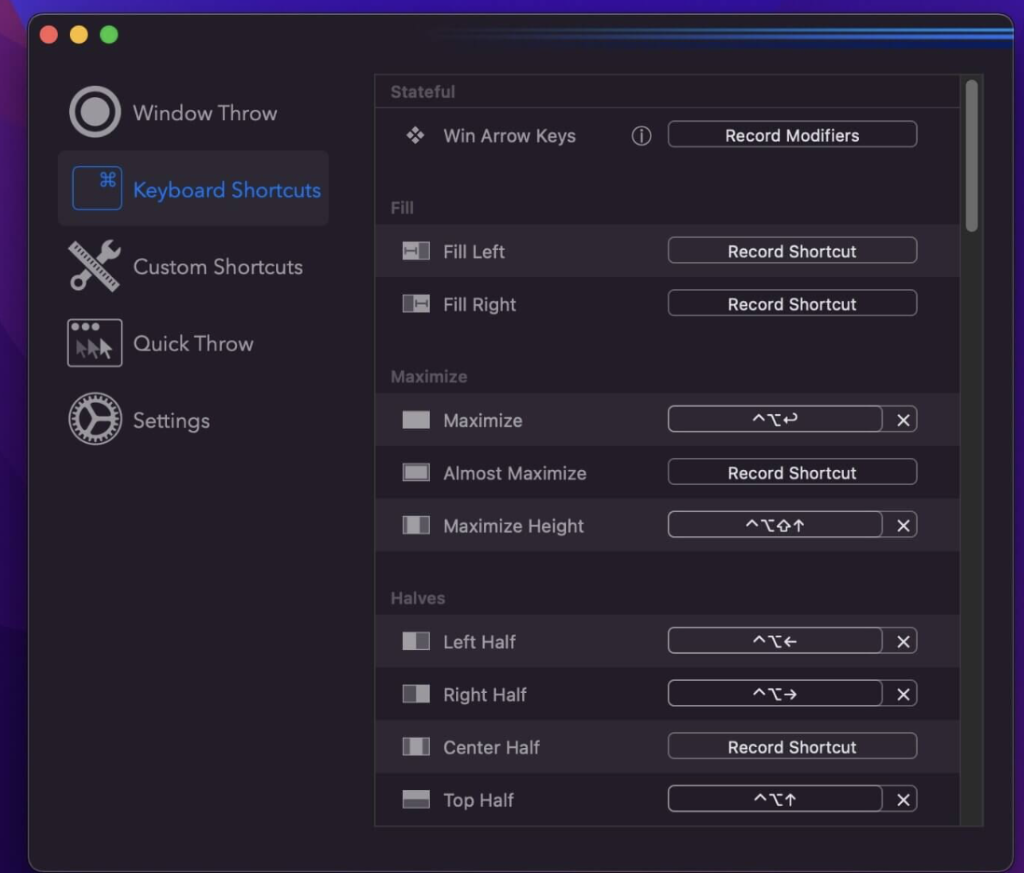
- Window Sizes & Positions: Rectangle offers 16 predefined window sizes and positions to quickly arrange your windows on the screen.
- Keyboard Shortcuts: You can create custom keyboard shortcuts for various window sizes and positions, allowing you to snap windows with ease.
- Drag to Snap: Simply drag windows to the edges of your screen to snap them into place.
- Move and Resize with Key + Cursor: Hold down a key and move your cursor to move or resize windows quickly.
- Snap Windows Under Cursor: Rectangle allows you to snap windows even if they are not in focus, making it easier to manage multiple windows simultaneously.
- Custom Shortcuts: In addition to predefined sizes and positions, you can create custom shortcuts for any window size and position according to your preferences.
- System Integrity Protection (SIP): Note that you may need to disable System Integrity Protection (SIP) to perform certain actions with Rectangle.
Overall, Rectangle provides a convenient way to organize and manage windows on your Mac, enhancing productivity and workflow efficiency.
Visit the homepage for more information and to download Rectangle.
Download Pixologic ZBrush for Mac 2024.0.2
02 years

Name : Pixologic ZBrush
Size : 3.3 GB
Pixologic ZBrush for Mac free Download
ZBrush is a leading digital sculpting software widely used in the industry. The latest update brings several enhancements to explore new workflows and creative possibilities. Here are some key features of the update:
- Integration with Redshift: Fully GPU-accelerated, biased rendering can now be integrated into your ZBrush pipeline. Render high-quality images with features like Subsurface Scattering, Emissive Light generation, metallic material management, and caustic effects for realistic glass.
- Slime Bridge: A dynamic feature that expands modeling capacity by creating complex geometric connections and designs from one masked island to another. Utilize ZBrush’s masking system to create unique shapes and designs in real-time.
- Sculptris Pro: A dynamic tessellation sculpting workflow that enables you to sculpt without worrying about polygon distribution. Sculptris Pro dynamically adds and reduces polygons wherever needed, allowing you to focus entirely on sculpting without constraints.
- Subdivision Size Picker: Increase resolution capabilities with triangle size at five times the density. Control triangle size and density in desired areas while reducing them elsewhere, enabling more detail where needed.
- Multi-Resolution Mesh Editing: ZBrush allows you to move between subdivision levels at any time, making changes wherever necessary without sacrificing higher resolution details.
- Mask Region: Expands ZBrush’s masking system by allowing you to draw shapes on the surface of a mesh and fill those areas uniformly and independently. Auto-fill and analyze region options make masking selections easier and more efficient.
- Apply Last Action: Apply material attributes, color information, and other operations to multiple subtools with a single click. Folder support allows you to manage Apply Last Action to specific folders for increased control over modeling and asset representation.
ZBrush offers a library of over 400 sculpting brushes and supports various workflows including hard surface modeling, character creation, world building, and environment design.
Visit the homepage for more information about ZBrush and its latest features.
Download Infuse Pro for Mac 7.7.1
02 years
by Jameskarke
in Application

Name : Infuse Pro
Size : 70 MB
Infuse Pro for Mac free Download
Infuse is a versatile video player designed for iPhone, iPad, Apple TV, and Mac, offering seamless playback of various video formats without the need for conversion. Here are some key features of Infuse:
Supported Video Formats: Infuse supports a wide range of video formats, including MP4, M4V, MOV, MKV, AVI, WMV, MTS, ISO, VIDEO_TS, FLV, OGM, OGV, ASF, 3GP, DVR-MS, WebM, and WTV. It also includes fully certified Dolby Digital Plus (AC3/E-AC3), DTS, and DTS-HD audio.
Streaming from Various Sources: You can browse and play videos stored on your Mac, PC, NAS, Wi-Fi hard drive, as well as from apps like Plex, Emby, and Jellyfin. Additionally, it supports streaming from cloud services like Dropbox, Google Drive, OneDrive, Box, pCloud, Yandex.Disk, and Mega.nz.
Trakt 2-Way Sync: Infuse allows you to connect with Trakt to sync watched history, submit ratings, and post comments, providing a seamless viewing experience across devices.
Optimized Subtitles: Infuse offers optimized subtitles powered by OpenSubtitles, allowing you to bring your own subtitles or download them on the fly in virtually any language.
Player Features: Infuse includes various player features such as multiple audio tracks, chapters, gesture controls, video zoom options, continuous playback, and deinterlacing.
Extras: Additional features include library organization, one-click subtitle downloads from OpenSubtitles, scrobble plays to Trakt, download videos from networked devices, and drag-and-drop uploads via web browser.
Infuse Pro: With Infuse Pro, you can enjoy even more video formats, Dolby Digital Plus (AC3/E-AC3), DTS, and DTS-HD mobile surround sound, stream video types over AirPlay and Google Cast, access videos stored in cloud services, and sync libraries, settings, watched history, and playback progress between devices.
Compatibility: Infuse requires macOS 11.0 or later.
Visit the homepage for more information and to download Infuse.
Ryan Nangle – Pixel Sorting Effect for Final Cut Mac
02 years

Name : Ryan Nangle – Pixel Sorting Effect for Final Cut Pro
Size : 6.42 MB
Ryan Nangle – Pixel Sorting Effect for Final Cut Pro
Pixel Sorting Effects package offers 14 preset effects for pixel sorting, each of which is fully adjustable, allowing users to create their own unique visual styles. To install the package, simply download the folder and save it in your Motion Templates – Effects folder. Alternatively, you can refer to the tutorial provided above for detailed installation instructions.
Here’s a summary of what the package includes:
- 14 Preset Effects: Choose from a variety of preset pixel sorting effects to apply to your visuals.
- Customizable: Adjust each preset effect to tailor it to your specific needs and create your own distinctive visual style.
- Installation Instructions: Follow the provided tutorial for step-by-step guidance on how to install the package and start using the effects in your projects.
Visit the homepage for more information and to download the Pixel Sorting Effects package.
Download Pro Microphone for Mac 1.6.0
02 years

Name : Pro Microphone
Size : 67 MB
Pro Microphone for Mac free Download
Pro Microphone is a versatile voice and music recording studio designed for beginner singers or anyone looking to enhance their vocal recordings. With a variety of microphone types and effects, as well as features for recording and editing, Pro Microphone offers a professional studio experience right on your Mac. Here are some key features of Pro Microphone:
Key Features:
- Various Mic Types: Choose from dynamic, stage, valve, condenser, and other microphone types, each offering unique sound effects. Detailed information about each mic, including its frequency response, is provided.
- Recording and Looping: Record vocals and music with multiple slots for recordings and loops. Experiment with different backing tracks to enhance your recordings.
- Custom Backing Tracks: Easily import your own backing tracks by dragging and dropping files into the app. Edit tracks as needed to customize your recordings.
- New Features: The latest version of the app includes a how-to-use tutorial to help you get started, cloud storage for saving your recordings, and bug fixes for improved performance.
Compatibility:
- Pro Microphone is compatible with macOS 10.15 or later, ensuring compatibility with a wide range of Mac systems.
Experience the convenience of a professional recording studio right on your Mac with Pro Microphone. Visit the homepage for more information and to download the application.