We rank the best UK-licensed online casinos for real money and live craps in 2026, comparing bonuses, games, payouts, and mobile play. read the best online craps casino guide

Posts by Jameskarke
GraphicConverter for Mac 12.2.0 (6570)
0
Name : GraphicConverter
Size : 261 MB
GraphicConverter for Mac free Download
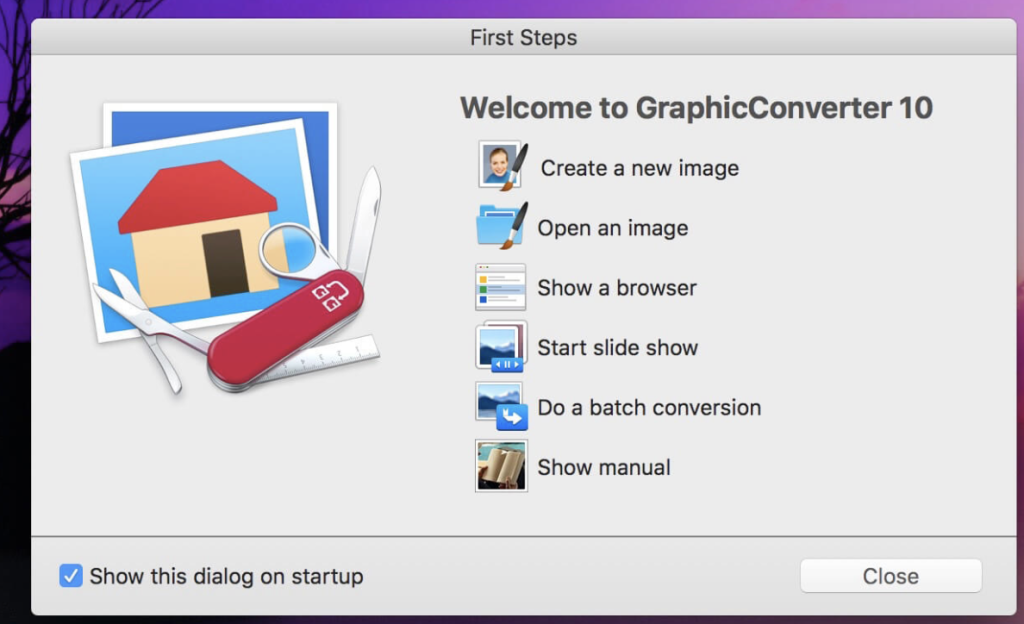
GraphicConverter is a versatile image-editing program designed to handle a wide range of graphic formats and editing tasks. Known for its ability to import over 200 different graphic formats and export to 80 formats, GraphicConverter is a go-to tool for graphic manipulation, offering powerful editing features and support for Photoshop-compatible plug-ins.
Key Features:
Comprehensive Format Support:
- Import and Export: Supports importing from 200 graphic formats and exporting to 80 formats, making it a highly versatile tool for any image editing or conversion task.
- Batch Conversion: Capable of converting multiple images in a batch process, saving time and effort.
Advanced Editing Tools:
- High-End Editing: Offers a variety of advanced editing tools suitable for both basic and complex image manipulation.
- Photoshop Plug-ins: Compatible with Photoshop plug-ins, extending its functionality with additional effects and features.
RAW Image Developer:
- Enhanced RAW Editing: Provides a full-screen dialog for editing RAW images, offering controls for Exposure, Contrast, and Color Corrections. The tool also allows for significant noise reduction, making it ideal for working with high-detail RAW images.
- No Gray Haze: Unlike some JPG edits, RAW images edited in GraphicConverter maintain clarity and avoid gray haze, even when brightening.
Unpack Archives:
- Archive Content Preview: Easily preview or extract content from various archive formats, including Zip, TAR, and TGZ. This feature is particularly useful for managing image archives.
Specialized Tools:
- Wide-Angle Equalization: Corrects distortion in wide-angle photos, particularly useful for reducing the stretching effect at the edges of images.
- Gradient Creation: Allows the creation of gradients with up to 10 colors, ideal for backgrounds or creative design projects.
- Duo-Tone Effects: Apply duo-tone effects by coloring lighter and darker shades with two different colors, adding a unique and artistic touch to images.
Metadata Management:
- Batch and Individual Editing: Offers tools for both batch and individual editing of metadata, including EXIF, IPTC, and XMP data.
Apple Finder Tags:
- Finder Tag Integration: Integrates with Apple’s Finder Tags, allowing users to organize and manage images efficiently. Tags can be viewed and edited directly within the browser via the context menu.
Additional Features:
- Slide-Show Window: Conveniently view and manage images in a slide-show format.
- Batch Rename: Rename multiple files simultaneously with batch processing, enhancing workflow efficiency.
Compatibility:
- Operating System: macOS 10.13 or later
Availability:
- Homepage: GraphicConverter
GraphicConverter is an all-in-one image editing and conversion tool that caters to both beginners and professionals. With its broad format support, advanced editing capabilities, and specialized tools, it’s a powerful resource for anyone working with images on macOS.

Native Instruments Komplete Kontrol 3.3.2
0
Name : Native Instruments Komplete Kontrol
Size : 452 MB
Native Instruments Komplete Kontrol for Mac free Download
KOMPLETE KONTROL is an intuitive tool designed to streamline your music production workflow. It organizes all your instruments, effects, presets, loops, and samples, making it easy to find, play, and tweak sounds. This free plug-in integrates with any DAW (Digital Audio Workstation) and works seamlessly with any MIDI controller, as well as with a standard mouse and keyboard.
Key Features:
Works with Hundreds of Instruments and Effects:
- Comprehensive Integration: KOMPLETE KONTROL supports all KOMPLETE instruments and effects and over 750 other plug-ins from more than 90 top creators like Waves, Spitfire Audio, Softube, Arturia, and Output.
- Native Kontrol Standard (NKS): The extended plug-in format by Native Instruments ensures a smooth and unified workflow, bringing together a vast array of tools in one platform.
Millions of Loops and Samples Made Simple:
- NKS for Loops and Samples: KOMPLETE KONTROL now includes support for loops and samples, synchronizing all your Collections from Sounds.com with just one click.
- Organized Browsing: All sounds, including those from the MASCHINE library and Expansions, are neatly tagged for easy browsing in your DAW.
- Built-in Sampler: Play everything with an integrated sampler, and easily drag loops and one-shots into your DAW timeline or sample-based instruments like BATTERY, TRK-01, and FLESH.
Quickly Find and Audition Your Sounds:
- Smart Tagging: Easily browse through sounds using tags, making it simple to find specific types of sounds like ‘analog’ bass synths, ‘gloomy’ soundscapes, or kick drum samples.
- Instant Previews: Preview sounds instantly as you scroll, eliminating the need to load individual plug-ins to hear them.
Play Scales, Chords, and Arpeggios:
- Smart Play Feature: Unlock new and inspiring ways to perform by mapping your keyboard to over 100 different scales and modes, playing chords with a single finger, and creating expressive arpeggios.
- Visual Feedback: If you own an S-Series keyboard, you get visual feedback directly from the Light Guide, enhancing your performance experience.
Everything is Pre-Mapped and Ready to Play:
- Automatic Mapping: Thanks to NKS, KOMPLETE KONTROL automatically maps all instruments and effects to your hardware. The mappings are designed by the instrument creators themselves, ensuring that essential parameters are always within reach.
Compatibility:
- Operating System: macOS 12.0 or later
- Processor: Compatible with both Apple Silicon and Intel Core processors
Availability:
- Homepage: KOMPLETE KONTROL
KOMPLETE KONTROL is designed to make music production more intuitive, bringing together all your tools in one place, and offering powerful features for both performance and sound design. Whether you’re a producer, DJ, or musician, KOMPLETE KONTROL provides a seamless and efficient workflow, allowing you to focus on your creativity.
Pixelmator Pro for Mac Download 3.6.6
0
Name : Pixelmator Pro
Size : 656 MB
Pixelmator Pro for Mac free Download
Pixelmator Pro is a powerful, beautiful, and easy-to-use image editor designed exclusively for Mac. This software provides a comprehensive set of professional-grade, nondestructive image editing tools, making it ideal for both beginners and seasoned professionals. Whether you want to enhance photos, create intricate designs, draw, paint, apply stunning effects, or design beautiful text, Pixelmator Pro offers everything you need to bring your creative visions to life.
Key Features:
Exceptional Design and Functionality:
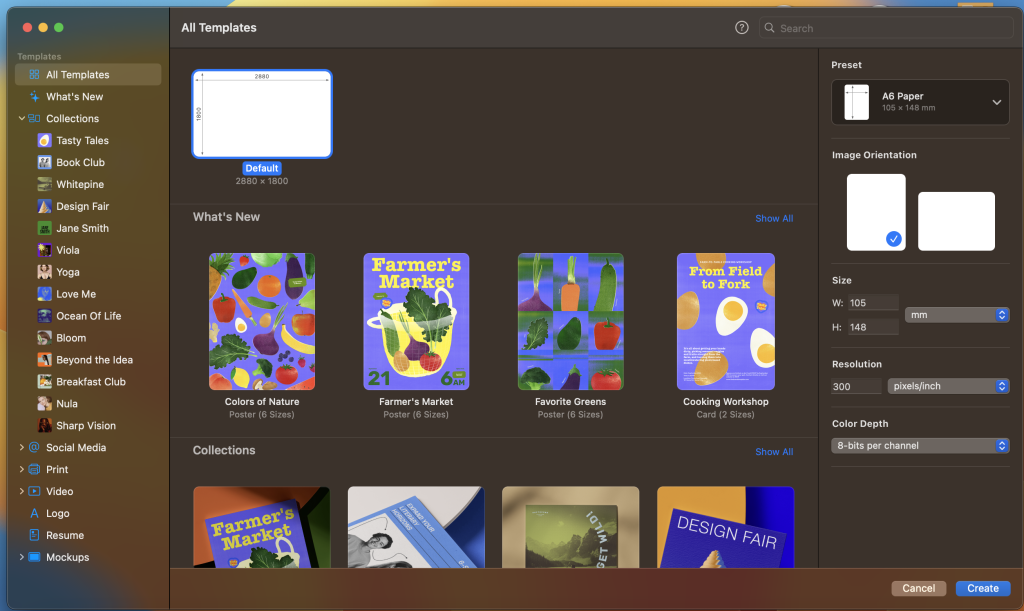
- Modern Interface: A single-window interface designed specifically for Mac, offering an intuitive experience.
- Ease of Use: Accessible design that makes image editing straightforward, even for beginners.
- Adaptable Appearance: Native dark and light modes that adapt to your macOS theme.
- Customizable Workspace: Organize your workspace with presets tailored for photography, design, illustration, and painting.
- Photos Extension: A full-featured extension that allows you to edit images within the Photos app while maintaining nondestructive edits.
Professional Tools:
- Nondestructive Editing: Adjustments can be modified or removed at any time without losing quality.
- Comprehensive Image Editing: Tools for moving, resizing, arranging objects, and more to create stunning compositions.
- Advanced Color Adjustments: Machine learning-powered tools for color correction and enhancement.
- RAW Support: Full support for editing RAW files, taking advantage of their extended range data.
- Customizable Brushes: Digital and traditional painting tools with handcrafted, dual-texture brushes, and tablet support.
- Artistic Effects: Combine built-in effects to create limitless artistic possibilities.
- Presets: Save and reuse combinations of adjustments, effects, and layer styles, with options to share them with others.
- Retouching Tools: Tools for removing imperfections, cloning, lightening, darkening, and reshaping areas of your images.
- Vector Graphics: Add or create vector graphics using the Pen tool, with designs provided by the Pixelmator Team.
- Typography Tools: Full set of tools for designing great-looking text, including options for curved, circular, and path text.
- Web Optimization: Advanced compression tools for optimizing and saving images for the web.
- Automation: Batch process images with Automator actions and automate workflows with AppleScript support.
Image Editing Enhanced by Machine Learning:
- Repair Tool: Magically remove objects and recreate image areas with stunning realism.
- ML Enhance: Intelligently enhance photos using a machine learning algorithm trained on millions of professional photos.
- ML Super Resolution: Zoom and enhance image resolution with machine learning.
- ML Match Colors: Automatically copy the look of one photo to another.
- ML Denoise: Remove noise and compression artifacts while preserving image details.
- Quick Selection: Easily make accurate selections with the Quick Selection tool.
Compatibility:
- Supported Formats: Open and edit images in popular formats like JPEG, TIFF, PNG, PSD, HEIF, SVG, PDF, GIF, BMP, TGA, WebP, and JPEG-2000.
- Photoshop Integration: Open and edit Photoshop images with layers.
- SVG Support: Open and edit SVG vector images.
- Sharing Options: Share images to Photos, Mail, AirDrop, and more.
Built Exclusively for Mac:
- Seamless macOS Integration: Designed for macOS, Pixelmator Pro supports most macOS features and integrates seamlessly with macOS Big Sur.
Compatibility:
- Operating System: macOS 12.0 or later.
Availability:
- Homepage: Pixelmator Pro
Pixelmator Pro combines powerful tools with a user-friendly interface, making it a versatile choice for anyone looking to edit images professionally or casually on a Mac. Its integration with macOS, advanced machine learning features, and extensive customization options ensure that it meets the needs of both beginners and experienced professionals.

Algoriddim Neural Mix Pro for Mac 2.0.2
0
Name : Algoriddim Neural Mix Pro
Size : 145 MB
Algoriddim Neural Mix Pro for Mac free Download
Neural Mix™ Pro by Algoriddim is an AI-powered music player and editor designed for producers, DJs, and musicians. Whether you’re a professional or just a music enthusiast, Neural Mix™ Pro offers powerful tools to deconstruct songs, isolate beats, instruments, and vocals, and create custom loops. The software, crafted by the creators of multiple Apple Design Award-winning apps, provides an intuitive interface with a range of features to enhance your creative workflow.
Key Features:
Music Source Separation:
- Extract Components: Isolate beats, instruments, and vocals from any song, allowing for individual manipulation.
- Multi-track Waveforms: View and interact with multi-track waveforms side by side for detailed editing.
AI Music Player:
- Real-Time Isolation: Mute or isolate vocal or instrumental components on the fly.
- Time-Stretching: Change the tempo of a song without altering its pitch, with a range of up to ±75%.
- Pitch-Shifting: Transpose a song to a different key, up to ±1 octave.
- Automatic Detection: Automatic detection of BPM and key for seamless integration.
- Advanced Waveforms: Frequency-colored waveforms for enhanced visual editing.
- Beat-Quantized Looping: Create beat-precise loops easily.
Offline Export:
- Flexible Output: Export instrumentals, acapellas, drums, harmonics, and combinations like Harmonic+Vocals or Drums+Vocals.
- Multi-Track Export: Export multiple tracks at once in WAV or AAC formats.
- Customizable BPM and Key: Adjust target BPM and key for exported files.
Loop Editor:
- Precision Editing: Extract and fine-tune beat-matched loops from any part of a track.
- Custom Loops: Set auto-quantized or manual loop in & out points for precision.
- Flexible Export: Export loops in different formats, adjusting target BPM and key as needed.
Music Browser:
- Integration: Seamless integration with Music and Finder for easy access to your tracks.
- Playlist Export: Export multi-track playlists and folders as instrumentals or acapellas.
- Powerful Search: Advanced track sorting and search options.
Built for macOS:
- Core ML Integration: Utilizes Core ML for advanced machine learning capabilities.
- Optimized Performance: Multi-core analysis and export for fast processing.
- Touch Bar & Trackpad: Support for Touch Bar and multi-touch trackpad control.
- Accessibility: VoiceOver support ensures the software is accessible to all users.
Compatibility:
- Operating System: macOS 10.15 or later.
- In-App Purchases: Full Version included.
Availability:
- Homepage: Neural Mix™ Pro
Neural Mix™ Pro is ideal for anyone looking to manipulate music tracks with precision, offering a unique set of tools that leverage AI to enhance your music editing and production capabilities. Whether you’re isolating elements for remixes, creating custom loops, or preparing tracks for DJ sets, Neural Mix™ Pro provides the technology to transform your creative ideas into reality.

Navicat BI for Mac Download 2.0.10
0
Name : Navicat BI
Size : 330 MB
Navicat BI for Mac free Download
Unlock the Power of Data with Visual Intelligence
Enhance your decision-making process by transforming complex data into impactful visualizations. This approach empowers businesses to simplify data analysis, leverage interactive dashboards, and foster collaborative decision-making, aligning strategies with data-driven insights.
Key Features:
- Data Exploration and Visualization: Simplify data analysis with intuitive tools that enable you to create visualizations that make sense of your data. This is essential during the data exploration phase of your Business Intelligence (BI) process.
- Interactive Dashboards: Create and share interactive dashboards with colleagues, making it easier to collaborate on data-driven decisions and align business strategies.
- Seamless Data Integration:
- Databases: Easily connect to various databases including MySQL, PostgreSQL, SQL Server, Oracle, SQLite, MariaDB, MongoDB, and Snowflake.
- ODBC: Import data from ODBC sources such as Sybase, Snowflake, and DB2.
- File Types: Import data from Excel, Access, CSV, and other external files, whether stored locally, on a network, or via a URL.
- Linked File: Link charts to data sources for real-time updates based on underlying data changes.
- Diverse Chart Types: Choose from various chart types to ensure your data is presented in a meaningful and visually impactful way. The right chart type can answer your questions and convey your message clearly.
Important Notes:
- System Integrity Protection (SIP): To use this application on macOS, you may need to disable System Integrity Protection (SIP) and turn off Gatekeeper. Disabling SIP can expose your system to security risks, so it’s advised to proceed with caution and re-enable SIP after installation if necessary.
Compatibility:
- Operating System: macOS 11.0 or later.
Availability:
- Homepage: Navicat
This tool is designed for professionals who need to make informed decisions by visualizing and analyzing data effectively. It supports a wide range of data sources and offers powerful visualization capabilities to help you and your team unlock the true potential of your data.

Navicat Premium for Mac Download 17.0.15
0
Name : Navicat Premium
Size : 354 MB
Navicat Premium for Mac free Download
Navicat Premium is a comprehensive database development tool designed to enable users to manage and interact with multiple database types simultaneously from a single application. It supports a wide range of databases, including MySQL, MariaDB, SQL Server, Oracle, PostgreSQL, and SQLite, making it a versatile choice for developers, DBAs, and IT professionals.
Key Features of Navicat Premium:
- Multi-Database Connectivity: Simultaneously connect to various databases such as MySQL, MariaDB, SQL Server, Oracle, PostgreSQL, and SQLite.
- Cloud Database Compatibility: Easily manage cloud databases like Amazon RDS, Amazon Aurora, Amazon Redshift, SQL Azure, Oracle Cloud, and Google Cloud from within the application.
- Comprehensive Database Management: Perform tasks such as building, managing, and maintaining databases quickly and efficiently.
- Advanced Data Transfer: Supports seamless data migration between different database systems and cloud services.
- SQL Builder and Debugger: Write, debug, and optimize SQL queries with an intuitive SQL Builder that helps with syntax and query optimization.
- Data Visualization: Visualize your data with charts, reports, and dashboards for better data interpretation and decision-making.
- Secure Connections: Ensures your database connections are secure with SSH tunneling, SSL encryption, and multi-factor authentication.
Important Notes:
- System Integrity Protection (SIP): To install and run Navicat Premium on macOS, you may need to disable the System Integrity Protection (SIP) and turn off Gatekeeper, which are security features in macOS. Disabling SIP could potentially expose your system to security risks, so proceed with caution and re-enable it after installation if necessary.
Compatibility:
- Operating System: Requires macOS 11.0 or later.
Availability:
- Homepage: Navicat Premium
Navicat Premium is an all-in-one solution for database development and management, offering support for multiple databases and cloud services in a secure and user-friendly environment.

4K Video Downloader Plus Pro for Mac 1.8.4
0
Name : 4K Video Downloader Plus Pro 1
Size : 193 MB
4K Video Downloader Plus Pro for Mac free Download
4K Video Downloader is a versatile and powerful tool that allows users to download videos from a wide range of popular websites, including YouTube, Vimeo, TikTok, SoundCloud, Facebook, Twitch, Bilibili, and many more. This software is designed to provide high-quality video downloads with a user-friendly interface and fast processing times.
Key Features of 4K Video Downloader:
- Wide Website Support: Download videos from numerous popular platforms like YouTube, Vimeo, TikTok, SoundCloud, Facebook, Twitch, Bilibili, and many more.
- High-Quality Downloads: Save videos in the best possible quality, ensuring that your downloads look and sound great on any device.
- In-App Browser: Use the built-in browser to find and download videos directly from within the application, making the process quick and straightforward.
- Sleek Design: The software boasts a modern and intuitive interface, making it easy to navigate and use even for beginners.
- Fast Download Speeds: Enjoy super-fast download speeds, allowing you to quickly save your favorite videos for offline viewing.
Compatibility:
- Operating System: Requires macOS 10.13 or later.
Availability:
- Homepage: 4K Video Downloader
This tool is perfect for anyone looking to download and enjoy online videos offline, offering support for a wide range of platforms and high-quality download options in a sleek, user-friendly package.

4K YouTube to MP3 Pro for Mac Download 5.5.4
0
Name : 4K YouTube to MP3 Pro
Size : 164 MB
4K YouTube to MP3 Pro for Mac free Download
4K YouTube to MP3 is a straightforward tool designed to extract audio from various online platforms, such as YouTube, VEVO, SoundCloud, and Facebook. This software is specifically created to convert videos into audio formats like MP3, M4A, and OGG, allowing you to enjoy your favorite tracks offline.
Key Features of 4K YouTube to MP3:
- Easy Audio Extraction: Simply drag and drop links to the songs you love, and the software will quickly convert them into MP3 files, which are saved directly to your computer.
- Multiple Format Support: In addition to MP3, you can also convert audio into M4A and OGG formats, providing flexibility depending on your preferred audio format.
- Device Compatibility: Transfer the converted songs directly to your iPod, iPhone, and iPad, enabling you to carry your music with you wherever you go.
- User-Friendly Interface: The application is designed with simplicity in mind, offering a clean, functional interface without any complicated settings or unnecessary options.
Compatibility:
- Operating System: Requires macOS 10.13 or later.
Availability:
- Homepage: 4K YouTube to MP3
This tool is ideal for anyone looking to easily convert and download audio from online videos for offline listening, with minimal hassle and a user-friendly experience.
Money Pro for Mac free 2.10.15
0
Name : Money Pro
Size : 48 MB
Money Pro for Mac free Download
Money Pro is a comprehensive financial management tool designed for bill planning, budgeting, and account tracking, making it suitable for both personal and business use. It offers an easy sync feature with iPhone and iPad versions, ensuring that your financial data is always up-to-date across all your devices.
Key Features of Money Pro:
1. Calendar:
- Bill Tracking: Mark important dates on a large calendar when your bills are due.
- Recurring Bills: Schedule bills with customizable periodicity to automate reminders.
- Date Filtering: Easily filter transactions by selecting specific dates on the calendar.
2. Today View:
- Quick Glance: View bills that are due today at a glance.
- Transaction Approval: Quickly approve transactions as they occur.
- Prediction: Money Pro predicts transactions that may not have been manually scheduled for the day.
3. Bills Due Notifications:
- Reminder System: A comprehensive alert system notifies you of upcoming bills.
- Quick Rescheduling: Easily reschedule bills that are due soon, like tomorrow, in three days, or next week.
4. Budgets:
- Income & Expense Tracking: Create budget entries for both income and expenses, with customizable budget limits.
- Variable Limits: Set different budget limits for each period, allowing for gradual spending reduction.
- Category Progress: Track the progress of each budget category, along with overall spending progress.
- Visual Indicators: Monitor for budget overspending with clear visual indicators.
- Trend Analysis: Analyze budget trends for specific categories with dynamically generated charts.
5. Budget Rollover:
- Leftover Transfer: Transfer the leftover budget of the current period to the next.
- Spending Control: Automatically limit spending if there was overspending in previous periods.
6. Checkbook Register:
- Multiple Accounts: Manage an unlimited number of accounts (checking, savings, credit card, etc.) in one place.
- Transaction Types: Set transactions as recurring or one-time only.
- Balance History: Keep track of balance changes over time.
- Organizational Fields: Include additional details like payee, description, check number, and class (e.g., personal/business expenses).
- Receipt Attachments: Attach photos of receipts to transactions.
7. Account Reconciliation:
- Reconcile Transactions: Record transactions and clear them later when reconciling accounts.
- Balance Calculation: Automatically calculate both available and cleared balances.
Additional Features:
- Multilingual Support: Available in English, Spanish, Italian, German, and other languages.
- Compatibility: Requires macOS 10.12 or later with a 64-bit processor.
Availability:
- Mac App Store: Money Pro on the Mac App Store
Money Pro is an ideal solution for anyone looking to manage their finances efficiently, offering robust tools for budgeting, bill tracking, and account management.

Topaz Video AI for Mac free Download 5.2.3
0
Name : Topaz Video AI
Size : 512 MB
Topaz Video AI for Mac free Download
Topaz Video AI is a powerful software tool designed for time-aware video quality enhancement, offering advanced features such as upscaling, denoising, deinterlacing, restoration, and frame rate conversion. It leverages deep learning technology to analyze multiple frames of video, resulting in superior quality improvements that are difficult to achieve with traditional methods.
Key Features of Topaz Video AI:
1. Upscaling:
- Convert videos from SD to HD, and HD to 4k or 8k by gathering detail from multiple frames. This results in sharp, natural video quality, even when significantly increasing resolution.
2. Denoising:
- Remove noise and grain from videos while recovering real details, effectively minimizing flickering and other temporal artifacts typically introduced by frame-by-frame denoising techniques.
3. Deinterlacing:
- Utilize deep learning to convert interlaced videos to progressive formats, preserving image definition and significantly reducing visual artifacts compared to traditional deinterlacing methods.
4. Restoration:
- Naturally restore old or degraded videos without adding new visual artifacts. The software removes compression artifacts and restores realistic details, making old footage look new again.
5. Frame Rate Conversion:
- The Chronos AI model, introduced in version 2.3, increases video frame rates from 24 to 60 FPS or 30 to 60 FPS without introducing artifacts. This model generates new frames that blend seamlessly with the original ones, enhancing video fluidity with natural-looking results.
6. Smooth Slow-Motion Effects:
- Generate new frames for slow-motion effects without stuttering or motion artifacts. The software’s machine learning approach produces smooth, natural slow-motion results compared to traditional time interpolation techniques.
7. Fewer Motion Artifacts:
- The software reduces common issues like shimmering or flickering effects that often result from processing adjacent frames differently. VEAI is trained to minimize such artifacts, ensuring smoother video playback.
8. Detail Recovery:
- VEAI injects real details into your videos by utilizing information from multiple adjacent frames, delivering a superior level of video enhancement compared to other techniques.
9. Trained on Video Clips:
- Unlike other tools trained on still images, VEAI has been specifically trained on video clips, resulting in enhanced video quality tailored for motion content.
10. Optimized Performance:
- The software is optimized to work efficiently with your hardware, ensuring fast processing times.
11. Convenient Workflow:
- Easily convert and combine multiple videos with support for export presets and batch processing, making it ideal for large-scale video enhancement projects.
12. Flexible Import/Export:
- Supports common video file formats and image sequences for input, with options to export directly to mp4, mov, or as image sequences.
13. Batch Processing:
- Queue up videos for overnight processing, and return to enhanced footage the next day, perfect for handling large batches of videos.
Compatibility:
- macOS: 10.12 or later
Homepage:
Topaz Video AI stands out for its time-aware video enhancement capabilities, making it an excellent choice for filmmakers, video editors, and anyone looking to improve the quality of their video content, whether for professional or personal projects.