We rank the best UK-licensed online casinos for real money and live craps in 2026, comparing bonuses, games, payouts, and mobile play. read the best online craps casino guide
Posts by Jameskarke
Download RAW Power for Mac 3.4.17
0
Name : RAW Power
Size : 57 MB
Raw Power For Mac free Download
RAW Power® – Photo Editing
RAW Power® is a versatile photo editing application with robust integration with Finder, Photos, and iCloud. It offers advanced RAW editing features, ratings, and more, making it a comprehensive tool for photographers. Whether used as a standalone image editor, an Apple Photos library app, or a Photos editing extension, RAW Power provides powerful editing capabilities.
Key Features:
- Advanced RAW Editing:
- Leverages Apple’s RAW engine for powerful adjustments.
- Unique adjustments enhance photos in ways not possible in other applications.
- Compatible with hundreds of cameras, including iPhone RAW.
- Organize and Manage:
- Organize and manage Photos Library with full compatibility with iCloud Photo Library.
- Changes in the library sync over iCloud Photos.
- Zoom up to 800% for precise adjustments.
- View metadata, create photo library albums, and arrange images.
- Finder Support:
- Fast, standalone image editor with excellent non-destructive RAW processing.
- No need to import – quickly browse any folder on your disk.
- Rate and Filter:
- Filter by file type, rating, flag, and edit state.
- Ratings and flags sync over iCloud Photos.
- Multiple windows/tabs for simultaneous viewing of different parts of your disk or library.
- Real-time Editing:
- Unparalleled highlight recovery and real-time control of Apple’s RAW.
- Auto Enhance, Auto White Balance, Auto Levels, Auto Curves, and more.
- Histogram with Clipping Indicators and Hot Pixels Overlay.
- Batch Processing:
- Apply presets, paste adjustments, and export images in batches.
- Apply Auto Enhance or Auto White Balance to multiple images at once.
- Real-time and GPU Accelerated:
- Real-time control of sliders with GPU acceleration for efficient editing.
- Fully non-destructive editing with changes stored in sidecars.
Compatibility:
- Compatibility: macOS 10.14 or later.
Homepage:
For more information about RAW Power and to explore its features, you can visit the official homepage.
RAW Power is designed to cater to photographers’ needs, providing advanced RAW editing, organizational tools, and real-time adjustments. Its integration with Finder, Photos, and iCloud enhances its usability, making it a versatile application for photography enthusiasts.

Download Aiseesoft FoneTrans for Mac 9.2.28
0
Name : Aiseesoft FoneTrans
Size : 79 MB
Aiseesoft Fonetrans for Mac free Download
Aiseesoft Mac iOS Transfer 9.2.28
Aiseesoft Mac iOS Transfer is a software designed for managing and transferring content between Mac and iOS devices. It facilitates the transfer of contacts, photos, songs, videos, and more. Additionally, it offers features for editing playlists and podcasts, providing users with effective control over their digital content.
Key Features:
- Content Transfer:
- Transfer contacts, photos, songs, videos, and more between Mac and iOS devices.
- Playlist and Podcast Editing:
- Edit playlists and podcasts for effective content management.
What’s New in Version 9.2.28:
- Release notes for this version were not provided.
System Requirements:
- Compatibility: macOS 10.12 or later.
Homepage:
For more information about Aiseesoft Mac iOS Transfer 9.2.28 and to explore its features, you can visit the official homepage.
Aiseesoft Mac iOS Transfer aims to simplify the management of digital content between Mac and iOS devices. Users can conveniently transfer and edit various types of content, enhancing their control over the digital aspects of their iOS experience.

PreSonus Studio One 6 Professional v6.5.1
0
Name : PreSonus Studio One 6 Professional
Size : 346 MB
PreSonus Studio One 6 Professional for Mac free Download
Studio One 6 – Comprehensive Music Production Software
Studio One 6 is an all-encompassing music production software designed for recording, producing, mixing, mastering, and performing. It streamlines the creative process with smart templates, a drag-and-drop workflow, customizable interface, and integrated tools.
Key Features:
- Smart Templates:
- Quick-start essential workflows for various tasks such as recording, mixing, mastering, and beat production with a single click.
- Drag-and-Drop Workflow:
- Pioneering drag-and-drop functionality allows users to add audio loops, virtual instruments, effects, and more by simply dragging them from the Browser.
- Copy FX Chains:
- Effortlessly copy entire FX chains by dragging and dropping them from one channel to another.
- Collaboration Simplified:
- Upload and download files to and from PreSonus Sphere Workspaces with drag-and-drop ease, facilitating collaboration.
- Sound Replacement:
- Replace drum sounds with samples by dragging the source track to an Impact XT track.
- Customizable User Interface:
- The Customization Editor enables users to view only the tools needed for a specific task, creating a custom user interface. Customizations can be saved for instant recall.
- Beginner Customizations:
- Default customizations are available for essential workflows, allowing beginners to start with the functions they need and gradually add more tools.
- Advanced Customizations:
- Users can create their own customizations from default options, hiding unnecessary tools or features to eliminate distractions.
Compatibility:
- The information provided does not specify the exact system requirements, so users are encouraged to check the official homepage for detailed compatibility information.
Homepage:
For more information and to explore Studio One 6, you can visit the official homepage.
Studio One 6 provides an extensive suite of features, from smart templates for quick starts to customizable interfaces for tailored workflows, making it a comprehensive solution for musicians and producers.

Download MarkMyWords for Mac 2.9.0
0
Name : MarkMyWords
Size : 8 MB
MarkMyWords for Mac free Download
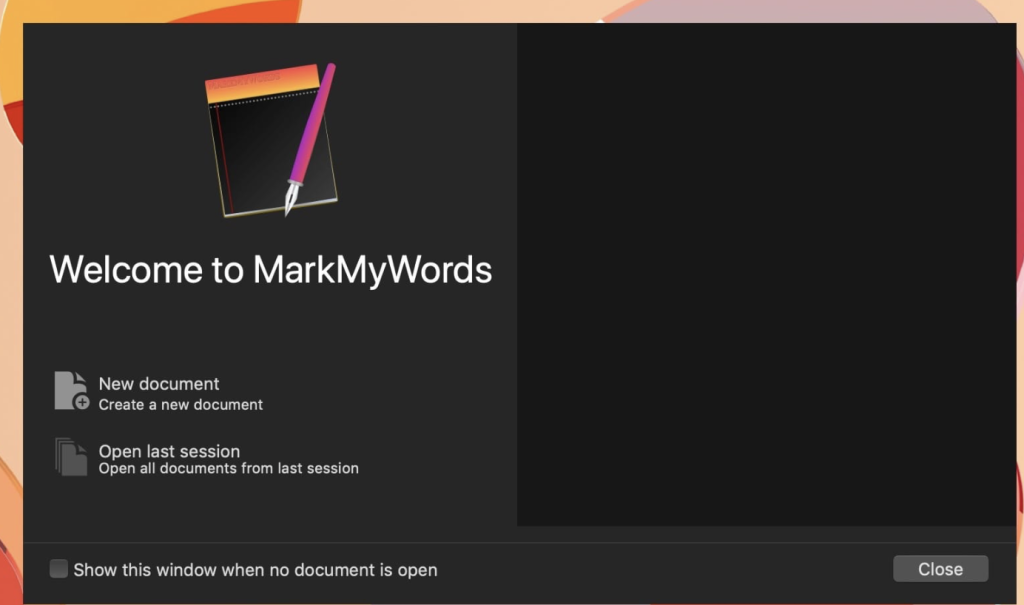
MarkMyWords – Plain Text Editor with Markup Language Support
MarkMyWords is a versatile plain text editor designed for easy formatting and structuring of articles intended for web publication. It remains platform-independent by utilizing plain text documents and provides features to streamline the writing process.
Key Features:
- Markup Language Support:
- MarkMyWords supports a variety of markup languages, including BBCode, Markdown, MultiMarkdown, MarkdownExtra, Smark, Textile, and Wikitext.
- Live Preview:
- Live-preview of content with the ability to add custom CSS stylesheets for visualizing how the formatted output will appear on webpages.
- Text Templates and Markers:
- Use text templates and markers for quick text navigation, making it efficient to structure and organize content.
- Easy Import:
- Import text data easily from popular RSS readers and web browsers, streamlining the process of gathering information.
- Flexible Fullscreen Mode:
- Enjoy a flexible fullscreen mode for distraction-free writing and editing.
- Plugin System:
- MarkMyWords features a plugin system, allowing users to extend functionality based on their specific needs.
- Little Tricks:
- Includes various little tricks to enhance the writing task and improve user experience.
Compatibility:
- OS X 10.10 or later (64-bit)
Screenshots:
For a visual preview of MarkMyWords, you can visit the official homepage.
MarkMyWords offers writers a platform-independent solution with support for popular markup languages, live preview, and additional features to streamline the creation of content for the web.

Download Topaz Video AI for Mac 4.1.0
0
Name : Topaz Video AI
Size : 254 MB
Topaz Video AI for Mac free Download
Topaz Video Enhance AI – Time-Aware Video Quality Enhancement
Topaz Video Enhance AI is an advanced tool designed for time-aware video quality enhancement. It utilizes information from multiple frames to achieve high-end results in video upscaling, denoising, deinterlacing, and restoration. Addressing motion-related issues like flickering, blockiness, and wavy artifacts, Video Enhance AI improves video quality naturally by looking at surrounding frames.
Key Features:
- Upscaling:
- Upscale video resolution with detail gathered from multiple frames.
- Convert SD to HD and HD to 4k or 8k while adding crisp and natural video details.
- Denoising:
- Remove noise and grain while recovering real detail in videos.
- Minimize flickering and other temporal artifacts caused by frame-by-frame denoising.
- Deinterlacing:
- Use deep learning to convert interlaced videos to progressive while preserving image definition.
- Significantly reduce visual artifacts compared to traditional deinterlacing.
- Restoration:
- Naturally restore old videos without adding visual artifacts.
- Remove compression artifacts from old or degraded sources.
- Frame Rate Conversion (Chronos AI):
- Increase video frame rate without artifacts.
- Generate new frames that are often indistinguishable from frames captured in-camera.
- Smooth Slow-Motion Effect:
- Create a smooth slow-motion effect with natural results.
- Generate new frames without stuttering or motion artifacts.
- Fewer Motion Artifacts:
- Significantly reduce shimmering or flickering effects caused by processing in adjacent frames.
- Recover Video Details:
- Inject real details into videos derived from information in multiple adjacent frames.
- Trained on Videos:
- Trained exclusively on video clips for superior video enhancement results.
- Optimized for Hardware:
- Work directly with different hardware manufacturers for optimal performance.
- Convenient Workflow:
- Easily convert and combine multiple videos from SD to HD, HD to 4k, and more.
- Includes export presets and batch processing.
- Flexible Import/Export:
- Supports common video file types and image sequences as input.
- Export directly to mp4, mov, or image sequences.
- Batch Processing:
- Queue up videos for batch processing, leave it overnight, and return to enhanced footage.
System Requirements:
- macOS 10.12 or later.
For more information and to explore the features of Topaz Video Enhance AI, you can visit the official homepage.
Download Mp3tag for Mac 1.8.12
0
Name : Mp3tag
Size : 11 MB
Mp3tag for Mac free Download
Mp3tag – Audio File Metadata Editor
Mp3tag is a powerful and user-friendly tool designed for editing metadata of audio files. It caters to musicians, DJs, podcasters, and audio enthusiasts, providing extensive features for handling various audio formats, including MP3, MP4, M4V, FLAC, OGG, OPUS, AIF, DSF, MPC, and WAV.
Key Features:
- Batch Tag Editing:
- Edit metadata for multiple files simultaneously.
- Support for Various Audio Formats:
- Covers MP3, MP4, M4V, FLAC, OGG, OPUS, AIF, DSF, MPC, WAV, and more.
- Online Database Lookups:
- Retrieve proper tags and download cover art from Discogs and MusicBrainz.
- File Renaming:
- Rename files based on tag information.
- Tag Information Import:
- Import tag information from filenames.
- Cover Art Editing:
- Edit and manage cover art for audio files.
- Flexible Tagging:
- Support for user-defined tag fields in a standardized way.
- Action Groups:
- Combine tasks into action groups for repetitive workflows.
- Supported File Formats:
- MP3, MP4/M4A/M4B/M4V, FLAC, OGG, OPUS, AIF, DSF, MPC, WAV, and more.
System Requirements:
- macOS 10.14 or later
- Apple Silicon or Intel Core processor
For more information and to explore the features of Mp3tag, you can visit the official homepage.

Native Instruments Traktor Pro Plus 3.11.0.44
0
Name : Native Instruments Traktor Pro Plus
Size : 506.99 MB
Download Native Instruments Traktor Pro Plus for Mac free
TRAKTOR PRO 3 is a leading DJ software designed for professional DJs, offering innovative features and a powerful platform for creative mixing. With support for four decks and a range of creative tools, it caters to the needs of industry professionals. The software includes innovative Stem decks for creative mixing with compatible hardware, powerful looping, over 40 effects, and a 1-knob Macro control.
Key Features:
- Club-Ready Layout:
- Redesigned interface for clarity and ease of use in club environments.
- New metering and fader designs for accurate mix gain adjustments.
- Redesigned master panel for instant access to clock, quantization, and master output controls.
- High-Fidelity Sound:
- Every signal-processing step is refined for high-fidelity sound.
- Elastique 3 time-stretching for accurate and high-quality tempo shifting.
- Classic TRAKTOR limiter and a transparent master limiter for punchy and clear sound.
- New Mixer FX:
- Mixer FX on each channel for one-touch control over club-grade effects.
- Eight new Mixer FX, three filters, and assignable slots for quick modulation.
- Reverse Button and Flux Mode:
- Reverse button for playing a deck backward with Flux Mode for seamless sync.
- Create shifted percussion parts, hidden-message vocals, and more.
- Made for DVS:
- TRAKTOR SCRATCH capability included as standard for DVS enthusiasts.
- Use timecode vinyl with any sound card for turntables or CD players.
System Requirements:
- macOS 11.0 or later
- Apple Silicon or Intel Core processor
For more information and to explore the features of TRAKTOR PRO 3, you can visit the official homepage.

Bigasoft Total Video Converter for Mac Download free 5.7.2.8768
0
Name : Bigasoft Total Video Converter
Size : 50 MB
Bigasoft Total Video Converter for Mac Free Download
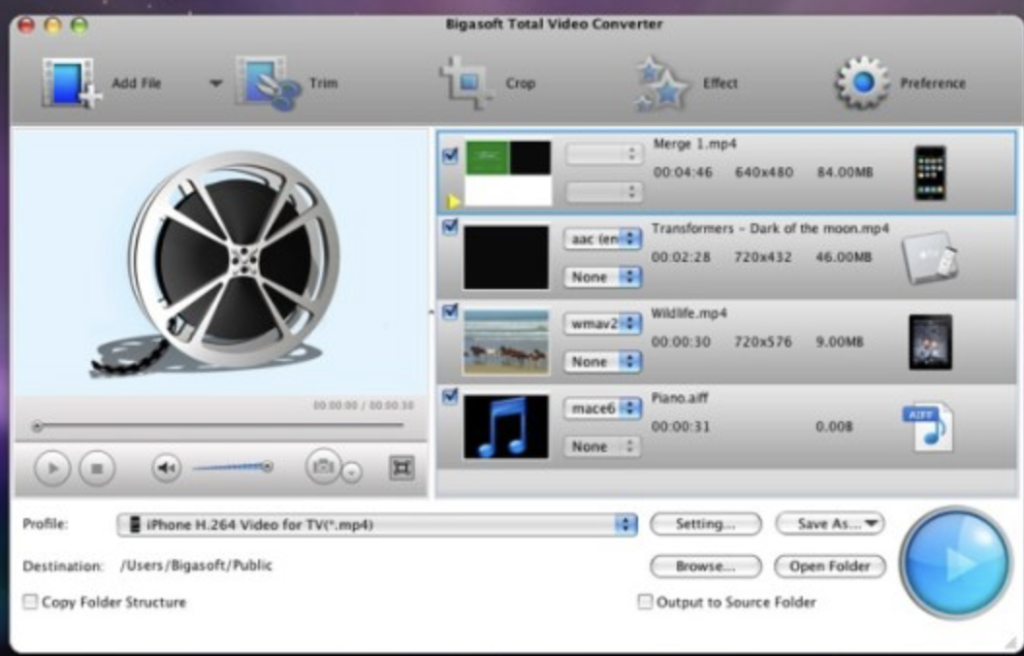
Bigasoft Total Video Converter for Mac is a professional and user-friendly video converter designed for Mac users. It facilitates easy conversion between various video formats, making it versatile for handling different video and audio needs. The supported formats include TiVo, HEVC/H.265, MP4, MOV, MKV, AVI, MPEG, Xvid, DivX, H.264, 3GP, WMV, FLV, MOD, TOD, WTV, MXF, MVI, F4V, Apple ProRes MOV, WebM, VP8, 720p, 1080p, 1080i HD, AVCHD videos, and more. Additionally, it allows converting between audio formats such as APE, MP3, AAC, AC3, WAV, and WMA, and extracting audio from movie files.
What’s New in Version 5.7.2.8768:
- Release notes were unavailable at the time of the update.
Compatibility:
- OS X 10.9 or later (64-bit)
Homepage:
Bigasoft Total Video Converter for Mac is equipped with features that cater to the diverse needs of users working with video and audio content on Mac. Whether you need to convert between different video formats or extract audio from video files, this software provides a user-friendly solution. For more information or to download the software, you can visit the Bigasoft Total Video Converter for Mac homepage.
Download Bigasoft WTV Converter Mac 5.7.2.8768
0
Name : Bigasoft WTV Converter
Size : 49 MB
Bigasoft WTV Converter for Mac free Download
Bigasoft WTV Converter for Mac
Bigasoft WTV Converter for Mac is designed to provide an easy and practical solution for converting and editing WTV files on Mac. It supports various Window Media Center WTV files, including standard definition WTV files, HD WTV files, and WTV files with H.264 content.
Key Features:
- Versatile Conversion:
- Converts WTV files, HD WTV files, and H.264 WTV files to a wide range of video and audio formats on Mac.
- Format Support:
- Supports conversion to formats like MP4, MOV, H.264, DV, MPG, MKV, FLV, 3GP, 3GPP, AVI, DivX, Xvid, MPEG-1, MPEG-2, ASF, RM, WebM, VP8, MOD, TOD, MTS, TS, 720p, 1080p, HD videos, and more.
- Audio Extraction:
- Acts as a WTV to MP3 Converter, extracting WTV to MP3 and converting WTV to WAF, AIFF, M4A, AAC, and other audio formats.
- Device Compatibility:
- Presets optimized videos for various portable devices including iPad, iPad 2, iPhone, iPhone 5S, iPhone 5C, iPhone 5/4, iPod, iPod touch, Apple TV, Zune, Android phones, PSP, Xbox 360, Wii, Smart Phones, BlackBerry, Archos, Creative Zen, iRiver, Pocket PC, PDA, and more.
Compatibility:
- OS X 10.9 or later
Homepage:
Bigasoft WTV Converter for Mac allows users to convert and edit WTV files on Mac, supporting various types of Window Media Center WTV files. It provides a straightforward solution for converting WTV to different video and audio formats, making it compatible with a wide range of devices. For more details or to download the software, you can visit the Bigasoft WTV Converter for Mac homepage.

Download Bigasoft iMovie Converter 5.7.2.8768
0
Name : Bigasoft iMovie Converter
Size : 49 MB
Bigasoft iMovie Converter for Mac free Download
Bigasoft iMovie Converter
Bigasoft iMovie Converter is a professional video converter specifically designed for converting various video formats to MP4 for fast import into iMovie on Mac OS X. It supports a wide range of video formats, including AVI, MTS, MKV, FLV, MOD, and more.
Key Features:
- Versatile Format Support:
- Convert video clips in various formats such as AVI, DivX, Xvid, ASF, WMV, MKV, MPEG, RM, RMVB, VOB, 3GP, FLV, MOD, TOD, MOV, AVCHD, MTS, M2TS, MP4, H.264, and more.
- iMovie Compatibility:
- Convert videos to an iMovie-friendly format (MP4) for seamless import into iMovie on Mac OS X.
- High-Quality Output:
- Ensure great output quality while converting and importing videos into iMovie.
- Wide Device Compatibility:
- Supports converting videos for various devices and applications.
Compatibility:
- OS X 10.9 or later
Homepage:
Bigasoft iMovie Converter allows users to overcome restrictions on the types of video files that can be imported into iMovie. By converting videos to the iMovie-compatible format (MP4), users can easily import a variety of video clips into iMovie on Mac OS X. For more details or to download the software, you can visit the Bigasoft iMovie Converter homepage.