We rank the best UK-licensed online casinos for real money and live craps in 2026, comparing bonuses, games, payouts, and mobile play. read the best online craps casino guide

Posts by Jameskarke
Download Slidepad for Mac 1.4.7
0
Name : Slidepad
Size : 13 MB
Slidepad for Mac free Download
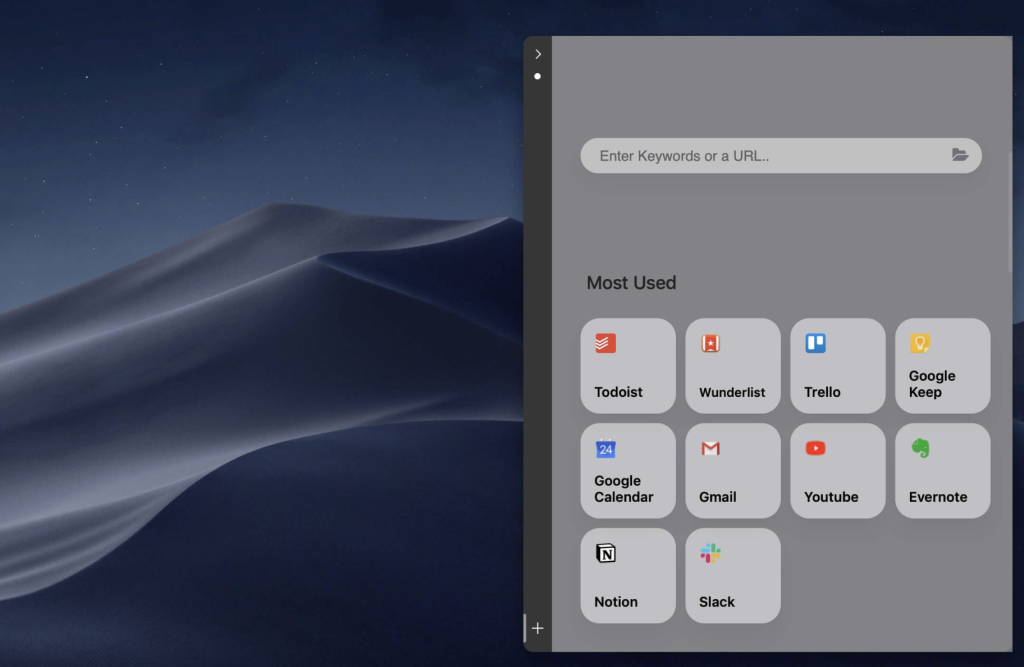
Slidepad is a productivity application that brings an iPad-style slide-over window to your web apps on macOS. Developed to simplify multitasking and streamline the process of accessing different web apps, Slidepad allows users to create an iPad-style window that can be easily slid in and out, reducing the hassle of switching between multiple browser tabs. The app offers a simple sidebar for quick app switching, an omnibox for opening various content types, and additional features to enhance the overall user experience.
Key Features:
- iPad-Style Slide Over Window:
- Introduces an iPad-style multitasking window for web apps on macOS.
- Smooth slide-in and slide-out functionality, similar to using the dock.
- Simple Sidebar for App Switching:
- Features a minimal-style sidebar for quick switching between different web apps.
- Provides a more straightforward approach compared to traditional tabs.
- Omnibox for Versatile Content:
- An omnibox allows users to type keywords, URLs, or any content similar to common browsers.
- No limitations on the type of content that can be placed on Slidepad.
- Additional Features:
- Minimal-style sidebar design for a clean interface.
- Corner snapping for improved user experience.
- Developer tool support enabled.
- Customizable sound settings.
- Mobile/Desktop user-agent switching.
- Display badge for new notifications.
- Live notification toggling.
- Multi-screen support.
- Drag-and-drop support.
- Picture in Picture (PiP) support.
- Quick Look icon support.
- Dark theme support (macOS 10.14 and later).
- Global keyboard shortcut support.
Compatibility:
- macOS 10.13.4 or later.
Homepage:
Slidepad aims to enhance the macOS user experience by introducing an intuitive slide-over window concept for web apps. The app’s features, including the simple sidebar, omnibox, and additional customization options, provide users with a convenient and efficient way to manage and access their web applications.
Download Cardhop for Mac V-2.2.15
0
Name : Cardhop
Size : 33 MB
Carhop for Mac free Download
Cardhop is a powerful and intuitive contact management application designed exclusively for macOS. Developed by Flexibits, the creators of Fantastical, Cardhop simplifies the management and interaction with contacts, offering a seamless and efficient experience for users. With its intuitive parsing engine, Cardhop enables users to search, add, edit, and interact with contacts using natural language sentences.
Key Features:
- Menu Bar App:
- Beautiful and simple menu bar app designed for macOS.
- Instant Integration:
- Works seamlessly with existing macOS contacts without the need for configuration.
- Contact Groups:
- Toggle contact groups quickly with a simple click.
- Notes:
- Add and manage notes for contacts, enhancing relationship management.
- Recents:
- Quickly interact with recent contacts through the app.
- Birthdays:
- View upcoming birthdays and send wishes directly from the app.
- iPhone and Bluetooth Dialing:
- Support for dialing contacts using iPhone and Bluetooth.
- macOS Action Extension:
- Integrated action extension for streamlined interactions.
- Dark and Light Themes:
- Choose between dark and light themes based on preferences.
- Powerful Actions:
- Instantly interact with contacts using actions like Call, Copy, Directions, Email, FaceTime, Large Type, Message, Skype, Telegram, Twitter, URL, VoIP, and more.
- Flexible Actions:
- Supports flexible actions, allowing users to perform actions with natural language input.
- Customizable Quick Actions:
- Configure and use customizable quick actions for single-click interactions.
What’s New in Version 2.2.15:
- Release notes for this version were unavailable at the time of the update.
Compatibility:
- macOS 10.13.2 or later.
Homepage:
Cardhop provides a user-friendly and feature-rich solution for managing contacts on macOS. With its intuitive parsing engine and seamless integration with existing contacts, Cardhop aims to simplify contact management tasks and enhance user interactions with a streamlined interface.

Download Dash for Mac v- 7.2.1
0
Name : Dash
Size : 21 MB
Dash for Mac free Download
Dash Overview:
Dash is a versatile tool serving as both an API Documentation Browser and Code Snippet Manager. It aids users in storing and managing code snippets while offering instant search and navigation through documentation for a wide range of APIs. With support for offline documentation and numerous features for developers, Dash aims to streamline coding workflows.
Documentation Browser Features:
- Offline Documentation:
- Access offline documentation for various platforms and languages, including iOS, OS X, Swift, Java, Python, JavaScript, and many more.
- API Support:
- Provides documentation for an extensive list of APIs, covering web development, programming languages, frameworks, and more.
- Offline Availability:
- Access documentation without an internet connection, ensuring availability even in offline environments.
- Highlighted Search:
- Perform in-page searches with highlighted results for quick navigation.
- Bookmarks and Profiles:
- Save bookmarks for frequently used documentation pages.
- Create search profiles to switch between docsets easily.
- Integration Plugins:
- Integrated with various development tools and applications, including Xcode, Sublime Text, Atom, Eclipse, and more.
- Search Filters:
- Define keyword filters to search specific docsets, enhancing search precision.
- Integration with Other Apps:
- Support for integration with applications using the “dash://” URL scheme or the “Look up in Dash” system service.
- Remote Screen for iOS:
- Use Dash for iOS to turn an iOS device into a remote screen dedicated to documentation.
- Annotation Support:
- Annotate documentation pages and view public annotations for collaboration.
Snippet Manager Features:
- Code Snippet Collection:
- Collect and manage snippets of code that are frequently reused.
- Syncing with Dropbox:
- Sync the snippet library using Dropbox for seamless access across devices.
- Syntax Highlighting:
- Supports over 80 syntaxes for code highlighting.
- Variable Placeholders:
- Edit variable placeholders before pasting to customize snippets.
- Abbreviation Expansion:
- Expand abbreviations wherever they are typed for efficient coding.
- Special Snippet Placeholders:
- Includes placeholders like @clipboard, @cursor, @date, and @time for dynamic snippet insertion.
- Fuzzy Search:
- Utilizes fuzzy search to accommodate for misspellings during searches.
- Retina-Ready and Multi-Touch:
- Provides a high-resolution Retina display and supports multi-touch gestures.
Compatibility:
- macOS 10.14 or later (64-bit).
What’s New in Version 7.2.1:
- Release notes were unavailable at the time of the update.
Homepage:
Dash offers a comprehensive solution for developers, providing quick access to offline documentation and efficient management of reusable code snippets. With a user-friendly interface and integration support with popular development tools, Dash is designed to enhance productivity in coding tasks.
Download Debit & Credit Premium for Mac 6.3.0
0
Name : Debit & Credit Premium
Size : 12 MB
Debit & Credit Premium for Mac free Download
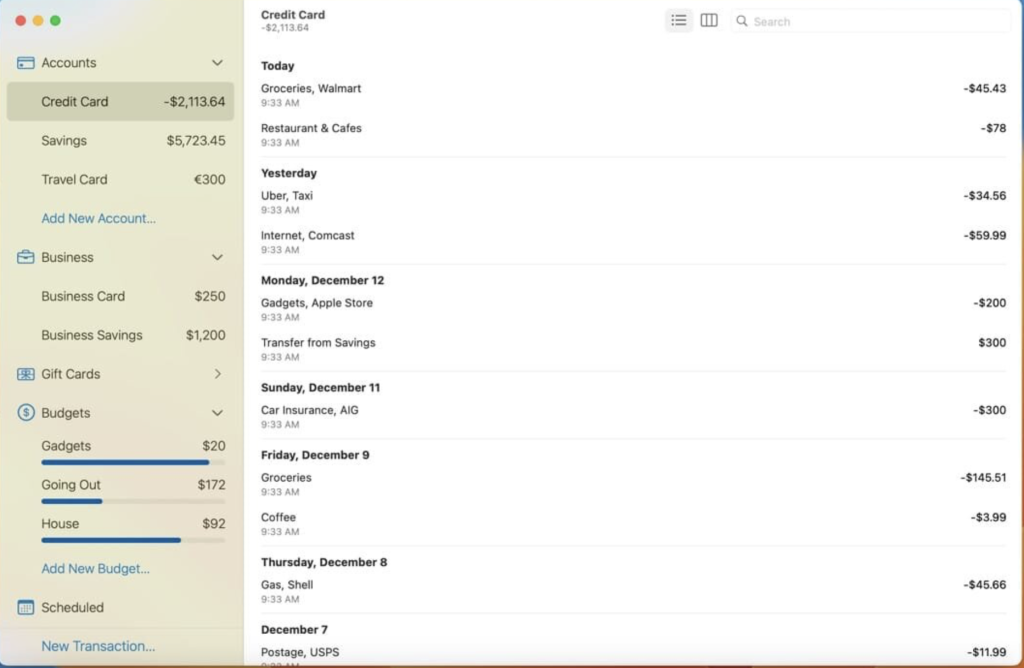
Debit & Credit is a personal finance app designed for users seeking convenience, ease of use, and robust features for managing their finances. The app consolidates all financial accounts into a single platform, allowing users to streamline their everyday financial activities. With a focus on speed and simplicity, Debit & Credit aims to provide a hassle-free experience in managing financial records.
Key Features:
- All Accounts in One App:
- View and manage all financial accounts in a single application.
- Super Fast Transactions:
- Create new transactions quickly with a user-friendly interface.
- Companion iOS & Apple Watch App:
- Sync data with the iOS app for convenient on-the-go transaction management.
- Importing Data:
- Support for importing transactions from various file formats, including CSV, QIF, QMTF, OFX, and QFX.
- Budgets & Scheduled Transactions:
- Set budgets for expense categories and schedule transactions for future reminders.
- Financial Plans:
- Plan ahead by creating financial plans for the future and track performance against them.
- Reports:
- Access clean and comprehensible reports to analyze spending and financial trends.
- Shared Accounts:
- Share selected accounts with others via iCloud for collaborative financial management.
- Bank Reconciliation Mode:
- Easily reconcile accounts with bank statements to ensure accuracy.
- Transaction Attachments:
- Attach files to transactions, including scanned documents or photos from iPhone.
- Powerful Features:
- Split categories, Touch ID support, pending transactions, transaction export, tags, and more.
- iCloud Sync:
- Securely store data in iCloud for sync across devices without requiring personal details.
What’s New (Version 6.0.1):
- Fixed bugs related to report layouts and graphs in various scenarios.
- Improved performance and stability.
Compatibility:
- macOS 10.14.5 or later.
In-App Purchases:
- Premium Version (included).
Languages:
- English, Dutch, French, German, Italian, Portuguese, Russian, Simplified Chinese, Spanish, Turkish, Ukrainian.
Mac App Store:
Debit & Credit offers a comprehensive solution for personal finance management, supporting a range of features including budgeting, reports, shared accounts, and powerful financial planning tools. With a focus on simplicity and efficiency, it caters to users looking for an intuitive and effective way to handle their financial records on macOS.
Download Mp3tag for Mac 1.8.13
0
Name : Mp3tag
Size : 11 MB
Mp3tag for Mac free Download
Mp3tag is a versatile and user-friendly tool designed for editing metadata of audio files. It is widely used by musicians, DJs, podcasters, and audio enthusiasts to manage and organize their audio libraries efficiently. The software supports batch tag-editing, making it convenient for users to edit metadata for multiple files simultaneously. Mp3tag covers a variety of audio formats, including MP3, MP4, M4V, FLAC, OGG, OPUS, AIF, DSF, MPC, and WAV.
Key Features:
- Bulk Editing of Tags:
- Edit metadata for multiple files at once, supporting various audio formats.
- Cover Art Editing:
- Manage and edit cover art associated with audio files.
- File Renaming:
- Rename files based on tag information.
- Metadata Import:
- Import metadata from filenames.
- Auto-Numbering Wizard:
- Assign track and disc numbers automatically.
- Online Database Lookups:
- Retrieve tag information and cover art from online databases like Discogs and MusicBrainz.
- Flexible Tagging:
- Support for user-defined tag fields in a standardized way.
- Action Groups:
- Combine tasks into action groups, creating reusable workflows for consistency.
- Support for Various File Formats:
- MP3, MP4/M4A/M4B/M4V, FLAC, OGG, OPUS, AIF, DSF, MPC, WAV.
Supported File Formats:
- MP3, MP4/M4A/M4B/M4V, FLAC, OGG, OPUS, AIF, DSF, MPC, WAV.
Compatibility:
- macOS 10.14 or later.
- Apple Silicon or Intel Core processor.
Homepage:
Mp3tag stands out with its ability to handle bulk editing, support for various file formats, online database lookups, and flexible tagging options. Whether you’re organizing your music library, podcast episodes, or DJ sets, Mp3tag provides a comprehensive solution for editing and managing audio file metadata on macOS.


Download Iris for Mac V-1.6.5
0
Name : Iris
Size : 23 MB
Iris for Mac free Download
Iris is a high-performance screen recorder designed for macOS, offering advanced features and leveraging on-board GPU acceleration when available. It provides users with the ability to record their screen in high-quality h.264 format, with additional options for Apple ProRes. Iris also allows the inclusion of video from a camera and supports up to two microphones. While Iris is available for free to try, recorded content may have a watermark. Users can remove the watermark by opting for the in-app purchase.
Key Features:
- High-Performance Recording:
- Records directly to h.264 or Apple ProRes.
- GPU acceleration utilized for enhanced performance.
- Audio Recording:
- Records audio from the Mac, including the option to target a specific app.
- Color Matching:
- Ensures great color matching for recorded content.
- Retina Quality Recording:
- Records in Retina quality on supported Macs.
- Timers and Hotkey Support:
- Start and stop timers for convenient recording.
- Full hotkey support for quick actions.
- Advanced Naming and Tagging:
- Automatic naming and tagging options for organized recording management.
Compatibility:
- macOS 10.14.4 or later.
Homepage:
Iris is a feature-rich screen recorder with a focus on performance and quality. Its support for GPU acceleration, audio recording, and advanced features makes it a versatile choice for users looking to capture their screen activities on macOS.

Download AppKiller for Mac 3.5
0
Name : AppKiller
Size : 4.4 MB
AppKiller for Mac free Download
App Killer is a straightforward utility designed for macOS users who want to quickly close all their open applications without going through each one individually. It provides a hassle-free solution to streamline the process, allowing users to close all apps with a single click or, even more conveniently, using a keyboard shortcut.
Key Features:
- Easy-to-Use:
- App Killer resides unobtrusively in the status bar, ready to execute commands.
- Ultra-Fast:
- Closing all open applications is designed to take just milliseconds, ensuring efficiency.
- Cmd+Shift+K Shortcut:
- Users can instantly close all open apps with a single keyboard shortcut: Cmd+Shift+K.
Compatibility:
- Works on macOS 10.13 and later.
- Compatible with M1/M2 and the latest macOS Sonoma.
How to Use:
- Install and run App Killer.
- Access the utility from the status bar.
- Press Cmd+Shift+K to quickly close all open applications.
App Killer is a lightweight tool that serves a specific purpose: closing all open applications swiftly and with minimal effort. Its unobtrusive design and straightforward functionality make it a convenient choice for users looking to streamline their workflow on macOS.

Northern Softworks Sonoma Cache Cleaner 19.0.3
0
Name : Sonoma Cache Cleaner
Size : 169 MB
Sonoma Cache Cleaner for Mac free Download
Sonoma Cache Cleaner is an award-winning general-purpose tool designed for macOS X. It simplifies system maintenance with a user-friendly point-and-click interface, catering to both novice and expert users. Known for its millions of global downloads, Sonoma Cache Cleaner offers a comprehensive set of tools for maintaining and optimizing macOS systems.
Key Features:
- Maintenance Tools:
- Point-and-click interface for macOS X maintenance tasks.
- Automation of common maintenance chores, including virus scanning of internet downloads.
- SCC Engine for repairing permissions automatically after software installations.
- Optimization:
- Improves system performance by tuning internet and file cache settings.
- Implements ram disks to enhance performance.
- Cleans out various cached and stale data to recover disk space.
- Optimizes files and memory.
- Customization:
- Lets users control their macOS X experience.
- Ability to turn off or on features like Spotlight, Dashboard, and Login Items Folder.
- Tweaks various macOS X features to suit user preferences without permanently altering the system.
- Disaster Planning:
- Creates a bootable Installer USB drive from the Sonoma download.
- Builds bootable Emergency Disks with system repair utilities and cache cleaning functions.
- Portable version for testing hardware components before purchasing a machine.
- Antivirus Protection:
- Adds three additional layers of malware protection to Big Sur.
- Includes the ClamAV antivirus for industrial-strength virus protection from Mac and Windows threats.
- Scans downloads on the fly to enhance security.
Compatibility: Universal Binary requires macOS X 10.4 – 14.0.
Sonoma Cache Cleaner is a versatile tool designed to streamline system maintenance, optimize performance, and enhance security on macOS X systems. Its wide range of features caters to users with varying levels of expertise, making it a valuable tool for maintaining the health and performance of macOS devices.

Download Sketch for Mac 99.5
0
Name : Sketch
Size : 71 MB
Sketch For Mac Free Download
Sketch is a graphic design software designed for the digital world, offering powerful tools and an elegant interface within a single award-winning package. It provides a joyful and efficient platform for creating beautiful designs, whether it’s for icons, websites, interfaces, or other visual elements.
Key Features:
- Versatile Design Tools:
- Multiple fills, borders, and shadows per layer.
- Non-destructive boolean operations.
- Smart pixel alignment.
- Automatic slicing and multiple resolution export.
- Vector Tools and Basic Shapes:
- Foundation for designing icons, websites, interfaces, etc.
- Combine shapes with non-destructive boolean operations.
- Advanced layer style options: shadows, fills, gradients, noise, blending, and more.
- Image Editing:
- Rotate, scale, crop, and mask imported images.
- Best-in-class text tool for accurate typography with native font rendering.
- Symbols:
- Reuse entire groups of content with Symbols.
- Update once, and changes reflect everywhere in the document.
- Mac Integration:
- Built for macOS with support for OS X’s Versions and Auto Save.
- iCloud support for syncing work across multiple Mac computers.
- Full-screen mode for maximizing canvas size.
- Single-Window Interface:
- Everything is accessible within a single-window interface.
- Simple interface design with powerful tools.
Compatibility: macOS 12.0 or later.
In summary, Sketch is a comprehensive graphic design tool that empowers users to create stunning visuals with its array of features. From versatile design tools to vector operations, image editing, and seamless integration with Mac, Sketch provides an efficient and enjoyable environment for digital design.

Download4K Video Downloader Pro for Mac 4.29.0
0
Name : 4K Video Downloader Pro
Size : 135 MB
4K Video Downloader Pro for Mac free Download
4K Video Downloader is a powerful tool that allows users to download videos, audio, and subtitles from YouTube in high quality and at a fast download speed. It supports downloading entire playlists and channels, and users can save videos in various formats such as MP4, MKV, M4A, MP3, FLV, and 3G. The application also offers advanced features like subtitles download, 3D video download, and the ability to download content from other platforms like Vimeo, SoundCloud, Flickr, Facebook, and DailyMotion.
Key Features:
- YouTube Downloads:
- Download video, audio, and subtitles from YouTube.
- Download entire playlists and channels.
- Save videos in MP4, MKV, M4A, MP3, FLV, and 3G formats.
- Generate .m3u file for playlists.
- High-Quality Downloads:
- Download videos in HD 1080p, HD 720p, or 4K quality.
- Enjoy high-dimensional videos on HD TVs, iPads, or other devices.
- Subtitle Options:
- Advanced subtitles download.
- Choose between .srt file or embedded subtitles in the video.
- Smart Mode:
- Activate “Smart Mode” to apply selected settings to all downloads.
- Streamline the download process with ease.
- 3D Video Download:
- Download videos in 3D format.
- Watch live shows and cartoons in impressive 3D quality.
- Embedded Video Download:
- Download embedded YouTube videos from any web pages.
- Copy/paste the link, and the program will find the source for download.
- Additional Platform Support:
- Download video and audio from Vimeo, SoundCloud, Flickr, Facebook, and DailyMotion.
- Multilingual Support:
- Available in multiple languages.
Compatibility: OS X 10.10 or later.
In summary, 4K Video Downloader is a versatile and user-friendly tool that simplifies the process of downloading videos from various platforms, including YouTube. With support for high-quality downloads, playlists, subtitles, and additional platform compatibility, it caters to users who want to enjoy their favorite content offline on different devices.