Free Macsoftware One click Download

Posts by Jameskarke
Wondershare UniConverter for Mac 15.5.7.86
02 years
by Jameskarke
in Application
Name : Wondershare UniConverter
Size : 290 MB
Wondershare UniConverter for Mac free Download
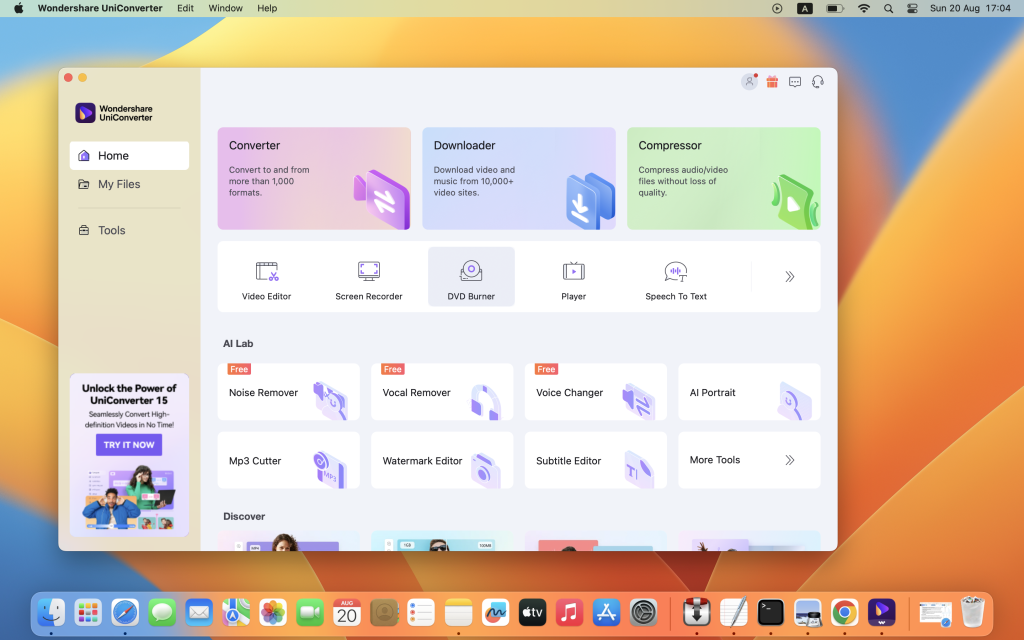
Wondershare UniConverter is a comprehensive video toolbox designed to meet all your video-related needs. From conversion and editing to downloading and burning, UniConverter offers a wide range of features to enhance your video experience. Here are some key highlights of Wondershare UniConverter:
- Video Conversion: Convert videos to and from virtually any video format with 30X faster conversion speed. Supported formats include AVI, WMV, MP4, MKV, FLV, 3GP, and more. UniConverter also supports converting video to 3D and 4K Ultra HD formats.
- Video Editing: Edit and enhance your videos with built-in editing tools. You can trim, crop, rotate, add watermarks, apply effects, adjust brightness, contrast, and saturation, and more.
- Video Downloading: Download videos from popular video-sharing sites like YouTube, Google, Yahoo, and others. You can download videos in various formats and resolutions for offline viewing.
- Video Burning: Burn video files to Blu-ray/DVD discs, DVD folders, or ISO files. Create personalized DVDs with custom menus, chapters, and subtitles.
- Video Compression: Compress large video files without compromising quality. Reduce file size for easier sharing and storage.
- Video Recording: Capture streaming videos, online meetings, gameplay, and more with the built-in screen recorder. Record your screen with audio from system sound or microphone.
- Video Organization: Organize your video library with UniConverter’s file management features. You can rename, merge, split, and batch process video files with ease.
- Media Playback: UniConverter also serves as a media player, allowing you to play back videos and audio files directly within the application.
The latest version, 15.5.7.86, includes various improvements and enhancements. However, detailed release notes were not available at the time of this listing.
Wondershare UniConverter is compatible with macOS 10.11 or later. To learn more about its features and capabilities, visit the official homepage: Wondershare UniConverter
Wondershare PDFelement Pro 10.3.6 for Mac (OCR)
02 years

Name : Wondershare PDFelement Pro
Size : 756 MB
Wondershare PDFelement Pro for Mac free Download
PDFelement is an intuitive software solution that simplifies the creation, editing, conversion, and signing of PDF documents. With the all-new PDFelement 8, users can enjoy a redesigned UI, advanced writing tools, enhanced team collaboration features, powerful conversion tools, a user management console, and more. Here are some key features of PDFelement Pro:
- OCR (Optical Character Recognition): Exclusive to the Pro version, OCR enables users to edit and convert characters in scanned PDF files or images. It supports recognition of 29 languages, making it easier to work with scanned documents.
- Create & Sign Forms: In the Pro version, users can create fillable PDF forms from interactive field objects like buttons, checkboxes, radio buttons, list boxes, and drop-down lists. Additionally, digital signatures can be added to forms for authentication.
- Merge PDF: Exclusive to the Pro version, users can combine files of different formats into a single PDF document, streamlining document management and organization.
- Convert PDF: The Pro version offers expanded conversion options, allowing users to convert PDF files to various output formats such as EPUB, HTML, Text, and RTF, providing greater flexibility in document sharing and distribution.
- PDF/A Support: PDF/A, an ISO standard for long-term archiving, is available as an output format in the Pro version, ensuring that documents are preserved for future reference and compliance.
- Batch Processing: Exclusive to the Pro version, users can process PDFs in batches, saving time and effort. Tasks like adding backgrounds, watermarks, headers, footers, and applying Bates Numbering can be performed in bulk.
- Redact PDF: In the Pro version, users can redact sensitive text and images in PDF documents, safeguarding confidential information and ensuring compliance with privacy regulations.
The latest version, 10.3.6 (OCR), introduces improvements and enhancements to the OCR functionality. It is compatible with macOS 10.15 or later.
To explore the full capabilities of PDFelement and experience seamless PDF document management, visit the official homepage: PDFelement
Imagenomic Professional Plugin Suite For Adobe Photoshop Mac 2027 download Free
02 years
by Jameskarke
in Graphic and Design

Name : Imagenomic Professional Plugin Suite For Adobe Photoshop
Size : 71 MB
Imagenomic Professional Plugin Suite For Adobe Photoshop free Download Mac
The Imagenomic Plugins bundle combines three powerful tools to enhance your creative workflow and elevate your photos:
- Portraiture: This plugin offers automatic skin smoothing, healing, and enhancing effects, making it ideal for portrait retouching. It helps achieve a natural and polished look for portraits by seamlessly smoothing skin imperfections while preserving skin texture.
- Noiseware: Recognized for its excellence in noise reduction, Noiseware is an award-winning plugin and standalone application. It effectively reduces noise in photos, resulting in cleaner and more refined images. Whether dealing with high ISO noise or grainy images, Noiseware delivers exceptional results.
- Realgrain: Realgrain is a versatile plugin that offers various toning, film emulation, and grain effects. It allows users to achieve authentic-looking black and white conversions, apply classic film effects, and add grain for a vintage or cinematic aesthetic.
Host Compatibility: The Imagenomic Plugins bundle is compatible with Adobe Photoshop versions from 2022 to 2024, providing seamless integration with your editing workflow.
System Requirements: macOS 13.0 or later
Enhance your creative projects with these powerful plugins by visiting the official homepage: Imagenomic
PopClip for Mac Download 2024.5
02 years

Name : PopClip
Size : 8 MB
PopClip for Mac free Download
PopClip is a handy status bar menu application designed to streamline text processing tasks on your Mac. Here’s how you can use it:
- Select Text: Use your mouse pointer to highlight some text.
- PopClip Appears: Once you’ve selected text, PopClip will appear as a popover menu, providing quick access to various text processing options.
Key Features:
- Beautiful Interface: PopClip features a beautifully rendered user interface that seamlessly integrates with your Mac display.
- Web Search: Instantly search the web for the selected text without leaving your current application.
- Open Links: Open web links directly with just one click from the popover menu.
- Dictionary Definitions: Get definitions and spelling corrections for the selected text.
- Popover Size Adjustment: Customize the size of the PopClip popover according to your preference, from small to very large.
- Fast and Convenient: PopClip is small, fast, and convenient, making it a great tool for working with text on your Mac.
Compatibility: macOS 10.13.6 or later
PopClip simplifies text processing tasks by providing quick access to essential functions right from your status bar. Explore more on the official website: PopClip Homepage
Final Draft for Mac Download 12.0.11
02 years

Name : Final Draft
Size : 120 MB
Final Draft for Mac free Download
Final Draft is the go-to application for writers working on movie scripts, television episodics, and stage plays. It simplifies the writing process by handling the script formatting automatically, allowing writers to focus solely on the content. Here are some of the top features of Final Draft:
Top Writing Features:
- Scene View: Easily outline and reorder scenes using a drag-and-drop interface.
- Navigator: View, sort, and filter important details of scenes, Scriptnotes, and Characters.
- Index Cards: Outline your story and restructure your script scene by scene.
- ScriptNotes: Make color-coded notes that won’t affect script pagination.
- Templates: Over 100 classic and current templates available, with the option to customize your own.
- Pagination: Final Draft ensures your script adheres to industry standards for formatting and pagination.
- Watermarking: Add watermarks when printing or saving scripts to PDF.
- Panels System: Split your screen to view scene outlines while writing.
- Format Assistant: Check for formatting errors after completing your first draft.
- Retina and Full Screen Support: Distraction-free writing with full screen mode and retina display compatibility.
- Mac OSX Dictation Support: Utilize Mac’s built-in dictation feature for hands-free writing.
Top Production Features:
- Title Page: Easily create a professional Title Page for your script.
- Revision Mode: Save different revisions for production purposes.
- Page Locking: Omit scenes, lock pages, and set revision colors.
- Colored Production Pages: Colored borders and solid color production pages in PDF for distribution.
- Character Highlighting: Highlight specific characters’ lines for table reads or tracking dialogue.
- Customizable Reporting: Seven different reports available including Scene, Character, and Location reports.
Compatibility: macOS 10.15 or later
Final Draft streamlines the writing and production process, making it an essential tool for writers in the entertainment industry. Explore more on the official website: Final Draft Homepage

Disk Doctor for Mac free Download 4.5
02 years
Name : Disk Doctor
Size : 8 MB
Disk Doctor for Mac free Download
Disk Doctor offers a convenient solution to free up significant disk space on your hard drive by removing unnecessary files. With just a few clicks, you can selectively remove files from various categories, including:
- Applications Caches
- Application Logs
- Browser Data
- Mail Downloads Folder
- Downloads Folder
- Large Files (files within your user folder that are larger than 100 MB)
- Partial Downloads
- Developer Files
- Old iOS Software Updates
- Trash Can
The application now boasts a completely redesigned user interface with full Retina support, ensuring a seamless user experience.
Compatibility: OS X 10.7 or later, 64-bit processor
Free up valuable disk space on your Mac by downloading Disk Doctor from the Mac App Store: Disk Doctor on the Mac App Store
Derivative TouchDesigner Pro for Mac 2023.11760
02 years
by Jameskarke
in Application

Name : Derivative TouchDesigner Pro
Size : 615 MB
Derivative TouchDesigner Pro for Mac free Download
TouchDesigner is a powerful visual development platform designed to empower users to create stunning real-time projects and rich user experiences. Whether you’re working on interactive media systems, architectural projections, live music visuals, or rapid prototyping, TouchDesigner provides the tools you need to bring your ideas to life.
Interoperability: TouchDesigner seamlessly integrates with other software, protocols, hardware devices, and the web, offering extensive options for interoperability to fit into any environment.
Application Building: With TouchDesigner, you can build both the application engine and interface in one integrated environment, from simple functional prototypes to complete polished applications.
High Performance Media Systems: TouchDesigner offers the highest performance video playback software available today, allowing you to play more movies, at higher resolutions or frame rates, to maximize your hardware’s potential.
Realtime 3D and Compositing: Experience realtime 3D rendering combined with high-resolution compositing, creating a pixel playground that enables you to explore entirely new ways of creating content.
Projection Mapping: TouchDesigner provides custom solutions for every projection mapping job, ensuring that any projection project is possible with its suite of features and customization options.
Lighting and Live Shows: TouchDesigner technology can communicate with lighting equipment, audio systems, input/output devices, and show control systems used in all types of live show performances.
VR Support: TouchDesigner seamlessly integrates with built-in VR tools, allowing users to quickly and easily get started with virtual reality while leveraging all of TouchDesigner’s other features.
Extensibility and Customization: TouchDesigner offers tools to build completely customizable systems and extend functionality to meet the specific needs of your project.
Compatibility: macOS 10.14 or later.
Explore the endless possibilities of TouchDesigner by visiting the official homepage at https://derivative.ca/.
Native Instruments Kontakt 7 for Mac v7.10.2
02 years
by Jameskarke
in Application

Name : Native Instruments Kontakt 7
Size : 916 MB
Native Instruments Kontakt 7 for Mac free Download
KONTAKT 7 continues its legacy as both an instant inspiration tool and the leading instrument-building platform. In this seventh generation release, we’ve brought KONTAKT’s 20-year legacy into the future with exciting new features and improvements:
New Resizable Browser: Easily find sounds with a resizable browser, making navigation more intuitive and efficient.
Overhauled Factory Library: Explore new musical ideas and find fresh inspiration with our redesigned Factory Library. Discover a wealth of new sounds, effects, and under-the-hood audio improvements.
Newly Added Effects: Enhance your compositions with newly added effects, providing even more creative possibilities.
Release Notes for Version 7.10.2 (2024-05-07):
- FIXED: Crash when loading instruments in Logic Pro on macOS Sonoma.
- FIXED: Crash when clicking NI logo in Logic Pro on macOS Sonoma.
- FIXED: Intermittent crashes when loading Orchestral Tools libraries inside of Komplete Kontrol or Maschine.
- FIXED: Kontakt standalone crashes when Canon EOS camera software is installed.
- FIXED: Character “a” is ignored by Text Fields when Edit View is shown.
Known Issues:
- Intermittently long loading times and visual stalls when loading certain libraries in Logic Pro.
- Intermittent visual glitches and computer shutdown when using Kontakt on Apple M2 / M3 computers in clamshell mode, or when Kontakt is hosted in GarageBand.
- Intermittent crashes when Kontakt 7 is used with the following combination: Logic Pro, macOS 14, Kontrol S MK3. Apple is working on a fix for this communication layer crash.
- In Pro Tools, Kontakt window is cropped when zooming larger than available display size.
- Please note that if you have updated to Kontakt 7.10 from a version before 7.9, you may need to reselect your audio device on first launch (macOS only).
Compatibility: macOS 11.0 or later, Apple Silicon or Intel Core processor.
For more information and to explore the full capabilities of KONTAKT 7, visit our homepage at https://www.native-instruments.com/en/products/komplete/samplers/kontakt-7/
EditReady for Mac Download 24.2
02 years
by Jameskarke
in Application

Name : EditReady
Size : 148 MB
EditReady for Mac free Download
EditReady offers a streamlined, efficient solution for video professionals seeking fast and powerful transcoding capabilities. Here’s a breakdown of its key features:
- Comprehensive Transcoding: EditReady enables users to transcode MOV, MP4, and MXF media files into edit-ready QuickTime movies in popular professional formats such as ProRes, DNxHD, and H.264. This ensures compatibility with leading editing software.
- LUT Application: Users can apply Look-Up Tables (LUTs) to their video during the transcoding process, allowing for the application of specific looks or the conversion of Log footage into Linear. This feature enhances the visual quality and consistency of the footage.
- Frame Rate Adjustment: EditReady offers the flexibility to override the frame rate of converted files, enabling pristine slow-motion effects with high-frame-rate footage captured at 60p or 120p.
- Smart Metadata Editing: The application provides a robust metadata viewer and editor, allowing users to access and modify metadata associated with their video files. This includes GPS data, lens settings, diagnostic information, and more. Users can manually add location data, set reel names, or generate filenames based on metadata.
- Optimized Performance: EditReady is designed to leverage the full power of modern Mac systems, utilizing hardware-accelerated video decoding, OpenCL image processing, and efficient CPU utilization. This ensures fast transcoding speeds and optimal performance.
- Future-Ready: The application is built with future compatibility in mind, capable of adapting to new formats and workflows as they emerge. This ensures that users can stay ahead of technological advancements and continue to work efficiently.
EditReady’s user-friendly interface, powerful features, and focus on efficiency make it a valuable tool for video professionals looking to streamline their workflow and achieve high-quality results.
Compatibility: macOS 10.15 or later
RAR Extractor Max – Unzip File for Mac 12.3
02 years

Name : RAR Extractor Max – Unzip File
Size : 14 MB
RAR Extractor Max – Unzip File for Mac free Download
“RAR Extractor Max” builds upon the strengths of its predecessor, “RAR Extractor Pro,” offering a redesigned user interface and enhanced functionality. Here are some of its key features:
- Wide Format Support: Extract files from various formats including RAR, winmail.dat, ZIP, 7z, tbz, sti, tar, xar, lha, lzh, hqx, bin, bz2, bzip2, bz, xz, iso, cid, nrg, mdf, taz, lzma, exe, msi, cpio, lzx, jar, swf, xip, ace, arj, pak, pkg, apk, lbr, lqr, cab, rpm, cpt, sea, pdf, nsa, dcs, now, spk, and more.
- Encrypted Archive Support: Unarchive and unrar encrypted archives with ease, ensuring that your sensitive data remains secure.
- Preview Before Extraction: Quickly preview files within an archive using Quick Look, allowing you to verify the contents before extraction.
- Convenient Extraction Options: Extract individual files or folders from archives, or choose to unarchive the entire contents.
- Integration with macOS: Seamlessly integrate with macOS by setting “RAR Extractor Max” as the default archiver, enabling double-click extraction and drag-and-drop functionality.
- Batch Decompression: Efficiently decompress multiple archives in one go, saving you time and effort.
- Password Protection: Create password-protected ZIP and 7Z archives using the AES256 encryption algorithm, ensuring the security of your compressed files.
- User-Friendly Interface: Benefit from a redesigned user interface that enhances usability and makes working with archives intuitive and straightforward.
“RAR Extractor Max” is designed to meet the needs of users who require a reliable and versatile tool for managing compressed files on macOS. Whether you’re extracting files from various formats, creating encrypted archives, or previewing contents before extraction, this app provides the functionality you need.