Free Macsoftware One click Download
Utility
Video Cut&Crop&Join for Mac 3.9
02 years

Name : Video Cut&Crop&Join
Size : 161 MB
Video Cut&Crop&Join for Mac free Download
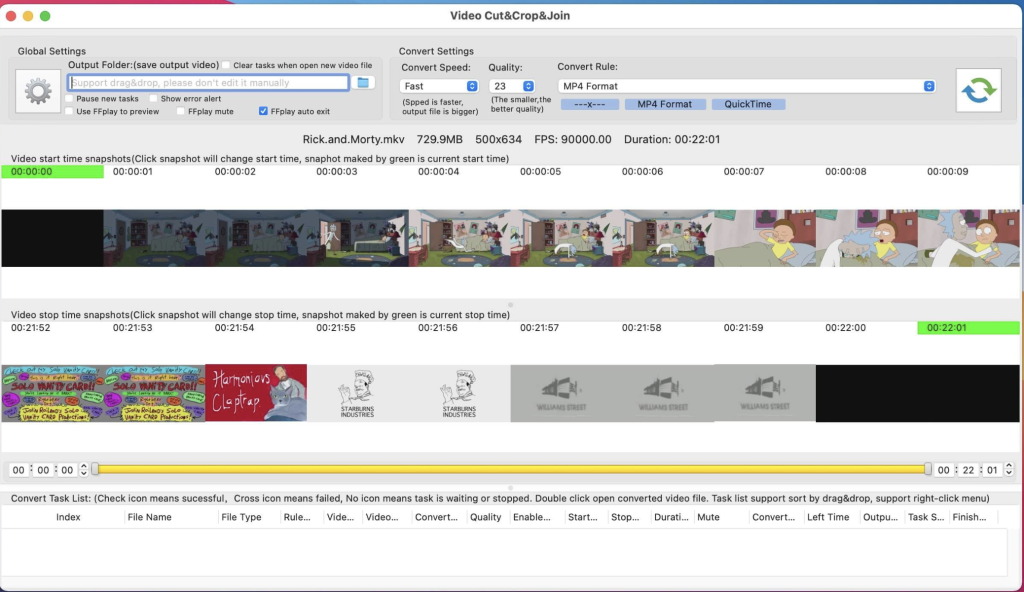
Video Cut & Crop Join is a versatile tool designed to make video editing tasks such as cutting, cropping, merging, and converting videos quick and easy. With support for all popular video formats and powered by FFmpeg, it provides fast and efficient processing capabilities. Here’s how to use it:
How to Use:
1. Cut Videos:
- Step 1: Drag and drop the video file into the app’s snapshot view.
- Step 2: Choose the desired video clip and select the video convert option.
- Step 3: Click the “Submit” button to initiate the cut task.
2. Merge Video Clips:
- Step 1: Follow the steps for cutting videos.
- Step 2: Select the clips you want to merge.
- Step 3: Right-click the task list and choose “Merge videos” from the menu to merge the video clips.
Key Features:
- Fast Processing: Utilizes FFmpeg for quick cutting, merging, and cropping of videos.
- Powerful Selection: Offers handy and powerful video clip selection tools.
- Video Frame Crop: Supports cropping of video frames to reduce the output file size.
- Rich Convert Options: Provides various video conversion options and supports iCloud sync.
- Multi-Task Support: Allows for the execution of multiple conversion tasks simultaneously.
- Embed FFplay: Includes FFplay for efficient video playback, enabling accurate selection of video clips.
FAQs:
- How to Crop Part of Video Frame?
- Use the “Screenshot & Crop” window to draw the rectangle you want to crop, then click “Set Crop Rectangle.”
- Choose the conversion rule in the main interface and click “Convert.”
- How to Join Video Clips?
- Add the video to the app, cut clips, sort them, and select the clips to merge.
- Right-click and select “Merge Video” from the menu.
- How to Select Video Clips?
- Use the time sliders, change start/end time text fields, click the start/end screenshot, or use shortcuts.
- Why Do Conversions Sometimes Fail?
- Clear or reset the output folder and try again. Ensure filenames and output folder paths are not too long or contain illegal characters.
Compatibility:
Video Cut & Crop Join is compatible with macOS 10.14.6 or later.
For more information and to download the app, visit the homepage at https://apps.apple.com/app/video-cut-crop-join/id1258081151.
ForkLift for Mac Download 4.1.2
02 years

Name : ForkLift
Size : 13 MB
ForkLift for Mac free Download
ForkLift stands out as a robust file manager and lightning-fast FTP client, boasting a sleek and adaptable UI that seamlessly blends absolute simplicity with raw power, characteristic of top-notch Mac software.
This versatile tool effortlessly connects to a wide array of remote servers, including SFTP, FTP, WebDAV, Amazon S3, Backblaze B2, Google Drive, Rackspace CloudFiles, SMB, AFP, and NFS shares. Essentially, ForkLift can interface with virtually any server or device that can be linked to a Mac. Additionally, it offers an extensive toolbox for file management, featuring Folder Synchronization, Multi-Rename, Archive handling, Application deletion, remote file editing, and more. All these potent capabilities are wrapped within a Finder-like, dual-pane interface that ensures optimal workflow while maintaining a familiar user experience. Moreover, ForkLift supports Quick Look, Spotlight search, and other essential macOS functionalities.
Notable features include:
- Complete transition to Swift for enhanced performance and efficiency
- ForkLift Mini for quick access to essential functions
- Two-way Sync for seamless file synchronization
- Preview functionality for quick file examination
- Quick Open for speedy file access
- Dark Mode support for a comfortable viewing experience
- Dual Pane layout options (vertical or horizontal)
- Favorite Sync via Dropbox for convenient synchronization
- Transfer bandwidth throttling for efficient data transfer management
- Tags support for better file organization
- Disklet feature for mounting remote connections as local disks
- Sync Browsing for synchronized navigation across local and remote directories
- Tabs for multitasking within the same window
- Advanced search capabilities by name, extension, kind, tags, or content
- Quick Select feature for efficient file selection
- Remote Editing for editing files directly over remote connections
- Archive Management tools for handling compressed files
- Keyboard Control for streamlined navigation
- Workspaces for customizing workflow setups
- FXP Copy for direct server-to-server file transfer
- Tools such as Git support and integration with Terminal, iTerm, or Hyper
- Hidden Files visibility toggle
- Share functionality for easy file sharing
- Option to set as the default file viewer
- File Compare with support for various comparison tools like FileMerge, Kaleidoscope, Beyond Compare, and Araxis Merge
- Multilingual support with languages including English, German, Hungarian, Polish, Russian, and Ukrainian
The latest version 4.1.2 brings unspecified improvements and fixes, although specific release notes were unavailable at the time of updating the listing.
Please note that disabling System Integrity Protection (SIP) may be required to perform certain actions with the application.
ForkLift is compatible with macOS 12.0 or later. For more information and to download ForkLift, visit the homepage at https://binarynights.com/.

Downie for Mac Download 4.7.11
02 years

Name : Downie
Size : 50 MB
Download Downie for Mac free
Downie is a simple yet powerful download manager designed specifically for Mac users who want to save videos from various websites directly to their disk drive. It’s particularly useful for individuals with poor internet connections, as it allows them to download videos for offline viewing without experiencing streaming issues.
One of the standout features of Downie is its user-friendly interface, making it easy for users to download videos with just a few clicks. You can simply drag and drop the video URL onto the app’s main window or Dock icon, and Downie will add it to your downloads list. From there, you can initiate the download process with the click of a button, and even remove items from the list as needed.
By default, Downie downloads videos in MP4 format and saves them to your default Downloads folder. However, you have the flexibility to customize these settings through the Preferences window. Additionally, Downie offers notifications and post-processing actions, such as converting videos to MP4 format or extracting audio only.
With support for over 400 different websites hosting video content, including popular platforms like YouTube, Vimeo, and BBC, Downie ensures compatibility with a wide range of sources. If a website is not supported out of the box, you can request support directly from the developers within the app.
Furthermore, Downie provides browser extensions for Firefox, Safari, Google Chrome, and Chromium, allowing for seamless integration and easier downloading directly from your web browser.
Overall, Downie offers a straightforward solution for downloading online video content, making it a valuable tool for Mac users who want to enjoy videos offline. It’s compatible with macOS 10.12.6 or later. For more information and to download Downie, visit the homepage at https://software.charliemonroe.net/downie/.
FoneDog Toolkit for Android for Mac 2.1.18
02 years

Name : FoneDog Toolkit for Android
Size : 55 MB
FoneDog Toolkit for Android for Mac free Download
FoneDog Android Data Recovery is a specialized tool designed to retrieve a wide range of lost data from Android devices. Whether it’s deleted contacts, text messages, call history, WhatsApp messages/attachments, photos, videos, audio files, or documents, this software offers comprehensive recovery solutions.
Even if you forget to back up your device or encounter backup failures, FoneDog Android Data Recovery ensures that your data can still be recovered effortlessly. The process involves connecting your device, selecting the files you want to recover, scanning the data, and initiating the recovery process.
Supported by many popular Android brands including Samsung, LG, HTC, Motorola, Sony, Google Nexus, Huawei, ZTE, and Xiaomi, FoneDog Android Data Recovery offers broad compatibility. It boasts a 100% secure operation and boasts one of the highest success rates in data recovery within the industry.
Whether your device is rooted or not, FoneDog Android Data Recovery can help you find lost and deleted data, providing peace of mind and a reliable solution for data retrieval on Android devices.
For users with macOS systems, the software is compatible with OS X 10.10 or later 64-bit systems. For more information and to access the software, visit the homepage at https://www.fonedog.com.
Download PDF Expert for Mac 3.10
02 years
Name : PDF Expert
Size : 109 MB
PDF Expert for Mac free Download
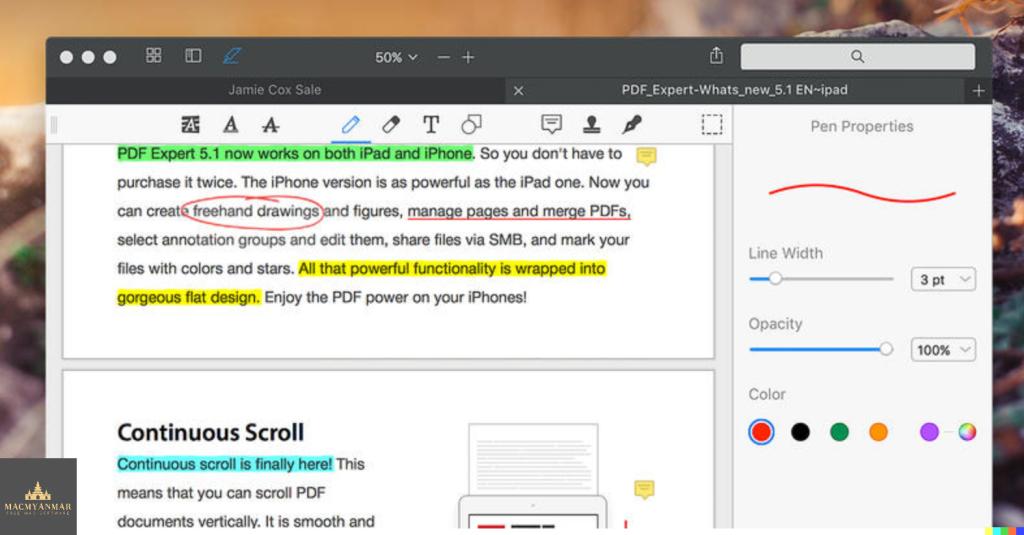
PDF Expert is your go-to tool for effortlessly handling PDF documents on your Mac. Here’s what it offers:
- Instant Document Opening: PDFs open swiftly, whether they’re small email attachments or lengthy 2000-page reports.
- Professional Annotation: From simple edits to extensive editing sessions, PDF Expert provides powerful yet user-friendly tools for efficient annotation.
- Lightning-Fast Document Viewer: With an award-winning tabbed document viewer, you can breeze through multiple PDFs quickly and easily.
- Form Filling: PDF Expert offers an excellent experience for filling out PDF forms, supporting text fields, checkboxes, radio buttons, and more. Even complex interactive forms with JavaScript function seamlessly.
- Easy Document Signing: Signing documents is made simple – type your name on the keyboard and PDF Expert transforms it into beautiful handwriting, or use your MacBook’s trackpad or your finger on a touch-enabled device.
- Wide Sharing Options: Share documents effortlessly with clients, coworkers, and others using PDF Expert’s top-notch support for macOS’s system-wide share sheet and other apps. If an app accepts PDFs, PDF Expert can send them there.
- Cross-Device Compatibility: PDF Expert works seamlessly across all your Apple devices – Mac, iPad, and iPhone. Utilize Apple’s Continuity and Handoff features to transfer documents effortlessly between devices and continue editing where you left off.
Compatibility:
PDF Expert is compatible with macOS 10.13 or later.
Explore more on the homepage: PDF Expert Homepage
CleanMyMac X for Mac Download 4.15.2
02 years

Name : CleanMyMac X
Size : 115 MB
CleanMyMac X for Mac free Download
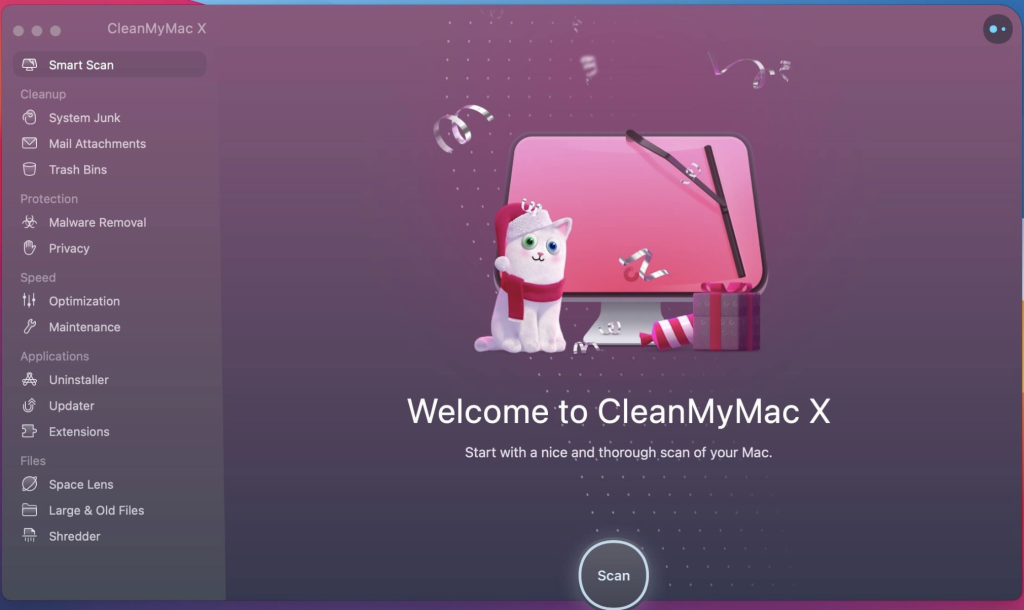
CleanMyMac X is an all-in-one solution for optimizing your Mac’s performance and keeping it clean and secure. Here are some key features and benefits of CleanMyMac X:
- Junk Cleanup: Removes unnecessary files such as caches, broken downloads, logs, and unused localizations to free up disk space and improve performance.
- iTunes, Mail, and Photos Cleanup: Locates and removes clutter from specific applications like iTunes, Mail, and Photos, helping to reclaim gigabytes of storage space.
- Speedup Tools: Provides tools to free up RAM, run maintenance scripts, manage login items, launch agents, and deal with hung applications, optimizing system performance.
- Malware Protection: Detects and removes malware, adware, ransomware, and other threats specific to macOS, ensuring your system stays secure.
- Uninstaller and Updater: Completely removes unwanted apps and updates all software to keep your system organized and up to date, preventing software conflicts.
- User-Friendly Interface: Features an easy-to-use, drag-and-drop interface that simplifies the cleaning and optimization process.
- Slims Universal Binaries: Removes unnecessary architecture files to reduce the size of applications, freeing up disk space.
- Secure File Eraser: Provides a quick and secure method for erasing files, ensuring they cannot be recovered.
- Preference Pane Management: Manages widgets, plugins, and preference panes, helping to keep your system tidy and organized.
- Trash Monitoring: Monitors the Trash to ensure that trashed applications are uninstalled correctly, freeing up additional disk space.
CleanMyMac X is compatible with macOS 10.10 or later and offers regular updates to maintain compatibility and security. You can learn more and download CleanMyMac X from the official website: MacPaw – CleanMyMac X
Geekbench for Mac free Download 6.3.0
02 years

Name : Geekbench
Size : 280 MB
Geekbench for Mac free Download
Geekbench 5 is a powerful cross-platform benchmarking tool that measures your system’s performance with just the press of a button. Here’s a rundown of its key features and compatibility details:
Key Features:
- CPU Benchmark: Measures your processor’s single-core and multi-core power, providing insights into performance for various tasks such as email, photography, music playback, and more. Geekbench 5’s CPU benchmark also evaluates performance in emerging areas like Augmented Reality and Machine Learning.
- Compute Benchmark: Assesses your system’s potential for gaming, image processing, and video editing. It tests GPU power with support for OpenCL, CUDA, Metal APIs, and now includes support for Vulkan, the next-generation cross-platform graphics and compute API.
- Cross-Platform: Enables comparisons across different devices, operating systems, and processor architectures. Geekbench 5 supports Android, iOS, macOS, Windows, and Linux, allowing you to compare performance across a wide range of systems.
- Geekbench Browser: Upload your benchmark results to the Geekbench Browser to share them with others or to compare your device’s performance with others worldwide. You can easily track all your results by creating an account and access them from any device.
Compatibility:
- macOS 11.0 or later
Geekbench 5 provides valuable insights into your system’s performance and allows you to compare it with other devices on the market. You can download Geekbench 5 and learn more about its features on the official website: Geekbench Homepage
Disk Drill Enterprise for Mac 5.5.1515
02 years

Name : Disk Drill Enterprise
Size : 64 MB
Disk Drill Enterprise for Mac Free Download
Disk Drill is a robust Mac data recovery software specifically designed for macOS, offering comprehensive protection for your files and efficient recovery options. Here are the key features and highlights of Disk Drill:
Key Features:
- Recovery Vault: Protects files from accidental deletion by keeping track of file properties such as original file name and location, enabling easy recovery.
- Support for Various Storage Devices and File Systems: Disk Drill supports a wide range of storage devices, file types, and file systems, ensuring compatibility with most storage setups.
- Data Recovery from iPhone and Android Devices: Disk Drill allows you to recover deleted files from both iPhone and Android devices, expanding its utility beyond just Mac disks.
- Disk Management Tools: The software offers additional tools for disk management, including duplicate file finder, byte-to-byte backups, disk cleanup, space visualization, bootable data recovery drive, and disk health monitoring.
- S.M.A.R.T. Disk Monitoring: Disk Drill features built-in S.M.A.R.T. disk monitoring, providing real-time status updates and automatic notifications for potential disk failures or issues.
- Advanced Scanning Modes: Disk Drill PRO includes advanced scanning modes for data recovery from FAT, NTFS, HFS/HFS+, and other file systems, as well as formatted (initialized) drives.
- Quick Scan and Deep Scan: Quick Scan locates recently deleted items on FAT and NTFS disks, while Deep Scan thoroughly scans disks or memory cards for deleted files, even after formatting.
What’s New in Version 4:
- Better Interface: Enhanced user interface with easier access to features, faster and more informative scans, and simple management of found items.
- More Files Found: Updated recovery algorithms for FAT32, NTFS, HFS+, and APFS file systems result in up to a 200% increase in recovery efficiency and quality.
- Data Shredder: Securely delete files and folders beyond recovery with the new Data Shredder module, ensuring complete data privacy.
- Time Machine Recovery: Analyze Time Machine backups and extract necessary data without the need for restoration.
- macOS 11 Big Sur Compatibility: Optimized for macOS 11 Big Sur with Dark Mode support and enhancements for improved performance and compatibility.
- iOS 14 Support: Added support for iOS 14, enhancing Disk Drill’s iOS recovery capabilities.
- New Disk Image Formats: Added support for additional disk image formats, including DSK, BIN, DAT, RAW, and DD.
- More Free Tools: Included Data Shredder and Free Disk Space Erasure as separate free tools to prevent further data recovery and securely erase unused disk space.
Compatibility: macOS 10.15 or later
To learn more about Disk Drill and its features, visit the official homepage: Disk Drill Homepage
Wondershare Recoverit for Mac 12.5.9.2
02 years

Name : Wondershare Recoverit
Size : 125 MB
Wondershare Recoverit for Mac free Download
Wondershare Recoverit: Comprehensive Data Recovery for Mac
Wondershare Recoverit is a powerful data recovery suite designed to help Mac users recover lost or deleted data from various storage devices. Whether you’ve accidentally deleted files, formatted a drive, encountered a virus infection, or experienced unexpected data loss, Recoverit can help you retrieve your valuable data quickly and efficiently.
Key Features:
- Comprehensive Data Recovery: Recoverit can restore data lost due to accidental deletion, formatting, virus infection, improper operation, power failure, and other unknown reasons. It supports recovering data from a wide range of storage devices, including hard drives, USB drives, SD cards, digital cameras, mobile phones, MP3 players, and MP4 players.
- Versatile File System Support: Compatible with HFS+, FAT16/32, and NTFS file system volumes, Recoverit ensures safe and non-destructive data recovery without modifying the original data stored on your Mac or other storage media.
- Safety First: Recoverit operates in a read-only mode, ensuring that no writing operations are performed on your original data during the recovery process, minimizing the risk of further data loss.
- Precise File Recovery: Before initiating the data recovery process, you can choose the specific file types you want to scan, saving time and enabling precise recovery. Recoverit can restore deleted files with their original file names, shooting dates, and storage paths.
- Versatile Preview Ability: Recoverit provides real-time and direct scan results for images during the scanning process, allowing you to stop scanning once the target images are found. For other file types such as videos, audio files, archives, and documents, a Hex mode preview is available.
- Easy-to-Use Interface: With a complete wizard and user-friendly interface, Recoverit makes the data recovery process straightforward and hassle-free, even for novice users.
System Requirements:
- Operating System: macOS 10.14 or later
Wondershare Recoverit is a reliable and efficient tool for recovering lost or deleted data on your Mac. With its comprehensive features and intuitive interface, it’s an essential tool for any Mac user. Visit the official homepage to learn more: Wondershare Recoverit Homepage
Download Cisdem PDFMaster for Mac 6.0.0
02 years

Name : Cisdem PDFMaster
Size : 137 MB
Cisdem PDFMaster for Mac free Download
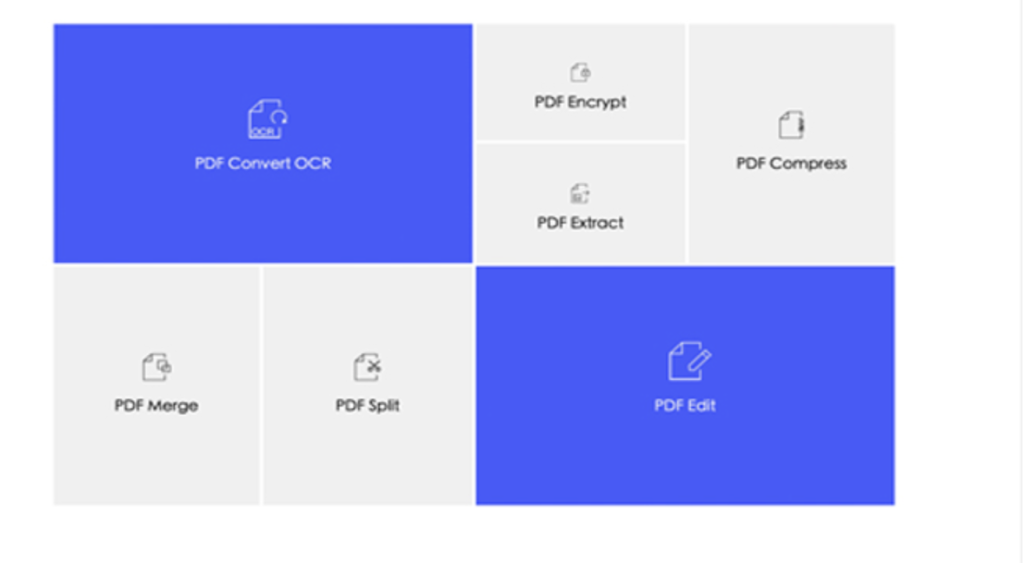
Cisdem PDFMaster for Mac: Your Complete PDF Solution
Cisdem PDFMaster for Mac offers a comprehensive suite of tools to efficiently handle your PDF documents. From converting PDFs to various formats to OCR capabilities for precise text recognition, it empowers you to manage and manipulate your PDFs with ease.
Key Features:
- Batch Conversion: Convert PDFs to Word, PowerPoint, Excel, Keynote, Pages, and more in batches, saving you time and effort. The ultra-fast conversion speed ensures efficiency without compromising accuracy.
- OCR Technology: Leverage advanced OCR technology to accurately recognize text, numbers, and images within your PDFs. Preserve document layout while converting scanned PDFs or images into editable formats.
- Annotation Tools: Make annotations directly on your PDF files before meetings or collaborate seamlessly by adding comments, highlights, and signatures. Streamline your workflow and enhance productivity with intuitive annotation features.
- Document Management: Organize, annotate, convert, and manage your PDFs according to your preferences. Keep your documents neatly organized and easily accessible for efficient retrieval.
What’s New in Version 6.0.0:
- Release notes were unavailable at the time of this listing update.
System Requirements:
- Operating System: macOS 10.13 or later (64-bit)
Experience the convenience and efficiency of managing your PDF documents with Cisdem PDFMaster for Mac. Visit the official homepage to learn more and download the software: Cisdem PDFMaster Homepage