We rank the best UK-licensed online casinos for real money and live craps in 2026, comparing bonuses, games, payouts, and mobile play. read the best online craps casino guide
Posts by Jameskarke
Rectangle Pro for Mac Download 3.0.30
0
Name : Rectangle Pro
Size : 10 MB
Rectangle Pro for Mac free Download
Rectangle Pro (Formerly Hookshot): Enhanced Window Management for macOS
Rectangle Pro, previously known as Hookshot, is a powerful tool for managing window positions and sizes on your Mac. This feature-rich application allows you to quickly snap windows into place, resize, and move them with ease using keyboard shortcuts and cursor movements.
Key Features
- 16 Window Sizes & Positions:
- Predefined window sizes and positions to fit various screen configurations and workflows.
- Keyboard Shortcuts:
- Quickly snap windows into place using customizable keyboard shortcuts.
- Edge Snapping:
- Drag windows to the screen edges to snap them into predefined sizes and positions.
- Cursor Movement Controls:
- Move and resize windows by holding a key and moving your cursor.
- Snap windows under your cursor, even if they are not in focus.
- Custom Shortcuts:
- Create custom shortcuts for any window size and position to suit your specific needs.
Compatibility
- macOS: Requires macOS 10.15 or later.
- Note: You need to disable System Integrity Protection (SIP) to perform certain actions with this application.
Homepage
For more information, visit the Rectangle Pro Homepage.
Rectangle Pro is ideal for users who want a highly customizable and efficient way to manage window placement and sizes on their Mac. Its advanced features and user-friendly interface make it an essential tool for improving productivity and multitasking.

FiveNotes for Mac free Download 3.0.2
0
Name : FiveNotes
Size : 8 MB
FiveNotes for Mac free Download
FiveNotes: Simple and Accessible Note-Taking App
FiveNotes, previously known as Quick, is a streamlined text editor designed for quick and easy note-taking. With its status bar icon, you can access FiveNotes anytime, even when working in a full-screen app. This makes it ideal for quick notes, reminders, or as a cheat-sheet app that remains on top of your other windows.
Key Features
- Quick Access:
- Access FiveNotes with a click on the status bar icon or using shortcut keys.
- Works seamlessly even with full-screen applications.
- Five Notes Limit:
- Offers exactly five notes for simplicity and focus.
- Switch between notes using colorful circles under the text area.
- Use keyboard shortcuts for quick navigation (cmd+shift+[ and cmd+shift+] or cmd+number of note).
- Always on Top:
- Option to keep the app on top of other windows for constant visibility and easy reference.
Compatibility
- macOS: Requires macOS 10.12 or later.
Homepage
For more information, visit the FiveNotes Homepage.
FiveNotes is perfect for users who need a simple, no-fuss solution for quick note-taking and easy access to frequently used notes. Its minimalist design and accessibility features make it a handy tool for daily productivity.

SideNotes for Mac free 1.4.15
0
Name : SideNotes
Size : 19 MB
SideNotes for Mac Free Download
SideNotes: Convenient Note-Taking App
SideNotes is a versatile note-taking application designed to help you manage your notes efficiently without juggling multiple windows. The app is designed to stay on top of other windows, making it easily accessible with just a click or a keyboard shortcut. It offers various features to keep your notes organized and easily accessible.
Key Features
- Easy Access:
- Pull out your notes from the side of your monitor and hide them back with ease.
- Use keyboard shortcuts for smooth operation without needing a mouse.
- Organization:
- Mark notes with colors for better organization.
- Group notes into folders for a clutter-free workspace.
- Rich Media Support:
- Drag and drop pictures directly from your web browser into your notes.
- Save links, code snippets, and even colors.
- Task Management:
- Create task lists and mark items as done to keep track of your to-dos.
- Versatile Note Creation:
- Create notes directly from the pasteboard.
- Drop text files or folders into the app to create new notes.
- Text Formatting:
- Support for three text formatting modes: Markdown, Plain Text, and Code.
Compatibility
- macOS: Requires macOS 10.14 or later.
- Note: You need to disable the System Integrity Protection (SIP) to perform the selected application.
Homepage
For more information, visit the SideNotes Homepage.
SideNotes is perfect for users who need quick access to their notes while working on other tasks. Its ability to stay on top of other windows and its organizational features make it a powerful tool for productivity.

QLab Pro for Mac free Download 5.4.3
0
Name : QLab Pro
Size : 39 MB
QLab Pro for Mac free Download
QLab: Multimedia Design for Live Performances
QLab is a versatile and powerful tool used worldwide to create rich multimedia designs for live performances and installations. It is trusted by professionals in various venues, from Broadway to concert halls, churches, museums, and theaters. QLab allows users to bring their audio and video to life with ease and precision.
Key Features
Simple and Powerful Show Control:
- Multimedia Design: Design and operate multimedia performances from your macOS computer.
- Control Capabilities: Manage audio, video, MIDI, OSC, and more within a single QLab workspace.
User-Friendly Yet Deep Functionality:
- Building Blocks (“Cues”): Create sophisticated designs quickly using cues.
- Easy Start: Drag in a file, press “GO,” and start your design. Add commands to fade volume, animate videos, or apply audio and video effects.
- Advanced Features:
- Scripting
- Video corner pinning
- Multi-projector edge blending
- Audio localization
- Multi-computer designs via local network commands
Industry Standard:
- Battle-Tested: Widely used by designers globally, making it a trusted choice in diverse venues.
Audio and Video Effects:
- Live Audio Effects: Apply EQ, pitch shift, reverb, and more to your cues. Effects can be added to individual cues, across all outputs, or on device outputs.
- Dynamic Effects: The Fade Cue adjusts audio effect parameters in real time, allowing for dynamic speed adjustments with or without pitch shifting.
- Live Audio Inputs: The Mic Cue supports up to 24 channels of live audio inputs, with the same routing, fading, and audio effects available for Audio Cues.
Compatibility
- macOS: Requires macOS 11.0 or later.
Homepage
- For more information, visit the QLab Homepage.
QLab stands out for its ease of use combined with deep functionality, making it an essential tool for creating professional multimedia performances. Whether you’re new to multimedia design or an experienced designer, QLab offers the features and flexibility needed to bring your vision to life.

Wirecast Pro for Mac 16.2.2x
0
Name : Wirecast Pro
Size : 626 MB
Wirecast Pro for Mac free Download
Wirecast: All-in-One Live Streaming Production Application
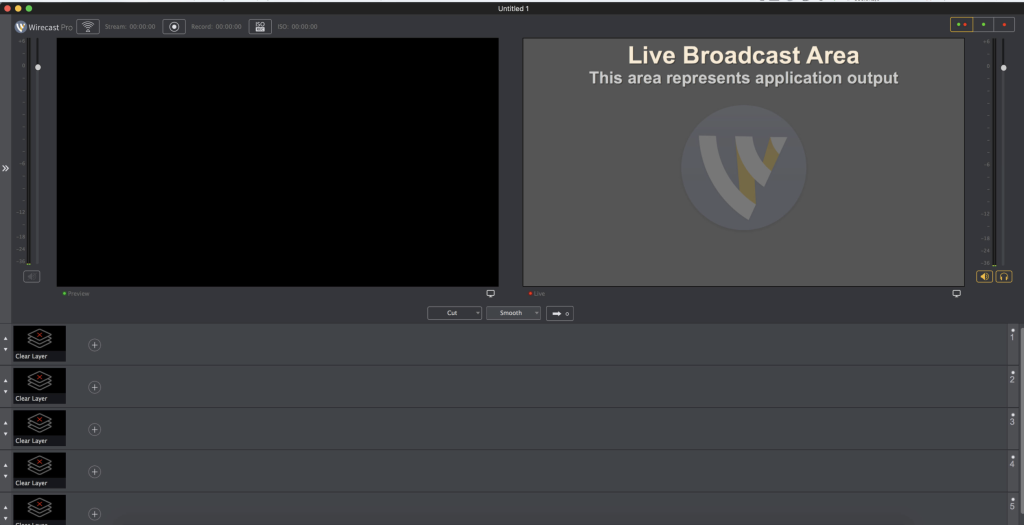
Wirecast is a comprehensive live streaming production tool designed to capture, encode, and broadcast video to multiple servers and platforms simultaneously. Whether you’re using webcams, DV/HDV, SDI cameras, IP and web-based sources, or wireless devices, Wirecast offers a seamless experience for creating professional-quality live streams.
Key Features
Wide Range of Camera Inputs:
- Unlimited Camera Inputs: Supports USB, webcams, SDI, composite, S-Video, DV/HDV, Component, HD-SDI, HDMI sources, IP Cameras, ONVIF, web stream sources, and screen capture sources.
- Automatic Device Recognition: Simply plug in your device, and Wirecast will automatically recognize it as a live feed.
Live Compositing:
- 35 Layers of Live Compositing: Effortlessly add watermarks, background music, and other visual elements to your webcast.
- Professional Titles and Lower Thirds: Choose from over 30 built-in professional broadcast title themes, type in your text, and apply them to your broadcast.
Advanced Video Processing:
- Real-Time Transition and Effect Generator: Enhance your live streams with smooth transitions and effects.
- GPU Accelerated Green and Blue Screen: Built-in support for green and blue screen solutions to create professional backdrops.
- Core Image Filter and Transition Library: GPU accelerated filters and transitions for enhanced video quality.
Broadcast Quality and Integration:
- Fully ISO-Compliant MPEG-4 Video Streams: Ensure your video streams meet professional standards.
- H.264 Video Codec Support: High-quality video encoding for efficient streaming.
- Keynote Integration: Seamlessly integrate Keynote presentations into your live streams.
- Multi-Language Support: Use Wirecast in your preferred language for ease of use.
What’s New
Version Updates:
- Check the Telestream website or the app store for the latest updates and improvements.
Compatibility
- macOS: Requires macOS 11.0 or later.
Homepage
- For more information, visit the Wirecast Homepage.
Wirecast is a versatile and powerful tool for live streaming, offering a wide range of features to enhance your broadcasting experience. Whether you’re a professional broadcaster or a hobbyist, Wirecast provides the tools you need to create high-quality live streams with ease.
Artstudio Pro for Mac Download 5.2.2
0
Name : Artstudio Pro
Size : 243 MB
Artstudio Pro for Mac free Download
iA Writer Pro: Professional Writing Suite
iA Writer Pro is a professional writing suite designed to provide an unmatched writing experience. With its focus on simplicity and productivity, iA Writer Pro offers a variety of features to help writers concentrate on their text and manage their documents effectively.
Key Features
Unmatched Writing Experience:
- Keyboard Focus: Designed to keep your hands on the keyboard and your mind in the text for an uninterrupted writing flow.
Integrated Document Library:
- Swipe Right to Library: Access all your documents with a simple swipe to the right, providing easy navigation and management of your texts.
Synchronized Scrolling Preview:
- Swipe Left to Preview: Separates form and content with synchronized scrolling preview, allowing for an optimized plain text writing experience and stellar formatted export.
Focus Mode and Syntax Control:
- Focus Mode: Fades all but the current sentence to enhance concentration.
- Syntax Control: Highlights different parts of speech to improve writing style.
Seamless Sync Across Devices:
- Dropbox and iCloud Sync: Keeps your documents safe and accessible on any device, ensuring you can write whenever inspiration strikes.
Additional Features:
- Document Library: Integrated library for easy document management.
- Markdown Preview: Offers synchronized scrolling for Markdown preview.
- Preview Templates: Beautiful templates with curated fonts for a professional look.
- Microsoft Word Conversion: Convert formatting to and from Microsoft® Word .docx.
- HTML and PDF Export: Export formatting to HTML and beautifully styled PDFs.
- Auto Markdown: Automatically formats text on-screen.
- Night Mode: Provides a comfortable writing environment in low light conditions.
- Real-Time Sync: Ensures documents are always up-to-date with real-time iCloud and Dropbox sync.
- Reading Time and Count: Displays reading time along with sentence, word, and character count.
- Retina Display Optimization: Customized for Retina displays for crisp and clear text.
- Handoff Support: Allows seamless transition between devices.
- Full Screen Mode: Enables total immersion in the text for a distraction-free writing experience.
What’s New
Version Updates:
- Keep an eye on the app store for the latest updates and improvements.
Compatibility
- macOS: Requires macOS 10.15 or later.
Homepage
- For more information, visit the iA Writer Pro Homepage.
iA Writer Pro is a versatile and powerful writing tool, perfect for professionals looking to enhance their writing process with a suite designed for efficiency and focus.

iA Writer for Mac free Download 7.1.4
0
Name : iA Writer
Size : 20 MB
iA Writer for Mac free Download
iA Writer Pro: Professional Writing Suite
iA Writer Pro is a professional writing suite designed to provide an unmatched writing experience. With its focus on simplicity and productivity, iA Writer Pro offers a variety of features to help writers concentrate on their text and manage their documents effectively.
Key Features
Unmatched Writing Experience:
- Keyboard Focus: Designed to keep your hands on the keyboard and your mind in the text for an uninterrupted writing flow.
Integrated Document Library:
- Swipe Right to Library: Access all your documents with a simple swipe to the right, providing easy navigation and management of your texts.
Synchronized Scrolling Preview:
- Swipe Left to Preview: Separates form and content with synchronized scrolling preview, allowing for an optimized plain text writing experience and stellar formatted export.
Focus Mode and Syntax Control:
- Focus Mode: Fades all but the current sentence to enhance concentration.
- Syntax Control: Highlights different parts of speech to improve writing style.
Seamless Sync Across Devices:
- Dropbox and iCloud Sync: Keeps your documents safe and accessible on any device, ensuring you can write whenever inspiration strikes.
Additional Features:
- Document Library: Integrated library for easy document management.
- Markdown Preview: Offers synchronized scrolling for Markdown preview.
- Preview Templates: Beautiful templates with curated fonts for a professional look.
- Microsoft Word Conversion: Convert formatting to and from Microsoft® Word .docx.
- HTML and PDF Export: Export formatting to HTML and beautifully styled PDFs.
- Auto Markdown: Automatically formats text on-screen.
- Night Mode: Provides a comfortable writing environment in low light conditions.
- Real-Time Sync: Ensures documents are always up-to-date with real-time iCloud and Dropbox sync.
- Reading Time and Count: Displays reading time along with sentence, word, and character count.
- Retina Display Optimization: Customized for Retina displays for crisp and clear text.
- Handoff Support: Allows seamless transition between devices.
- Full Screen Mode: Enables total immersion in the text for a distraction-free writing experience.
What’s New
Version Updates:
- Keep an eye on the app store for the latest updates and improvements.
Compatibility
- macOS: Requires macOS 10.15 or later.
Homepage
- For more information, visit the iA Writer Pro Homepage.
iA Writer Pro is a versatile and powerful writing tool, perfect for professionals looking to enhance their writing process with a suite designed for efficiency and focus.

Dash for Mac free Download 7.2.4
0
Name : Dash
Size : 21 MB
Dash for Mac free Download
Dash: API Documentation Browser and Code Snippet Manager
Dash is a comprehensive tool designed for developers, allowing them to store code snippets and instantly search and browse documentation for a wide array of APIs.
Key Features
Documentation Browser:
- Offline Documentation: Access documentation for a vast number of technologies and frameworks, such as iOS, OS X, Android, AngularJS, C++, Python, Ruby on Rails, and many more.
- Download Docsets: Get docsets from various repositories like CocoaDocs.org, RubyGems.org, Maven.org, Packagist.org, and GoDoc.org.
- Custom Docsets: Supports docsets generated using Appledoc and Doxygen.
- Table of Contents: Methods are shown in a convenient table format.
- Search Functionality: Highlighted in-page search and fuzzy search for fast and accurate results.
- Bookmarks: Save and quickly access your most used documentation pages.
- Search Profiles: Easily switch between different docsets.
- Keyword Filters: Search specific docsets using keyword filters (e.g., “ruby:” for Ruby documentation).
- Integration Plugins: Integrates with a multitude of applications including Xcode, Sublime Text, Atom, Vim, IntelliJ IDEA, and more.
- Annotations: Annotate documentation pages and view public annotations.
- Remote Documentation: Use Dash for iOS to turn your iOS device into a remote screen for documentation.
Snippet Manager:
- Code Collection: Collect and reuse code snippets.
- Sync: Sync your library using Dropbox.
- Syntax Highlighting: Over 80 syntaxes supported.
- Variable Placeholders: Edit placeholders before pasting.
- Abbreviations: Expand abbreviations wherever you type them.
- Special Snippet Placeholders:
@clipboardfor clipboard contents.@cursorto reposition the cursor.@datefor the current date.@timefor the current time.
Additional Features:
- Retina-Ready: Optimized for high-resolution displays.
- Multi-Touch Gestures: Supports modern macOS gestures.
- Quick Access: Accessible via menu item or dock, with keyboard shortcuts.
- Standalone Use: Can be used solely as a Snippet Manager or Documentation Browser.
What’s New
Version 7.2.4:
- Release notes were unavailable at the time of this listing.
Compatibility
- macOS: Requires macOS 10.14 or later (64-bit).
Homepage
- Visit the Dash Homepage for more information.
Dash is designed to enhance the productivity of developers by providing quick and efficient access to documentation and reusable code snippets, all in one place.
ChatGPT for macOS 1.2024.179
0
Name : ChatGPT for macOS
Size : 46.27 MB
ChatGPT for macOS free Download
OpenAI ChatGPT Desktop App for macOS
OpenAI has launched the native ChatGPT desktop app for macOS, making it easier than ever to interact with ChatGPT directly from your computer.
Key Features
Instant Access with Keyboard Shortcut
- Quick Access: Press Option + Space to instantly ask ChatGPT a question.
Screenshots and Discussions
- Capture and Discuss: Take screenshots and discuss them directly in the app.
Photo Integration
- New Conversations with Photos: Start new conversations with photos from your computer or new photos you take.
Voice Conversations
- Voice Mode: Engage in voice conversations with ChatGPT. Click the headphone icon in the bottom right corner to start.
- Future Enhancements: GPT-4o’s audio and video capabilities are coming soon.
GPT-4o Model
GPT-4o is OpenAI’s new flagship model capable of reasoning across audio, vision, and text in real-time.
Availability
- ChatGPT: Available in ChatGPT Free, Plus, and Team (Enterprise coming soon).
- APIs: Accessible via Chat Completions API, Assistants API, and Batch API.
What’s New
Version 1.2024.179
- Release notes were unavailable at the time of this listing.
Compatibility
- macOS: Requires macOS 14.0.
- Apple Silicon: Compatible with M1 or better.
Homepage
For more information and to download the app, visit the ChatGPT download page.
The new ChatGPT desktop app for macOS integrates seamlessly into your workflow, providing quick access to powerful AI capabilities. Whether you need to brainstorm ideas, prepare for interviews, or simply have a conversation, the app offers a variety of features to enhance your productivity and creativity. With the introduction of the advanced GPT-4o model, the app promises even more exciting functionalities in the future.
PDF Reader Pro for Mac Download 4.0.4
0
Name : PDF Reader Pro
Size : 153 MB
PDF Reader Pro for Mac free Download
PDF Reader Pro
PDF Reader Pro is a robust and versatile PDF management tool designed to meet all your document needs. With a comprehensive set of features including annotation, editing, form filling, OCR, conversion, creation, signing, bookmarking, and protection, PDF Reader Pro allows seamless maneuvering through your PDF files.
Key Features
Annotation and Editing
- Annotate: Add comments, highlights, and other annotations to your PDFs.
- Edit Text: Modify the text in your PDF documents.
Form Filling and Signing
- Form Filling: Fill out interactive PDF forms.
- Sign: Add electronic signatures to your documents.
Conversion and Creation
- Convert PDF: Transform PDFs into Microsoft Word, PowerPoint, Excel, RTF, HTML, Text, Image, CSV, and more.
- Create PDF: Generate PDFs from various file formats.
Document Management
- Merge and Split: Combine multiple documents into one or split a PDF into several files.
- Insert Pages: Insert pages from another PDF document.
- Bookmark and Protect: Add bookmarks and protect your PDFs with passwords.
Presentation Mode
- Showcase PDFs: Present your PDF documents to others using the built-in presentation mode.
Enhanced Productivity
PDF Reader Pro is designed to make your work more efficient and productive with its lighter PDFs and powerful tools. The app supports offline conversion, making it convenient to use without an internet connection.
Compatibility
- macOS: Requires macOS 10.13 or later.
Homepage
For more information and to download PDF Reader Pro, visit the PDF Reader Pro Homepage.
With PDF Reader Pro, you can enjoy a seamless PDF experience that includes everything from basic viewing and annotation to advanced editing, conversion, and presentation features. Whether you are a professional needing to manage large volumes of documents or a student looking to annotate and organize your notes, PDF Reader Pro has the tools you need to succeed.