Jameskarke

Jameskarke

This user hasn't shared any profile information

Home page: http://macmyanmar.com

Posts by Jameskarke

Download Debit & Credit Premium for Mac 6.3.3

0

Name : Debit & Credit Premium

Size : 12 MB

Debit & Credit Premium for Mac free Download

Debit & Credit offers a convenient and feature-rich solution for personal finance management, with a range of capabilities designed to streamline your financial tasks. Here are some key features:

  1. Unified Account Management: View all your accounts in one place, making it easier to manage your finances and track transactions.
  2. Speed and Simplicity: Perform tasks quickly with a user-friendly interface designed for efficiency and convenience.
  3. Companion iOS and Apple Watch App: Seamlessly sync data across devices using the companion app for iPhone and iPad, allowing you to add transactions on the go.
  4. Importing Data: Easily import transactions from financial institutions using supported file formats like CSV, QIF, QMTF, OFX, and QFX.
  5. Budgets and Scheduled Transactions: Set budgets for expense categories and schedule future transactions to stay organized and on track with your financial goals.
  6. Financial Plans: Create financial plans for the future and compare your performance against them to track your net wealth over time.
  7. Reports: Access clean and comprehensive reports to analyze your spending habits and financial performance.
  8. Shared Accounts: Share selected accounts with family members via iCloud while keeping others private, ideal for managing family finances collaboratively.
  9. Bank Reconciliation: Easily reconcile accounts with bank statements within the app to ensure accuracy and eliminate discrepancies.
  10. Transaction Attachments: Attach files to transactions, such as receipts or documents, and sync them across devices via iCloud.
  11. Advanced Features: Enjoy additional features like split categories, Touch ID support, pending transactions, transaction export, transaction tags, and more.
  12. iCloud Sync: Store all your data securely in iCloud without the need to create an account or provide personal details.

This version 6.0.1 update includes bug fixes and improvements to enhance the user experience, ensuring accurate and reliable performance.

Debit & Credit is compatible with macOS 10.14.5 or later and is available for download on the Mac App Store.

AnyMP4 Video Converter for Mac 8.2.30

0

Name : AnyMP4 Video Converter

Size : 54 MB

AnyMP4 Video Converter for Mac Download

AnyMP4 Video Converter Ultimate for Mac is a versatile solution for converting videos between various formats on macOS. Here are some key features and functionalities:

  1. Wide Format Support: The app allows you to convert both 1080p HD videos and 4K UHD videos. It supports the latest 4K codecs, including H.265, VP9, H.264, and more.
  2. Predefined Device Profiles: You can easily convert videos for popular digital devices and TVs, such as iPhone, iPad, Samsung Galaxy, Huawei, LG, Sony, Apple TV, Samsung TV, and more. The app offers predefined video formats optimized for different devices.
  3. Compatibility with Video Editing Software: AnyMP4 Video Converter Ultimate for Mac enables you to convert videos for use in various video editing software, including iMovie, Final Cut Pro, Avid Media Composer, Premiere Pro, and more. This allows you to import and edit your videos seamlessly within these editing programs.
  4. Fast and Convenient Conversion: The app offers a fast and convenient solution for converting videos, making it easy to convert between different formats with just a few clicks.
  5. User-friendly Interface: With its user-friendly interface, AnyMP4 Video Converter Ultimate for Mac makes it easy for users to navigate and perform video conversions effortlessly.
  6. Compatibility: The app is compatible with macOS 10.10 or later, ensuring compatibility with a wide range of Mac systems.

Overall, AnyMP4 Video Converter Ultimate for Mac provides a comprehensive solution for video conversion needs on macOS, offering a wide range of features and compatibility with various devices and software.

Dropzone 4 Pro for Mac free 4.80.8

0

Name : Dropzone 4 Pro

Size : 62 MB

Dropzone 4 Pro for Mac free Download

Dropzone is a versatile macOS app designed to streamline file management tasks, enhance productivity, and facilitate seamless sharing across various services. Here are some key features and functionalities of Dropzone:

  1. Efficient File Management: Dropzone simplifies file copying, moving, and opening applications, allowing users to perform these tasks faster and more efficiently than ever before.
  2. URL Shortening: Users can quickly shorten URLs using the Tinyurl shortener feature. By selecting a URL and pressing a keyboard shortcut, Dropzone automatically shortens the URL and copies it to the clipboard for easy sharing.
  3. AirDrop Integration: Dropzone seamlessly integrates with AirDrop, enabling users to share files or folders from any app and distribute them to other Macs on the same network.
  4. Imgur Integration: With Imgur integration, users can swiftly share images and obtain shareable links for pasting into other applications or sharing with others.
  5. Cloud Service Integration: Dropzone Pro offers advanced features such as uploading files to Amazon S3, FTP servers, and Google Drive. Users can also download and install add-on actions to extend Dropzone’s functionality, allowing uploads to additional services like YouTube.
  6. Multi-Tasking Engine: Dropzone’s powerful multi-tasking engine enables users to run multiple tasks simultaneously and track the progress of each task through the in-grid task status area.
  7. Keyboard Shortcuts: Users can launch Dropzone actions using customizable keyboard shortcuts, providing quick access to frequently used actions and enhancing workflow efficiency.
  8. Customization: Dropzone offers flexibility and customization options, allowing users to add applications, folders, or actions to their grid with ease. Additionally, users can develop their own actions using the updated Ruby or Python API available in Dropzone Pro.
  9. Drop Bar: Dropzone includes Drop Bar, a feature that allows users to stash files they anticipate needing later. Files dropped onto the Drop Bar icon remain easily accessible until the user is ready to use them.

Dropzone’s attention to detail, intuitive interface, and extensive customization options make it an invaluable tool for macOS users looking to optimize their workflow and streamline file management tasks.

To access the Pro features and additional functionalities, users can consider purchasing Dropzone 4 Pro via the Mac App Store: Dropzone 4 Pro

Dropzone requires macOS 10.15 or later for compatibility.

iBarcoder Mac Download 3.15.0

0

Name : iBarcoder

Size : 16 MB

iBarcoder for Mac free Download

The Cristallight iBarcoder is a professional barcode generator designed for macOS, allowing users to create individual or sequential barcodes and print them as colorful labels in various styles, sizes, and shapes. Additionally, users can export the generated barcodes as graphic image files in common vector and raster formats. Here are some key features of iBarcoder:

  1. Barcode Generation: iBarcoder supports more than 40 1-D and 2-D barcode symbologies, including popular formats like QR Code and Datamatrix. Users can easily create barcodes for various purposes, such as product labeling, inventory management, and more.
  2. Customization: The software offers extensive customization options, allowing users to design and customize barcode labels according to their preferences. Users can choose from a wide range of styles, sizes, shapes, and colors to create personalized barcode labels.
  3. Printing: iBarcoder simplifies the process of designing and printing barcode labels on macOS. Users can easily print barcode labels directly from the software, ensuring accurate and high-quality output. The software supports printing on a variety of label and sticker paper types.
  4. Export Options: Users can export generated barcodes as high-resolution image files or vector graphics in formats such as PDF, EPS, BMP, TIFF, JPEG, PNG, and more. This flexibility enables users to use the generated barcodes in various applications and environments.
  5. Ease of Use: iBarcoder features an intuitive and user-friendly interface, making it easy for users to create, customize, and export barcode labels. The software’s streamlined workflow and comprehensive feature set ensure efficient barcode generation and printing.
  6. Compatibility: iBarcoder is compatible with macOS 10.10 or later, ensuring compatibility with a wide range of Mac computers.

Overall, iBarcoder is a versatile and powerful barcode generation tool for macOS, suitable for individuals and businesses alike. Whether you need to create barcode labels for product packaging, inventory management, or asset tracking, iBarcoder provides the tools and features to meet your requirements.

To learn more about iBarcoder and explore its features, you can visit the official homepage: iBarcoder

ON1 Effects 2024.3 for Mac v18.3.0.15358

0

Name : ON1 Effects 2024.3

Size: 1.7 GB

ON1 Effects 2024.3 for Mac free Download

ON1 Effects offers photographers and creative professionals an extensive collection of photo effects, filters, LUTs, borders, textures, and presets to enhance and stylize their images. Here are some key features and highlights of ON1 Effects:

  1. Wide Range of Effects: ON1 Effects includes hundreds of built-in photo effects, filters, and presets that cover various styles and creative looks. From HDR effects and black-and-white conversions to lens blur, glows, color enhancers, and more, there are endless possibilities to explore.
  2. Customization: Each effect and preset in ON1 Effects is fully customizable, allowing users to fine-tune settings and adjustments to suit their individual style and preferences. Whether you’re color grading, creating HDR images, or aiming for a specific look, ON1 Effects provides the tools to achieve your vision.
  3. Versatility: With ON1 Effects, photographers can apply a wide range of effects to their images, including HDR looks, black-and-white conversions, split tones, film looks, and more. The software caters to various photography genres and styles, offering versatility and flexibility in creative expression.
  4. Ease of Use: ON1 Effects features an intuitive interface that makes it easy for users to navigate and apply effects to their photos. The software’s user-friendly design ensures a smooth workflow, allowing photographers to focus on their creativity without being overwhelmed by complex tools.
  5. Presets and Customization: ON1 Effects comes with a collection of pre-built presets that users can apply to their photos with a single click. Additionally, photographers can create and save their own presets, enabling them to quickly apply their favorite looks to future projects.
  6. Compatibility: ON1 Effects is compatible with macOS 10.15 or later, ensuring that users can seamlessly integrate the software into their existing workflow.

Overall, ON1 Effects provides photographers and creative professionals with a comprehensive set of tools for enhancing and stylizing their images. With its vast collection of effects, customizable presets, and intuitive interface, ON1 Effects empowers users to unleash their creativity and achieve stunning results in their photography projects.

To learn more about ON1 Effects and explore its features, you can visit the official homepage: ON1 Effects

Araxis Merge Pro for Mac Download 2024.6000

0

Name : Araxis Merge Pro

Size : 83 MB

Download Araxis Merge Pro for Mac

Araxis Merge is a powerful file comparison, merging, and folder synchronization tool designed to meet the needs of various professionals across different industries. Here are some key features and use cases of Araxis Merge:

  1. Text Comparison and Merging: Araxis Merge allows you to compare and merge different revisions of text files, such as source code, XML, and HTML files. It supports various file formats, including Microsoft Office, OpenDocument, PDF, and RTF files. You can easily pinpoint similarities and differences between files with its color-coded side-by-side comparison.
  2. Image and Binary File Comparison: In addition to text files, Merge also supports image comparison, enabling you to identify modifications at the pixel level. It also offers binary comparison for data files, allowing you to detect byte-level differences.
  3. Three-Way Comparison and Automatic Merging: Merge Professional edition provides advanced three-way visual file comparison and merging capabilities, which is particularly useful when multiple individuals are working on the same set of files. Automatic Merging feature allows swift reconciliation of even large files.
  4. Folder Hierarchy Comparison and Synchronization: Merge supports folder hierarchy comparison and synchronization, making it ideal for detecting changes in different versions of source code or web pages. You can compare entire directory trees and verify the contents of recordable CDs or USB thumbsticks. It also supports three-way folder comparison for efficient integration of source code branches.
  5. Customization and Optimization: Merge offers customization options to suit your preferences. You can configure it to ignore differences in whitespace, line endings, or changes matching specified regular expressions. This ensures that only relevant changes are highlighted during comparison.

Araxis Merge is a versatile tool trusted by professionals in various fields, including legal, publishing, software development, and quality control. Its intuitive interface and powerful features make it indispensable for anyone who needs to compare, understand, and merge different versions of files and folders.

To learn more about Araxis Merge and download the software, visit the official homepage: Araxis Merge

Northern Softworks Sonoma Cache Cleaner 19.0.5

0

Name : Northern Softworks Sonoma Cache Cleaner

Size : 170 MB

Northern Softworks Sonoma Cache Cleaner for Mac

Sonoma Cache Cleaner is a versatile maintenance tool for macOS X, designed to simplify system maintenance tasks with its easy-to-use interface. Whether you’re a novice or an expert user, Sonoma Cache Cleaner provides a comprehensive set of tools to keep your macOS system running smoothly. Here are some key features of Sonoma Cache Cleaner:

  1. Maintenance: Sonoma Cache Cleaner offers a range of maintenance tools to keep your system healthy and optimized. It can automate common maintenance tasks such as virus scanning of internet downloads and repairing permissions after software installations.
  2. Optimization: Improve system performance by tuning internet and file cache settings, implementing RAM disks, and cleaning out cached and stale data. Sonoma Cache Cleaner can also recover wasted disk space by eliminating unnecessary language localization files and slimming Universal Binaries.
  3. Customization: Control your macOS X experience by tweaking various system settings. Sonoma Cache Cleaner allows you to turn off Spotlight or Dashboard, adjust login items, and customize other macOS features according to your preferences.
  4. Disaster Planning: Sonoma Cache Cleaner provides tools for disaster planning, including the ability to create bootable installer USB drives and emergency disks. In case of system failure, Sonoma Cache Cleaner is available at the command prompt in Single User Mode for troubleshooting.
  5. Antivirus Protection: Protect your system from malware with Sonoma Cache Cleaner’s built-in antivirus features. It adds extra layers of malware protection to macOS Big Sur and includes the powerful ClamAV antivirus for scanning downloads in real-time.

Sonoma Cache Cleaner is compatible with Universal Binary and supports macOS X 10.4 through 14.2. It’s a trusted tool with millions of downloads worldwide, offering comprehensive system maintenance and optimization capabilities.

To learn more and download Sonoma Cache Cleaner, visit the official homepage: Sonoma Cache Cleaner

Wondershare UniConverter 15.5.7.87 only Apple Silicon Mac Download

0

Name : Wondershare UniConverter

Size : 259 MB

Wondershare UniConverter 15.5.7.87 only Apple Silicon free Download

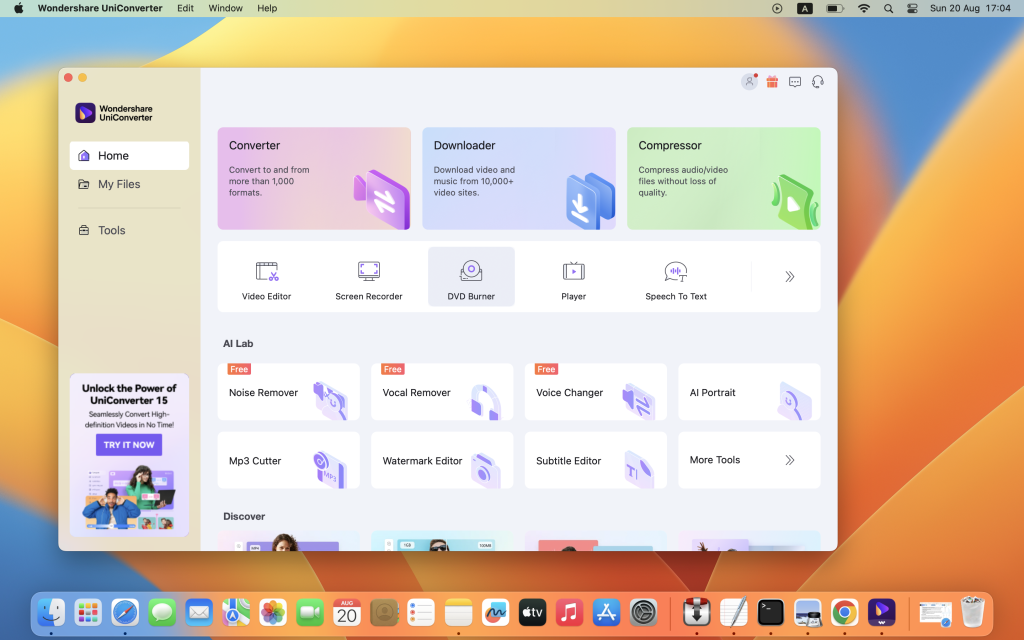
Wondershare UniConverter is a comprehensive video toolbox designed to meet all your video-related needs. From conversion and editing to downloading and burning, UniConverter offers a wide range of features to enhance your video experience. Here are some key highlights of Wondershare UniConverter:

  1. Video Conversion: Convert videos to and from virtually any video format with 30X faster conversion speed. Supported formats include AVI, WMV, MP4, MKV, FLV, 3GP, and more. UniConverter also supports converting video to 3D and 4K Ultra HD formats.
  2. Video Editing: Edit and enhance your videos with built-in editing tools. You can trim, crop, rotate, add watermarks, apply effects, adjust brightness, contrast, and saturation, and more.
  3. Video Downloading: Download videos from popular video-sharing sites like YouTube, Google, Yahoo, and others. You can download videos in various formats and resolutions for offline viewing.
  4. Video Burning: Burn video files to Blu-ray/DVD discs, DVD folders, or ISO files. Create personalized DVDs with custom menus, chapters, and subtitles.
  5. Video Compression: Compress large video files without compromising quality. Reduce file size for easier sharing and storage.
  6. Video Recording: Capture streaming videos, online meetings, gameplay, and more with the built-in screen recorder. Record your screen with audio from system sound or microphone.
  7. Video Organization: Organize your video library with UniConverter’s file management features. You can rename, merge, split, and batch process video files with ease.
  8. Media Playback: UniConverter also serves as a media player, allowing you to play back videos and audio files directly within the application.

The latest version, 15.5.7.86, includes various improvements and enhancements. However, detailed release notes were not available at the time of this listing.

Wondershare UniConverter is compatible with macOS 10.11 or later. To learn more about its features and capabilities, visit the official homepage: Wondershare UniConverter

Wondershare UniConverter for Mac 15.5.7.86

0

Name : Wondershare UniConverter

Size : 290 MB

Wondershare UniConverter for Mac free Download

Wondershare UniConverter is a comprehensive video toolbox designed to meet all your video-related needs. From conversion and editing to downloading and burning, UniConverter offers a wide range of features to enhance your video experience. Here are some key highlights of Wondershare UniConverter:

  1. Video Conversion: Convert videos to and from virtually any video format with 30X faster conversion speed. Supported formats include AVI, WMV, MP4, MKV, FLV, 3GP, and more. UniConverter also supports converting video to 3D and 4K Ultra HD formats.
  2. Video Editing: Edit and enhance your videos with built-in editing tools. You can trim, crop, rotate, add watermarks, apply effects, adjust brightness, contrast, and saturation, and more.
  3. Video Downloading: Download videos from popular video-sharing sites like YouTube, Google, Yahoo, and others. You can download videos in various formats and resolutions for offline viewing.
  4. Video Burning: Burn video files to Blu-ray/DVD discs, DVD folders, or ISO files. Create personalized DVDs with custom menus, chapters, and subtitles.
  5. Video Compression: Compress large video files without compromising quality. Reduce file size for easier sharing and storage.
  6. Video Recording: Capture streaming videos, online meetings, gameplay, and more with the built-in screen recorder. Record your screen with audio from system sound or microphone.
  7. Video Organization: Organize your video library with UniConverter’s file management features. You can rename, merge, split, and batch process video files with ease.
  8. Media Playback: UniConverter also serves as a media player, allowing you to play back videos and audio files directly within the application.

The latest version, 15.5.7.86, includes various improvements and enhancements. However, detailed release notes were not available at the time of this listing.

Wondershare UniConverter is compatible with macOS 10.11 or later. To learn more about its features and capabilities, visit the official homepage: Wondershare UniConverter

Wondershare PDFelement Pro 10.3.6 for Mac (OCR)

0

Name : Wondershare PDFelement Pro

Size : 756 MB

Wondershare PDFelement Pro for Mac free Download

PDFelement is an intuitive software solution that simplifies the creation, editing, conversion, and signing of PDF documents. With the all-new PDFelement 8, users can enjoy a redesigned UI, advanced writing tools, enhanced team collaboration features, powerful conversion tools, a user management console, and more. Here are some key features of PDFelement Pro:

  1. OCR (Optical Character Recognition): Exclusive to the Pro version, OCR enables users to edit and convert characters in scanned PDF files or images. It supports recognition of 29 languages, making it easier to work with scanned documents.
  2. Create & Sign Forms: In the Pro version, users can create fillable PDF forms from interactive field objects like buttons, checkboxes, radio buttons, list boxes, and drop-down lists. Additionally, digital signatures can be added to forms for authentication.
  3. Merge PDF: Exclusive to the Pro version, users can combine files of different formats into a single PDF document, streamlining document management and organization.
  4. Convert PDF: The Pro version offers expanded conversion options, allowing users to convert PDF files to various output formats such as EPUB, HTML, Text, and RTF, providing greater flexibility in document sharing and distribution.
  5. PDF/A Support: PDF/A, an ISO standard for long-term archiving, is available as an output format in the Pro version, ensuring that documents are preserved for future reference and compliance.
  6. Batch Processing: Exclusive to the Pro version, users can process PDFs in batches, saving time and effort. Tasks like adding backgrounds, watermarks, headers, footers, and applying Bates Numbering can be performed in bulk.
  7. Redact PDF: In the Pro version, users can redact sensitive text and images in PDF documents, safeguarding confidential information and ensuring compliance with privacy regulations.

The latest version, 10.3.6 (OCR), introduces improvements and enhancements to the OCR functionality. It is compatible with macOS 10.15 or later.

To explore the full capabilities of PDFelement and experience seamless PDF document management, visit the official homepage: PDFelement

Jameskarke's RSS Feed
Go to Top