Free Macsoftware One click Download

Posts by Jameskarke
YT Saver Video Downloader & Converter for Mac 7.8.2
02 years
by Jameskarke
in Application

Name : YT Saver Video Downloader & Converter
Size : 59 MB
YT Saver Video Downloader & Converter for Mac free Download
YT Saver: Ultimate Video and Audio Downloader and Converter
YT Saver is a versatile tool that allows you to download videos, audio, and playlists from over 10,000 websites. It provides a seamless way to convert downloaded content into various formats, ensuring compatibility with a wide range of devices.
Key Features
- Wide Website Compatibility:
- Download content from YouTube, Facebook, Instagram, Dailymotion, Vimeo, TikTok, and many more.
- Built-in Browser:
- Browse video and audio sharing sites directly within the app and download content easily.
- Unlimited Downloads:
- Download unlimited videos and playlists with YT Saver PRO, and access your downloads offline.
- Batch Downloads:
- Download multiple videos simultaneously, saving time and effort.
- Ultra-Fast Download Speed:
- 10X faster download speed ensures quick downloads and fast conversions.
- Private Mode:
- Protect your downloaded videos and audio in a password-protected folder to maintain privacy.
Supported Formats
- Input Formats:
- Video: MP4, M4V, 3GP, MPEG, DAT, AVI, ASF, WMV, VOB, MKV, FLV, 3GS, 3G2, F4V, WEBM, TS, RMVB, MOV.
- Audio: AAC, AC3, FLAC, M4A, WAV, WMA, AMR, MKA, MP2, AIF, AU, AIFF, CAF, OGG, RAM, RA, M4B, M4R, APE, OPUS, WEBM.
- Output Formats:
- Video: MP4, MOV, WMV, AVI, FLV, MKV, HEVC MP4, HEVC MKV, 3GP, iPhone/iPod, iPad, Android Phone, Android Tablets.
- Audio: M4A, MKA, WAV, AAC, FLAC, AIFF, OGG.
What’s New in Version 7.8.2
- Release notes were unavailable when this listing was updated.
System Requirements
- macOS Compatibility: Requires macOS 10.10 or later.
For more details and to download YT Saver, visit the YT Saver Homepage.
iTubeGo YouTube Downloader for Mac 7.8.2
02 years
by Jameskarke
in Application

Name : iTubeGo YouTube Downloader
Size : 59 MB
iTubeGo YouTube Downloader for Mac free Download
iTubeGo HD Video Downloader: High-Speed HD/4K/8K Video Downloads
iTubeGo HD Video Downloader is a powerful tool designed for downloading high-quality videos from over 10,000 websites, including YouTube, Dailymotion, Facebook, and more. This software provides a fast, efficient way to download and convert videos and music, supporting various resolutions and formats.
Key Features
- Wide Website Compatibility:
- Download videos from YouTube, Facebook, Instagram, Dailymotion, Vimeo, TikTok, Pornhub, Xvideos, SpankBang, xHamster, and more.
- High-Quality Video Downloads:
- Supports SD and UHD video quality options: 480p, 720p, 1080p, 2K, 4K, 8K.
- 10X Faster Download Speed:
- Provides significantly faster download speeds for high-quality video downloads in bulk.
- Built-in Browser:
- Includes a built-in browser for easy video and music downloads.
- Audio Extraction:
- Extracts audio from videos and saves it as high-quality 320kbps MP3 files.
- MP3 Downloads:
- Supports MP3 downloads from most music sites.
- Bulk Downloads:
- Download multiple videos simultaneously.
- Video to MP4/MP3 Conversion:
- Convert downloaded YouTube videos to MP4, MP3, and more.
What’s New in Version 7.8.2
- Release notes were unavailable when this listing was updated.
System Requirements
- macOS Compatibility: Requires macOS 10.10 or later.
For more details and to download iTubeGo HD Video Downloader, visit the iTubeGo Homepage.
Antivirus Zap Pro for Mac 4.2.1.0
02 years
by Jameskarke
in Application

Name : Antivirus Zap Pro
Size : 49 MB
Antivirus Zap Pro for Mac free Download
Antivirus Zap: Comprehensive Malware and Virus Protection for Mac
Antivirus Zap is a robust security solution designed to scan and remove malware and other malicious software from your Mac. It provides multiple scanning options, protecting your system from current threats and preventing future infections.
Key Features
- Malware and Virus Detection: Detects and removes malware and viruses to safeguard your Mac.
- Quick Scan:
- Targets the most likely locations for malware and adware.
- Takes approximately 5-15 minutes depending on the number of files.
- Normal Scan:
- Checks extended locations including Applications, Downloads, Desktop, Mail Download, etc.
- Takes about an hour or more depending on the number of files.
- Full Scan:
- Conducts a comprehensive scan of the entire system.
- Ideal for overnight scans as it takes an hour or more depending on the number of files.
- Custom Scan:
- Allows you to select specific files or folders for scanning.
- Perfect for suspicious files, folders, and USB drives.
- Scan + Browser Restore:
- Combines Quick Scan features with browser restoration by removing extensions, cookies, and caches.
- Takes about 10-30 minutes depending on the number of files.
- Memory and Startup Scans:
- Scans all applications and processes currently in memory.
- Scans all programs that start automatically with the system.
- Cross-Platform Threat Detection:
- Detects macOS, Windows, and Linux threats.
- Scans Windows Bootcamp, external, and network drives for malware.
- File Type Exclusion:
- Option to exclude certain file types such as images, movies, and audio files which are unlikely to pose a threat.
- Archive Scanning:
- Searches for malware in archives (zip, pkg, etc.) and inside various file types (pdf, pkg, zip, etc.).
- User Interface:
- Easy to use, intuitive interface.
- Daily Updates:
- Daily database updates to keep up with new threats.
What’s New in Version 4.2.1.0
- Release notes were unavailable when this listing was updated.
Language Support
Available in English, Catalan, French, German, Italian, Japanese, and Spanish.
System Requirements
- macOS Compatibility: Requires macOS 10.13 or later.
For more details and to download Antivirus Zap, visit the Antivirus Zap Homepage.
Compressor for Mac Download 4.8.0
02 years
Name : Compressor
Size : 83 MB
Compressor for Mac free download
Compressor: Powerful Video Encoding and Conversion Tool
Compressor is a robust video encoding application that integrates seamlessly with Final Cut Pro, providing flexibility and advanced features for video conversion and output customization. It offers a user-friendly interface, efficient encoding processes, and tools for creating iTunes Store-compliant packages.
Advanced Encoding for Final Cut Pro
- Custom Encoding Settings: Customize encoding settings in Compressor and use them in Final Cut Pro.
- Batch Processing: Streamline the encoding of large numbers of files with batch processes.
- Custom Destinations: Combine encoding with tasks like moving or copying files.
- Self-contained Droplets: Encode on the desktop with drag-and-drop ease using self-contained droplets.
- Shared Settings: Share settings such as HEVC output with other editors.
- HEVC Format: Encode Final Cut Pro and Motion projects in the HEVC format.
iTunes Store Package Creation
- Organize Content: Import and organize movies, trailers, closed captions, and subtitles into iTunes Store-compliant packages.
- Sync Verification: Audition video with any audio, caption, or subtitle to verify sync.
- Error Detection: Identify issues with packages and navigate directly to the source of the issue.
- HDR Video: Deliver HDR video in P3 D65 PQ, Rec. 2020 HLG, and Rec. 2020 PQ formats.
- Dolby Vision Support: Link Dolby Vision graded video files to Dolby Vision XML.
Support for Industry Standards
- Broad Format Support: Encode to formats including MPEG-4, H.264, MXF, and ProRes.
- DVD and Blu-ray: Encode and burn themed menus to DVD or Blu-ray discs.
- HTTP Live Streaming: Generate files for HTTP live streaming in one step.
- Image Sequences: Import and encode Targa, DPX, TIFF, PSD, PNG, or OpenEXR image sequences.
- Advanced Features: Add closed captioning, metadata, and more.
Pristine Format Conversions
- Format Conversion: Convert files between formats, e.g., NTSC to PAL, SD to HD.
- Color Spaces: Manipulate wide color video and deliver in Rec. 601, Rec. 709, or Rec. 2020.
- HDR Delivery: Deliver HDR video with color space conversions and HDR metadata.
- H.264 Encoding: Use CABAC entropy multipass H.264 encoding for superior results with hardware-accelerated export.
- Customization Tools: Clean up content using image filters, timecode overlay, and watermarks.
- Frame Rate Adjustment: Speed up or slow down video, or adjust frame rate for runtime matching.
Distributed Encoding
- Encoding Work Distribution: Distribute encoding work among multiple workstations to save time.
- Node Activation: Install Compressor on any Mac to use it as a node for distributed encoding.
- Shared Computers: Speed up encoding by choosing a group of shared computers for exporting.
System Requirements
- macOS Compatibility: Requires macOS 12.6 or later, with full compatibility for macOS 13.5 or later.
- RAM and VRAM: Requires 4GB of RAM (8GB recommended for 4K editing, 3D titles, and 360° video editing), Metal-capable graphics card, 1GB of VRAM recommended for advanced tasks.
- Disk Space: Needs 1.2GB of available disk space. ProRes RAW requires a Mac that supports Metal.
- Blu-ray Burning: Requires a Blu-ray recorder for burning Blu-ray discs.
Language Support
Available in English, French, German, Japanese, Simplified Chinese, and Spanish.
For more details and to download Compressor, visit the Compressor Homepage.
Motion for Mac free Download 5.8.0
02 years
by Jameskarke
in Application
Name : Motion
Size : 2 GB
Motion for Mac free Download
Motion: Powerful Motion Graphics for Video Editors
Motion is a robust motion graphics tool designed for video editors, enabling the creation of cinematic 2D and 3D titles, smooth transitions, and realistic effects in real-time.
2D and 3D Titles
- 360° Media Support: Import and design 360° titles, generators, and effects.
- 3D Titles: Build 3D titles from scratch, use templates, or convert 2D titles to 3D.
- Text Animation: Animate titles using over 100 drag-and-drop behaviors and text animation tools.
- Customization: Create unique looks with over 90 Apple-designed 3D materials, including metal, wood, and stone.
Motion Graphics for Final Cut Pro
- Integration with Final Cut Pro: Save titles, effects, transitions, or generators and access them directly in Final Cut Pro.
- Customization: Open and customize Final Cut Pro elements in Motion.
- Motion Templates: Create templates with adjustable parameters using sliders, pop-up menus, or checkboxes in Final Cut Pro.
- Aspect Ratio Support: Use Display Aspect Ratio snapshots for templates supporting multiple aspect ratios.
Stunning Effects
- Behaviors: Choose from over 230 behaviors for natural animation without keyframes.
- Keying Filter: Create accurate chroma keys in one step.
- Cinematic Mode: Adjust focus points or depth effect for iPhone Cinematic mode videos (requires macOS Monterey or later).
- Particle Emitters: Design custom particle emitters or choose from 200 presets for effects like smoke and sparkles.
- Masking Tools: Use professional masking tools for rotoscoping.
- Machine Learning Tracking: Detect, track, and match the movement of faces or objects automatically.
- Neon Filter: Easily add neon glows to text, shapes, video, and stills.
- Third-Party Plug-ins: Extend capabilities with FxPlug plug-ins for advanced tracking and motion graphics.
Effortless 3D
- 3D Space Transition: Add cameras to transition from 2D to 3D space.
- 360° Projects: Create 3D scenes within a 360° project for realistic environments.
- Dynamic Shadows: Set up realistic shadows that animate with camera and light movements.
- Reflective Surfaces: Turn any shape, video plane, or paint stroke into a reflective surface.
- USDZ Objects: Import third-party USDZ objects or use one of the 60 premade objects in the Motion Library.
Breakthrough Speed, Quality, and Output
- HDR Images: Import wide color HDR images, view them on supported Macs, and export in Rec. 709 or Rec. 2020 color space.
- Optimized Performance: Enhanced performance on Mac computers with Apple silicon, including M1 Pro, M1 Max, and M1 Ultra chips.
- System Requirements: macOS 12.6 or later, 4GB of RAM (8GB recommended for 4K editing, 3D titles, and 360° video editing), Metal-capable graphics card, 1GB of VRAM recommended for 4K editing, 3D titles, and 360° video editing, 4.7GB of available disk space (3.5GB app, 1.2GB supplemental content).
- Compatibility: macOS 13.5 or later.
For more details and to download Motion, visit the Motion Homepage.
Final Cut Pro for Mac free 10.8.0
02 years

Name : Final Cut Pro
Size : 4.7 GB
Final Cut Pro for Mac free Download
Final Cut Pro: Revolutionary Video Editing and Powerful Media Organization
Final Cut Pro offers revolutionary video editing capabilities combined with powerful media organization and exceptional performance, enabling you to create at the speed of thought.
Revolutionary Video Editing
- Magnetic Timeline: Utilizes advanced metadata and Clip Connections for efficient editing.
- Enhanced Timeline Index: Allows drag-and-drop audio roles for easier timeline arrangement.
- Object Tracker: Automatically matches titles and effects to the movement of faces or objects using drag-and-drop.
- Cinematic Mode Editing: Change focus points or depth effect for video shot in Cinematic mode on iPhone (requires macOS Monterey or later).
- Multicamera Editing: Sync and edit multicamera projects with support for up to 64 camera angles.
- Smart Conform: Automatically transform projects for square or vertical delivery.
- 360° Video Editing: Import and edit 360° equirectangular video in various formats and frame sizes.
- Closed Captions: Create, edit, and deliver closed captions directly within the app.
- Workflow Extensions: Extend capabilities with third-party workflow extensions.
Powerful Media Organization
- Library Management: Organize work within libraries for efficient media management and collaboration.
- Proxy Media: Create proxy copies for improved portability and performance.
- Keywording: Apply custom keywords or favorites on the fly.
- Smart Collections: Dynamically organize content for quick access.
- Duplicate Media Detection: Locate duplicates in the timeline using highlighted clip ranges or the Timeline Index.
Incredible Performance
- Optimized for Apple Silicon: Enhanced speed and efficiency on Mac computers with Apple silicon.
- Support for M2 Chips: Unrivaled performance with optimizations for M2 Pro, M2 Max, and M1 Ultra chips.
- Format Compatibility: Work with a wide range of formats including ProRes, RED, XAVC, AVCHD, Avid DNxHR®, Avid DNxHD®, H.264, HEVC, and more.
Compelling, Customizable Effects
- 2D and 3D Titles: Beautifully animated and customizable.
- Intuitive Controls: Easily change the look of titles, transitions, and effects.
- Third-Party Plug-ins: Choose from an ecosystem of FxPlug plug-ins with custom interfaces.
Integrated Audio Editing
- Role Assignment: Track and organize projects by assigning roles during import.
- Multichannel Audio Editing: Expand and edit multichannel audio directly in the timeline.
- Logic-Based Effects: Apply effects and reduce background noise to isolate voices.
- Audio Syncing: Sync video with separate audio using instant audio waveform matching.
Intuitive Color Grading
- Color Space Support: Import, edit, and deliver video in standard color spaces, Rec. 2020, and HLG.
- Advanced Tools: Use powerful color wheels and curves with keying and masks.
- HDR Viewing: Accurately view HDR on MacBook Pro and Pro Display XDR.
One-Step, Optimized Output
- Fast Export: Quickly export for playback on Apple devices and upload to websites like Vimeo and YouTube.
- Audio Stems: Export audio stems and multiple versions using roles metadata.
- XML Support: Import and export XML for third-party workflows such as color grading and sound mixing.
System Requirements
- Operating System: macOS 12.6 or later.
- RAM: 4GB minimum, 8GB recommended for 4K editing, 3D titles, and 360° video editing.
- Graphics: Metal-capable graphics card with 1GB of VRAM recommended for 4K editing, 3D titles, and 360° video editing.
- Storage: 5.5GB of available disk space.
- Languages: English, Chinese, French, German, Japanese, Spanish.
- Compatibility: macOS 13.5 or later.
For more details and to download Final Cut Pro, visit the Final Cut Pro Homepage.
Microsoft Office 2021 for Mac LTSC v16.86 VL
02 years

Name : Microsoft Office 2021 for Mac LTSC
Size : 2.3 GB
Office 2021 for Mac: The Perfect Blend of Office and macOS
Office 2021 for Mac is tailored to leverage the latest Mac features, including Retina display, full screen view support, and scroll bounce. This suite combines the trusted functionality of Office with the elegance and performance of macOS.
Key Applications and Features
Word
- Professional Document Creation: Advanced editing, reviewing, and sharing tools.
- Design Tab: Quick access to formatting features.
- Smart Lookup: Contextual web information directly within Word.
Excel
- Data Analysis and Visualization: New interface with your favorite keyboard shortcuts.
- Advanced Tools: Analysis Toolpak, Slicers, and Formula Builder for efficient data management.
PowerPoint
- Enhanced Presentation Tools: New slide transitions and improved Animations task pane.
- Collaborative Features: Threaded comments for feedback and Presenter View for seamless presentations.
OneNote
- Digital Notebook: Store notes, ideas, web pages, photos, audio, and video in one place.
- Collaboration: Share and collaborate on notes, ideal for school, work, and personal projects.
Outlook
- Email and Calendar Management: Manage emails, calendar, contacts, and tasks efficiently.
- Push Email Support: Keeps your inbox updated.
- Conversation View: Groups related messages.
- Calendar View: Side-by-side calendar viewing for better planning.
New Features in Version 16.86
- The release notes were unavailable at the time of the listing update.
System Requirements
- Operating System: macOS 10.15 or higher.
- Languages Supported: English, العربية, 中文, Čeština, Dansk, Nederlands, Suomi, Français, Deutsch, Ελληνικά, עברית, Magyar, Bahasa Indonesia, Italiano, 日本語, 한국어, Norsk, Polski, Português, Русский, Slovenčina, Español, Svenska, ภาษาไทย, Türkçe.
For more details and to download Office 2021 for Mac, visit the Microsoft Office Homepage.
Office 2021 for Mac integrates seamlessly with macOS, providing a powerful suite of tools for creating, analyzing, and presenting data, managing communications, and organizing your digital life, all while maintaining the look and feel that Mac users love.
RAW Power for Mac Download 3.4.23
02 years
by Jameskarke
in Application

Name : RAW Power
Size : 62 MB
RAW Power for Mac free Download
RAW Power®: Advanced RAW Image Editing for macOS
RAW Power offers the most seamless Finder, Photos, and iCloud integration among non-Apple photo apps, bringing advanced RAW editing, ratings, and comprehensive photo management to your fingertips.
Key Features
Three Tools in One:
- Standalone Image Editor: No import required, allowing quick browsing and non-destructive editing of any folder on your disk.
- Apple Photos Library Manager: Full compatibility with iCloud Photos ensures synchronization across all your devices.
- Photos Editing Extension: Consistent editing features across app and extension modes.
Advanced RAW Processing:
- Unlock Apple’s RAW Engine: Advanced adjustments like Boost, unique to Aperture, for unparalleled photo enhancements.
- Highlight Recovery: Exceptional control over highlights, noise reduction, black point, and gamut mapping.
Comprehensive Organization:
- Finder Integration: Browse folders and edit photos without the need for importing.
- Ratings and Filters: Rate, flag, and filter images, with synchronization over iCloud Photos.
- Batch Processing: Apply presets, adjustments, and export settings to multiple images simultaneously.
Real-Time Editing Tools:
- Wide Camera Support: Compatible with hundreds of cameras, including iPhone RAW.
- Extensive Adjustments: Highlights, shadows, vibrancy, local contrast, lighten/darken sliders, and more.
- Precision Tools: Histogram with clipping indicators, LUTs, curves and levels, crop and straighten, and depth effect.
- Non-Destructive Editing: All changes are stored in sidecars, ensuring original files remain untouched.
Customizable and Efficient:
- Presets: Create and apply custom presets and camera-specific starting points.
- Performance: GPU-accelerated sliders and a Metal-based image processing engine for high-speed performance.
User-Friendly Organization and Display
- Zoom: Up to 800% for detailed adjustments.
- Metadata Viewing: Access comprehensive file and shot information, including location data.
- Multiple Windows/Tabs: View different disk or library sections simultaneously.
- Batch Processing: Automate enhancements, white balance, and other adjustments in the background.
Compatibility and Requirements
- macOS: Compatible with macOS 10.14 or later.
- Device Support: Supports a wide range of cameras (excluding Fuji Compressed RAW).
Homepage
- For more information and to download RAW Power, visit the RAW Power Homepage.
RAW Power® is designed for photographers seeking advanced RAW editing capabilities and seamless integration with macOS features, making it a versatile and powerful tool for managing and enhancing your photo library.
Dash for Mac free Download 7.2.3
02 years
Name : Dash
Size : 21 MB
Dash for Mac free Download
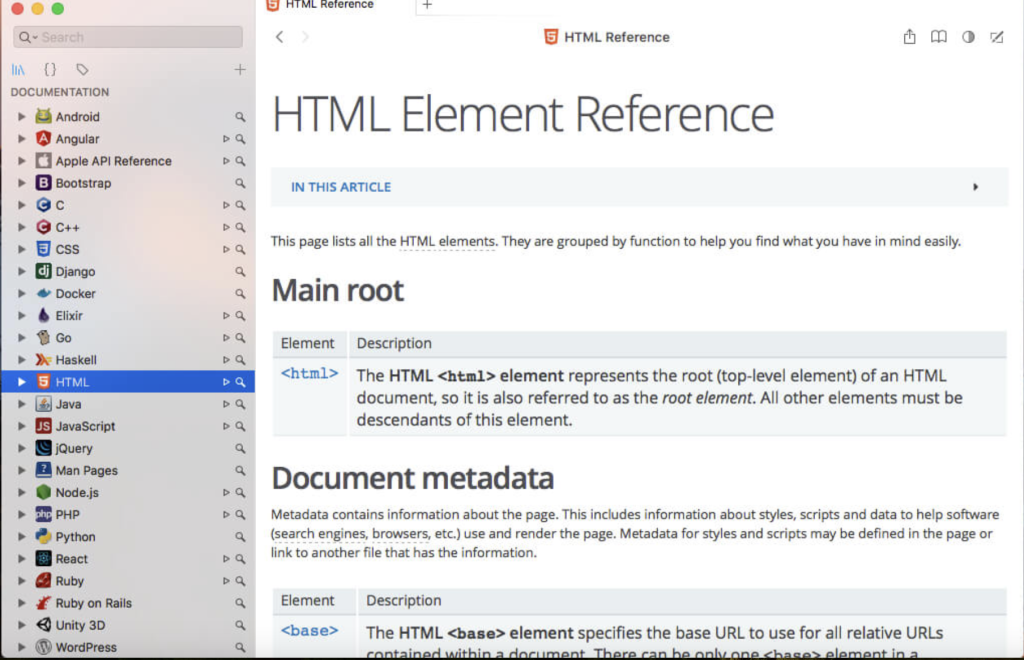
Dash: Comprehensive API Documentation Browser and Code Snippet Manager
Dash is an essential tool for developers, combining an API documentation browser with a code snippet manager. It provides instant access to a wide array of documentation sets and facilitates efficient code management.
Key Features
Documentation Browser:
- Offline Documentation: Access a comprehensive library of documentation, including iOS, OS X, Swift, .NET Framework, Android, AngularJS, Apache, C, C++, Django, Java, jQuery, PHP, Python, Ruby, and many more.
- Custom Docsets: Download additional docsets from sources like CocoaDocs.org, RubyGems.org, Maven.org, Packagist.org, and GoDoc.org.
- Table of Contents: Conveniently view methods and properties in a structured table of contents.
- In-Page Search: Highlighted and easy-to-use search within documentation pages.
- Bookmarks and Profiles: Save frequently used documentation pages and create search profiles for easy switching between docsets.
- Keyword Filters: Search specific docsets using keywords (e.g., “ruby:method” to search only Ruby documentation).
Integration:
- IDE and Editor Plugins: Integrates with Xcode, Alfred, Quicksilver, LaunchBar, Coda, Espresso, Sublime Text, Atom, Brackets, Vim, Emacs, Eclipse, IntelliJ IDEA, and more.
- URL Scheme: Use “dash://” URLs or the “Look up in Dash” service to integrate with other applications.
- Public Annotations: Annotate documentation pages and view annotations from other users.
- iOS Integration: Use Dash for iOS to turn your iOS device into a remote screen for documentation.
Snippet Manager:
- Snippet Collection: Save and manage code snippets with support for over 80 programming syntaxes.
- Sync: Sync snippets via Dropbox for access across devices.
- Variable Placeholders: Edit variable placeholders before pasting snippets.
- Special Placeholders: Use placeholders like @clipboard, @cursor, @date, and @time for dynamic snippet insertion.
- Abbreviations: Expand abbreviations into snippets wherever you type them.
Additional Features:
- Retina-Ready: Optimized for high-resolution displays.
- Multi-Touch Gestures: Supports multi-touch gestures for easier navigation.
- Quick Access: Available as a menu item or dock application, always accessible via a keyboard shortcut.
- Fuzzy Search: Handles misspellings to ensure accurate search results.
- Speed: Designed for fast and efficient searching.
Latest Updates
Version 7.2.3:
- Minor updates and fixes (detailed release notes were unavailable).
Compatibility
- macOS: Compatible with macOS 10.14 or later (64-bit).
Homepage
- For more information and to download Dash, visit the Dash Homepage.
Dash is an indispensable tool for developers, streamlining access to API documentation and code snippets, enhancing productivity, and integrating seamlessly with a wide range of development environments and tools.
SyncMate Expert for Mac 8.8.539
02 years

Name : SyncMate Expert
Size : 69 MB
SyncMate Expert for Mac free Download
SyncMate: Comprehensive Mac Data Synchronization Tool
SyncMate is a versatile synchronization application for Mac that supports syncing data with Android, iOS, other Macs, MTP devices, and mounted storage devices. Additionally, it allows sync with various cloud services such as Google, Dropbox, and iCloud.
Key Features
Free Edition:
- Contacts and Calendar Sync: Seamlessly synchronize your Mac’s contacts and calendar entries with supported devices.
- Cloud Sync: Sync data with Google and Dropbox accounts.
- Message Access: Read messages from Android and iOS devices directly on your Mac.
Expert Edition:
- Advanced Media Sync: Sync iTunes, iPhoto, Photos.app, Safari Bookmarks, Reminders, and specific folders.
- AutoSync: Automate synchronization by setting various parameters for supported devices.
- Real-Time Folder Sync: Sync folders between Mac and mounted storage devices or other Macs in real-time.
- Message Management: Create, send, delete, search, and export text messages from Android and iOS devices on your Mac.
- Media Conversion: Convert videos to AVI, MPG, MP4, WMV, ASF, 3GP, and audio files to MP3 and WAV before syncing.
- Flexible Connection Options: Sync via USB, Wi-Fi, Bluetooth, and Ethernet, depending on the device.
Compatibility
- Operating System: Compatible with OS X 10.10 or later (64-bit).
- Device Compatibility: Supports iOS 5.x-8.x devices and Android 3.x, 4.x, 5.x, 6.x, 7.x.
SyncMate provides a comprehensive solution for keeping your data consistent across multiple devices and platforms, ensuring that your information is always up-to-date and accessible.
For more information and to download SyncMate, visit the SyncMate Homepage.
SyncMate stands out as a robust tool for users who need to maintain seamless data synchronization across diverse devices and cloud services, making it an indispensable application for Mac users with a variety of syncing needs.
