Jameskarke

Jameskarke

This user hasn't shared any profile information

Home page: http://macmyanmar.com

Posts by Jameskarke

Download Capture One Enterprise 16.3.4.5

0

Name : Capture One Enterprise

Size : 966 MB

Capture One Enterprise for Mac free Download

Capture One 23 Enterprise is presented as a powerful photo editing solution tailored for image production studios and e-commerce platforms. Below are key features and information highlighted in the provided details:

  1. True-to-Life Color Processing: Capture One 23 Enterprise boasts authentic, true-to-life color processing, providing a high-quality and accurate representation of colors in edited photos.
  2. Seamless Editing Experience: The software offers a seamless editing experience, allowing photographers to have total creative control over their images. The editing tools are designed to be state-of-the-art.
  3. Fastest Tethering in the Industry: Capture One 23 Enterprise is recognized for having the fastest tethering capabilities in the industry. This feature is particularly beneficial for photographers who need to shoot and edit images in real-time.
  4. Enterprise Version for Business: The Enterprise version of Capture One is specifically built for businesses, especially catering to the needs of photography studios. It offers standard features aligned with the workflow of studio photography.
  5. Collaboration and Standardization: For studios with multiple contributors, such as photographers, studio managers, retouchers, etc., Capture One Enterprise is designed to facilitate collaboration, standardization, and integration with other systems like barcode scanners, PIM systems, digital asset management systems, and e-commerce platforms.
  6. KPI Optimization: The software aims to improve key performance indicators (KPIs) such as “Time to Market,” “Cost per Image,” and “Reduce Risk” by optimizing the image production process.
  7. Enterprise-Specific Features: Capture One Enterprise introduces features tailored to business needs, including Barcode scanner tool, Advanced Guides, Next Capture Backup, Next Capture Keywords, Next Capture Metadata, Tool Locks, Capture Pilot with Enterprise enhancements, and Dedicated Studio workspaces.
  8. Automated Workflows: The software supports automated workflows within Capture One Enterprise, enhancing efficiency and reducing manual intervention in the image production process.
  9. Integration into IT Infrastructure: Capture One Enterprise can be integrated into a studio’s IT infrastructure through workflow enhancements, integrations, and customized solutions, maximizing value and efficiency.
  10. Customized Solutions for Specialized Needs: For studios with specialized requirements, Capture One offers customized solutions, such as ultra-accurate color profiling, to meet specific KPIs like reducing product returns due to color discrepancies.
  11. Color Profiling for E-commerce Cameras: Capture One provides individual color profiles for businesses, allowing for fine-tuned color profiling for the most popular e-commerce cameras used by photography studios.
  12. Compatibility: Capture One 23 Enterprise is compatible with macOS 10.15 or later.
  13. Release Notes: The release notes for the software are available on the provided homepage.
  14. Homepage: For more information and exploration of features, the official homepage is https://www.captureone.com/en/explore-features/enterprise.

In summary, Capture One 23 Enterprise is positioned as a sophisticated photo editing solution tailored to the specific needs of image production studios and e-commerce platforms, offering features that enhance collaboration, standardization, and overall efficiency in the photography workflow.

Capture One 23 Pro for Mac 16.3.4.5

0

Name : Capture One 23 Pro

Size : 966 MB

Capture One 23 Pro for Mac free Download

Capture One 23 is described as a professional RAW converter designed to deliver ultimate image quality with beautiful colors and incredible detail for over 500 high-end cameras. The software offers state-of-the-art tethered capture, powerful digital asset management, extensive adjustment tools, and a flexible workflow through customizable workspaces. Here are some key features, improvements, and information highlighted in the provided details:

  1. Professional RAW Conversion:
  • Capture One 23 is designed for professional RAW conversion, providing high-quality images with beautiful colors and intricate details.
  • It supports over 500 high-end cameras.
  1. Tethered Capture:
  • The software offers state-of-the-art tethered capture, allowing photographers to capture images directly from the camera to the computer.
  1. Digital Asset Management:
  • Capture One provides powerful digital asset management tools to organize and manage image files efficiently.
  1. Adjustment Tools:
  • The software includes extensive adjustment tools, giving users precise control over image adjustments to achieve the desired results.
  1. Flexible Workflow:
  • Capture One features a flexible workflow with customizable workspaces, allowing users to tailor the software to fit their specific needs.
  1. New Features and Improvements in Version 23:
  • Speed Edit: A feature that enhances the efficiency of editing by providing highly responsive precision tools.
  • Dehaze: A tool to reduce or eliminate the haze in images for improved clarity.
  • Improved Importer: Enhancements to the importer for a better user experience.
  • General User Experience Improvements and Tweaks: Various improvements and tweaks to enhance the overall user experience.
  • HEIF Support: Support for High-Efficiency Image Format (HEIF).
  • Easy Brush Adjusting: Streamlined adjustments using brushes.
  • Improved Performance: Enhancements to performance for a smoother experience.
  • Colored Gradients on White Balance Sliders: Visual indicators for adjustments.
  • Enhanced Tooltips: Improved tooltips for better guidance.
  • Easy Access to Tutorials: Convenient access to tutorials for user guidance.
  1. Compatibility:
  • Capture One 23 is compatible with macOS 10.15 or later.
  1. Homepage:
  • For more information and access to the software, users can visit the official homepage at https://www.phaseone.com/.

In summary, Capture One 23 is positioned as a professional choice in imaging software, offering advanced RAW conversion, powerful adjustment tools, and a flexible workflow for photographers seeking high-quality results. The new features and improvements in version 23 contribute to enhancing the overall user experience and efficiency in image editing.

Download ACDSee Photo Studio for Mac 10.0.3

0

Name :ACDSee Photo Studio

Size : 181 MB

ACDSee Photo Studio for Mac free Download

ACDSee Photo Studio for Mac is presented as a speedy digital asset manager and RAW processor for managing and enhancing your photo collection. The application provides various tools and features for efficient organization, searching, and adjustment of digital images. Here are key features and information highlighted in the provided details:

  1. Speedy Digital Asset Manager:
  • ACDSee Photo Studio for Mac is positioned as one of the speediest digital asset managers and RAW processors on the platform.
  • The application offers import-free access to images, making it convenient for users to take control of their photo collections.
  1. Efficient Organization:
  • The software provides one-click searches, drag and drop searching, and saved searches for efficient organization of images.
  • Improved Browser History Support allows users to hold down the Back button to view a list of recently browsed folders.
  1. Customizable Batch Operations:
  • ACDSee Photo Studio for Mac includes customizable batch operations, allowing users to apply actions to multiple images simultaneously.
  1. RAW Support:
  • The application supports RAW files from over 550 camera models, providing compatibility with a wide range of digital cameras.
  1. Non-Destructive Adjustments:
  • A full toolkit of non-destructive adjustments is available, allowing users to enhance their images without losing the original quality.
  1. More Ways to Control Your Collection:
  • Easy-Select Tabs enable users to select or deselect multiple folders and subfolders along the file tree.
  • Direct access to iCloud Drive allows easy backup and sharing of files on the iCloud drive directly through ACDSee.
  • Improved keyword management includes pre-loaded frequently-used keyword sets and the ability to import and export established keyword lists.
  • Saved Searches feature enables users to create searches based on specific criteria and access those results with a single click.
  1. Compatibility:
  • ACDSee Photo Studio for Mac is compatible with macOS 12.0 or later.
  1. Version 10.0.3:
  • Release notes for version 10.0.3 were not available at the time of the listing update.
  1. Homepage:
  • For more information and access to the software, users can visit the official homepage at https://www.acdsee.com/en/index/.

In summary, ACDSee Photo Studio for Mac is positioned as a comprehensive solution for photographers, offering tools for efficient image organization, quick searches, and non-destructive adjustments. The software’s compatibility with a wide range of camera models and support for RAW files contribute to its versatility as a digital photography resource.

Topaz Video AI for Mac 4.1.1

0

Name : Topaz Video AI

Size : 216 MB

Topaz Video AI for Mac free Download

Video Enhance AI by Topaz Labs is a video quality enhancement tool that utilizes information from multiple frames to achieve high-quality results in video upscaling, denoising, deinterlacing, and restoration. The application is designed to address the complexities of improving video quality, including motion-related issues like flickering, blockiness, and wavy artifacts. Here are the key features and information highlighted in the provided details:

  1. Upscaling:
  • Video Enhance AI can upscale video resolution with details gathered from multiple frames.
  • It is capable of converting standard definition (SD) to high definition (HD) and HD to 4k or 8k while adding crisp and natural video details.
  1. Denoising:
  • The tool can remove noise and grain from videos while recovering real details.
  • It minimizes flickering and other temporal artifacts caused by frame-by-frame denoising approaches.
  1. Deinterlacing:
  • Video Enhance AI uses deep learning to convert interlaced videos to progressive format while preserving image definition.
  • It significantly reduces visual artifacts compared to traditional deinterlacing methods.
  1. Restoration:
  • The application is capable of naturally restoring old videos without adding visual artifacts.
  • It can restore realistic details and remove compression artifacts from old or degraded video sources.
  1. Frame Rate Conversion (Chronos AI Model):
  • Introduced in version 2.3, the Chronos AI model increases video frame rate without artifacts.
  • It uses machine learning to generate new frames between existing frames, providing more natural and consistent results compared to traditional methods like frame blending and optical flow.
  • This feature is useful for increasing video frame rates (e.g., from 24 to 60 FPS or 30 to 60 FPS) and creating smooth slow-motion effects.
  1. Motion Artifacts Reduction:
  • Video Enhance AI is designed to reduce motion artifacts commonly found in other video upscaling techniques, creating a smoother and more natural viewing experience.
  1. Details Recovery:
  • The tool injects real details into videos derived from the additional information in multiple adjacent frames, resulting in superior video enhancement.
  1. Training on Videos:
  • Video Enhance AI was trained exclusively on video clips rather than still images, contributing to improved results.
  1. Hardware Optimization:
  • The software is optimized to work as fast as possible on different hardware configurations, with direct collaboration with hardware manufacturers.
  1. Convenient Workflow:
    • Video Enhance AI provides an easy workflow for converting and combining multiple videos with export presets and batch processing.
  2. Flexible Import/Export:
    • Supports common video file types and image sequences as input, allowing export to mp4, mov, or image sequences.
  3. Batch Processing:
    • Users can queue up multiple videos for enhancement and leave Video Enhance AI running overnight for batch processing.
  4. Compatibility:
    • Video Enhance AI is compatible with macOS 10.12 or later.
  5. Homepage:
    • For more information, users can visit the official homepage at https://www.topazlabs.com/topaz-video-ai.

In summary, Video Enhance AI is a comprehensive tool for enhancing video quality, addressing various challenges associated with upscaling, denoising, deinterlacing, and restoration. Its advanced features, including the Chronos AI model, make it a versatile solution for video enhancement.

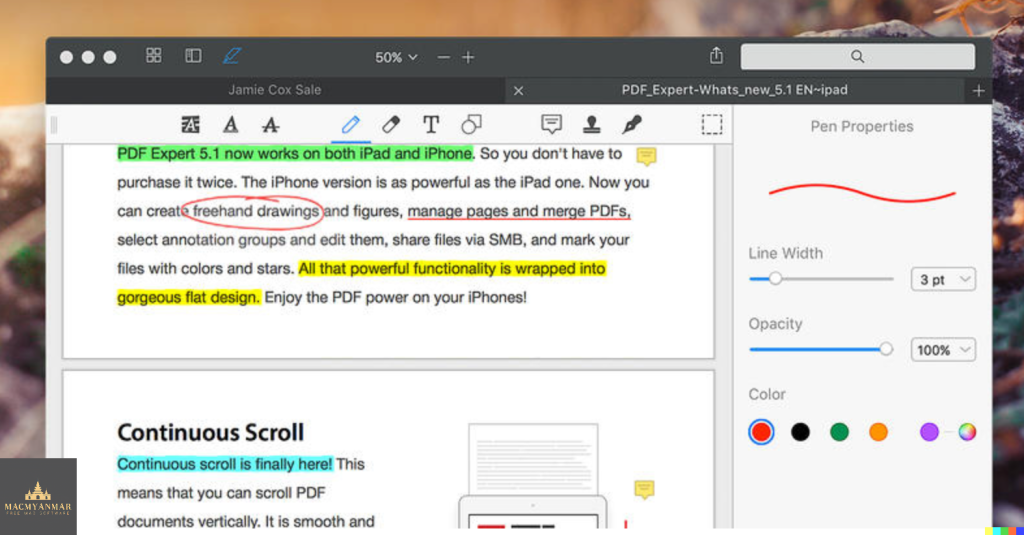
Download PDF Expert for Mac 3.8.3

0

Name : PDF Expert

Size : 105 MB

PDF Expert for Mac free Download

PDF Expert is a robust PDF management application for macOS that provides a range of features for viewing, editing, and annotating PDF documents. Here are some highlighted features and information about PDF Expert:

  1. Fast PDF Opening: PDF Expert is designed for quick performance, ensuring that PDFs open instantly, regardless of whether they are small email attachments or large 2000-page reports.
  2. Professional Annotation Tools: The application offers powerful and easy-to-use annotation tools for making changes and edits to PDF documents. These tools are accessible with just a click, allowing users to annotate documents efficiently.
  3. Tabbed Document Viewer: PDF Expert includes a tabbed document viewer, recognized for its speed. It enables users to navigate through multiple PDFs quickly and efficiently.
  4. Form Filling: The application provides an excellent experience for filling out PDF forms. It supports text fields, checkboxes, radio buttons, and other form elements, ensuring that the entered information is saved within the form. It is capable of handling complex interactive forms with JavaScript.
  5. Document Signing: PDF Expert simplifies the process of signing documents on a Mac. Users can type their name on the keyboard, and PDF Expert transforms it into a beautiful handwriting style. Alternatively, users can use the MacBook’s trackpad to sign with their finger. Signatures created in PDF Expert for iOS can also be used.
  6. Wide Sharing Options: PDF Expert supports extensive sharing options. When it’s time to send documents to clients, coworkers, or others, the application integrates with the Mac’s system-wide share sheet and other apps. PDFs can be easily shared with any app that accepts PDF files.
  7. Cross-Device Compatibility: PDF Expert works seamlessly across all Apple devices, including Mac, iPad, and iPhone. Users can take advantage of Apple’s Continuity and Handoff features to transfer documents between devices and continue editing seamlessly.
  8. Compatibility: PDF Expert is compatible with macOS 10.13 or later.
  9. Homepage: More information about PDF Expert can be found on the official homepage at https://geo.itunes.apple.com/app/id1055273043.

In summary, PDF Expert is a versatile PDF management tool that prioritizes speed, professional annotation capabilities, and ease of use. It offers a range of features suitable for various tasks, from simple viewing to complex document annotation and form filling.
Download Disk Drill Enterprise for Mac 5.4.1426

0

Name : Disk Drill Enterprise

Size : 56 MB

Disk Drill Enterprise for Mac free Download

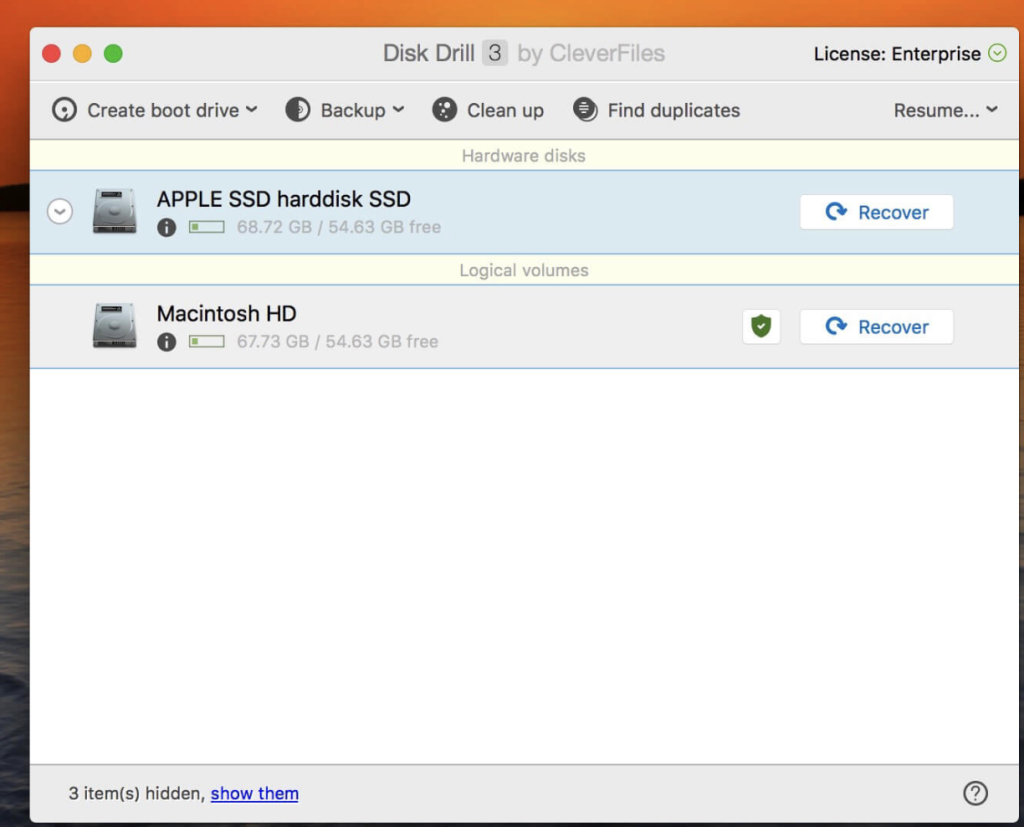
Disk Drill is a Mac data recovery software designed natively for macOS, offering features to protect files from accidental deletion, recover lost data from various storage devices, and provide additional disk management tools. Here are the key features and information highlighted in the provided details:

  1. Data Recovery for Mac OS: Disk Drill is designed for Mac OS and aims to recover lost data from Mac disks. It supports a wide range of storage devices, file types, and file systems.
  2. Recovery Vault: The software includes a feature called Recovery Vault, which helps protect files from accidental deletion. It not only allows the recovery of the file itself but also its properties, such as the original file name and location.
  3. Compatibility: Disk Drill supports most storage devices, file types, and file systems. It can recover deleted files from iPhone and Android devices as well.
  4. Disk Management Tools: The software offers free tools for disk management, including a duplicate file finder, byte-to-byte backups, disk cleanup and space visualization, bootable data recovery drive, disk health monitoring, and more.
  5. S.M.A.R.T. Disk Monitoring: Disk Drill includes S.M.A.R.T. disk monitoring out-of-the-box, allowing users to monitor the hardware status of their disks and receive automatic notifications of potential failures or issues.
  6. Disk Imaging: If a disk or partition is failing, users can easily back it up into a disk image (DMG), which can later be mounted for recovery.
  7. Advanced Scanning Modes: Disk Drill PRO features advanced scanning modes for data recovery, supporting FAT, NTFS, HFS/HFS+, and other file systems. Quick Scan and Deep Scan methods are available to locate and recover deleted items.
  8. What’s New in Version 4:
  • Improved Interface: Offers easier access to features, faster and more informative scans, and simplified management of found items.
  • More Files Found: Updated recovery algorithms for FAT32, NTFS, HFS+, and APFS, resulting in up to a 200% recovery efficiency boost.
  • Data Shredder: A new module to securely delete files and folders beyond future recovery.
  • Time Machine Recovery: Analyze Time Machine backups and extract needed data without restoring or rolling back historic snapshots.
  • macOS 11 Big Sur and iOS 14 Ready: Optimized for the new macOS and iOS versions, including Dark Mode support.
  • New Disk Image Formats: Added support for DSK, BIN, DAT, RAW, and DD formats for scanning lost data.
  • More Free Tools: Added Data Shredder and Free Disk Space Erasure as free extras to prevent further data recovery.
  1. Compatibility: Disk Drill requires macOS 10.15 or later.
  2. Homepage: For more information and to explore features, the official homepage is https://www.cleverfiles.com/mac-data-recovery.html.

In summary, Disk Drill is a comprehensive data recovery solution for macOS, offering not only recovery features but also disk management tools, disk monitoring, and additional enhancements in its latest version.
Download NCH Express Scribe Pro for Mac 13.00

0

Name : NCH Express Scribe Pro

Size :4.1 MB

NCH Express Scribe Pro for Mac free Download

Express Scribe is professional audio player software designed for PC, aimed at facilitating the transcription of audio recordings. Here are the key features highlighted in the provided information:

  1. Audio Playback and Hot Keys: Express Scribe provides audio playback features with keyboard hot keys. This allows users to control the playback without using the mouse, enhancing the transcription workflow.
  2. Transcribing Pedals Support: The software supports the use of transcribing pedals, which can be installed to further streamline the transcription process. This can be particularly useful for hands-free control during transcription.
  3. Variable Speed Playback: Users can control the playback speed, with the option of variable speed playback while maintaining a constant pitch. This feature can help transcribers adjust the speed to match their typing capabilities.
  4. Multi-Channel Control: Express Scribe offers multi-channel control, allowing users to manage multiple audio channels during transcription.
  5. Video Player Support: The software is not limited to audio playback only; it also supports video playback. This can be useful for transcribing content that includes both audio and visual elements.
  6. File Format Support: Express Scribe supports a variety of audio formats, including MP3, M4A, DSS, WAV, and more. It can also handle encrypted dictation files.
  7. Workflow Improvement Features:
  • Supports hand-held recorders, making it easy to transfer audio quickly.
  • Allows docking both analog and digital portable voice recorders to load recordings.
  • Offers automatic file reception and loading via internet (FTP), email, or local computer network.
  • Facilitates the automatic sending of finished transcriptions to clients directly from the program.
  • Enables loading of CD audio directly for immediate transcription.
  1. Compatibility: Express Scribe is compatible with macOS, specifically requiring OS X 10.6.6 or later.
  2. Integration with Other Software & Hardware:
  • Supports professional USB foot pedals for playback control.
  • Works with speech recognition software like Dragon Naturally Speaking to convert speech to text.
  • Compatible with Microsoft Word and other major word processors.
  • Integrates with FastFox text expander for efficient entry of medical/legal phrases and common phrases using keyboard shortcuts.
  1. Homepage: The official homepage for Express Scribe is https://www.nch.com.au/, where users can find more information about the software and potentially download it.

In summary, Express Scribe is a feature-rich transcription tool with various functionalities aimed at improving efficiency and accuracy in the transcription process.

Download MetaVideo for Mac OS

0

Name : MetaVideo

Size : 52 MB

MetaVideo for Mac free Download

MetaVideo seems to be a comprehensive tool for managing video metadata on Mac, with a focus on automating the editing of QuickTime and GPS tags. Here are the key features highlighted in the provided information:

  1. Bug Awareness and Fix: The developers are aware of a bug in the current app version affecting file reading, and a fix is mentioned to be on the way. This demonstrates a commitment to addressing issues and improving the user experience.
  2. QuickTime and GPS Tag Editing: MetaVideo enables users to automate the editing of QuickTime and GPS tags. This feature allows users to take control of their video metadata, making it a valuable tool for those who need to modify metadata, add artwork, or fix GPS coordinates.
  3. Metadata Support: The application extends beyond QuickTime tags, supporting a variety of other metadata tags such as EXIF, XMP, and IPTC for video and audio files that support them. It is highlighted that the app is not limited to only MP4 and MOV formats, providing flexibility for users working with different file types.
  4. Presets for Efficiency: Users can create presets in MetaVideo, allowing them to apply the same changes to multiple videos. This feature is designed to save users time and effort by streamlining repetitive tasks.
  5. Media Information Retrieval: MetaVideo can automatically retrieve relevant metadata for movies and TV shows, including titles, descriptions, release dates, genres, ratings, and cover art. This information is sourced from online services like Apple TV, iTunes, TheMovieDB, and more.
  6. GPS Tagging Support: The app offers unique functionality for editing QuickTime location ISO6709, allowing users to easily add GPS coordinates to their videos and audio files. Multiple options are provided for adding GPS coordinates to suit user preferences.
  7. Compatibility: MetaVideo is compatible with macOS 11.0 or later, ensuring that it works with recent versions of the operating system.
  8. Homepage: The official homepage for MetaVideo is https://neededapps.com/, where users can find additional information about the application and potentially download it.

In summary, MetaVideo appears to be a versatile and powerful tool for users who want to take control of their video metadata, automate editing tasks, and efficiently manage media files on their Mac.

Download MetaRename for Mac 1.0.8

0

Name : MetaRename

Size : 48 MB

MetaRename for Mac free Download

MetaRename appears to be a useful tool tailored for photographers and videographers who manage extensive collections of files. The application simplifies the process of renaming and organizing photos and videos based on metadata, such as camera model, date taken, and location. Here are the key features highlighted in the provided information:

  1. File Handling: MetaRename can handle various types of files, including images, videos, and audio files. It is designed to efficiently manage large numbers of files, making it suitable for users with extensive media collections.
  2. Metadata Filtering: The application boasts powerful metadata reading capabilities, allowing users to filter files based on a variety of criteria, including conditions related to metadata. This can assist users in efficiently organizing and locating specific files.
  3. Preview Metadata: MetaRename enables users to preview the metadata of their files directly within the app. This feature is helpful for quickly reviewing and confirming file information before making any changes to filenames. It eliminates the need for third-party software for this purpose.
  4. User-Friendly Interface: The application is designed with a user-friendly interface, making it accessible to users of all levels of technical knowledge and experience. Users can define new paths and filenames easily, and MetaRename takes care of the rest.
  5. Customizable Filenaming: Users can customize filenames by selecting components from a list of tags, such as date, camera model, location, and more. Additionally, users can add their own custom texts or special formats to create personalized filenames.
  6. Presets for Reusability: MetaRename allows users to save their file renaming and organization criteria as presets. This feature facilitates the reuse of settings between sessions, saving time and effort. Users can create multiple presets to cover different file organization needs and switch between them as required.
  7. Compatibility: MetaRename is compatible with macOS 11.0 or later, ensuring that it can be used on recent versions of the operating system.
  8. Homepage: The official homepage for MetaRename is https://neededapps.com/metarename/, where users can find additional information about the application and potentially download it.

In summary, MetaRename appears to be a versatile and user-friendly tool that addresses the specific needs of photographers and videographers when it comes to efficiently managing and organizing their media files based on metadata.


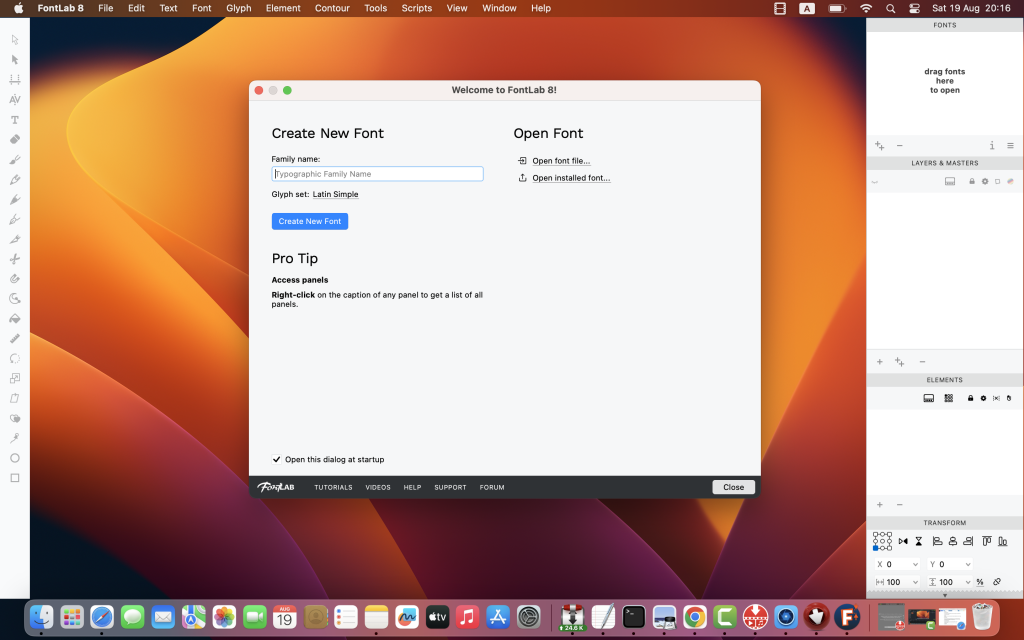
Download FontLab for Mac 8.3.0.8766

0

Name : FontLab

Size : 133 MB

FontLab for Mac free Download

It seems like you’ve provided information about Unclutter, a utility app for macOS. Unclutter aims to help users keep their desktop organized by providing a convenient space for storing notes, files, and clipboard clips. Here’s a breakdown of the main features mentioned:

  1. Instant, Configurable Access: Unclutter provides quick and configurable access to its features, even in full-screen mode, by moving the pointer to the top of the screen and scrolling down.
  2. Full Multi-Display Support: The application supports multiple displays, allowing users to manage their clutter across different screens.
  3. File Storage: Unclutter helps keep the desktop clean from temporary files by providing a dedicated space for file storage.
  4. Notes: Users can quickly jot down notes using Unclutter, making it a handy tool for capturing thoughts or reminders.
  5. Clipboard Manager: The app includes a clipboard manager that tracks the user’s copy and paste actions, allowing them to browse clipboard history.
  6. Draggable Cards: Unclutter features draggable cards that can stick on top of other windows, offering a convenient way to keep important items visible.
  7. Auto-Sync with Dropbox: Files and notes stored in Unclutter automatically synchronize across all of the user’s Macs via Dropbox, ensuring consistency and accessibility.
  8. Retina Display Support: The app is designed to support Retina displays, providing a high-resolution experience.
  9. Compatibility: Unclutter is compatible with macOS 10.13 or later.
  10. Homepage: The official website for Unclutter is https://unclutterapp.com/, where users can find more information about the application and potentially download it.

Overall, Unclutter appears to be a versatile tool for users who want a streamlined way to manage files, notes, and clipboard history on their Mac desktop.
Jameskarke's RSS Feed
Go to Top